





FrozenGamer
Members
-
Joined
-
Last visited
Everything posted by FrozenGamer
-
This is more of a mac question - Using Catalina and MacOs downloaded all the photos and started filling up my virtual drive - i don't mind having access to the photos but prefer they stay in the could. How can i get the photos deleted off the VM to make space without deleting the originals.. I want them to stay online, access them and remain on my iphone. Thanks In Advance.
-
I have the binhex java minecraft server running nicely for the kids - and i would like to try and set this up as well, so that their friends can connect with other platforms. Is there anything to running bedrock and java versions simultaneously in containers? And would it be recommended way to do the port forwarding in this case? I always thought that minecraft java just needed port 25565, but see here it says some more ports, unless that is for the windows 10 minecraft. https://portforward.com/minecraft/
-
No Machine is working great, i tried at least 5 different solutions for a good server and none of them worked well. Very glad you posted this as it solved my dilemna of finding a nice low footprint remote access from windows 10.
-
Same lag and sound still not working - although i did get some really glitchy sound when watching a video before adding the ich9. Clipboard functionality is there. Looks like its using a lot of CPU according to activity monitor. I bumped up to 8 gb of ram for the vm but left the cpu's at the default 2. That doesn't seem to make a difference. VNC works like a charm except the limitations of no clipboard or sound. I haven't had any luck finding a good free small footprint vnc server or similar for Catalina yet. Attaching the xml in case there might be something else wrong. Sound would be nice but not critical. Really none of this is super critical, but if someone has the time and has any ideas, thanks. <?xml version='1.0' encoding='UTF-8'?> <domain type='kvm' id='13' xmlns:qemu='http://libvirt.org/schemas/domain/qemu/1.0'> <name>MacinaboxCatalina</name> <uuid>f6eedaff-8b35-4c05-a370-2421928d6968</uuid> <description>MacOS Catalina</description> <metadata> <vmtemplate xmlns="unraid" name="Windows 10" icon="default.png" os="Catalina"/> </metadata> <memory unit='KiB'>8388608</memory> <currentMemory unit='KiB'>8388608</currentMemory> <memoryBacking> <nosharepages/> </memoryBacking> <vcpu placement='static'>2</vcpu> <cputune> <vcpupin vcpu='0' cpuset='0'/> <vcpupin vcpu='1' cpuset='1'/> </cputune> <resource> <partition>/machine</partition> </resource> <os> <type arch='x86_64' machine='pc-q35-3.1'>hvm</type> <loader readonly='yes' type='pflash'>/mnt/user/domains/MacinaboxCatalina/ovmf/OVMF_CODE.fd</loader> <nvram>/mnt/user/domains/MacinaboxCatalina/ovmf/OVMF_VARS.fd</nvram> </os> <features> <acpi/> <apic/> </features> <cpu mode='host-passthrough' check='none'> <topology sockets='1' cores='1' threads='2'/> </cpu> <clock offset='utc'> <timer name='rtc' tickpolicy='catchup'/> <timer name='pit' tickpolicy='delay'/> <timer name='hpet' present='no'/> </clock> <on_poweroff>destroy</on_poweroff> <on_reboot>restart</on_reboot> <on_crash>restart</on_crash> <devices> <emulator>/usr/local/sbin/qemu</emulator> <disk type='file' device='disk'> <driver name='qemu' type='qcow2' cache='writeback'/> <source file='/mnt/user/domains/MacinaboxCatalina/Clover.qcow2'/> <backingStore/> <target dev='hdc' bus='sata'/> <boot order='1'/> <alias name='sata0-0-2'/> <address type='drive' controller='0' bus='0' target='0' unit='2'/> </disk> <disk type='file' device='disk'> <driver name='qemu' type='raw' cache='writeback'/> <source file='/mnt/user/domains/MacinaboxCatalina/Catalina-install.img'/> <backingStore/> <target dev='hdd' bus='sata'/> <alias name='sata0-0-3'/> <address type='drive' controller='0' bus='0' target='0' unit='3'/> </disk> <disk type='file' device='disk'> <driver name='qemu' type='raw' cache='writeback'/> <source file='/mnt/user/domains/MacinaboxCatalina/macos_disk.img'/> <backingStore/> <target dev='hde' bus='sata'/> <alias name='sata0-0-4'/> <address type='drive' controller='0' bus='0' target='0' unit='4'/> </disk> <controller type='usb' index='0' model='ich9-ehci1'> <alias name='usb'/> <address type='pci' domain='0x0000' bus='0x00' slot='0x07' function='0x7'/> </controller> <controller type='usb' index='0' model='ich9-uhci1'> <alias name='usb'/> <master startport='0'/> <address type='pci' domain='0x0000' bus='0x00' slot='0x07' function='0x0' multifunction='on'/> </controller> <controller type='usb' index='0' model='ich9-uhci2'> <alias name='usb'/> <master startport='2'/> <address type='pci' domain='0x0000' bus='0x00' slot='0x07' function='0x1'/> </controller> <controller type='usb' index='0' model='ich9-uhci3'> <alias name='usb'/> <master startport='4'/> <address type='pci' domain='0x0000' bus='0x00' slot='0x07' function='0x2'/> </controller> <controller type='pci' index='0' model='pcie-root'> <alias name='pcie.0'/> </controller> <controller type='pci' index='1' model='pcie-root-port'> <model name='pcie-root-port'/> <target chassis='1' port='0x10'/> <alias name='pci.1'/> <address type='pci' domain='0x0000' bus='0x00' slot='0x02' function='0x0' multifunction='on'/> </controller> <controller type='pci' index='2' model='pcie-root-port'> <model name='pcie-root-port'/> <target chassis='2' port='0x11'/> <alias name='pci.2'/> <address type='pci' domain='0x0000' bus='0x00' slot='0x02' function='0x1'/> </controller> <controller type='pci' index='3' model='pcie-root-port'> <model name='pcie-root-port'/> <target chassis='3' port='0x12'/> <alias name='pci.3'/> <address type='pci' domain='0x0000' bus='0x00' slot='0x02' function='0x2'/> </controller> <controller type='pci' index='4' model='pcie-root-port'> <model name='pcie-root-port'/> <target chassis='4' port='0x13'/> <alias name='pci.4'/> <address type='pci' domain='0x0000' bus='0x00' slot='0x02' function='0x3'/> </controller> <controller type='virtio-serial' index='0'> <alias name='virtio-serial0'/> <address type='pci' domain='0x0000' bus='0x02' slot='0x00' function='0x0'/> </controller> <controller type='sata' index='0'> <alias name='ide'/> <address type='pci' domain='0x0000' bus='0x00' slot='0x1f' function='0x2'/> </controller> <interface type='bridge'> <mac address='52:54:00:57:64:01'/> <source bridge='br0'/> <target dev='vnet0'/> <model type='e1000-82545em'/> <alias name='net0'/> <address type='pci' domain='0x0000' bus='0x01' slot='0x00' function='0x0'/> </interface> <serial type='pty'> <source path='/dev/pts/0'/> <target type='isa-serial' port='0'> <model name='isa-serial'/> </target> <alias name='serial0'/> </serial> <console type='pty' tty='/dev/pts/0'> <source path='/dev/pts/0'/> <target type='serial' port='0'/> <alias name='serial0'/> </console> <channel type='unix'> <source mode='bind' path='/var/lib/libvirt/qemu/channel/target/domain-13-MacinaboxCatalina/org.qemu.guest_agent.0'/> <target type='virtio' name='org.qemu.guest_agent.0' state='connected'/> <alias name='channel0'/> <address type='virtio-serial' controller='0' bus='0' port='1'/> </channel> <input type='tablet' bus='usb'> <alias name='input0'/> <address type='usb' bus='0' port='1'/> </input> <input type='mouse' bus='ps2'> <alias name='input1'/> </input> <input type='keyboard' bus='ps2'> <alias name='input2'/> </input> <graphics type='vnc' port='5900' autoport='yes' websocket='5700' listen='0.0.0.0' keymap='en-us'> <listen type='address' address='0.0.0.0'/> </graphics> <sound model='ich9'> <alias name='sound0'/> <address type='pci' domain='0x0000' bus='0x00' slot='0x1b' function='0x0'/> </sound> <video> <model type='qxl' ram='65536' vram='65536' vgamem='16384' heads='1' primary='yes'/> <alias name='video0'/> <address type='pci' domain='0x0000' bus='0x00' slot='0x01' function='0x0'/> </video> <memballoon model='virtio'> <alias name='balloon0'/> <address type='pci' domain='0x0000' bus='0x03' slot='0x00' function='0x0'/> </memballoon> </devices> <seclabel type='dynamic' model='dac' relabel='yes'> <label>+0:+100</label> <imagelabel>+0:+100</imagelabel> </seclabel> <qemu:commandline> <qemu:arg value='-usb'/> <qemu:arg value='-device'/> <qemu:arg value='usb-kbd,bus=usb-bus.0'/> <qemu:arg value='-device'/> <qemu:arg value='isa-applesmc,osk= <qemu:arg value='-smbios'/> <qemu:arg value='type=2'/> <qemu:arg value='-cpu'/> <qemu:arg value='Penryn,kvm=on,vendor=GenuineIntel,+invtsc,vmware-cpuid-freq=on,+pcid,+ssse3,+sse4.2,+popcnt,+avx,+aes,+xsave,+xsaveopt,check'/> </qemu:commandline> </domain>
-
Thanks SpaceInvaderOne and JagadGuru !! - I got it working splashtop works now - Is there any reason that splashtop has occasional and consistent delays - one every 45 seconds or so. so i will have to wait 5 plus seconds for the text to show up or the item i click on to respond, then it goes back and works fine.i have connect via local network box enabled - and connection is smooth versus sharp.(these are the only settings i could find) VNC is still a low latency consistently smooth connection. Any recommendations for a VNC or similar program to work with sound and shared clipboard? I suppose shared clipboard more important than sound. Other than Teamviewer?
-
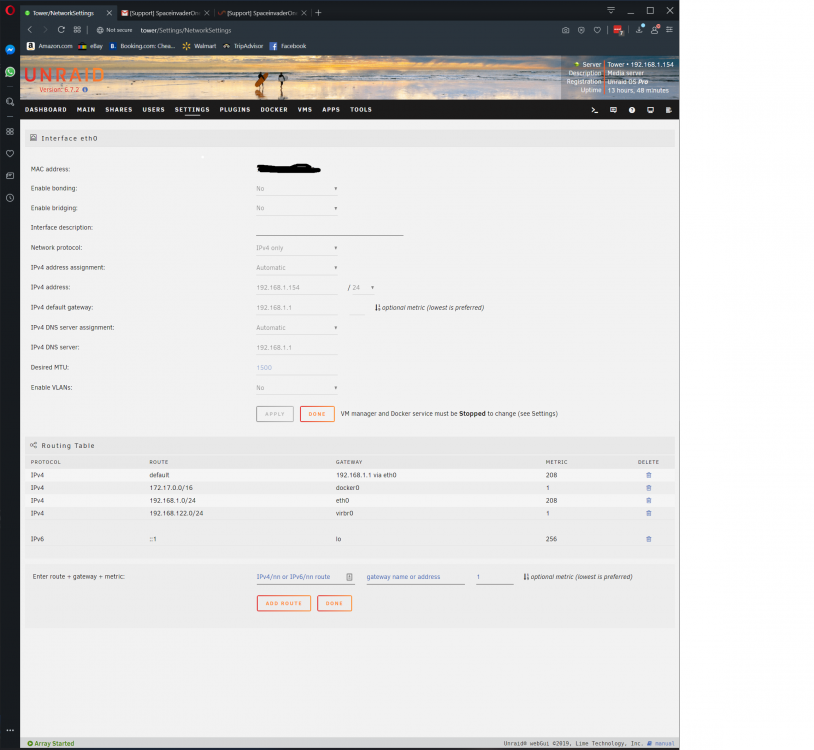
do you mean these settings -?
-
This is giving me MTU error Execution Error Cannot get interface MTU on 'br0': No such device maybe this xml will help figure out what is wrong. <?xml version='1.0' encoding='UTF-8'?> <domain type='kvm' xmlns:qemu='http://libvirt.org/schemas/domain/qemu/1.0'> <name>MacinaboxCatalina</name> <uuid>f6eedaff-8b35-4c05-a370-2421928d6968</uuid> <description>MacOS Catalina</description> <metadata> <vmtemplate xmlns="unraid" name="Windows 10" icon="default.png" os="Catalina"/> </metadata> <memory unit='KiB'>4194304</memory> <currentMemory unit='KiB'>4194304</currentMemory> <memoryBacking> <nosharepages/> </memoryBacking> <vcpu placement='static'>2</vcpu> <cputune> <vcpupin vcpu='0' cpuset='0'/> <vcpupin vcpu='1' cpuset='1'/> </cputune> <os> <type arch='x86_64' machine='pc-q35-3.1'>hvm</type> <loader readonly='yes' type='pflash'>/mnt/user/domains/MacinaboxCatalina/ovmf/OVMF_CODE.fd</loader> <nvram>/mnt/user/domains/MacinaboxCatalina/ovmf/OVMF_VARS.fd</nvram> </os> <features> <acpi/> <apic/> </features> <cpu mode='host-passthrough' check='none'> <topology sockets='1' cores='1' threads='2'/> </cpu> <clock offset='utc'> <timer name='rtc' tickpolicy='catchup'/> <timer name='pit' tickpolicy='delay'/> <timer name='hpet' present='no'/> </clock> <on_poweroff>destroy</on_poweroff> <on_reboot>restart</on_reboot> <on_crash>restart</on_crash> <devices> <emulator>/usr/local/sbin/qemu</emulator> <disk type='file' device='disk'> <driver name='qemu' type='qcow2' cache='writeback'/> <source file='/mnt/user/domains/MacinaboxCatalina/Clover.qcow2'/> <target dev='hdc' bus='sata'/> <boot order='1'/> <address type='drive' controller='0' bus='0' target='0' unit='2'/> </disk> <disk type='file' device='disk'> <driver name='qemu' type='raw' cache='writeback'/> <source file='/mnt/user/domains/MacinaboxCatalina/Catalina-install.img'/> <target dev='hdd' bus='sata'/> <address type='drive' controller='0' bus='0' target='0' unit='3'/> </disk> <disk type='file' device='disk'> <driver name='qemu' type='raw' cache='writeback'/> <source file='/mnt/user/domains/MacinaboxCatalina/macos_disk.img'/> <target dev='hde' bus='sata'/> <address type='drive' controller='0' bus='0' target='0' unit='4'/> </disk> <controller type='usb' index='0' model='ich9-ehci1'> <address type='pci' domain='0x0000' bus='0x00' slot='0x07' function='0x7'/> </controller> <controller type='usb' index='0' model='ich9-uhci1'> <master startport='0'/> <address type='pci' domain='0x0000' bus='0x00' slot='0x07' function='0x0' multifunction='on'/> </controller> <controller type='usb' index='0' model='ich9-uhci2'> <master startport='2'/> <address type='pci' domain='0x0000' bus='0x00' slot='0x07' function='0x1' multifunction='on'/> </controller> <controller type='usb' index='0' model='ich9-uhci3'> <master startport='4'/> <address type='pci' domain='0x0000' bus='0x00' slot='0x07' function='0x2'/> </controller> <controller type='pci' index='0' model='pcie-root'/> <controller type='pci' index='1' model='pcie-root-port'> <model name='pcie-root-port'/> <target chassis='1' port='0x10'/> <address type='pci' domain='0x0000' bus='0x00' slot='0x02' function='0x0' multifunction='on'/> </controller> <controller type='pci' index='2' model='pcie-root-port'> <model name='pcie-root-port'/> <target chassis='2' port='0x11'/> <address type='pci' domain='0x0000' bus='0x00' slot='0x02' function='0x1'/> </controller> <controller type='pci' index='3' model='pcie-root-port'> <model name='pcie-root-port'/> <target chassis='3' port='0x12'/> <address type='pci' domain='0x0000' bus='0x00' slot='0x02' function='0x2'/> </controller> <controller type='pci' index='4' model='pcie-root-port'> <model name='pcie-root-port'/> <target chassis='4' port='0x13'/> <address type='pci' domain='0x0000' bus='0x00' slot='0x02' function='0x3'/> </controller> <controller type='virtio-serial' index='0'> <address type='pci' domain='0x0000' bus='0x02' slot='0x00' function='0x0'/> </controller> <controller type='sata' index='0'> <address type='pci' domain='0x0000' bus='0x00' slot='0x1f' function='0x2'/> </controller> <interface type='bridge'> <mac address='52:54:00:57:64:01'/> <source bridge='br0'/> <model type='vmxnet3'/> <address type='pci' domain='0x0000' bus='0x01' slot='0x00' function='0x0'/> </interface> <serial type='pty'> <target type='isa-serial' port='0'> <model name='isa-serial'/> </target> </serial> <console type='pty'> <target type='serial' port='0'/> </console> <channel type='unix'> <target type='virtio' name='org.qemu.guest_agent.0'/> <address type='virtio-serial' controller='0' bus='0' port='1'/> </channel> <input type='tablet' bus='usb'> <address type='usb' bus='0' port='1'/> </input> <input type='mouse' bus='ps2'/> <input type='keyboard' bus='ps2'/> <graphics type='vnc' port='-1' autoport='yes' websocket='-1' listen='0.0.0.0' keymap='en-us'> <listen type='address' address='0.0.0.0'/> </graphics> <video> <model type='qxl' ram='65536' vram='65536' vgamem='16384' heads='1' primary='yes'/> <address type='pci' domain='0x0000' bus='0x00' slot='0x01' function='0x0'/> </video> <memballoon model='virtio'> <address type='pci' domain='0x0000' bus='0x03' slot='0x00' function='0x0'/> </memballoon> </devices> <qemu:commandline> <qemu:arg value='-usb'/> <qemu:arg value='-device'/> <qemu:arg value='usb-kbd,bus=usb-bus.0'/> <qemu:arg value='-device'/> <qemu:arg value='isa-applesmc,osk= <qemu:arg value='-smbios'/> <qemu:arg value='type=2'/> <qemu:arg value='-cpu'/> <qemu:arg value='Penryn,kvm=on,vendor=GenuineIntel,+invtsc,vmware-cpuid-freq=on,+pcid,+ssse3,+sse4.2,+popcnt,+avx,+aes,+xsave,+xsaveopt,check'/> </qemu:commandline> </domain>
-
This worked kind of right off the bat for me. I was unable to find any instructions though. Probably basic stuff for experienced minecrafters. used terminal to adjust server.properties and had to delete the world folder that was there for default before it would regenerate the world. Anyhow would love to find the documentation, such as how do the backups work. Kiddo is in and having fun.
-
I got it all working - works fine with the novnc, but im trying to setup splashtop - I can't see how to connect locally on the network from a windows 10 pc. streamer installed on the vm and personal installed on the windows 10 machine - says unable to connect "to access a computer that's on a different wireless network you need the anywhere access pack) - the Mac's local IP is 192.168.122.xxx and my local network is 192.168.1. Any tips on setting this up or a recommended alternative - i connected to the built in vnc with vnc viewer, but one time the keyboard didn't type and then after a reboot it did.
-
Really appreciate trying - thanks!
-
unfortunately - still no mouse - but i'm able to use arrow keys - space bar - f1 - enter etc, just cant get past the initial screen with space invader - just goes black.
-
I am stuck with a black screen after pressing enter on initial boot of the VM. This is the first VM i have tried on unraid. My first problem was that it would not boot and gave the following error - "Cannot get interface MTU on 'br0': No such device" - this was solved by pressing refresh under "Network MAC" in the template for the vm. (edit - i should add this is being accessed remotely, not on the machine but in another room) Next problem was i could not see my mouse cursor in the VNC session. I read here in the forums that that is normal and i should just press enter. When i do so, i am stuck at a black screen. Please advice me what information i should post here - I do not see an OSK key in the xml file so i am not posting it until i figure that out. I am running unraid 6.7.2. Posting libvert log since it has some warnings - 2019-11-07 18:56:45.242+0000: 25339: info : libvirt version: 5.1.0 2019-11-07 18:56:45.242+0000: 25339: info : hostname: Tower 2019-11-07 18:56:45.242+0000: 25339: error : virNetDevGetMTU:415 : Cannot get interface MTU on 'br0': No such device 2019-11-07 18:57:05.719+0000: 25338: error : virNetDevGetMTU:415 : Cannot get interface MTU on 'br0': No such device 2019-11-07 19:01:22.246+0000: 25340: error : virNetDevGetMTU:415 : Cannot get interface MTU on 'br0': No such device 2019-11-07 19:05:08.741+0000: 25340: error : virNetDevGetMTU:415 : Cannot get interface MTU on 'br0': No such device 2019-11-07 19:14:50.263+0000: 25338: warning : qemuDomainObjTaint:7986 : Domain id=5 name='MacinaboxCatalina' uuid=91b8977d-95ea-4cde-9b39-fefce6b490a4 is tainted: high-privileges 2019-11-07 19:14:50.263+0000: 25338: warning : qemuDomainObjTaint:7986 : Domain id=5 name='MacinaboxCatalina' uuid=91b8977d-95ea-4cde-9b39-fefce6b490a4 is tainted: host-cpu 2019-11-07 19:36:17.454+0000: 25338: warning : qemuDomainObjTaint:7986 : Domain id=6 name='MacinaboxCatalina' uuid=91b8977d-95ea-4cde-9b39-fefce6b490a4 is tainted: high-privileges 2019-11-07 19:36:17.454+0000: 25338: warning : qemuDomainObjTaint:7986 : Domain id=6 name='MacinaboxCatalina' uuid=91b8977d-95ea-4cde-9b39-fefce6b490a4 is tainted: host-cpu 2019-11-07 19:38:36.854+0000: 25338: warning : qemuDomainObjTaint:7986 : Domain id=7 name='MacinaboxCatalina' uuid=91b8977d-95ea-4cde-9b39-fefce6b490a4 is tainted: high-privileges 2019-11-07 19:38:36.854+0000: 25338: warning : qemuDomainObjTaint:7986 : Domain id=7 name='MacinaboxCatalina' uuid=91b8977d-95ea-4cde-9b39-fefce6b490a4 is tainted: host-cpu 2019-11-07 19:42:09.813+0000: 25338: warning : qemuDomainObjTaint:7986 : Domain id=8 name='MacinaboxCatalina' uuid=91b8977d-95ea-4cde-9b39-fefce6b490a4 is tainted: high-privileges 2019-11-07 19:42:09.813+0000: 25338: warning : qemuDomainObjTaint:7986 : Domain id=8 name='MacinaboxCatalina' uuid=91b8977d-95ea-4cde-9b39-fefce6b490a4 is tainted: host-cpu
-
Super Newb question, if i am preventing disks from spinning up i should not have green lights under the active part of my dashboard, right? I disabled automatic scanning on plex to see if thats causing them to be green all day every day.
-
Thanks everyone for the answers. eb3k - what vpn are you using? I assume it makes difference for speeds.
-
Will the container isolate vpn to just deluge though? I would hate to have all other internet traffic on unraid go through vpn.
-
Super Newb question - Can i only have a vpn for deluge and nothing else on my unraid machine? How much will a vpn affect speeds?
-
I am curious, i have been using Binhex-Sonarr and it hasn't been updated in a long time... Has this version been getting updated lately?
-
It looks like i am having problems with sonarr importing files from drone factory folder. When episodes are missing i download them elsewhere and import them via drone factory folder. About a week or so ago, i ran fix docker permissions on my server and i assume that may have caused the problem. Expecting that this might be caused by folder permissions i set the drone folder to chmod -R 0777 and when that didn't work i set it in sonarr settings "Permissions" to file chmod mask 0777 and folder chmod mask 0777. Nothing that i have tried has fixed it, is it a problem in the destination directory? sabnzbd downloads appear to be processing correctly as far as i can tell. Or - this is happening to others as well?? - https://github.com/Sonarr/Sonarr/issues/2929 This is the error i am getting. ImportApprovedEpisodesCouldn't import episode /drone/showname.episode.etc.mkv: An empty file name is not valid System.ArgumentException: An empty file name is not valid. at System.IO.DirectoryInfo.CheckPath (System.String path) [0x0005d] in /build/mono/src/mono/mcs/class/corlib/System.IO/DirectoryInfo.cs:496 at System.IO.DirectoryInfo..ctor (System.String path, System.Boolean simpleOriginalPath) [0x00006] in /build/mono/src/mono/mcs/class/corlib/System.IO/DirectoryInfo.cs:61 at System.IO.DirectoryInfo..ctor (System.String path) [0x00000] in /build/mono/src/mono/mcs/class/corlib/System.IO/DirectoryInfo.cs:55 at (wrapper remoting-invoke-with-check) System.IO.DirectoryInfo..ctor(string) at NzbDrone.Common.Extensions.PathExtensions.IsParentPath (System.String parentPath, System.String childPath) [0x00060] in M:\BuildAgent\work\5d7581516c0ee5b3\src\NzbDrone.Common\Extensions\PathExtensions.cs:92 at NzbDrone.Common.Extensions.PathExtensions.GetRelativePath (System.String parentPath, System.String childPath) [0x00000] in M:\BuildAgent\work\5d7581516c0ee5b3\src\NzbDrone.Common\Extensions\PathExtensions.cs:60 at NzbDrone.Core.MediaFiles.EpisodeImport.ImportApprovedEpisodes.GetOriginalFilePath (NzbDrone.Core.Download.DownloadClientItem downloadClientItem, NzbDrone.Core.Parser.Model.LocalEpisode localEpisode) [0x0006f] in M:\BuildAgent\work\5d7581516c0ee5b3\src\NzbDrone.Core\MediaFiles\EpisodeImport\ImportApprovedEpisodes.cs:177 at NzbDrone.Core.MediaFiles.EpisodeImport.ImportApprovedEpisodes.Import (System.Collections.Generic.List`1[T] decisions, System.Boolean newDownload, NzbDrone.Core.Download.DownloadClientItem downloadClientItem, NzbDrone.Core.MediaFiles.EpisodeImport.ImportMode importMode) [0x00263] in M:\BuildAgent\work\5d7581516c0ee5b3\src\NzbDrone.Core\MediaFiles\EpisodeImport\ImportApprovedEpisodes.cs:105
-
Thanks for taking the time to comment and try and help! - At this point i am running a server with 22 8tb mostly seagate archive drives. Stuff is really slow when it involves writes. I need to look into getting better hardware also because i have a bottleneck in my backplate multiplier (if that is the right term). Need to find something on ebay that will keep my drives cool and has a bit more modern bandwidth for the drives to box. Parity check takes about 29 hours, a rebuild takes about 7 days. I am going to post a question once i find the appropriate forum for suggestions on what to buy on ebay.
-
No, it was going to be quite a while, i had left it all night while i slept and it was only 1/3 through the first rsync command. I have pretty slow writes to parity - 10-15MB/s.
-
Edit.. I am going to go back and manually delete all the duplicate files with binhex krusader on disks2, 1 and 4. I was able to discern what was incomplete and delete destination files in that case. Source otherwise. Really lucky and it was all large files that were transferred and that i didn't chose to scatter to all disks - if someone wants to post an easy way could have undone this versus manually please post. Otherwise disregard my question. If i press stop on a long scatter move operation, will unbalance delete the files that have been successfully moved so far? 415GB out of 3.17TB set to transfer. or do i have to go back and manually delete all the files on the source? (edit in answer to my own question, i have pressed stop now i have 500gb of duplicate files as far as i can tell it didn't delete any source files). Is there an easy way to go back and delete the source files that i was copying? or how do i go about doing this? I am reading that first it copies, then deletes. Does this normally happen at the end of each completed rsync command versus the end all of the rsync commands queued?
-
From reading it sounds like just disable plugin restart and see if it goes away. I did, and deleted and reinstalled, error comes back.
-
Thanks Everyone, i will run some mem tests.
-
Yes, I have ups, we have really dirty power here though. Lots of storms, not too many unclean shutdowns since the UPS's were installed. I looked at my history on my other server and i had 1 to 4 errors fairly often.
-
OK, i had 29 on that parity check and down to zero on this last one. I also ran another parity on my other server which had 3 errors on the last check and it came back zero. How much would ECC memory help? And if not that what would be your top recommendation to improve chances of less or no sync errors in future.

