aaronwt
Members
-
Joined
-
Last visited
-
I haven't tried any with unRAID yet. But I have tested several with data transfers. And they matched the speeds in the specs. EDIT: I forgot that I did put an unRAID trial on one of them. And the system booted into unRAID fine. But, I only did that once. I mainly put it on the drive for the memory test that you can use before unRAID loads. Since I wanted to test the Terramaster 8GB memory modules that came with the two Terramaster F6-424 NAS units I got recently. To replace two more of my old HP microservers.
-
For the past couple of years, I have been using these Orico 2.5 SSD SATA to 3.5 Hard Drive Adapter Internal Drive Bay Converters. They have worked well in my unRAID NAS boxes with external caddies. Since the adapter is the same size as a 3.5 inch drive. So, it can fit anywhere a 3.5 inch drive can. Amazon.com: [2Packs] ORICO 2.5 SSD SATA to 3.5 Hard Drive Adapter Internal Drive Bay Converter Mounting Bracket Caddy Tray for 7 / 9.5 / 12.5mm 2.5 inch HDD / SSD with SATA III Interface(1125SS-2) : Electronics EDIT: Sorry I misread the title. For a 5.25" to 3.5" bay adapter, I use these Syba SY-MRA55006 5.25" Bay Tray Less Mobile Rack for 3.5" and 2.5" drives. It turns the 5.25" drive bay into a bay that holds a 3.5" drive as well as a 2.5" drive. Where the drives can easily be installed and removed without using any screws. Amazon.com: Syba SY-MRA55006 5.25" Bay Tray Less Mobile Rack for 3.5" and 2.5" Sata III HDD with Extra 2 Port USB 3.0, Black/White : Musical Instruments I think they also make one that just takes a 3.5" drive? Or, it could have been Icy Dock? My first three unRAIDs use those. But, I bought those over a dozen years ago. So, I'm not entirely sure if those were from Syba. EDIT: I found what I bought back then. It was a StarTech 3.5in SATA Trayless Mobile Rack for 5.25in, TAA (HSB100SATBK) Internal SATA backplane enclosure, Hot swap, Holds one 3.5in SATA drive, Front-accessible, Lockable drive bay. I have used those for many years without any issues. Amazon.com: StarTech 3.5in SATA Trayless Mobile Rack for 5.25in, TAA (HSB100SATBK) | Internal SATA backplane enclosure, Hot swap, Holds one 3.5in SATA drive, Front-accessible, Lockable drive bay : Electronics I liked them because the Sata and power connector was just a pass though adapter. Some of the other ones I looked at had a circuit board attached that used power. Which could have been a failure point. But, the pass-through option was just a passive connection to get to the external connector.
-
My unRAID setups upgraded to 7.3.2 without any issues. I recently purchased a couple of the Patriot P300, 128GB, drives to use for the unRAID OS. And move from a USB stick to an NVMe drive. In the two Terramaster F6-424 boxes I setup recently (unRAID 8 and 9). Hopefully, I don't have any issues.
-
This past weekend, when I setup my second Terramaster F6-424 again, I did not have any shutdown issues using "Status and Counters" for the drive monitoring. When I looked closer, the only difference between the two setups was the recent setup had the RTL8125 Driver Plugin installed. So, I installed the RTL8125 Plugin in the first system. And now, using the S3 Sleep Plugin, it will automatically shut down using the "Status and Counters" option.
-
I use Dynamix Day Night with all my unRAID setups. They are still working properly here. I have not needed to make any changes from when I set it up a few years ago.
-
I was able to get the auto shutdown, after a fixed time of no activity, to work by changing "Device Activity Monitoring" from "Status and counters" to "Status only". No idea why it wouldn't work like my other devices.
-
I recently setup a couple of Terramaster F6-424 storage devices with unRAID. I am trying to get the Dynamix S3 Sleep plugin to work with it. Either to shut it down or even just sleep. I've had no issue using the plugin in the past. With old HP microservers and an N100 HeaLuck NAS to shut them down. But I can't get it to work with the N95 Terramaster F6-424. So, any idea what settings I would need to change in the BIOS or Plugin to get it to work properly? Thanks
-
I just finished upgrading six of my unraid setups (unRAID4 to unRAID9) from 7.3.0 to 7.3.1. They had no issues.
-
I updated six unRAID systems (unRAID 4 to unRAID 9), from 7.2.6 to 7.3.0, without any issues.
-
I updated six of my unRAIDs to 7.2.6 Saturday, from 7.2.5. I only had an issue with one, where it did not reboot. I just had to manually power it off. And then once I turned it on, it booted fine into 7.2.6.
-
My six unRAID setups, I use with XFS, upgraded to 7.2.4 without any issues. (I still have three using the ReiserFS that I have on an older unRAID version)
-
I've updated two of my unRAID systems to 7.0.1. This time, though, I did not uninstall the RTL8125 Drivers plugin prior to the update. And the two systems came back up with 2.5GbE network access working. I'll try two more tonight to see if they also come back up with network access. The next two unRAID systems I updated worked the same as the first two. I updated two more systems, and they worked just like the first four.
-
has this happened yet? The removal of the reiserfs filesystem from the unRAID kernel? I still have three old unRAID systems running reiserfs, with 20+ reiserfs drives in each system(188TB of total storage between them). I just have not upgraded their unRAID OS in awhile. I've copied most of the content from them, to six other unRAID setups, but not all the content. But, I have not deleted anything on them yet.
-
I just have different shares on each one. These same shares were on my initial three HP Microservers. Only they used four or five external enclosures for fifteen to twenty drives. Plus the internal drives. But the drives were all 2TB to 4TB. I wanted to move away from all those external, port multiplier, enclosures. So these six HP microservers use 12TB and/or 14TB drives. Four array, one parity, and one 1TB SSD.
-
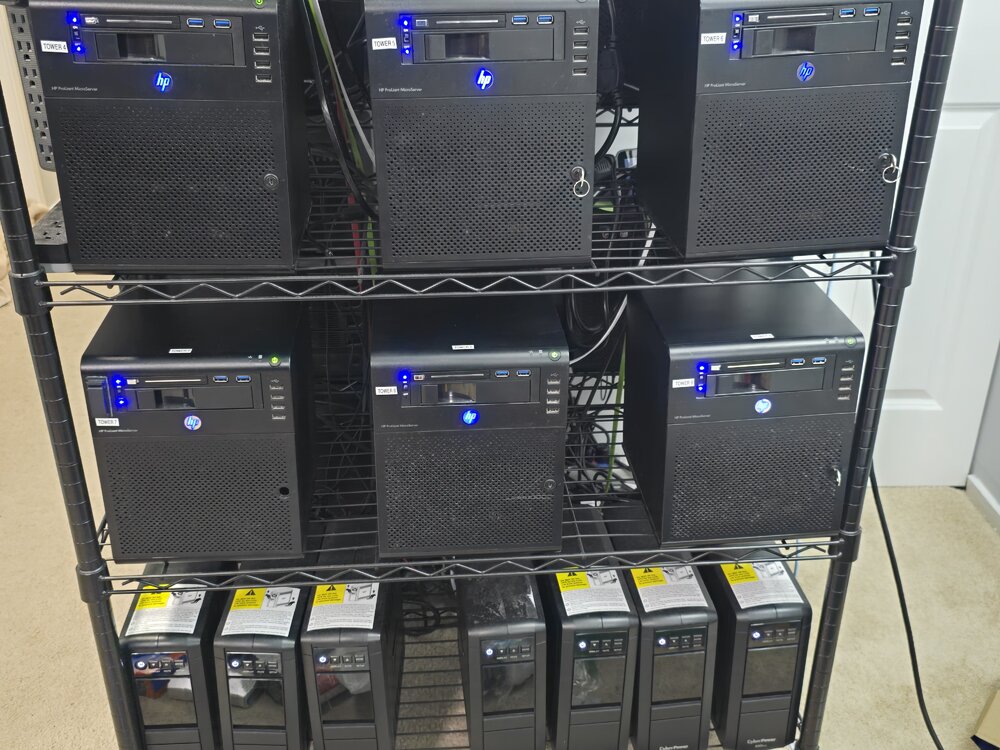
I have six of the microservers (1 N36L, 3 N40L, 2 N54L) with six internal drives now. I have the hardware to convert my original three Microservers (1 N54L, 2 N40L), but haven't gotten around to removing the dozen or so external enclosures from them yet. I am using a 2.5" 1TB SSD for the cache drive in each one. And I have installed 2.5GbE cards in all of them. As well as expanding the memory to 16GB of ECC memory in each of them. And then I have a small, 850VA Cyberpower, UPS for each system, in the bottom of the rack.