





eubbenhadd
Members
-
Joined
-
Last visited
Everything posted by eubbenhadd
-
Same here, got some errors, can't access hoobs by IP or any other way I'm stuck here too
-
yeah, I meant I can't actually find the orginals folder in terminal lol
-
NM. I watched the video and set it up as they did but still don't understand where to put my originals etc. The documentation site was a little scant on setup config info at least for what I am trying to understand.
-
oh sweet, I didn't realize Ibracorp did a video on Photoprism. Haven't seen it yet but I'm sure I'll be all set. Their videos are amazing
-
what is the backup path setting for in the docker template?
-
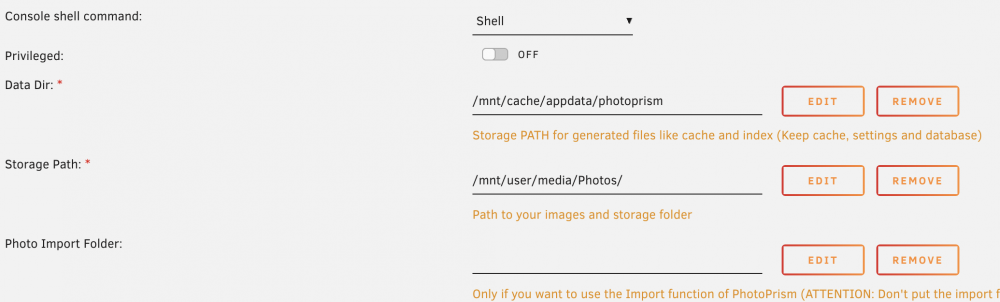
Yeah, i didn't know how to explain it well :D. I also left the /photoprism/storage path alone in the "more settings" section. Basically I can't see any of the container paths that are referenced, in particular the originals folder. I'm also interested in setting up to use with Nextcloud which i have to set up again too, not sure if that would change where I have the first Storage Path pointed to.
-
N00b question about PhotoPrism. I set up the docker in UnRaid and it works, but I can't for the life of me figure out where the originals/storage folders are. I know the one I specified in the docker setup but that's the only folder I can see. Is there a way in the GUI to change where the folders are located?
-
Did this ever get resolved? I had the same error on two WD 14TB drives. Also on unRAID 6.9.2, plugin v2021.04.11
-
ugh. I tried steps 2 and 3 to no avail. 2 worked to take me to the final build of 17.x but from there i get the can't install major upgrade... I tried step 3 to manually upgrade to v18 instead of the latest build and it also failed, but when I try step 2 again, it reports as follows with two conflicting versions then I get the can't install major upgrade error. HELP! ---------------------- Nextcloud Updater - version: v18.0.9-8-g27dac77 Current version is 18.0.14. Update to Nextcloud 17.0.10 available. (channel: "stable") Following file will be downloaded automatically: https://download.nextcloud.com/server/releases/nextcloud-17.0.10.zip Open changelog ↗ Steps that will be executed: [✔] Check for expected files [✔] Check for write permissions [✔] Create backup [✔] Downloading [✔] Verify integrity [✔] Extracting [✔] Enable maintenance mode [✔] Replace entry points [✔] Delete old files [✔] Move new files in place [✔] Done Continue update? [y/N]
-
Genius! Fixed my problem too!
-
Argh. Ran through the excellent tutorial and had no success. Can not access the webUI. Got the following log. Have tried setting key 5 (interface) to both eth0 and br0, no luck. Have bonded interface (active balanced 1) with bridging enabled. Docker is set up with separate IP (different from server). Any help GREATLY appreciated! EDIT: I notice on some other startups (from other people), there's this line but it doesn't show up on my install (which I've now tried re-installing, no difference) Pi-hole blocking is enabled LOG ------------------ s6-init] making user provided files available at /var/run/s6/etc...exited 0. [s6-init] ensuring user provided files have correct perms...exited 0. [fix-attrs.d] applying ownership & permissions fixes... [fix-attrs.d] 01-resolver-resolv: applying... [fix-attrs.d] 01-resolver-resolv: exited 0. [fix-attrs.d] done. [cont-init.d] executing container initialization scripts... [cont-init.d] 20-start.sh: executing... ::: Starting docker specific checks & setup for docker pihole/pihole WARNING Misconfigured DNS in /etc/resolv.conf: Two DNS servers are recommended, 127.0.0.1 and any backup server WARNING Misconfigured DNS in /etc/resolv.conf: Primary DNS should be 127.0.0.1 (found 127.0.0.11) nameserver 127.0.0.11 options ndots:0 Existing PHP installation detected : PHP version 7.0.33-0+deb9u8 Installing configs from /etc/.pihole... Existing dnsmasq.conf found... it is not a Pi-hole file, leaving alone! chown: cannot access '': No such file or directory chmod: cannot access '': No such file or directory chown: cannot access '/etc/pihole/dhcp.leases': No such file or directory ::: Pre existing WEBPASSWORD found Using custom DNS servers: 1.1.1.1 & 1.0.0.1 DNSMasq binding to default interface: eth0 Added ENV to php: "PHP_ERROR_LOG" => "/var/log/lighttpd/error.log", "ServerIP" => "192.168.15.2", "VIRTUAL_HOST" => "192.168.15.2", Using IPv4 ::: Preexisting ad list /etc/pihole/adlists.list detected ((exiting setup_blocklists early)) https://raw.githubusercontent.com/StevenBlack/hosts/master/hosts https://mirror1.malwaredomains.com/files/justdomains ::: Testing pihole-FTL DNS: FTL started! ::: Testing lighttpd config: Syntax OK ::: All config checks passed, cleared for startup ... ::: Docker start setup complete ::: Pre existing WEBPASSWORD found Using custom DNS servers: 1.1.1.1 & 1.0.0.1 DNSMasq binding to default interface: eth0 Added ENV to php: "PHP_ERROR_LOG" => "/var/log/lighttpd/error.log", "ServerIP" => "192.168.15.2", "VIRTUAL_HOST" => "192.168.15.2", Using IPv4 ::: Preexisting ad list /etc/pihole/adlists.list detected ((exiting setup_blocklists early)) https://raw.githubusercontent.com/StevenBlack/hosts/master/hosts https://mirror1.malwaredomains.com/files/justdomains ::: Testing pihole-FTL DNS: FTL started! ::: Testing lighttpd config: Syntax OK ::: All config checks passed, cleared for startup ... ::: Docker start setup complete [✗] DNS resolution is currently unavailable [✗] DNS resolution is currently unavailable
-
Argh. Ran through the excellent tutorial and had no success. Can not access the webUI. Got the following log. Have tried setting key 5 (interface) to both eth0 and br0, no luck. Have bonded interface (active balanced 1) with bridging enabled. Docker is set up with separate IP (different from server). Any help GREATLY appreciated! s6-init] making user provided files available at /var/run/s6/etc...exited 0. [s6-init] ensuring user provided files have correct perms...exited 0. [fix-attrs.d] applying ownership & permissions fixes... [fix-attrs.d] 01-resolver-resolv: applying... [fix-attrs.d] 01-resolver-resolv: exited 0. [fix-attrs.d] done. [cont-init.d] executing container initialization scripts... [cont-init.d] 20-start.sh: executing... ::: Starting docker specific checks & setup for docker pihole/pihole WARNING Misconfigured DNS in /etc/resolv.conf: Two DNS servers are recommended, 127.0.0.1 and any backup server WARNING Misconfigured DNS in /etc/resolv.conf: Primary DNS should be 127.0.0.1 (found 127.0.0.11) nameserver 127.0.0.11 options ndots:0 Existing PHP installation detected : PHP version 7.0.33-0+deb9u8 Installing configs from /etc/.pihole... Existing dnsmasq.conf found... it is not a Pi-hole file, leaving alone! chown: cannot access '': No such file or directory chmod: cannot access '': No such file or directory chown: cannot access '/etc/pihole/dhcp.leases': No such file or directory ::: Pre existing WEBPASSWORD found Using custom DNS servers: 1.1.1.1 & 1.0.0.1 DNSMasq binding to default interface: eth0 Added ENV to php: "PHP_ERROR_LOG" => "/var/log/lighttpd/error.log", "ServerIP" => "192.168.15.2", "VIRTUAL_HOST" => "192.168.15.2", Using IPv4 ::: Preexisting ad list /etc/pihole/adlists.list detected ((exiting setup_blocklists early)) https://raw.githubusercontent.com/StevenBlack/hosts/master/hosts https://mirror1.malwaredomains.com/files/justdomains ::: Testing pihole-FTL DNS: FTL started! ::: Testing lighttpd config: Syntax OK ::: All config checks passed, cleared for startup ... ::: Docker start setup complete ::: Pre existing WEBPASSWORD found Using custom DNS servers: 1.1.1.1 & 1.0.0.1 DNSMasq binding to default interface: eth0 Added ENV to php: "PHP_ERROR_LOG" => "/var/log/lighttpd/error.log", "ServerIP" => "192.168.15.2", "VIRTUAL_HOST" => "192.168.15.2", Using IPv4 ::: Preexisting ad list /etc/pihole/adlists.list detected ((exiting setup_blocklists early)) https://raw.githubusercontent.com/StevenBlack/hosts/master/hosts https://mirror1.malwaredomains.com/files/justdomains ::: Testing pihole-FTL DNS: FTL started! ::: Testing lighttpd config: Syntax OK ::: All config checks passed, cleared for startup ... ::: Docker start setup complete [✗] DNS resolution is currently unavailable [✗] DNS resolution is currently unavailable
-
REALLY stupid question. I set this up fine a few weeks ago and have totally forgotten the password so I wanted to just re-create the VM. Thing is I can't even delete the existing VM so I can re-run the app to create a new one. Appreciate any assistance.
-
Got it worked out, turns out there was a separate bridge set up, not sure how, but I changed the name in the VM and it worked. Thanks!
-
Nope, haven't set up jack for VMs, I don't even have any other VMs set up anymore.
-
Got to the part where I can start the VM, and I get the following execution error: "Cannot get interface MTU on 'br0': No such device". Nothing useful in the VM log. Any suggestions? ------------- Supermicro X10SL7-F v1.01 Intel Xeon E3-1230 v3 16gb DDR 3 ECC
-
Thanks! You're a lifesaver
-
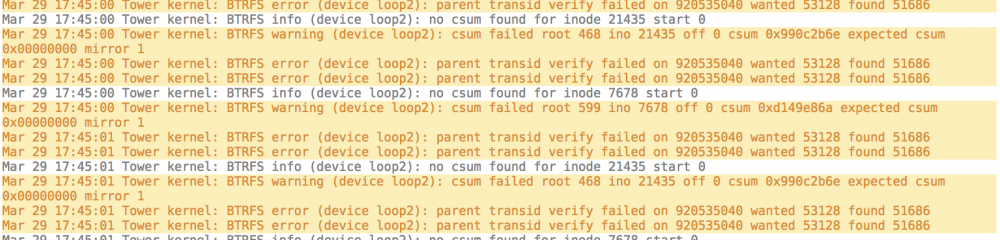
So went through the steps and getting some weird stuff now.

-
Sorry, one last question. At what point should I physically remove the bad drive?
-
Thanks! Does it make a difference if I'm removing from a 2-device pool?
-
@Johnnie.Black I'm also wanting to remove a drive from a 2-drive pool. My first device seems to be corrupt (has a ton of read errors that are unfixable). Had a couple of questions: 1) should I follow the instructions you referenced in the UnRaid v6 FAQ or use the command line instructions in this post? I'm not sure if I want to replace the bad drive with a new one or just stick to a single cache drive setup


