





steve1977
Members
-
Joined
-
Last visited
Everything posted by steve1977
-
I am concerned about the same @Espressomatic. TS is amazing, but has been restricting Unraid features to function (https://github.com/tailscale/tailscale/issues/14372). That's why I am a bit surprised that Unraid has been promoting TS so strongly and integrating natively. Wish TS can deliver its part of the partnership or at least provide some form of comment. Many of us Unraid users now use (and pay for) TS only because of Unraid promoting it. Context below:
-
That’s good to hear. Has there been progress and agreement that unraid will be fully supported again by tailscale in the future (including exit node)?
-
Besides the fact that Tailscale currently does not allow Unraid to use exit nodes, I'd have the same question. I am looking for some more granular control how dockers are using Tailscale exit nodes. Specifically, I am wondering the following: * Using exit node xxx on Unraid level (i.e., all Unraid traffic funneled through exit node xxx) * Enabling tailscale for docker aaa and enabling exit node yyy on docker level (i.e., all docker traffic funneled through exit node yyy) Will this setup above eventually work? Or does this lead to double-funneling (docker aaa funneled through two exit nodes), which obviously would lead to bad delays? Thanks for any ideas you may have!
-
I am still at a loss here. Tailscale is a commercial project (which I am paying for and the one & only reason for this is Unraid). Why is Unraid promoting it so heavily with its latest Unraid 7 release and native integration? While at the same time, Tailscale restricts use of Unraid and limits critical feautures for Unraid users. And then is completely unresponsive to Unraid users and developers on git. There is not even an answer why Unraid being in restrictive use for Tailscale for almost a month now or whether there are any plans to change this? FYI @ljm42 @SpaceInvaderOne for thoughts
-
I thought Unraid 7.0 has native integration, which (among other things) may also allow to use tailscale with some dockers (while not with others)? Currently already possible with the plugin, but more difficult.
-
Thanks for the update. Hope you’re right. Don’t think the native integration can be successful if there may be some lingering concerns by the tailscale team. Fingers crossed!
-
I've been a huge fan of Tailscale and looking forward to Unraid 7 release. Unfortunately, exit node implementation stopped working. Is there a formal contact / partnership between Unraid and Tailscale? Is this being worked on to address? If Tailscale is not supportive of the Unraid integration, this may just be the beginning of more issues to come? https://github.com/tailscale/tailscale/issues/14372
-
I seem to face a similar issue. Also likely since the 6.12.14 update. Some of my "user shares" show as "This share is invalid, it references storage that does not exist". Storage shows as "cache", which doesn't even exist. When I select the user share, it shows all the files, which are on a different storage. So, I am not sure whether this issue impacts in any way or is just a UI issue? Maybe related is that my Unraid storage no longer shows on my network share in Windows. I can still access it via the IP. Also sees to be the issue since the latest 6.12.14 update.
-
Same for me. I believe that’s by design and it requires command line to select an exit node.
-
I really love this plugin and amazing to read that it will find its way into native implementation to the Unraid 7 release. I have one question: I've enabled the plugin and routed all traffic through an exit node. I would like to exclude the sabnzbd from routing through the exit node. Is this possible to exclude just this one docker? Thanks for your advice!
-
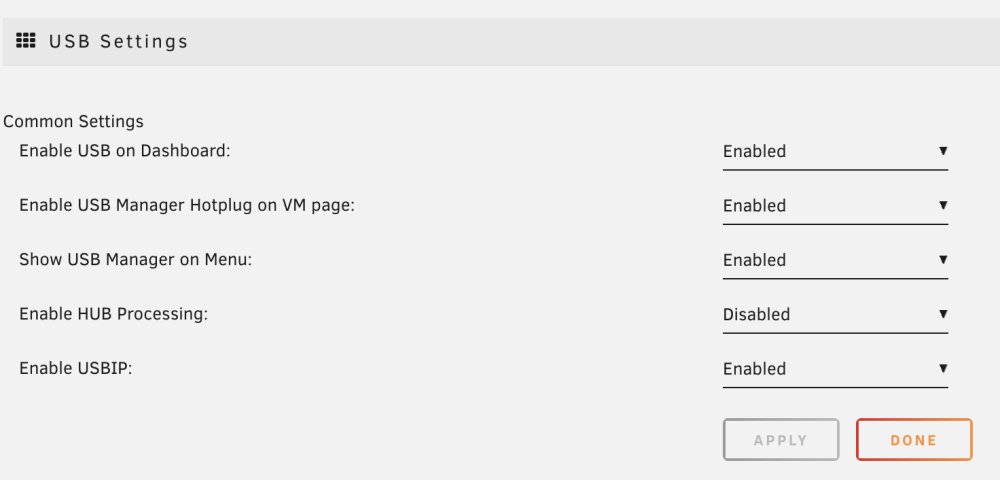
I've set up Tailscale well on Unraid (plugin) and a few other devices. First of all, big thank you, this is really great! I'd like to use "exit node" to funnel Unraid traffic through another tailscale instance. I.e., not using Unraid as exit node, but the other way round. Is this feasible? I tried to do so under "unraid tailscale settings", but it says "none" and doesn't seem that I can change this setting?Thanks. What's the difference between Tailscale versus VPS / reverse proxy / tailscale. What's the benefit of each of these two solutions?Thanks for your responses. In this case, I'd need to run tailscale on all of my devices? E.g., on iphone, apple tv, etc. People also speak about setting up a VPS in addition to tailscale? What's the additional benefit in doing so?I read IPV6 isn’t widely supported (public wifis, mobile networks, etc). Is this correct? If so, any suggestion on an alternative path?Unfortunately, my ISP has put me behind a CGNAT. What does it take to access Unraid remotely via Unraid Connect? Do I need to run Tailscale and get a remote VPS?Seeing the following error message: Remark: Unraid's WAN IPv4 [removed] does not match your client's WAN IPv4 [removed]. This may indicate a complex network that will not work with this Remote Access solution. Ignore this message if you are currently connected via Remote Access or VPN. Any idea what could be driving this. I do not use VPN. I use cable for Internet rather than DSL.And attached the diagnostic log. Thanks for your help! tower-diagnostics-20240413-2230.zipI tried to access dashboard on one device, while checking logs on another one. Unfortunately, no info in the log. There is one likely unrelated error message that occured even prior to accessing the dashboard: ntpd[1710]: kernel reports TIME_ERROR: 0x41: Clock UnsynchronizedTried the same with a keyboard and also cannot get it to work. I can successfully connect with USB disks though.Thanks. This gets me a step closer. I have attached the mouse to the VM. Still not working. Went to the device manager and seeing the error message below: The drivers for this device are not installed. (Code 28) There are no compatible drivers for this device. To find a driver for this device, click Update Driver.Tried both different browser (Safari instead of Chrome) and also two different devices. None of them allows me to access the dashboard view. One additional info: It only "crashes" the device/browser that has accessed the dashboard view. If I go to another device, I can still use the Unraid GUI. But this device also stops working once I access the dashboard view. And once I restart Unraid, it works on all devices/browsers again (except the dashboard view).Thanks. I've done all of above, but unfortunately, "dashboard" view still crushes Unraid.Not sure I am seeing what I mean to see. I went to the setup and see below info:
 I am quite sure that a stock unraid will solve it. I can give it a shot. If I need to recreate the flash drive, will I lose all my VM and Docker settings? Or how can I keep them?

