





mikeyosm
Members
-
Joined
-
Last visited
Everything posted by mikeyosm
-
UD?
-
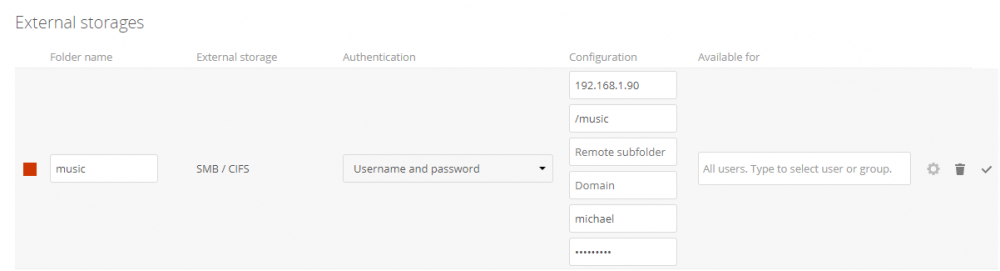
Im getting a red square and not sure why. Can you see what's wrong with the config? I added a path variable called /music to the docker. Nextcloud is running on its own IP 192.168.1.91:443 UNRAID host is running on 192.168.1.90

-
got it, thank you
-
do i just add a path then to the container? Please provide an example. thx
-
Hi - I am trying to add external storage (SMB) to owncloud but getting an error "Storage is temporarily unavailable" when trying to access the folder in Files. I specified UNRAID user credential and proper path (/mnt/disks/DATA02/Media/Music) and get a green circle. Any ideas what i might be doing wrong?
-
I have been looking for a cloud solution that lets me add a path that already exists in UNRAID so I can share it with other users. For example; being able to add /mnt/user/shares/music to an existing nextcloud user so they can see that folder in read only. Is that possible with nextcloud? I don't want to use FTP servers anymore.
-
thanks for that, it seems i was missing some cpu optimizations so i added those now the VM is nice and fast, even through VNC. Strangely though my mouse does not sync with the VNC mouse so not sure why this isnt working. Im using Firefox on W10. Any ideas?
-
I never got mouse scrolling to be in sync for me. Can you post your XML so I can compare? Cheers.
-
Have you tried using it purely through VNC client without GPU passthrough? The screen draw/refresh at 190x1080 is really slow for me.
-
Let me know if it works. I need to update the libvirt-python package to match and a few other things. prior to your fix I modified the plugin and removed the reference to d/l the python package, the plugin installed OK on 6.4 RC13.
-
Ok thanks
-
Awesome work. One thing I am noticing though, HSierra seems much more sluggish than Sierra when using VNC. What is it like for you?
-
Im using 6.4 RC13 and the plugin does not install? Python 2.7.14 is installed. plugin: installing: https://raw.githubusercontent.com/dmacias72/unRAID-plugins/master/plugins/libvirtwol.plg plugin: downloading https://raw.githubusercontent.com/dmacias72/unRAID-plugins/master/plugins/libvirtwol.plg plugin: downloading: https://raw.githubusercontent.com/dmacias72/unRAID-plugins/master/plugins/libvirtwol.plg ... done plugin: downloading: https://raw.githubusercontent.com/dmacias72/unRAID-plugins/master/packages/6.4/python-2.7.13-x86_64-1.txz ... failed (Invalid URL / Server error response) plugin: wget: https://raw.githubusercontent.com/dmacias72/unRAID-plugins/master/packages/6.4/python-2.7.13-x86_64-1.txz download failure (Invalid URL / Server error response)
-
Ah, I see, that's good to know. I did read somewhere that hypervisor.cpuid.v0 = FALSE disables certain performance enhancements within the W10 VM so I was reluctant to use this parameter. How about temperature monitoring? What does ESXi / vCenter show in terms of temperatures for your devices?
-
I thought nvidia passthrough was a no go with ESXi? Also, ESXi does not show temperatures for motherboard etc?
-
Bugger that. I pulled the trigger on an Asus Zenith Extreme x399 but not on a processor yet. I'm thinking of whether to return it and go x299 to avoid all the TR4 passthrough issues... Advice?
-
As an added tip I would also consider using direct passthrough for your SSD/NVME drive to the Windows 10 VM. In the past, whenever I provisioned a W10 VM using vfio scsi driver / raw image, i ran in to random audio 'crackle & pop' issues even when using msiutil. Passing through an nvme meant i could also use samsung nvme driver for optimal performance.
-
This is the same issue for me, fixed by using the patched clover. Mind you, this only happens when on 6.3rc6.
-
downgrade to 6.2.4 And that solves what exactly? 6.3 uses 6.2 ovmf as far as I know.
-
I upgraded to 6.3RC6 and now my sierra VM is running at half the speed that it was before, very strange! I did not change a thing, same UEFI clover boot loader. VM boots fine, OSX is usable but very slow. I have another install using UEFI and enoch boot loader and this is fine, full speed. any ideas?
-
Hi I am using an NTFS formatted nvme drive in unassigned devices so that I can passthrough the partition in a windows 10 VM. I do this by using /dev/disk/by-id method. This works well but the UNRAID console keeps outputting a blockdev error.... blockdev: cannot open /dev/nvme1n1p: No such file or directory. This error appears when I rescan or refresh the unassigned devices list in the main webUI. The nvme1n1p device does not exist in /dev/ so I am not sure how to exclude it or where it has manifested from. Any ideas?
-
I would like to sync my photos to dropbox that currently reside on an SMB share called 'Media'. Is it possible to sync just that folder using dropbox? Or do I need to install the dropbox docker and move the media folder and all pictures into the dropbox folder in appdata for it to sync?
-
Perhaps you can use something like this?. We use these dongles all the time at work. We host a bunch of headless Mac Minis for a large client, and these dongles make the onboard video card think that a monitor with 1920x1080 is connected so they never revert to 640x480 or whatever the default resolution is. They make a 4K equivalent. Pair it with a DisplayPort adaptor and you'd be in business, I think. thanks for that idea, i'll take a look.
-
I tried setterm but that did nothing for my monitor/display.
-
I think his problem is it IS automatically selecting the active cable, which is unRAID console after the VM sleeps. Confusing to other users. I had that problem with a previous monitor. My solution was to just unplug the unRAID display when I didn't need it, which was most of the time. Yes, this is what I am doing currently. However, I noticed an issue with this. When i unplug the display cable to UNRAID and power on a VM with another GPU (nvidia 980ti) in passthrough, the display resolution on this VM drops down to 640x480 and I have to reboot the vm or unplug/reconnect the displayport cable for the 2160 display res to be restored. Very odd. It does not do this as long as I keep the UNRAID display active at all times.

