





mikeyosm
Members
-
Joined
-
Last visited
Everything posted by mikeyosm
-
I booted an Ubuntu distro and I get all the sensors info. How do I get the same sensors to show up in UNRAID? I added the nct6683 module to modules.conf in Ubuntu but I can't see where I do this in UNRAID. /etc/modules-load.d$ cat modules.conf # /etc/modules: kernel modules to load at boot time. # # This file contains the names of kernel modules that should be loaded # at boot time, one per line. Lines beginning with "#" are ignored. nct6683 sensors coretemp-isa-0000 Adapter: ISA adapter Package id 0: +28.0°C (high = +99.0°C, crit = +115.0°C) Core 0: +25.0°C (high = +99.0°C, crit = +115.0°C) Core 1: +26.0°C (high = +99.0°C, crit = +115.0°C) Core 2: +27.0°C (high = +99.0°C, crit = +115.0°C) Core 3: +26.0°C (high = +99.0°C, crit = +115.0°C) Core 4: +27.0°C (high = +99.0°C, crit = +115.0°C) Core 5: +24.0°C (high = +99.0°C, crit = +115.0°C) Core 6: +27.0°C (high = +99.0°C, crit = +115.0°C) Core 7: +25.0°C (high = +99.0°C, crit = +115.0°C) Core 8: +26.0°C (high = +99.0°C, crit = +115.0°C) Core 9: +26.0°C (high = +99.0°C, crit = +115.0°C) nct6683-isa-0a20 Adapter: ISA adapter VIN0: 720.00 mV (min = +0.00 V, max = +0.00 V) VIN1: 1.01 V (min = +0.00 V, max = +0.00 V) VIN2: 992.00 mV (min = +0.00 V, max = +0.00 V) VIN3: 1.10 V (min = +0.00 V, max = +0.00 V) VIN7: 1.34 V (min = +0.00 V, max = +0.00 V) VIN14: 464.00 mV (min = +0.00 V, max = +0.00 V) VIN15: 1.04 V (min = +0.00 V, max = +0.00 V) VIN16: 1.06 V (min = +0.00 V, max = +0.00 V) VSB: 3.49 V (min = +0.00 V, max = +0.00 V) fan1: 500 RPM (min = 0 RPM) fan2: 739 RPM (min = 0 RPM) fan3: 2013 RPM (min = 0 RPM) fan4: 0 RPM (min = 0 RPM) Thermistor 13: +38.0°C (low = +0.0°C) (high = +0.0°C, hyst = +0.0°C) (crit = +0.0°C) sensor = thermistor PECI 0.0: +27.5°C (low = +0.0°C) (high = +0.0°C, hyst = +0.0°C) (crit = +0.0°C) sensor = Intel PECI Thermistor 12: +45.5°C (low = +0.0°C) (high = +0.0°C, hyst = +0.0°C) (crit = +0.0°C) sensor = thermistor intrusion0: OK beep_enable: disabled nvme-pci-0200 Adapter: PCI adapter Composite: +45.9°C (low = -60.1°C, high = +89.8°C) (crit = +94.8°C)
-
I actually just tried running it manually and still same results.
-
OK, this is proving to be one pain in the a*s. my dynamix.system.temp\drivers.conf has the following: coretemp.nct6683 but for some reason the NCT6683 module is not loading as you can see from my sensors output below. Sensors-detect: Found `Nuvoton NCT6683D eSIO' Success! (address 0xa20, driver `nct6683') Sensors: coretemp-isa-0000 Adapter: ISA adapter CPU Temp: +26.0°C (high = +99.0°C, crit = +115.0°C) Core 0: +24.0°C (high = +99.0°C, crit = +115.0°C) Core 1: +25.0°C (high = +99.0°C, crit = +115.0°C) Core 2: +26.0°C (high = +99.0°C, crit = +115.0°C) Core 3: +23.0°C (high = +99.0°C, crit = +115.0°C) Core 4: +25.0°C (high = +99.0°C, crit = +115.0°C) Core 5: +23.0°C (high = +99.0°C, crit = +115.0°C) Core 6: +25.0°C (high = +99.0°C, crit = +115.0°C) Core 7: +24.0°C (high = +99.0°C, crit = +115.0°C) Core 8: +24.0°C (high = +99.0°C, crit = +115.0°C) Core 9: +24.0°C (high = +99.0°C, crit = +115.0°C) nvme-pci-0200 Adapter: PCI adapter Composite: +44.9°C (low = -60.1°C, high = +89.8°C) (crit = +94.8°C) nvme-pci-3e00 Adapter: PCI adapter Composite: +45.9°C (low = -273.1°C, high = +84.8°C) (crit = +84.8°C) Sensor 1: +45.9°C (low = -273.1°C, high = +65261.8°C) Sensor 2: +46.9°C (low = -273.1°C, high = +65261.8°C) Any idea why the sensor module isn't loading? Linux peeps have managed to get it working by doing the following but there is no modules-load.d folder in UNRAID that I can see. echo "options nct6683 force=1" >> /etc/modprobe.d/sensors.conf modprobe nct6683 echo "nct6683" >> /etc/modules-load.d/modules.conf
-
do I add echo "options nct6683 force=1" >> /etc/modprobe.d/sensors.conf or options nct6683 force=1 ??
-
I need some help where I should add the following for sensors.conf so I can detect more sensors from the NCT6683D chip. options nct6683 force=1 echo "options nct6683 force=1" >> /etc/modprobe.d/sensors.conf The above line is for Linux but I need to add it systemp plugin or UNRAID somwhere I added it to /etc/sensors.d/sensors.conf but it is not persistent after reboot.
-
Amazing work with UDD, truly superb. I was looking for an Aida64 alternative to use in UNRAID so I could have a secondary display like this one https://www.amazon.co.uk/gp/product/B07PQQGP7R/ref=ppx_yo_dt_b_asin_title_o02_s00?ie=UTF8&psc=1 that displays system stats. Whilst the UDD looks amazing, it seems a bit cluttered so would be nice if there was a 'lite' version or is that not necessary?
-
I have [8086:15e7] 02:00.0 PCI bridge: Intel Corporation JHL7540 Thunderbolt 3 Bridge [Titan Ridge 2C 2018] (rev 06) 2C not 4C like yours. Are you using the Thunderbolt header or expansion card? Mine is onboard (Z490 Asrock ITX TB3). If you can, might be worth trying the TB3/egpu combo on Ubuntu or similar to guage whether your issue is specific to Linux in general or just UNRAID.
-
show us the IOMMU grouping with the enclosure connected please.
-
I tested it again after powering off both the host and TB3 dock and now UNRAID detects it - not sure what was going on but probably something screwy with BIOS. Anyways, still can't plug n play the dock, however, I can plug and play USB devices (samsing T5) connected to the dock, better than nothing I guess.
-
I have the Gigabyte gaming box and UNRAID detects the egpu enclosure and gfx card installed in it. You have to make sure it's connected before booting UNRAID. Also, TB3 support is not plug and play with UNRAID at the moment. If you unplug the egpu when UNRAID is running, you need to restart the host.
-
Ah might explain why my egpu shows but the Dock doesnt. Im ready to ditch unraid for ubuntu so I can use my thunderbolt devices. I tested it and plug n play works fine.
-
I turned off thunderbolt security in the bios and unraid still doesn't see it. Is there anything I can try or see in the logs to troubleshoot?
-
which unraid version and egpu enclosure?
-
For anyone considering using a TB3 dock, read this. I bought the Segate Firecuda Gaming dock and whilst it works perfectly well in Windows, UNRAID does not detect it when it's plugged in to the Thunderbolt 3 port.
-
OK, so today I tested my Seagte firecuda Thunderbolt 3 gaming dock and when plugged in to the TB3 port UNRAID does not detect it. I also tested it using a standard USB C cable (USB 3.1 mode) and UNRAID did detect it so UNRAID has a definite issue with Thunderbolt.
-
OK, makes sense thanks for the info!
-
Strange. When the host is rebooted the temps are missing from dev1 but then I wait 15 mins or so and then they appear. Tried different browsers and same issue.
-
Rc2 released now ssd temps aren't showing.
-
I bought the seagate gamers tb3 dock to do exactly that although havent had a chance to test it yet, I hope it works as intended.
-
The issue is not whether TB devices can be seen or passed through, the problem with most TB3 onboard or cards is that UNRAID does not handle removable egpu correctly. Example, you need to make sure the egpu is connected before starting unraid, if disconnected when UNRAID running, the host needs to be rebooted.
-
Hi Please can we have proper Thunderbolt implementation/support? Most of the time it isnt plug and play and having to reboot the host so that we can use an egpu is a joke. Promox does not have this issue so why are we having to wait so long for UNRAID to have TB3 support? New boards are slowly adopting TB3 and up coming TB4 controllers, it's about time we started to take this seriously.
-
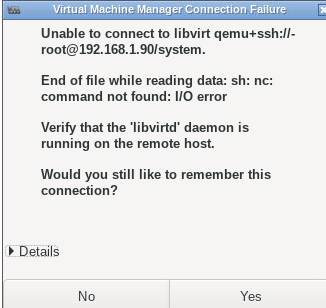
I get the same issue. Im typing the username root and IP correctly.
-
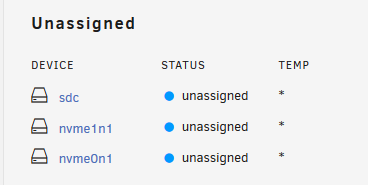
my issue is slightly different in that I dont see any unassigned temps on the dashboard. Main tab shows temps now.
-
6.9b35
-
Tempted to get that board myself. Do you have cpu/motherboard temps working?

