





mikeyosm
Members
-
Joined
-
Last visited
Everything posted by mikeyosm
-
I had to roll back gpu stat plugin to 2022.02.22 so that both (igpu and dgpu) AMD gpus are detected. The latest version (2022.11.30a) of the plugin breaks this, when will this be fixed please?
-
Is it possible for the plugin to show more than 1 GPU on the dashboard?
-
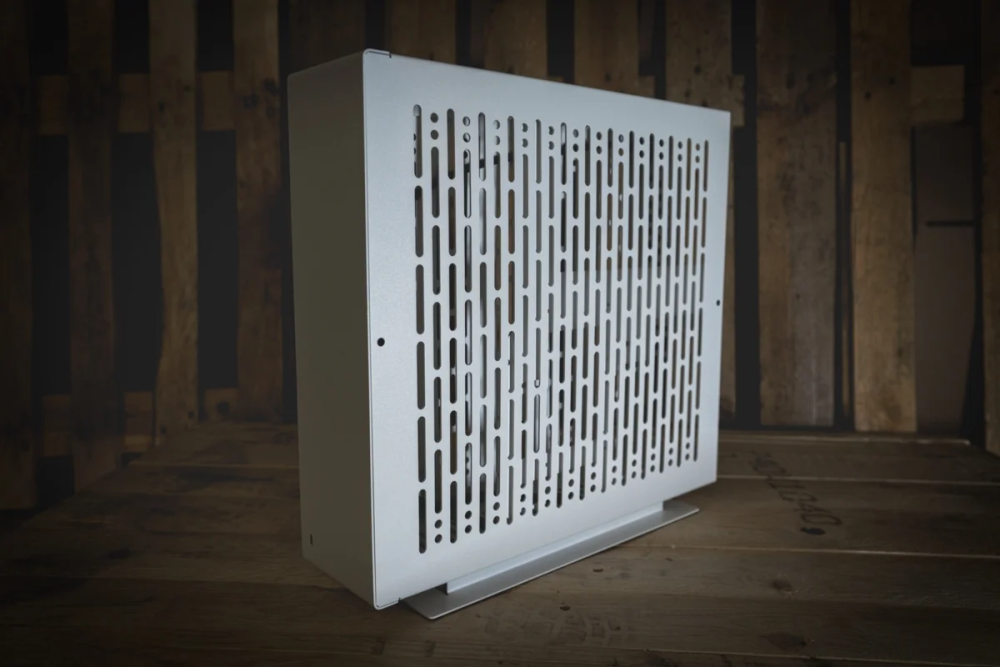
Please can you make a case icon for this awesome sff case? I just need it front facing with the usb c port bottom left, thank you.
-
I'm only using the betas in a vmware test environment. Still getting the same error. I used the installer to copy the 6.11 stable to the flash drive, then overwrote the files you suggested from 6.12 beta 5 zip. None of the betas work which is odd.
-
I have 6.12 beta 5 but the GUI refuses to display after entering a new first time password to log in to UNRAID. It does this for all betas (3,4 and 5). Fresh install. If I replace the bz files from 6.11 then I get a checksum error.

-
how bizarre, now it's opening. Not sure why it was failing before.
-
PID USER TIME COMMAND 1 root 0:00 /opt/base/sbin/cinit --progname supervisor --default-service-uid 99 --default-service-gid 100 461 root 0:00 sh 644 app 0:00 Xvnc -nolisten tcp -nolisten local -listen unix -geometry 1280x768 -depth 24 -rfbport=5900 -UseIPv6=no -rfbunixpath=/tmp/vnc.sock -rfbunixmode=0660 -SecurityTypes=None -desktop=JDownloader 2 :0 649 app 0:00 nginx: master process /opt/base/sbin/nginx -c /opt/base/etc/nginx/nginx.conf -g daemon off; 655 app 0:00 nginx: worker process 656 app 0:00 nginx: worker process 659 app 0:00 /opt/base/bin/openbox --config-file /var/run/openbox/rc.xml --startup touch /var/run/openbox/openbox.ready 678 app 0:00 {startapp.sh} /bin/sh /startapp.sh 680 app 0:13 /usr/bin/java -XX:-UsePerfData -Dawt.useSystemAAFontSettings=gasp -Djava.awt.headless=false -jar /config/JDownloader.jar 763 root 0:00 ps
-
Just updated the container today and now the webui wont show - Log file is stuck on 55-jdownloader2.sh: executing...
-
I'd be very keen to see your progress with this. I have a Tesla P4 for use with Proxmox but prefer UNRAID so really keen to see a driver that works with UNRAID versions greater than 6.10. I reached out to the original plugin dev but he doesn't know when the plugin will work with 6.11+.
-
Check this out https://www.lxg2016.com/55875.html Works on 6.10.3 - tried on 6.11.x but plugin does not work and does not download vgpu driver.
-
I want this board but can't find anywhere that sells it in the UK or EU. Supermicro X13SAE-F is a suitable option i guess....
-
I know it's a bit of niche use-case but more and more Telsla/Quadro cards are being affordable now and some make great gaming GPUs aka Tesla P4. Proxmox and ESXi both have support for Nvidia vGPU Manager / Drivers.
-
Any chance you could add the NVIDIA GRID vGPU driver as well? Some of us use Tesla cards like the P4 and would be very useful to be able to use this in dockers under split workload scenarios.
-
Oh I hope so and if not, hopefully soon. I have a Tesla P4 waiting ot be used with Parsec. 😀
-
Hi UNRAIDers Does UNRAID support the passthrough of Tesla cards (Tesla P4) for split workloads across multiple VMs? I assume the card will just appear as 1 GPU in the list of PCI devices? Would be really cool to be able to spread vGPU workloads rather than dedicate 1 GPU for every VM. Any ideas people? Thank you.
-
Did you ever figure this out?
-
DId this work? I'm thinking of buying a Telsa P4 and splitting the vgpu across multiple Windows 11 VMs
-
Damn my board had the IT87952E chip - any chance of supporting this one?
-
Me too. Installed Ventura B4 up to the country select screen and then random reboots occur. Using latest 0.8.3 opencore.
-
UPDATE - Updated OC boot picker img to 0.8.3 OC release, switched vcpu to 1 core, 1 thread and hey presto, ventura b4 boots to disk image and now is happily installing. I used the same qemu args as Monterey. UPDATE 2 - Install completed, rebooted got to country picker, crashed and rebooted. Ventura seems to be more of a challenge and I guess needs some opencore/kexts tweaking for this to work reliably in KVM.
-
it's a fresh install so using opencore v17 as boot picker. Here is my qemu args, please let me know what if anything i need to add/change.... I'm running AMD 3950X - Monterey VM working fine. old (works with Monterey not Ventura) <qemu:arg value='Penryn,kvm=on,vendor=GenuineIntel,+kvm_pv_unhalt,+kvm_pv_eoi,+hypervisor,+invtsc,+pcid,+ssse3,+sse4.2,+popcnt,+avx,+avx2,+aes,+fma,+bmi1,+bmi2,+xsave,+xsaveopt,check'/> new (still doesnt work with Ventura) <qemu:arg value='Haswell,vendor=GenuineIntel,+kvm_pv_eoi,+kvm_pv_unhalt,+hypervisor,+invtsc,kvm=on'/> <qemu:commandline> <qemu:arg value='-usb'/> <qemu:arg value='-device'/> <qemu:arg value='usb-kbd,bus=usb-bus.0'/> <qemu:arg value='-device'/> <qemu:arg value='isa-applesmc,osk=ynwa'/> <qemu:arg value='-smbios'/> <qemu:arg value='type=2'/> <qemu:arg value='-cpu'/> <qemu:arg value='Haswell,vendor=GenuineIntel,+kvm_pv_eoi,+kvm_pv_unhalt,+hypervisor,+invtsc,kvm=on'/> <qemu:arg value='-global'/> <qemu:arg value='ICH9-LPC.acpi-pci-hotplug-with-bridge-support=off'/> </qemu:commandline>
-
Today I tried to update my Monterey Macinabox VM to Ventura B4 with 0 success. I downloaded the beta via apple dev, ran the installer, waited 15 mins and the VM rebooted back to Monterey as if nothing had happened, no errors, nada. Anyone had any success getting Ventura installed?
-
Some good tips, thanks. Switched from vitio-net to vitio and boom! avg 700MB/s - happy with that.
-
How about enabling smb multichannel will that help? What is the known issue exactly?
-
Hello I have a bunch of media shares on my UNRAID server and tried copying a 10GB+ file to a W11 VM on the same UNRAID server. The virtio NIC on the W11 VM is running at 10gbps but I cannot copy from the UNRAID shares any faster than 200MB/s approx 2gbps. My physical NIC on the UNRAID server is a 2.5gbps onboard adaptor, is this the limiting factor? Is it possible to create a seperate virtual 10gb network so that VMs and shares on the same UNRAID server can copy at the full 10gbps speed available? Just to add, all shares and VMS are on nvme/ssd drives (seperate).



