





misterjtc
Members
-
Joined
-
Last visited
Everything posted by misterjtc
-
Did you find a solution for this? I just updated the container yesterday and now all my sites are down with this error. EDIT: I eliminated this error by commenting out the ssl on; because apparently its not needed with the listen 443 ssl http2; However, in doing this, I now have a new error: nginx: [emerg] the size 52428800 of shared memory zone "SSL" conflicts with already declared size 10485760 in /config/nginx/ssl.conf:3 I am not finding much on google, any advice is appreciated!
-
Thanks for the reply guys. I installed this from the marketplace within the Code Server instance. I have created an issue under the github extension but I will do the same for Code Server. I think this is a pretty popular extension so I cant imagine it will last long. EDIT: Created issue https://github.com/cdr/code-server/issues/1168
-
I am having issues when installing the extension Live Server. After install and reloading I get the following error: Activating extension 'ritwickdey.LiveServer' failed: Cannot find module 'live-server'. Has anyone else run into a similar issue?
-
Thanks for the reply @jonathanm. I did try gparted but I was to lazy to try and get it to work. I ended up downloading some shady piece of software which allowed me to get rid of the random windows partition in the way (risky probably?). Anyway it ended up working. On a less positive note, China is probably using my VM in a botnet right now. 🤦♂️
-
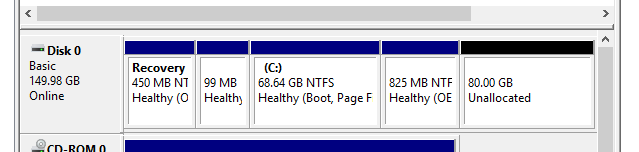
Unfortunately, this video doesn't consider the case where windows has placed some random partition to the right side of your main partition. From what I can tell, when this happens you cant extend (its greyed out) the volume to your newly added space. At the time of writing, I haven't figured out how to get around this...
-
@SpaceInvaderOne is there any chance that you can update the repo with some of these icons? I am especially looking to use one of the Linux Mint icons.
-
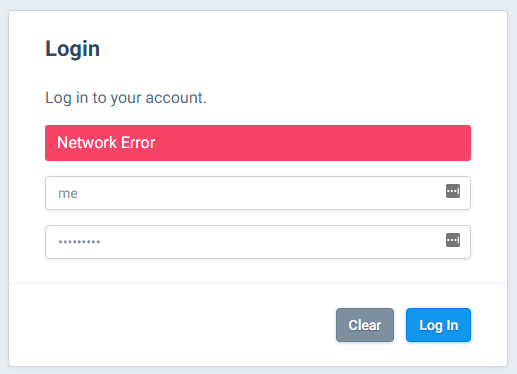
Do the recent changes affect Flood? I can't login anymore. I get the result below when I try to login and I don't see anything weird in the logs. EDIT: I lied. I found: 2019-03-04 20:09:31,260 DEBG fd 22 closed, stopped monitoring <POutputDispatcher at 22886222140264 for <Subprocess at 22886221024504 with name flood-script in state RUNNING> (stdout)> 2019-03-04 20:09:31,260 DEBG fd 26 closed, stopped monitoring <POutputDispatcher at 22886221150328 for <Subprocess at 22886221024504 with name flood-script in state RUNNING> (stderr)> 2019-03-04 20:09:31,260 INFO exited: flood-script (exit status 0; expected) 2019-03-04 20:09:31,260 DEBG received SIGCLD indicating a child quit
-
Just out of curiosity. What is the purpose of having this if you aren't using it through a proxy. I guess I assume that if you're on a computer to access this you already have a web browser. Thanks for the link, I'll check it out!
-
Has anyone tried using VNC Web Browser in a reverse proxy? I can get it to work but it doesn't connect to the VNC for some reason, so it never prompts me for the password. Works fine locally though.... Any ideas?
-
If one uses the LetsEncrypt docker as a reverse proxy and also uses this docker. Can the PiHole dashboard be accessed through the reverse proxy? I cannot get it to work. I get 502 bad gateway.
-
Looks cool! Just getting it set up now.
-
The method mentioned above by click on the VM name doesn't appear to work anymore. Is this true? OR am I missing something? EDIT: OK. I have expanded the vdisk using the command line but when trying the extend the volume in windows, it is greyed out. Does anyone know how to get around this?
-
If I was to dump a website inside the /www folder within this docker. How might one access this site internally within their LAN!?
-
The ip address of my unraid server is 192.168.2.134
-
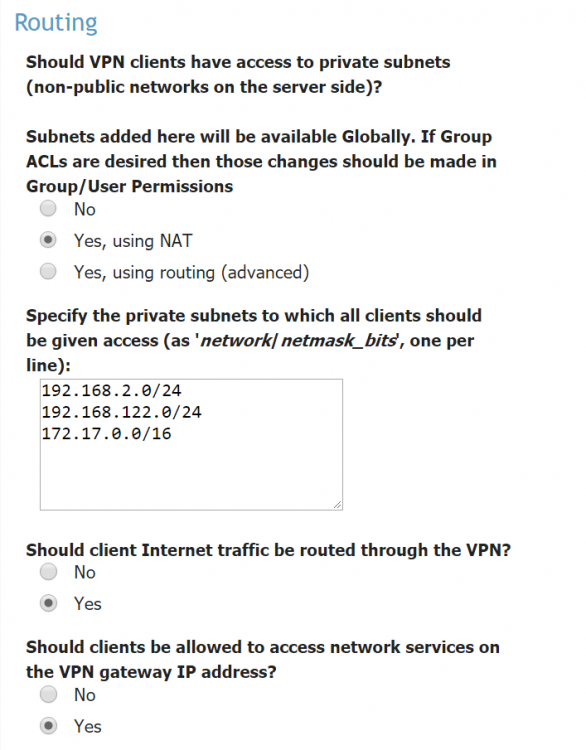
This is a bit above me at this point. But based on the screenshot below it looks like the subnet that my router and devices are attached to is listed there. I have been messing with this all day and I cant seem to get it to work. So weird. Spaceinvaderone made it look like it basically works out of the box....
-
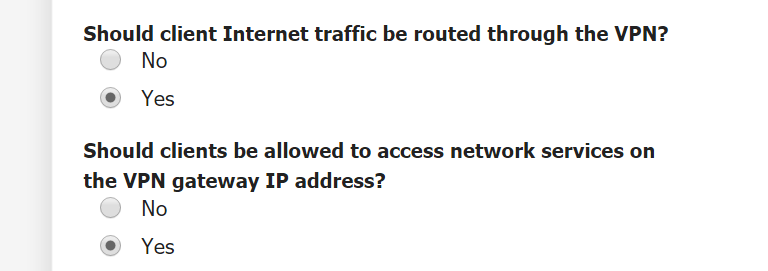
It looks like it is enabled by default as I didn't change any other settings other than setting up the domain with certs and creating the new user.
-
So I have this docker set up. I used this spaceinvdaerone guide initially: https://www.youtube.com/watch?v=I58LTMKyeYw and then reinstalled the docker taking into account updated information from the forum and the github page: https://github.com/linuxserver/docker-plex That said, I have everything setup and it appears to work properly and connect. The remote computer registers my unraid system external ip address when I check. However, when I try to access the unraid WebUI or any local network services they do not work.... Is there something I am missing? Any help is greatly appreciated.
-
This solved my problem as well!
-
Okay. But is using a reverse proxy with https and password protection actually a security risk!? I imagine it would be very secure as well, no?
-
Yes sir. I use them all the time through the conventional windows remote desktop app and it works perfectly. The error I am getting in the Webui is "The remote desktop server is currently unreachable. If the problem persists, please notify your system administrator, or check your system logs." Then, this is what the syslog says each time I try to connect. Nothing sticks out at me as helpful...... Sep 13 04:07:44 d37080f236f9 guacd[75]: Creating new client for protocol "rdp"Sep 13 04:07:44 d37080f236f9 guacd[75]: Connection ID is "$f88cc17f-3ce7-4fca-adb8-223170577f1f"Sep 13 04:07:44 d37080f236f9 guacd[858]: Security mode: ANYSep 13 04:07:44 d37080f236f9 guacd[858]: Resize method: noneSep 13 04:07:44 d37080f236f9 guacd[858]: User "@889670ec-bbf3-4d51-8ef3-9cfbed6f7dd9" joined connection "$f88cc17f-3ce7-4fca-adb8-223170577f1f" (1 users now present)Sep 13 04:07:44 d37080f236f9 guacd[858]: Loading keymap "base"Sep 13 04:07:44 d37080f236f9 guacd[858]: Loading keymap "en-us-qwerty"Sep 13 04:07:47 d37080f236f9 guacd[858]: Error connecting to RDP serverSep 13 04:07:47 d37080f236f9 guacd[858]: User "@889670ec-bbf3-4d51-8ef3-9cfbed6f7dd9" disconnected (0 users remain)Sep 13 04:07:47 d37080f236f9 guacd[858]: Last user of connection "$f88cc17f-3ce7-4fca-adb8-223170577f1f" disconnectedSep 13 04:07:47 d37080f236f9 guacd[75]: Connection "$f88cc17f-3ce7-4fca-adb8-223170577f1f" removed. Did windows 10 work with guac out of the box? No special configuration or regedits to allow them to communicate properly?
-
Why could you not use the reverse proxy with https and username/password for the Unraid WebUI? Would this not be just as secure as OpenVPN?
-
Does anyone have this working with Windows10? I cant for the life of me get it to connect through RDP.... Is there something I am missing?
-
https://github.com/tidusjar/Ombi This looks quite promising as an alternative to PlexRequests. Also, according to the devs of radarr it should be offering support in the near future. Hopefully, I can finally dump couchpotato.
-
Does anyone have this working? I am wondering if it is even supported anymore. Since I installed this plugin, I have lost ssh access for all of my users.
-
Has anyone had a look at Cardigann yet? It is inspired by Jackett and apparently better supported. https://github.com/cardigann/cardigann A container for this would be very useful.

