





zepheris
Members
-
Joined
-
Last visited
Everything posted by zepheris
-
Thanks for the advise. This is exactly what I did and haven't noticed any corrupted files. I've been browsing the disk directly looking for corruption and haven't seen anything yet.
-
Full transparency. I screwed up. Disk 6 is reporting errors on the UI and I miscounted the disk in my array and popped out the wrong disk which was marked offline and emulated. I stopped and restarted the array and popped the wrong disk back in and started a rebuild. 93% later and the same disk 6 is throwing errors again. I have 2 parity disks and I'm unsure what to do at this point. Is the rebuild going to be corrupted? Does unraid detect these read errors and use parity to fix read error on the fly? I have ordered a replacement disk, and it will be arriving sometime Tuesday (fingers crossed). Any advice is greatly appreciated. hades-diagnostics-20250810-1026.zip
-
I just started having similar errors after I updated Unraid to 6.11.5 Before the update, I've never run into this type of issue before. I've attached my diagnostics file in hopes this will help figure out the cause. hades-diagnostics-20221209-1059.zip
-
I just read the release notes for Unraid 6.10. Looks like I can change from macvlan to ipvlan. Gonna give this a try once the update is finalized. Thanks for your advise @JorgeB, but unfortunately I don't have a spare nic to try.
-
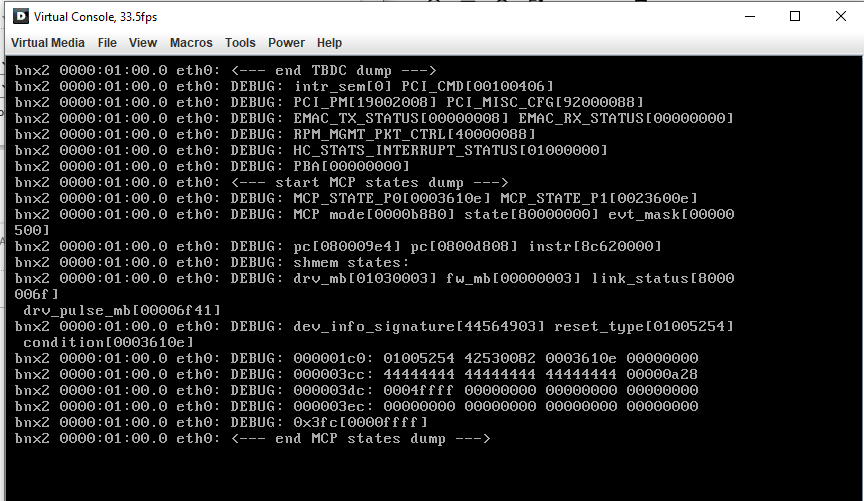
Unraid sometimes crashes after a reboot. I suspect it maybe related to issues I've heard about related to using vlans, but I can' t be sure. As of right now, my box is scrolling this on the screen over and over. I did see I had a logon prompt when I pressed the <enter> key a few times, but I'm not able to log in and can't seem to do anything other than reset. Based on the bnx2, I think it is related to a nic issue, but thats about all I've been able to find after doing some google searches. Anybody have any clue as to what may be happening? Update: Had to reboot to figure out what version I was running Unraid 6.9.2 Please let me know what information you need and I can provide it. Thanks!
-
Can confirm that changing the repo and then running Fix Common Problems plugin works with no issue. I did run into a problem with the extension on my browser. I had to log out and back in before it would sync again.
-
I have a suggestion that would help those of us who like to use reverse proxies (traefik as an example), MFA systems (Authelia), and their own domains. Add an optional field with the unraid-api plugin to enter a custom URL that would be used to access the local unraid server. The field could be setup to only ask for the url and its assumed the url will start with https. Then the unraid website could just use that link whenever the owner wanted to access the server remotely. Doing this would allow us to setup the reverse proxy and any MFA that we choose. This wouldn't be a end all method either. Limetech can still implement their own MFA, but I like the option of using my own. I know that we can not enable remote access through the plugin which is fine, but having the ability to click on my server from the server's section of the web page is seamless and more convenient.
-
Thats what I was missing. Thanks. I installed a proxy container and got it working. Thanks again!
-
Thanks for the info and Tip. I was going to use a proxy, but discovered the proxy settings do not include a username/password field. Are there any variables I can pass to the docker container? If so, could you let me know what those are? I tried looking around on the github page, but wasn't able to find anything. (maybe I'm blind) :)
-
Thanks for making this docker. Its really cool. I noticed an issue and unsure how to get past it. My log is showing this [3:47:02 PM] [33mwarn[39m :: ✖ [amazon] [evga (3090)] ftw3 ultra :: CAPTCHA All of the Amazon log entries show CAPTCHA. Is there a way to get around it? Thanks!
-
Will OpenZFS be a viable option with Unraid? https://github.com/openzfs/zfs
-
@Beaker69 Thanks for providing your code. I notice that the CPU usage isn't listed as an attribute. I think I understand why now. I just found this link (https://community.home-assistant.io/t/unraid-api-connect-and-control-unraid-servers-through-home-assistant-via-mqtt/154198/10) that discusses using glances to provide cpu usage. I guess I need to look into it a little more. Thanks EDIT: yep, I can't read very well. Glances https://github.com/nicolargo/glances this is where we're getting CPU usage and other stats. it can be found in the community apps page.
-
New to Home Assistant. I've been looking over your sample lovelace UI. I'm specifically looking at the bars. I can't seem to find any of the attributes anywhere in the MQTT server. Looking at the MQTT Server. The topic homeassistant/hades has the following information: (hades is the name of my Unraid server) { "arrayStatus": "Started", "arrayProtection": "Parity is valid.", "moverRunning": false, "parityCheckRunning": false, "title": "Hades", "cpu": "Intel® Xeon® CPU X5650 @ 2.67GHz", "memory": "64 GiB DDR3 Multi-bit ECC ", "motherboard": "Dell Inc. 0Y7JM4, Version A01", "diskSpace": "35.4 TB used of 42 TB (84.3 %)", "on": true } I suspect the CPU section is supposed to show my cpu usage, but all I see is the CPU type. I did check the topic homeassistant/binary_sensor/hades/config and have the following information: { "payload_on": true, "payload_off": false, "value_template": "{{ value_json.on }}", "state_topic": "homeassistant/hades", "json_attributes_topic": "homeassistant/hades", "name": "hades_server", "unique_id": "hades unraid api server", "device": { "identifiers": [ "hades" ], "name": "hades_server", "manufacturer": "Dell Inc. 0Y7JM4, Version A01", "model": "Unraid Server" } } homeassistant/binary_sensor/hades/config I'm confused. Is the Unraid_API docker not publishing all of the information its supposed to? Also to note. I'm receiving the following error in my docker log: There was a problem retrieving a field for a docker image Cannot read property 'contents' of undefined Unfortunately, the message doesn't identify which docker is the problem. I am using a plugin named Docker Folder. Do you think this is causing the error message? I even cloned the Unraid_API repo and built a new docker image to see if that would help and I'm not seeing where the CPU usage and other sensors are listed. Any help is appreciated. -Zeph
-
Holy cow! this is a flipping awesome plugin! Thank you for creating it!
-
Holy crap. Unraid on an Odriod? Thats awesome! Never considered doing that. I have Unraid on a Dell R710 with 2x 6 core CPUs w/ HT (24 logical processers) and 64GB ram. I'm 82% full on a 28TB array... Need more disks! Unraid has opened up so many options and it just keeps getting better and better.


