





denishay
Members
-
Joined
-
Last visited
-
Do not. If it works fine, don't fix it. :)
-
Do you need ECC memory support? What CPU platform (Intel Xeon, Intel Core, AMD EPYC) do you prefer? They don;t all have the same number of PCIe lanes Is this for a rackmount server or a tower NAS case? 14 is still easy to get on many older cases (or Fractal Define), but more kind of "requires" a rackmount case... not the same thing as just mobo+CPU
-
same. For the Seagate Exos, I have a mix of brand new [bought way before the crazy increases] and recertified.
-
I certainly hope that the reply will be a raised single finger. Even though this is more widespread of a requirement than California (EU and UK are also having their autocratic momentum and will both introduce digital ID as a precursor to digital currency), I will NOT have ANY device or equipment supporting such spyware. I'd rather do without internet services requiring it. Mind you, I am way over 50 years old, so it's not an age-restriction that I am complaining about. Free and open source will prevail. Not dictatorship posing as "protection" of minors.
-
Can't say for sure, but this seems to me as if you didn't map the /config properly. Make sure it is somewhere in /mnt/user/appdata/<nameofyourcontainer>. This one should be easy to check
-
thanks so much ! This fixed it for me!
-
Hi all, I hope this is the right place for this. I couldn't find any that I found more appropriate. So... short version is that I could like to have nat-pmp (or a compatible pmp supporting client or daemon) on the Unraid host. I do use a Proton VPN wireguard connection (mostly for torrents, but not only), and having nat-pmpc or any similar client to find out which port is redirected would help (I could then write a script to update qbittorrent with that port). I am asking that because I want to keep my current setup with an "original" qbittorrent and Wireguard at host-level. I do not want a container with qbittorrent+vpn inside. I know it exists, but that is not what I want. So... I am looking for the cleanest way possible to have such a client on Unraid. I know Unraid is Slackware-based, but I'd rather have a simple package or clean executable. I want to avoid modifying standard unraid (like not installing package manager, etc.) Did any of you do that already? OR know what would best suit my need for nat-pmp? Thanks in advance!
-
64GB. Happy that I did that way long before the insane price hikes
-
Hi all, Had a bad surprise this morning with 7.2.2 (main stable, no beta or rc): it seems that in some circumstances, the datasets on ZFS mounts are still not behaving properly. I had by accident created a folder under /mnt/user This created a share of the same name. Fine. Shouldn't be an issue I thought When I realized that the folder path was not what I wanted (I wanted that under /mnt/user/data/<fodlername>), I thought I would just have to delete the content, then proceed to delete the share. Step 1: delete content: no worries on that front Step 2: share deletion. That's where things started to be weird. • tried the "normal" Delete checkbox under the share management page -> didn't work. back to share management page and hare still here and not deleted • saw that for some reason (system default seem to be to have shares on cache), /mnt/cache contained and empty folder named <foldername> - tried to delete that as a root user with Midnight Commander, using rmdir, etc. --> no success either. Keep getting a "resource busy" error • Then I thought, as my cache is a ZFS1 dev, that meant that /mnt/cache contained a DATASET named <foldername>. Tried using the ZFS Master plugin to destroy the <foldername> dataset... a "no permissions" error showed up And... that's where I recalled my recent issues on this ZFS cache when upgrading to 7.2 Sure enough, I open an ssh session as root, type "mount -a".... and I could now just delete the folder without any issues. Are we in an "edge" use case which wasn't covered by the recent "fix"? I solved my immediate problem, but I'm bound to not be the only one ending up experiencing that
-
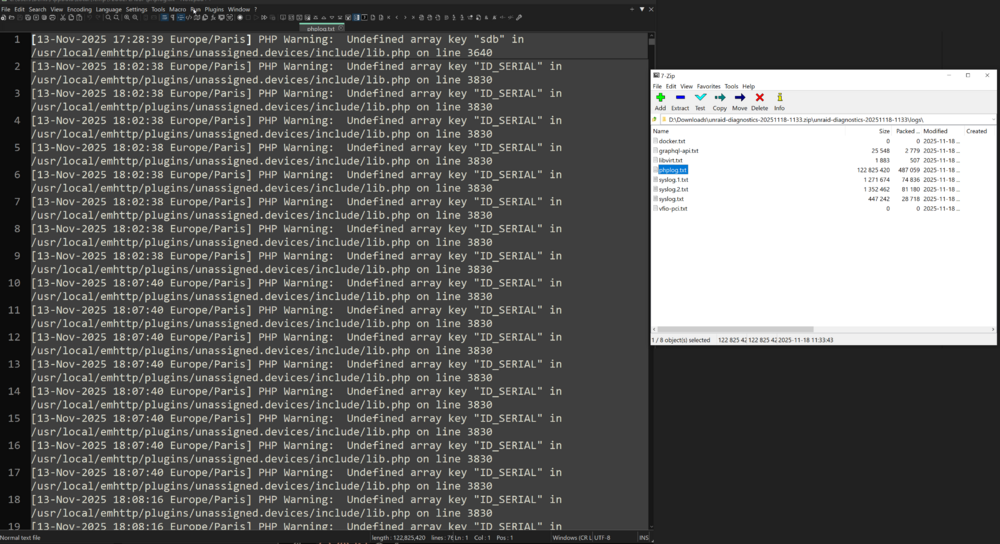
Thinking a bit deeper about it, I am wondering if it was not since this morning. Even after a restart I see the log usage climbing at neck breaking speed. There is not way it stayed like that for several days. Was there an update this morning? How can we install an "older" version of the plugin? (the Github is archived??)
-
Got some "new" behaviour from unassigned devices: log spam. For some weird reason since I updated to 7.2.1rc1 (I had to because of the ZFS array bug blocking writes after a mover operation) several days ago, then didn't think about it, but it seems that for some reason, the PHP log is now spammed with messages about some "undefined" entry (not sure what an "array key" is). I haven't changed to even swapped drives in forever. Those are the same drives as pre 7.2 upgrade I attached also the diagnostics file just in case unraid-diagnostics-20251118-1133.zip
-
just to confirm, the issue is indeed fixed. I am experiencing networking issues though since the migration to 7.2 (random "disconnections" from VMs or even console/ssh). Still investigating that and eliminating variables as much as possible before reporting
-
i just updated. Will let you know. Thanks for your patience and dedication!!
-
Upgraded to 7.2 and had that too. My main array is a "standard" unraid array, but yes, my cache is ZFS Z1. A restart and typing "zfs mount -a" solved it. I'm surprised something that bad hasn't been found during beta/rc. I mean something as basic as creating a folder...
-
Welcome Chris! Nice to see the Unraid team expanding!


