





thomast_88
Community Developer
-
Joined
-
Last visited
Everything posted by thomast_88
-
@Encino Stan If you already have nginx and a database running, you could use them. But you would have to configure the container to do so. My advice is to use the built in nginx and database. Furthermore, I don't even know what types of databases gitlab supports.
-
Same here
-
I don't have time to write a step-by-step guide today, but later some week I can do one. This thread (including the FAQ) should get you up and running pretty fast though. Any issues you are facing right now?
-
@jude Do you have Community Applications installed? If not, I suggest you use that. Just search rclone and it will pop up. EDIT: you should add https://github.com/tynor88/docker-templates/tree/master/tynor88
-
@MTA99 I see :-) But your point is good. The application can as well fail fast, as the rclone mount feature requires the colon to be there. Interesting. How many folder / files were in the directory you tried to list?
-
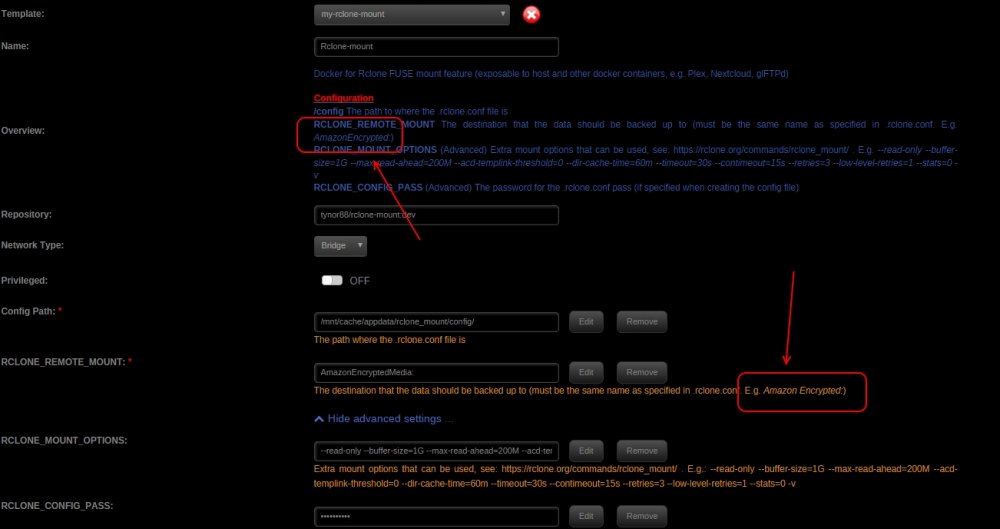
Right, gotta fix that. I was using a folder which was created by @Waseh's plugin, so my permissions were ok. Yes, i tried to make that clear in two places. (See screenshot). But you're right - it wouldn't work without a colon. I could perhaps check the variable at startup, and fail fast if there is no ":" specified. @MTA99 What do you mean by testing with a small sub folder? It shouldn't take any time to mount. I'm mounting 5 TB encrypted data in no time.
-
Good catch. I updated the template.
-
Sure, I'd be happy to receive some feedback on this once you get it up and running.
-
This plugin spawned from my initial docker which didn't support sharing the rclone FUSE mount. With Rclone-mount it's now possible. I'm not trying to hijack this thread, just want to let people know that I've created a Docker, which can expose the FUSE mount to the host and other docker containers, for those people who prefer dockerizing.
-
Best mount settings for Cloud Services Amazon Cloud Drive: --read-only --buffer-size=1G --max-read-ahead=200M --acd-templink-threshold=0 --dir-cache-time=60m --timeout=30s --contimeout=15s --retries=3 --low-level-retries=1 --stats=0 -v
-
FAQ Can I use my encrypted ACD/GDrive content with Plex and other dockers? Yes, that's exactly the purpose of this container. Can i haz unlimited space on my unRAID setup? I think 233 TB is the maximum I've seen so far with Amazon Cloud Drive. How do i create the .rclone.conf file? docker exec -it Rclone-mount rclone --config="/config/.rclone.conf" config I already have a .rclone.conf file from the rclone plugin, can I use it rather than creating a new one? Sure, there are two ways: Mount the /config volume so it points to the directory which contains the .rclone.conf file. E.g.: -v "/boot/config/plugins/rclone-beta/":"/config":rw Copy it to: "/mnt/cache/appdata/rclone-mount/config/" I cannot see my mounted volume/files outside of the container Make sure you have this in extra parameters (advanced view): --cap-add SYS_ADMIN --device /dev/fuse --security-opt apparmor:unconfine -v /mnt/disks/rclone_volume/:/data:shared Make sure that this docker container is started before the container you are sharing the volume with. Can i use the copy/sync features of rclone with this docker? Use the other docker i made which supports that. What are the best mount settings for Plex playback / transcoding? See this post And this discussion on the official rclone forum And ajkis wiki on GitHub I want more verbose logging, so I can see what's going on This is not entirely documented yet by rclone, but there is some discussion here. Summarized, in the RCLONE_MOUNT_OPTIONS variable put: -v flag for information logging Or -vv for alot verbose logging Why should I specify the /data mount in the Extra Parameters? Because the unRAID docker GUI does not support the shared mount propagation options, which is required for the rclone FUSE mount to be shared with other containers. I've already opened a feature request to have this option available in the GUI. This option has been added to the GUI by @bonienl and is no longer necessary. Can I change the volume mapping of the mount from /mnt/disks/rclone_volume/ to another location? Yes, in the Extra Parameters change the default value of -v /mnt/disks/rclone_volume/:/data:shared to -v <location>:/data:shared
-
Docker for Rclone FUSE mount feature (exposable to host and other docker containers, e.g. Plex, Nextcloud, glFTPd) Application Name: Rclone-mount Application Site: http://rclone.org/ Docker Hub: https://hub.docker.com/r/tynor88/rclone-mount/ Docker Store: https://store.docker.com/community/images/tynor88/rclone-mount Github: https://github.com/tynor88/docker-rclone-mount unRAID Template: https://github.com/tynor88/docker-templates/tree/master/tynor88 Setup/Configuration: https://rclone.org/commands/rclone_mount/ Supported Cloud Services: Google Drive Amazon S3 Openstack Swift / Rackspace cloud files / Memset Memstore Dropbox Google Cloud Storage Amazon Drive Microsoft One Drive Hubic Backblaze B2 Yandex Disk The local filesystem Creating the initial config file (.rclone.conf) docker exec -it Rclone-mount rclone --config="/config/.rclone.conf" config IMPORTANT Extra Parameters: In order for the FUSE mount to be exposable to the host and other docker containers, these settings have to be in the Extra Parameters option in the "Advanced View" when setting up the Docker. I've already made them default in the CA template file. --cap-add SYS_ADMIN --device /dev/fuse --security-opt apparmor:unconfine -v /mnt/disks/rclone_volume/:/data:shared With the above settings, the FUSE will be mounted to /mnt/disks/rclone_volume Note if you cannot see the mount inside other dockers This container must be started BEFORE other docker containers when sharing the FUSE mount. For automaticly fixing this at startup, use the great CA Docker Autostart Manager Plugin by @Squid Feel free to post any questions/issues/requests relating to this docker in this thread.
-
I'm getting this error when using "iotop". I tried reinstalling multiple times already How to fix this?
-
That's obviously a mistake. I will fix that asap.
-
docker exec -it Netdata /bin/bash cd /usr/libexec/netdata/plugins.d/
-
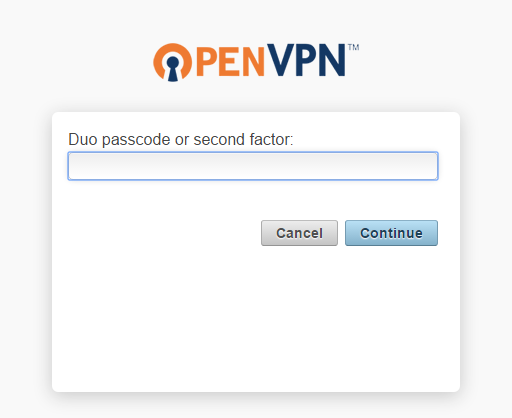
I've added Duo Security for Two-Factor Authentication when using this container. They have a free user tier which allows < 10 users. It will basically send a push request / sms to your mobile phone as an extra confirmation when logging in from the Web Interface (for those who have this exposed to the internet). I've followed the steps described here https://duo.com/docs/openvpn and modified them a bit. [*]download and edit duo_openvpn_as.py with secret key etc as described in the link [*]move duo_openvpn_as.py to /mnt/cache/appdata/openvpn-as/scripts [*]docker exec -it openvpn-as /bin/bash [*]chmod a+x /config/scripts/duo_openvpn_as.py [*]/config/scripts/sacli -a <admin_user> -k auth.module.post_auth_script --value_file=/config/scripts/duo_openvpn_as.py ConfigPut [*]/config/scripts/sacli -a <admin_user> Reset [*]Restart the container Now you have 2FA for logins. Write "push", "sms", "phone" and click connect, and you will receive a 2FA.
-
Why not just create a new user which is admin, and delete the default admin user? Is it recreated upon updates of this container, or did i miss something?
-
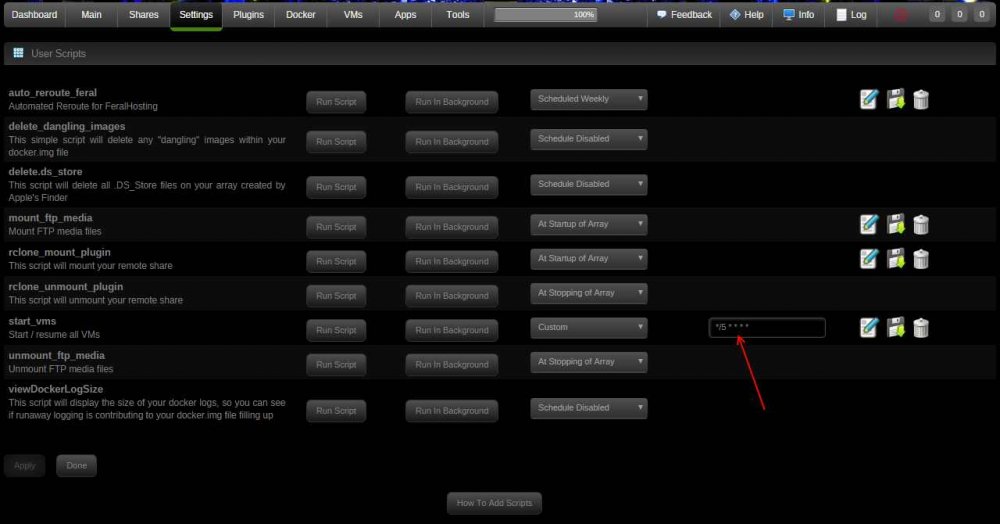
flexibility > user-friendliness Crisp ! That was quick! Already changed my first job to run every 5 minutes
-
Very simple script which will resume paused/suspended vms or start shut off vms. #!/bin/sh #description=Start / resume all VMs #arrayStarted=true virsh list --all | grep -E "(paused|suspended)$" | awk '{$1=""; print $0}' | sed -e 's/paused//g; s/suspended//g' | while read domain do echo "Resuming $domain ..." virsh resume "$domain" echo "Resuming $domain ..." done virsh list --all | grep -E "(shut off)$" | awk '{$1=""; print $0}' | sed -e 's/shut off//g' | while read domain do echo "Starting $domain ..." virsh start "$domain" echo "Started $domain ..." done
-
Okay cool - i appreciate your work. I can live with 1 hour for now. I'll wait patiently for the support of custom schedules
-
Would it be possible to set a custom cron schedule. I want to run a script every 5 minutes rather than every 1 hour (which seems to be the lowest frequency at the moment).
-
New version of rclone is out https://github.com/ncw/rclone/releases
-
+1 here as well
-
Where is your Application Data Storage Path mounted? Could it be some docker issue upgrades with unRAID? Did you have any other docker applications with issues? Which versions were you upgrading between? As far as I know it is set to the default I did not change it. "/mnt/cache/appdata/gitlab-ce/data"
-
Where is your Application Data Storage Path mounted? Could it be some docker issue upgrades with unRAID?



