





doblez
Members
-
Joined
-
Last visited
-
I had to add this as well - unsure why exactly that is. It might have to do with the fact that I use https between my nginx proxy manager and pangolin. But it sealed the deal for plex, so thank you for the tip!
-
It's also worth mentioning that I use a different raid card than the original once because of an error with the stock card. The new raid card I bought was already flashed to IT mode.
-
Can confirm - I went through the bios instead because I had physical access to my machine. But if the iDRAC is already set up you can go for that as well.
-
# static files location ^~ /browser { proxy_pass $forward_scheme://$server:$port; proxy_set_header Host $http_host; } # WOPI discovery URL location ^~ /hosting/discovery { proxy_pass $forward_scheme://$server:$port; proxy_set_header Host $http_host; } # main websocket location ~ ^/cool/(.*)/ws$ { proxy_set_header Upgrade $http_upgrade; proxy_set_header Connection "upgrade"; proxy_http_version 1.1; proxy_pass $forward_scheme://$server:$port; proxy_set_header Host $http_host; proxy_read_timeout 36000s; } # download, presentation and image upload location ~ ^/(c|l)ool { proxy_pass $forward_scheme://$server:$port; proxy_set_header Host $http_host; } # Admin Console websocket location ^~ /cool/adminws { proxy_set_header Upgrade $http_upgrade; proxy_set_header Connection "upgrade"; proxy_http_version 1.1; proxy_pass $forward_scheme://$server:$port; proxy_set_header Host $http_host; proxy_read_timeout 36000s; } Like I have changed it here - The directories/location for admin console websocket, download presentation and image upload, main websocket and static files. If you follow JC21's post on the github link you posted but use the above instead, it should work. Not that you still won't be able to open the WebUI unless you follow the instructions for changing the webUI-port, but the container and integration itself should work.
-
doblez changed their profile photo
-
@Knutowskie @[email protected] Fix for @SpaceInvaderOne config not working I got it working with a new proxy configuration file based on the documentation on Collabora's website. The reason it stopped working is that the image for the docker container was updated with new directories - Hence what was /loleaflet is now /browser and /lool is now /cool. The docker container itself hasn't been updated which is why the WebUI isn't working. - Can't seem to push an update to the container, so maybe @chvb can fix it? Fixing the WebUI: Edit the Collabora template Enable advanced view Change the WebUI url to: https://[IP]:[PORT:9980]/browser/dist/admin/admin.html Update the template and voila - Login with your admin details Fixing the proxy configuration file: Change lines 17, 35, 44 and 54 to their new directories inside the NGINX .conf file - I've attached it here as a file and code. # make sure that your dns has a cname set for collabora. If you setup Collabora to use the custom docker network (as in my earlier videos for reverse proxy) # then this config file will work as is. However the container name is expected to be "Collabora" as it is by default in chvb's container. # If you are not using the custom docker network for this container then change the line "server Collabora:9980;" to "server [YOUR_SERVER_IP]:9980;" resolver 127.0.0.11 valid=30s; upstream collabora { server Collabora:9980; } server { listen 443 ssl; server_name collabora.*; include /config/nginx/ssl.conf; # static files location ^~ /browser { proxy_pass https://collabora; proxy_set_header Host $host; } # WOPI discovery URL location ^~ /hosting/discovery { proxy_pass https://collabora; proxy_set_header Host $host; } # Capabilities location ^~ /hosting/capabilities { proxy_pass https://collabora; proxy_set_header Host $http_host; } # main websocket location ~ ^/cool/(.*)/ws$ { proxy_pass https://collabora; proxy_set_header Upgrade $http_upgrade; proxy_set_header Connection "Upgrade"; proxy_set_header Host $http_host; proxy_read_timeout 36000s; } # Admin Console websocket location ^~ /cool/adminws { proxy_buffering off; proxy_pass https://collabora; proxy_set_header Upgrade $http_upgrade; proxy_set_header Connection "Upgrade"; proxy_set_header Host $host; proxy_read_timeout 36000s; } # download, presentation and image upload location ~ ^/(c|l)ool { proxy_pass https://collabora; proxy_set_header Host $http_host; } } Working07-01-2022-collabora.subdomain.conf
-
Thanks - I ended up figuring it out myself, but I managed to bork my license key, so now I'm waiting for support! Have a good day!
-
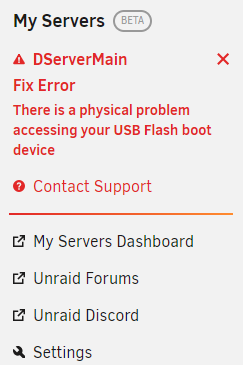
EDIT: Failed flash drive - Thanks ljm42 for verifying. I've recently gotten this error message and now I am unable to access my server at all since it defaults from my local IP to the unraid-provided https IP. Has anyone else had a similar error it? Otherwise the plugin works perfectly and is great.
-
Hey, Cool that your server has been running 2 years now - I am quite pleased with where Unraid has ended up by now! What exactly are you trying to do since you want Plex to rename them? I have mine running with "Keep Filename History" enabled and Plex doesn't have to rename anything, it just realises the new codec and file type. I have "Scan my library automatically" and "Run a partial scan when changes are detected". @Josh.5 Thanks for the awesome piece of software, it works beautifully. Feature request(s) if you at some point have time: 1. A way to initiate scan with a button-press. (Nice to have) 2. A way to blacklist folders within the specified library path, which is especially useful for TV-directories. (Very nice to have)
-
Hey, I did the same thing earlier with the same result. I tried deleting the Big Sur image files and changing it to method 2 which then grabbed the correct Big Sur image file from Apple. So yeah, I'd say workaround-able bug to be fixed when there is time to.
-
I can't see any VMs in the dashboard regardless of whether I put it in started-only mode or all vms. dservermain-diagnostics-20201206-0138.zip
-
64GB/768GB Multi-bit ECC in my main server 16GB/32GB non-ECC in my backup server Both overkill with my usecase though both my linux Vms love that I give them 16GB each
-
Hey Unraid Forum, I recently bought a used R720 Dell server with 6*900GB SAS Disks and 2*100GB SSD (Dell Branded), but I added two Seagate Barracuda 4TB 2.5" in dell branded caddies. Something is wrong with the raid card, so I pulled it out and tried booting without, which works "fine" - The previous raid card was a PERC H310 MINI from dell, and all of the disks SATA/SAS were detected. I can see all of my SAS drives in the bios, but none of the SATA drives, which I find very weird. Furthermore, none of the drives, SATA nor SAS show up in the unraid system. Do you have any clue what I should do? I am willing to try anything if you can explain it to a sorta dummy! In advance thanks tower-diagnostics-20190630-1916.zip
-
Hi, I'm noticing very slows speeds from the server to my client. The upload of the server is 40mbit/s, but I'm only getting like 3mbit/s. I have tried disabling compression, but my CPU isn't loaded anyway. My downlink at client connection is at least 30mbit/s at any given time Do you guys have any clue as to why I'm experiencing this slowdown?

