jademonkee
Members
-
Joined
-
Last visited
Everything posted by jademonkee
-
I searched for the word "memory" in the log accessible from the Container icon menu, and it found no results. EDIT: Also, FWIW, the memory usage for the container hasn't gone above 1.11 GB, and has now dropped back to 1.099 GB. So it's barely using any more RAM even now. I currently backup 3.6 TB to their servers, so I would expect it to want to use more than the current 1.09 GB RAM.
-
FYI: My account hasn't backed up for 15 days now because it is constantly "Synchronizing File Information." It seems to get to a point then starts over from the beginning again (the highest I've seen it get is maybe around the high 60s?). I contacted customer support, and they replied with the following: Looking at my Docker usage, it was indeed only using 1 GB RAM. So I popped into the app and applied the memory increase command (even though I thought I'd done it before). I could immediately see its RAM usage slowly start increasing. But then I remembered that it was actually an additional setting in the Container template. I hit edit on the container and in the CRASHPLAN_SRV_MAX_MEM: field is the value: 4096M How come the container was only using 1GB RAM? Is this a bug? Or have I entered an unacceptable value in the container settings? And will the command I issued in the Crashplan command line persist upgrades/restarts of the Container? Thanks for your help (and the container).
-
Worth a shot: did you clear your browser cache? Does the Android/iOS app still work?
-
Yep: similarly, I moved over to the new plugin upon the advice given by CA Backup, but have no interest in the remote access feature (I have a VPN already configured). As the "restore" feature isn't currently a full restore, I don't think it's the best advice for CA Backup to say that this method is deprecated, when it's actually superior. Plus with the change in the top banner, I'm uninstalling and moving back to CA Backup for flash backups (recognising that I need to keep a copy off-array, too). Will come back and check on the progress later (probably once encrypted, full backups exist in the cloud).
-
So, after limiting the Docker RAM allocation to 4GB, I tried to log into my Docker this morning and it threw up a web socket error, then a weird 404 (404 was written in red inside the interface, not an actual 404 from the browser). Looking at the usage, it was up hard against 4GB RAM. So I had to restart it. As per recommendations in this topic, I've now disabled DPI as it was only a mildly useful feature for me, anyhow. I really don't see how constantly growing RAM usage is acceptable. And given the constant complaints on the forum about v6.x, I've grown to regret forking out the money for the USG to replace my EdgerouterX. Every single feature that it brought into the Unifi interface has been a worse experience than on the EdgerouterX, and it offers absolutely no benefit (I have a 500Mbps connection, so it's not fast enough to handle threat protection (which I only found out AFTER I bought it) and the in-built speed test can't handle an internet connection of that speed, either). So yeah, not feelin' the love for Ubiquiti right now. Which sucks, coz the WiFi hardware has been great - fast and reliable (except for the problem with Chromecasts introduced in a fw update and promptly fixed). But the Controller... just terrible. I hope that, by the time v7 rolls around, Unifi Controller will be a fully fleshed out, reliable, usable product.

-
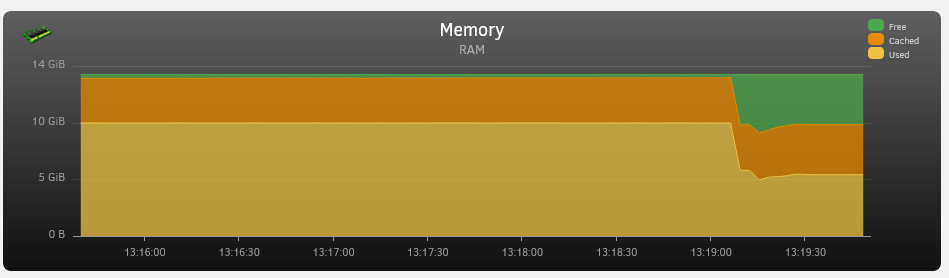
Any idea why my Unifi Controller is using so much RAM (4.887GiB)? I don't know how much it usually uses, but my server almost never goes above 6GB RAM usage but is now currently up at 10GB, so I'm guessing Unifi is the culprit. See attached. EDIT: A restart of the Docker brought usage back down, but I'd love to know if anyone else has had a similar experience.
-
I see the update notification, too, but my backups are working fine, so I don't think the update is related to your backups not working. Did you update your account to use 2FA? They made that a requirement as from March 4, so maybe that's it. Here's how to set it up: https://support.code42.com/Small_Business/Get_Started/Two-factor_authentication_for_CrashPlan_for_Small_Business (note that 2FA isn't needed when logging into the UI: only for the dashboard on the web) And yes: the update is tied to the Docker image, so we'll have to wait for it to be updated by @Djoss
-
FYI: I think it was just related to that one large file. CPU utilisation has returned to normal now that it's finished uploading it (and it didn't take 3 days, either). I guess I've just never noticed the CPU usage before in the 4 or so years of using CrashPlan + CA Backups
-
Noticed that my CPUI was getting hammered this evening, and it looks like CrashPlan is the culprit. It's currently backing up my ~26GB CA Backups appdata.tar.gz file (which it reckons will take 3 days...). This isn't the first time that that file is backed up, but I've never noticed such a spike in CPU usage? Any ideas what could be up? I heard that maybe not enough RAM allocation can spike CPU so I added the env var for 4096M (as well as via the Crashplan command line), but it still seems to be hitting my CPU harder than I've seen before (while also only using 1.5GB RAM). Any idea why? Is it common for large single-files to cause this and I've just never noticed before, or is something problematic going on? Thanks for your help and experience.
-
I use linuxserver/unifi-controller:5.14.23-ls76 and I chose it because it's considered stable by most.
-
I've never had success in having this plugin detect when drives are up or down, so uninstalled it years ago. However, remembering that it also allows scheduling, I thought I'd re-install it to have turbo write enabled during the day, then disabled during the night (allowing most of my disks to sleep during Mover operations). So I installed it two days ago, and set a schedule for it to enable Turbo Write at 8am for 13 hours: Cron: 0 0 8 ? * * * However, today I noticed that I was writing directly to the array, but none of the other disks were being read (ie Turbo Mode was not enabled). Does the scheduling only work if I have the "Enable automatic turbo mode" option enabled? As I've never had the plugin successfully detect when drives are spun up, I don't want to enable this option in case it keeps turning turbo mode on when it shouldn't be turned on, and keeping my disks forever spinning. In other words: is possible to use the scheduling functionality without using the disk detection functionality? Many thanks.
-
I think it means that it won't use the proxy when it talks to SABnzbd. It will still use the proxy for connecting to servers on the internet.
-
So what do we change to get Sonarr and Radarr to work via Privoxy if it's not the ADDITIONAL_PORTS var? EDIT: I got Sonarr and Radarr to work again by going to (in Sonarr and Radarr) Settings > Config > General > Proxy and adding my server's IP in "Ignore addresses" ("Bypass proxy for local addresses" was already checked, and I left it so). Additionally, in SABnzbd, if you have under General > Security a "List of local network ranges" defined, be sure to add the ranges for your Sonarr and Radarr Dockers, as well as your LAN IP range (or just leave it blank). Frustratingly, if you add it as CIDR notation, you will be locked out of the UI, so add it in the following format: 192.168.1.,172.17.0. (the second range covers both my Sonarr and Radarr Dockers)
-
I upgraded my 2x AP AC LR to 4.3.28.11361 last Thursday. Had 0 issues so far.
-
Gotcha, thanks. I can't imagine how flaky releases must be for even Unifi to consider them beta
-
Noob question: where do I store the script? I note that the UserScripts plugin doesn't work with interactive scripts, so I'm guessing I have to drop to terminal to execute this, but I have no idea what 'best practice' is for storing scripts. Should I just place it in the Backup directory? Or is it better to place it on the flash drive somewhere? Thanks for your help.
-
Link doesn't work for me (404), and I don't see it in the list here: https://community.ui.com/releases Do I have to be a beta tester or something to see it?
-
I can't remember for sure, but I don't think had issues with that version. I have a memory of my issues w v4.3.24.11355 not being the first time that my Chromecasts stopped working, but I think that might have been a config issue with the network rather than a firmware problem. Sorry I can't be more definitive. I think go to the earlier version and wait for ver 4.3.26.11358 to be officially released. If you have problems with the earlier version, it's easy to jump to the "known good" RC (at least, I'm not having any issues with it), and I believe you'll still receive upgrade notifications when new versions come out. You can see what issues people are facing with any firmware ver by visiting: https://community.ui.com/releases
-
FWIW this version prevents my Chromecasts from working, so I had to bump up to the RC ver 4.3.26.11358 to get them working again.
-
See the pinned notice at the top of the thread. Nothing to worry about.
-
I've been trying to search for a way to do this, but have come up empty-handed - probably because I haven't got the search terms quite right, so apologies if this has been covered before (as it almost certainly has). I would like to access some internal-facing websites via SSL - ones that I do not want accessible from the internet, such as Unraid, and Unifi - but I can't find a guide to do this that doesn't also point them to the internet. What settings can I change to a) have them receive an SSL via certbot (or is my wildcard cert already covering them?) and b) to be accessible by https://subdomain.mydomain.com address, but only from my LAN? Can someone point me to the right place that explains how I can do this? As I said before, I couldn't find it in the documentation mainly because I'm not quite sure what to search for. Bonus points for help on how (if it's possible) to set up a cert + SSL for my pi-hole instance, which is running on a separate RPi, rather than an Unraid Docker. Many thanks for your help.
-
I setup swag for the first time last week, and successfully pointed my domain to my nextcloud instance, and have been able to access it remotely all week via nextcloud.MYDOMAIN.COM*). I also set up a holding page (a single HTML file with an image) for my domain (without a subdomain). Today I changed my Edgerouter X for a Unifi Security Gateway (USG) so that I could manage everything from the one Unifi Controller interface (I already had two of their APs, so thought this would be neat). After having a heck of a time today getting it up and adopted, I do now have a running USG in my Unifi Controller. I have also added my old DHCP reservation and Port Forwards. But now to my problem relating to swag: However, I just checked my domain via my phone (not connected to WiFi), and when I navigate to nextcloud.MYDOMAIN.COM it shows a cert error that it's self-signed. If I hit proceed, it takes me to a Unifi page that I believe is coming from my USG saying "Fatal error. There was an error handling your request. Please try again later." WORSE YET though, is if I navigate to MYDOMAIN.COM it presents me (and anyone else on the internet) with my Unraid login screen! I disabled the port forwards in USG, but the login screen remained, so I've shutdown swag, and it now doesn't appear when I navigate to that page. Does anyone have ANY idea what's going on, and how I can fix it? *not my actual domain for reasons that should be obvious with the problem I'm currently facing OMG 🤦♂️ I just realised that when I set up the port frowarding on the USG, I accidentally had 80 > Unraid:80, and 443 to Unraid:443, rather than 80 > Unraid:180 and 443 > Unraid:1443. Classic. All seems to be working as it should now. Nevermind!
-
I setup swag for the first time last week, and successfully pointed my domain to my nextcloud instance, and have been able to access it remotely all week. Today I changed my Edgerouter X for a Unifi Security Gateway (USG) so that I could manage everything from the one Unifi Controller interface (I already had two of their APs, so thought this would be neat). After having a heck of a time today getting it up and adopted, I do now have a
-
Ok, I nuked the install, and have set everything back up again, but am having trouble receiving IP addresses. Worth noting first that I made some changes to my SSIDs: previously I had two different wireless networks in Unifi: 5G and 2G. Now I have one configured, and have the checkmark for 'combine 2G and 5G' disabled, so I have two SSIDs, but only one entry in the list of WiFi networks for it (I think I'd previously used WLAN groups for the 5G vs 2G networks, but can't remember why I did that, so didn't bother this time). So anyway, I now have to re-authenticate every device in my house, as I previously had the 5G SSID with a 5G suffix, and now only the 2G network has a suffix. So I've set everything up, including changing the controller hostname/IP to my server's IP and checking the "override inform host" option. I thought it may be related to the APs not being able to find the DHCP on my Edgerouter. So I popped over to the "Networks" section and changed the Gateway IP/Subnet to match my network/gateway (192.168.200.1/24). I then disabled the DHCP option below that. But my devices just won't receive an IP address. I have also tried it with the DHCP options matching those on my Edgerouter. No joy. I have also set (in the DHCP section of the Edgerouter interface) the IP address of my server for the "Unifi Controller" option, if that does or doesn't do anything (never really sure why there was an option for that in the Edgerouter firmware, but figure it must offer some benefit...). Any ideas? EDIT: OMGGGG a full reboot of my entire network - including modem, router, switch, my server, and every device connected - seems to have fixed it. Dunno why, but I'm super glad (as is my wife) that WiFi is back. Now to go re-authenticate every device to my new SSID!
-
Thanks for the insight - yeah, it seems that I'm now just another of the many 'why did you even ship this?' Unifi customers It's only my house, so two APs, no USG (I use an Edgerouter), and some dumb switches. I just wish I could access the UI so I could note down the channel (and other) settings I used. Ah well, will just be another weekend IT project. One final thing: the latest firmware for the APs stopped my Chromecasts from working, so I jumped up to a RC version last week (4.3.26.11358) by manually upgrading the APs. Will downgrading the controller to v5 cause any issues? Will I also have to downgrade the AP firmware to an earlier version, or does v5 work fine with the latest (I could see no mention of a minimum controller ver req on the beta page, but just thought I'd double check: https://community.ui.com/releases/UAP-Firmware-4-3-26-11358/e05cd041-ea54-460c-85f4-7f3fd97261e8 Thanks again for your help!