






ColeBrodine
Members
-
Joined
-
Last visited
-
I'm an idiot! I just tried the WebGUI and it worked. I was trying to connect with a VNC client. Thanks!
-
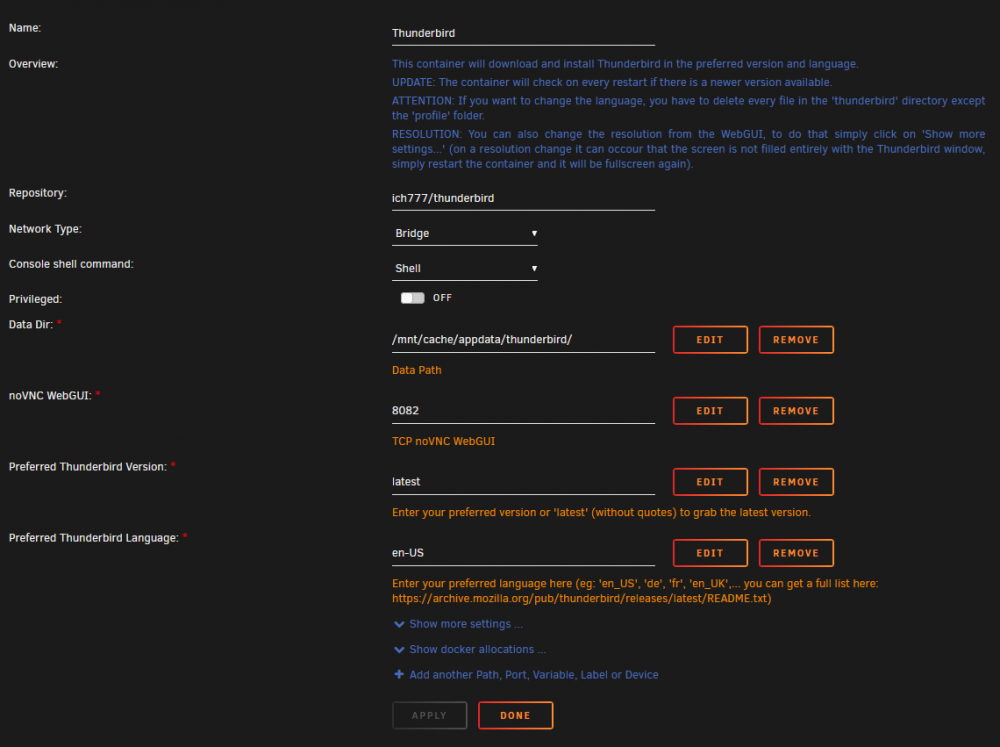
Having a little trouble getting the Thunderbird docker to work. I have it setup like so: I get the following output in the log: ---Checking if UID: 99 matches user--- usermod: no changes ---Checking if GID: 100 matches user--- usermod: no changes ---Setting umask to 000--- ---Checking for optional scripts--- ---No optional script found, continuing--- ---Checking configuration for noVNC--- Nothing to do, noVNC resizing set to default Nothing to do, noVNC qaulity set to default Nothing to do, noVNC compression set to default ---Starting...--- ---Version Check--- ---Thunderbird v91.4.1 up-to-date--- ---Preparing Server--- ---Resolution check--- ---Checking for old logfiles--- ---Checking for old display lock files--- ---Starting TurboVNC server--- ---Starting Fluxbox--- ---Starting noVNC server--- WebSocket server settings: - Listen on :8080 - Web server. Web root: /usr/share/novnc - No SSL/TLS support (no cert file) - Backgrounding (daemon) ---Starting Thunderbird--- [GFX1-]: glxtest: libpci missing [GFX1-]: glxtest: libEGL missing (thunderbird:105): GLib-GIO-WARNING **: 17:30:21.927: Failed to execute child process “update-desktop-database” (No such file or directory)
-
I've been using Unraid for 3 years now. So glad I found it and made the leap when I built my new file server. I've convinced at least 2 other people to start using it also! I have 2 Unraid licenses. One for a fileserver and one for a 2 in 1 gaming PC. I love the GUI and how easy it is to manage. I hate how addicted I have become to creating new VMs all the time! Happy 14th Birthday and here's to many more!
-
If you select the folder, only the files will show up but if Filebot renames every file in the folder it should place them in a new folder structure that you setup and remove the old folder. If even one file stays in the old folder, the old folder will need to be manually removed.
-
I saw this in the lounge and thought it might be of some interest here. Filebot is starting a Patreon to further Linux support: https://www.patreon.com/filebot/posts From their Patreon page:
-
Thanks so much for making this update! I use this daily and was so glad to see an update!
-
I did end up leaving it disabled, but just because I haven't tried it that way yet. I'll try to maybe turn it back on and see what happens. I only have so much data cap (hence using this container ) so I probably won't get it tested right away. I burned through quite a bit trying to figure out my DNS issue.
-
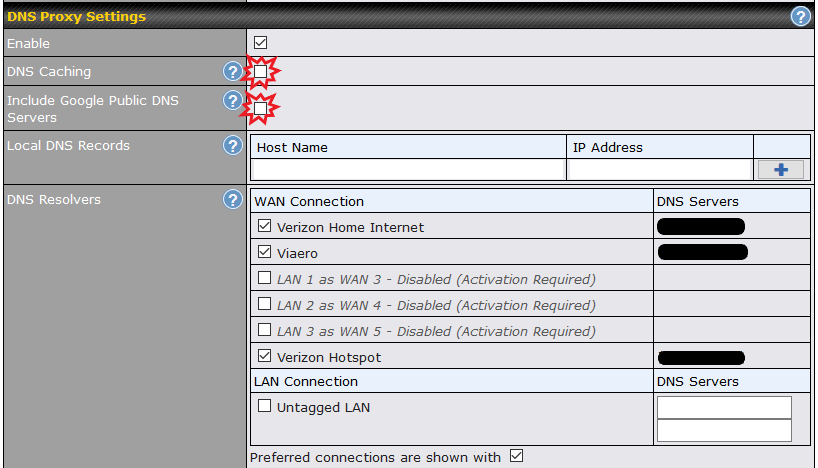
Sorry for all the replies, but I seemed to figure it out now. I also had some DNS settings in my router checked. Once I unchecked these it worked fine. Look deep in your router settings if you are having problems.
-
After doing some more research, this appears to be related to ipv6. If I disable the ipv6 functionality on my network adapter all pages start to load properly. I'd like to make this the default DNS for my router to hand out, so I'll do some more research. It would be better if I didn't have to go disabling ipv6 on all my devices.
-
Firefox will let you put in a proxy server, so if you are using one of Binhex's Privoxy servers you should be able to go into the Firefox settings and configure it directly to use the VPN Proxy.
-
ColeBrodine changed their profile photo
-
I'm struggling with steamcache and steamcache-dns. I've installed both dockers and given them their own IP addresses. in the steamcache-dns container I've pointed the STEAMCACHE_IP variable to the IP I assigned to steamcache (using the instructions linked in the post). I've updated a computer's DNS records to the IP assigned to steamcache-dns. It downloads games correct and caches them correctly (I see the red text, I uninstall and then the green text appears when I reinstall). For some reason, now I can't access any website except google from any of my web browsers? (maybe some others?, but google is the only one I've been able to access so far) I can ping google and I can't ping any other sites that I try. Where do I start trying to troubleshoot this? I'm afraid it isn't forwarding properly, but I'm not sure how to even check.



