





ufo56
Members
-
Joined
-
Last visited
Everything posted by ufo56
-
Are there any alternatives to Minio that work with Unraid ?
-
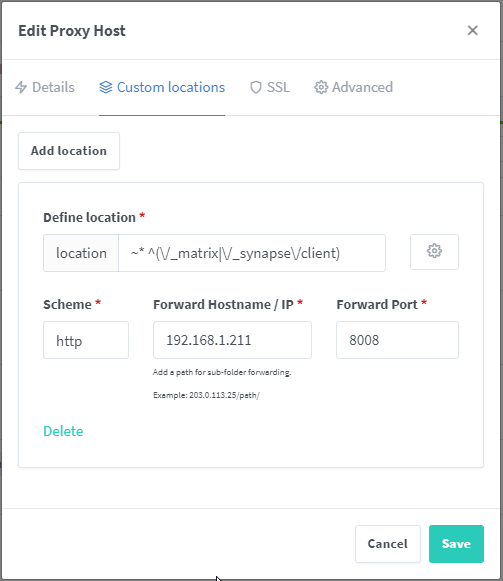
custom locations listen 8448 ssl; location / { proxy_pass http://192.168.1.211:8008; proxy_set_header X-Forwarded-For $remote_addr; } location /.well-known/matrix/client { return 200 '{"m.homeserver": {"base_url": "https://matrix.domain.com"}}'; default_type application/json; add_header Access-Control-Allow-Origin *; } location /.well-known/matrix/server { return 200 '{"m.server": "matrix.domain.com:443" }'; default_type application/json; add_header Access-Control-Allow-Origin *; }
-
Thank you for CrushFTP container! Really useful thing. Any plan to update this ? @MarkusMcNugen
-
@DrMcNasty @brent112 turn off Hyper-V on VM settings. My VM now works like it should be...
-
Same here, did you found solution ?
-
@infernix what memory modules you are using with X12SCA-5F ?
-
@gloworm @PanRider Add container extra options --device="/dev/bus/usb/001/004:/dev/bus/usb/001/004" -e "SERVICE_ENABLE_PIAWARE=false" -e "HTML_SITE_LAT=xxx" -e "HTML_SITE_LON=xxxx" -e "HTML_SITE_NAME=xxx" -e "HTML_DEFAULT_TRACKER=Flightradar24" -e "HTML_FR24_FEEDER_STATUS_PAGE=http://192.168.1.211:8754" -e "FR24FEED_FR24KEY=xxxxx" This container does not use config files anymore by long time ago now... And voilaa, everything works.
-
Has anyone been able to get NPM work with matrix federation ? https://github.com/matrix-org/synapse/blob/master/docs/reverse_proxy.md#nginx
-
Unraid update actually fixed that. Weird. I was using 6.8.2 EDIT: There is still something wrong, but seems to be some unraid error.
-
What to do... Nextcloud docker won't stop, only way to stop is kill -9 process id I deleted whole container and added again with empty appdata folder, same error still.... s6-svwait: fatal: supervisor died [s6-finish] sending all processes the TERM signal. [s6-finish] sending all processes the KILL signal and exiting.
-
Have to tell you that there is probably no solution for nextcloud speed problems, there is no difference is that iOS or NC windows app. I have wasted tens and tens of hours for debugging it over past 2 years. It has to be related docker, unraid docker network or specifically to this NC container. There are main 2 suspects on this case, for some reason php-fpm takes alot of time to process files that are uploaded ( 10mb chunks) and/or there is some specific internal docker network problem why it takes so long to transfer that file. Another server with much less cpu and ram and there i can upload 500-800mbit/s (server is 700 km away from my home, without docker, it uses reverse proxy also). On that server it takes about 400-800ms to process one chunk(10mb), compare with unraid docker NC where it takes 2-3 seconds. 4 core cpu with lower ghz and 6gb ram can process 15 times faster NC on bare metal than dual cpu xeon with 64gb ram on docker. There is no config file that i have not modified/tuned nginx, php, mysql, memcached, APCu, Redis... you name it Btw nginx and NC combo loves http1 not http2, there is alot talk about it on github/NC forum. Thats why im using on my second server http1 only, network speed went from 50mbit/s to almost gigabit.... However on my unraid server im out of ideas.
-
How to set permanent snmpd password other than "public" ? If i change from /usr/local/emhttp/plugins/snmp/snmpd.conf it gets changed back to public after restart
-
few posts back
-
Finally i found a solution to people who will experience this problem. Downloads/uploads for bigger files are impossible, 1gb+. Connection gets disconnected or is painfully slow. Well-known problem here and reddit threads. This problem appears on this container with reverse proxy tutorial and when u make reverse proxy with NginxProxyManager. Add to nginx.config or virtual host config file in reverse proxy. Depends on your configuration. client_max_body_size 2000m; proxy.conf extra lines proxy_temp_file_write_size 64k; proxy_connect_timeout 10080s; proxy_send_timeout 10080; proxy_read_timeout 10080; proxy_buffer_size 64k; proxy_buffers 16 32k; proxy_busy_buffers_size 64k; proxy_redirect off; proxy_request_buffering off; proxy_buffering off; --------------------- nextcloud php-fpm pm = ondemand pm.max_children = 25 pm.start_servers = 2 pm.min_spare_servers = 1 pm.max_spare_servers = 5 nextcloud php.ini memory_limit = 512M Redis cache is also suggested. Install redis container and add these lines to nextcloud. config.php 'memcache.local' => '\\OC\\Memcache\\Redis', 'memcache.locking' => '\\OC\\Memcache\\Redis', 'redis' => array ( 'host' => 'IP', 'port' => 6379, ),
-
Thank you for link. Auth protocol mistake it is. Changed to cloudflare.
-
After latest update letsencrypt tries challenge now on http port not https. https://pastebin.com/1PNLnSwG
-
I just came here to search if there is solution for slow speed im not the only one like i see here... 24h and 300gb backup done. Is there any good alternative to this crap ?
-
Did not work for me
-
At least im not alone with this problem. What i have figured out at moment is letsencrypt+nginx caching solution (at least in docker) is crap for files over 3-4gb. Even if you add proxy_max_temp_file_size It caches your file directly to docker image. That caching solution with docker is slow and i have to make your docker image much bigger. Example: you upload 2gb file, while you are uploading it goes do nginx cache (docker file) and when its completed it starts "moving" to your data dir. Thats why you have to have always at least free amount space on your docker image how big is your upload/download. Example: even if you have 100gb docker img file, proxy_max_temp_file_size 10000m then biggest file you can upload almost every time is 3gb and same about download. Upload never finish or downloads won't complete That solution what everyone here uses is suitable for maybe 1.5gb files, depends if someone else uploads something or downloads I hope you understand me EDIT. BTW i spin up two vps, did a test. 1'st test: 1 vps with nginx proxy and nginx webserver with nextcloud, basically like here. Same configs, it works. 2nd test: 2 vps, one with only nginx proxy and other vps with nginx and nextcloud. It works. Problem is in docker or some very specific configuration...
-
Seems to be same issue that i have. Speed is getting up and cpu goes 100% until crash and everything starts over.
-
Some weird issue.... Every time torrent get's about 20mb/sec speed rtorrent crashes. And after maybe 60 seconds it starts downloading again until 20mb/sec and over again.. rtorrent.log 1504978066 N rtorrent main: Starting thread. 1504978066 N worker_rtorrent: Starting thread.
-
Does anyone have better idea how mount windows share on Unraid ? I have to use that kind of setup because all my data to docker comes from Windows machine (stablebit clouddrive) plex, sonarr, radarr etc...
-
exactly same here, all my data comes over Windows share. Storage is on other machine.
-
On same lan machine.
-
what client ? Problem on win 8 side ?
