





AnnabellaRenee87
Members
-
Joined
-
Last visited
Everything posted by AnnabellaRenee87
-
Same here, running on 6.5.3-rc2. Tried removing and reinstalling the add on, didn't help ? Attaching logs. EDIT: Just tried adding https:// to the address and after accepting the security warning about a certificate it will load the page. I'm not using https on the server btw. PS. Sorry for all the edits. server-diagnostics-20180611-1609.zip
-
unBALANCE is crashing out on me when I hit the "Plan" button, I have to go to settings --> unBALANCE and re-start the service. (disable it and re-enable it to get the site to load again) What logs would you need for this? Just the standard Diagnostics Logs? (attached them just in case its a yes) server-diagnostics-20180510-1758.zip
-
@gridrunner was wondering if you could upload these to your server.
-
Don't suppose you could add Opensense's Icon?
-
I noticed it when Fix Common Problems said Statistics needed removed because Preclear wasn't installed
-
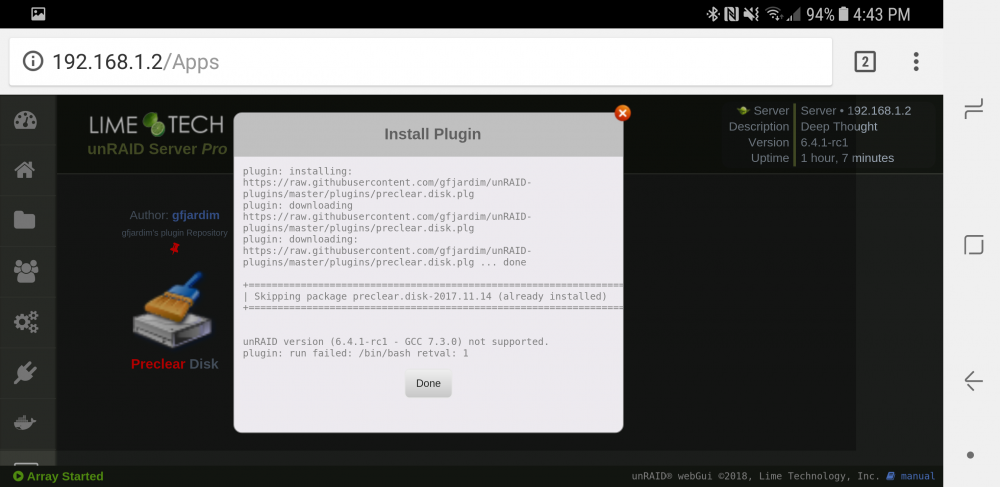
Didn't mean to come off as rude, feeling under the weather today. It's installed, I assume once it's updated it will start working again. Sorry ? SERVER-preclear.disk-20180128-1649.zip server-diagnostics-20180128-1650.zip
-
Don't suppose we could get some 6.4.1 RCx support could we? Getting incompatible errors.
-
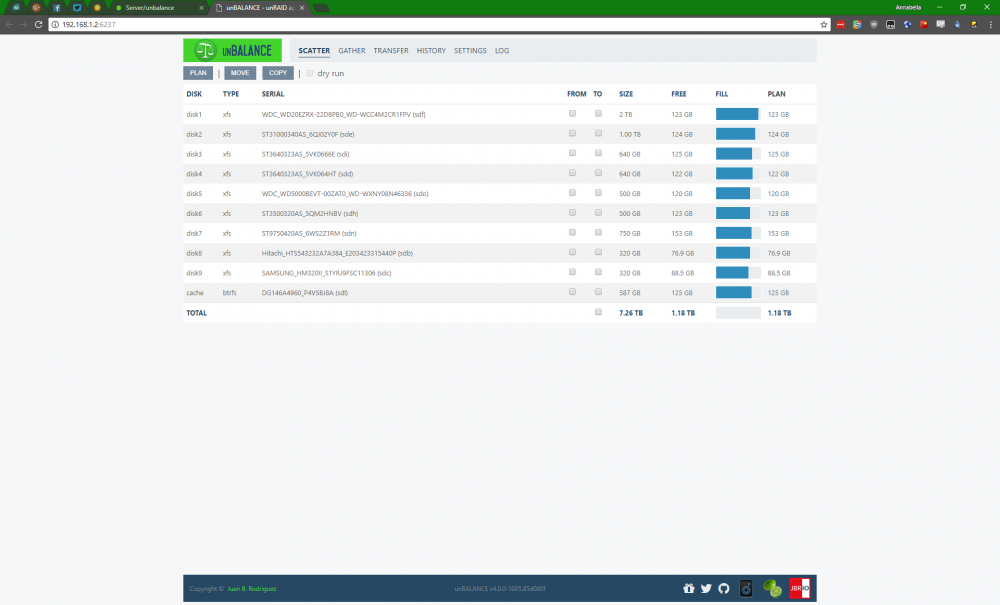
Got the new 4.0 update, fixed my weird issue on my 1TB drive.
-
Yeah, just checked, all is well now <3
-
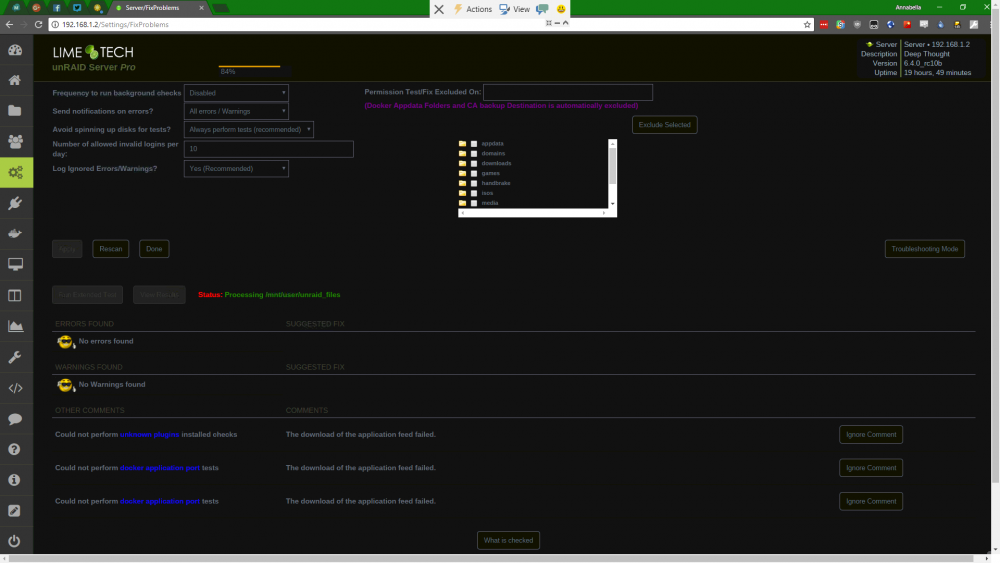
I'm so glad I checked this thread before I started tearing plugins out lol Yeah, getting "Download of appfeed failed" too. Would this also cause this?
-
This post right? Also any point to do that if my CPUs don't have integrated graphics? My CPUs https://ark.intel.com/products/37111/Intel-Xeon-Processor-X5570-8M-Cache-2_93-GHz-6_40-GTs-Intel-QPI I may hold off a bit if I have to do a VM, I only have like 1-3 streams playing at a time. I just wish anything h254 didn't make all the cores go crazy high load. I wish there was a way to load drivers in for GPUs into unRAID.
-
So correct me if I'm wrong. If I want GPU Encoding on this docker I turn on Privileged Mode in the docker's template/settings and it uses the GPU? (and turn it on in the PMS Settings?) I was thinking about adding a GT 1030 in the machine for just encoding H265 streams. Would I have to "pci-stub.ids=" the other GPUs I have assigned to VMs?
-
I often wondered this too. I just run with "nobody" and run Docker Safe Permissions after moving things and wonder if using root would be a good idea or not to avoid running Docker Safe Permissions Sent from my SM-G955U using Tapatalk
-
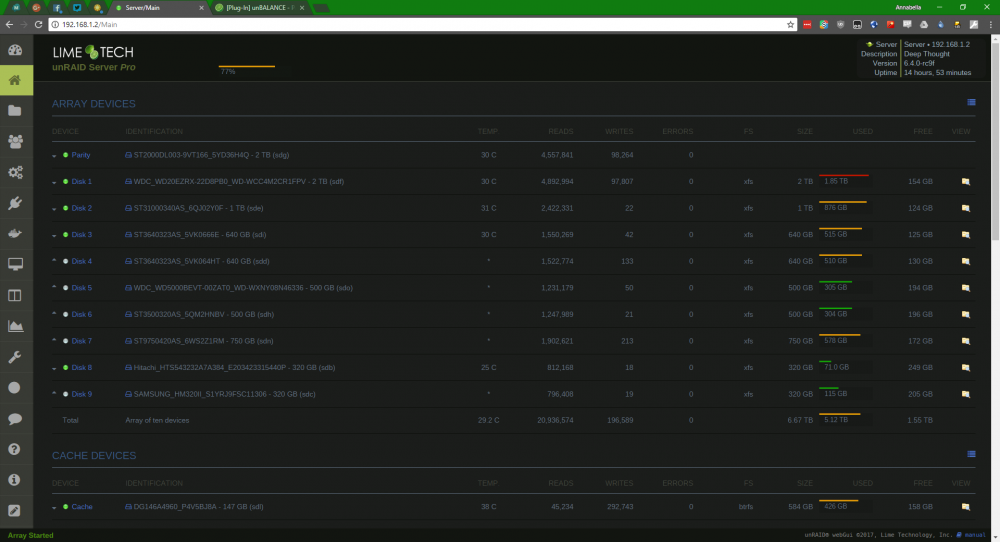
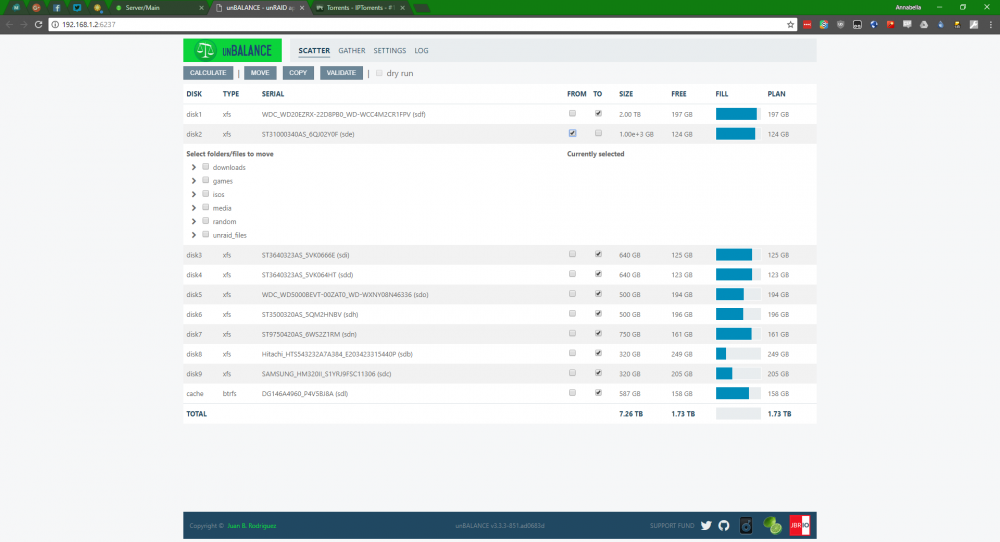
["disk2"] idx="2" name="disk2" device="sde" id="ST31000340AS_6QJ02Y0F" size="976762552" status="DISK_OK" rotational="1" luksState="0" format="MBR: 4K-aligned" temp="31" numReads="2422115" numWrites="22" numErrors="0" type="Data" color="green-on" exportable="no" fsType="xfs" fsStatus="Mounted" fsColor="green-on" comment="" fsSize="976285620" fsFree="120773864" spindownDelay="0" spinupGroup="" deviceSb="md2" idSb="ST31000340AS_6QJ02Y0F" sizeSb="976762552" Oddly enough the main page of unRAID has the right size reported. This drive use to be in a machine that had a Gigabyte motherboard in it, I wonder if its messed with that drive. EDIT: Doesn't look like it messed with it, I had to remove the HPA from another drive before. root@Server:/usr/local/emhttp/state# hdparm -N /dev/sde /dev/sde: max sectors = 1953525168/1953525168, HPA is disabled
-
Filesystem 1B-blocks Used Available Use% Mounted on /dev/md2 999716474880 876044038144 123672436736 88% /mnt/disk2
-
Just wondering, why does Disk 2 show 1.00e+3 GB vs 1TB?
-
Cups was working great but all of a sudden I'm getting "Filter Failed". I removed the docker went to appdata and deleted the CUPS folder there and reinstalled from scratch but it's giving the same error.
-
I just call the Cache Module a key because I'm too lazy to type it lol. I had a problem with it being able to spin down the disk and unRAID wouldn't read the SMART data from the disk either on the latest firmware for it.
-
Oh you quoted me before I edited the RAID out of my post
-
Half right, without the RAID key installed on the board you can only do 4 arrays, after that you have to have the key.
-
You cant put the P410i in JBOD/IT mode, on my HP DL370 G6 I had to get a HP H220 SAS card, this is the exact listing I got mine from https://www.ebay.com/p/HP-638834-001-LSI-Sas9205-8i-6gb-SAS-Pci-e-HBA-Card-Host-Bus-Adapter-660088-001/1540401135?_trksid=p2047675.m4096.l9055 If you need more ports you can get this SAS Expander http://www.ebay.com/itm/468405-002-468405-001-HP-24-BAY-3GB-SAS-EXPANDER-CARD-W-4x-CABLE-/131875011137?epid=723600883&hash=item1eb45cfa41:g:PBoAAOSwq~tZXRnq These are the exact ones I have.
-
Telling me that Java is not installed at all.
-
OK, was lurking in the background hoping you would reply to them. The Docker runs Java 7 and its not good at all with Pocket Edition/Windows 10. I tried bashing in to the docker and force updating it to 8 but it reverts the moment you restart the docker. Source https://forums.cubecoders.com/chat/aborted-launch-for-pe-nukkit-jar-minecraft Also more exotic Minecraft Servers may have issues. (i get random errors in my console related to Java on my Spigot server) And Pocket/Windows 10 Edition wont work due to the error in that link.
-
Old Server is at 16GB new server is 48GB but I can max that one out at 384GB which I may do, depends on if I need it more or not.
-
Command Command: root@localhost:# /usr/local/emhttp/plugins/dynamix.docker.manager/scripts/docker run -d --name="PlexMediaServer" --net="host" -e TZ="America/New_York" -e HOST_OS="unRAID" -e "PUID"="99" -e "PGID"="100" -e "VERSION"="plexpass" -v "/mnt/user/Media/":"/media":rw -v "/mnt/user/appdata/plex":"/config":rw linuxserver/plex 0640602d80350e2c5ed6f1a3d430420f2b1857409a46094e24570bad2cffac17 The command finished successfully! Logs ErrorWarningSystemArrayLogin [s6-init] making user provided files available at /var/run/s6/etc...exited 0. [s6-init] ensuring user provided files have correct perms...exited 0. [fix-attrs.d] applying ownership & permissions fixes... [fix-attrs.d] done. [cont-init.d] executing container initialization scripts... [cont-init.d] 10-adduser: executing... ------------------------------------- _ _ _ | |___| (_) ___ | / __| | |/ _ \ | \__ \ | | (_) | |_|___/ |_|\___/ |_| Brought to you by linuxserver.io We gratefully accept donations at: https://www.linuxserver.io/donations/ ------------------------------------- GID/UID ------------------------------------- User uid: 99 User gid: 100 ------------------------------------- [cont-init.d] 10-adduser: exited 0. [cont-init.d] 30-dbus: executing... [cont-init.d] 30-dbus: exited 0. [cont-init.d] 40-chown-files: executing... [cont-init.d] 40-chown-files: exited 0. [cont-init.d] 50-plex-update: executing... ##################################################### # Login via the webui at http://<ip>:32400/web # # and restart the docker, because there was no # # preference file found, possibly first startup. # ##################################################### [cont-init.d] 50-plex-update: exited 0. [cont-init.d] done. [services.d] starting services Starting dbus-daemon Starting Plex Media Server. [services.d] done. dbus[265]: [system] org.freedesktop.DBus.Error.AccessDenied: Failed to set fd limit to 65536: Operation not permitted Starting Avahi daemon Starting Plex Media Server. Found user 'avahi' (UID 106) and group 'avahi' (GID 107). Successfully dropped root privileges. avahi-daemon 0.6.32-rc starting up. No service file found in /etc/avahi/services. *** WARNING: Detected another IPv4 mDNS stack running on this host. This makes mDNS unreliable and is thus not recommended. *** socket() failed: Address family not supported by protocol Failed to create IPv6 socket, proceeding in IPv4 only mode socket() failed: Address family not supported by protocol Joining mDNS multicast group on interface docker0.IPv4 with address 172.17.0.1. New relevant interface docker0.IPv4 for mDNS. Joining mDNS multicast group on interface virbr0.IPv4 with address 192.168.122.1. New relevant interface virbr0.IPv4 for mDNS. Joining mDNS multicast group on interface br0.IPv4 with address 192.168.1.2. New relevant interface br0.IPv4 for mDNS. Network interface enumeration completed. Registering new address record for 172.17.0.1 on docker0.IPv4. Registering new address record for 192.168.122.1 on virbr0.IPv4. Registering new address record for 192.168.1.2 on br0.IPv4. Server startup complete. Host name is SERVER-1.local. Local service cookie is 2641782854. Starting Plex Media Server. Starting Plex Media Server. Starting Plex Media Server. Starting Plex Media Server. Starting Plex Media Server. Starting Plex Media Server. Starting Plex Media Server. Starting Plex Media Server. Starting Plex Media Server. Starting Plex Media Server. Starting Plex Media Server. Starting Plex Media Server. Starting Plex Media Server. Starting Plex Media Server. Starting Plex Media Server. Starting Plex Media Server. Starting Plex Media Server. Starting Plex Media Server. Starting Plex Media Server. Starting Plex Media Server. Starting Plex Media Server. Starting Plex Media Server. Starting Plex Media Server. Starting Plex Media Server. Starting Plex Media Server. Starting Plex Media Server. Starting Plex Media Server. Starting Plex Media Server. Starting Plex Media Server. Starting Plex Media Server. Starting Plex Media Server. Starting Plex Media Server. Starting Plex Media Server. Starting Plex Media Server. Starting Plex Media Server. Starting Plex Media Server. Starting Plex Media Server. Starting Plex Media Server. Starting Plex Media Server. Starting Plex Media Server. Starting Plex Media Server. Starting Plex Media Server. Starting Plex Media Server. Let me know if you need anything else.


