





positronicP
Members
-
Joined
-
Last visited
Everything posted by positronicP
-
Appdata and domains are usually root folders and it converts them by default.
-
Essentially what the Si1 userscript in the video does. Albeit automated with some additional safety checks.
-
Same problem. Write is showing read speeds, and Read is always zero. This is for the System Stats plugin
-
After some testing, was able to rename a zpool with the following commands in terminal: remove pool to be renamed: zpool export pool_to_rename re-add pool with new name zpool import pool_to_rename new_pool_name The only caveat being ZFS Master wasn't able to see pools with a period in the name. `zpool list` would still show them, but ZFS Master would not.
-
Hey I just want to note there is no refresh button in when Page View set to Tabbed. Is this something easily remedied? Tabbed Non-Tabbed


-
This will rename an unRaid pool. I don't see a GUI way to rename a zpool yet, including using the ZFS Master plugin. To answer the original question, THIS is how to do it via terminal command line. I haven't tried it, but all zfs commands I've used (thus far) have worked as expected.
-
Assuming you've set up Krusader in a Docker container, you'll have to map a container path to it (similar to how you mapped a path for shares and unassigned disks). Steps will be the same, but set Host Path as /mnt if you want to see all your unRaid drives, or /mnt/nameOfPoolDevice if you only want to map to the pool device.
-
This was also a point of friction for me. Remedied by using 'GUI Search' from the App Store. Does a great job finding the setting I'm looking for, and accessible via a magnifying glass icon in the top bar. Similar to Spotlight on the Mac.
-
Believe you have to set a DHCP pool range for each network interface when using multiple. You have two pipes coming in, each with it's own DHCP service within docker, and they are both drawing from the same default pool. Since neither DHCP service knows what the other is doing, you have to manually specify the pool space for each. From the photos: 'DHCP pool: not set' I'm not 100% on docker network architecture, but I'm trying to do the same thing you were and that's my understanding.
-
Someone tell Dropbox. 90% of their deployment is SMR.
-
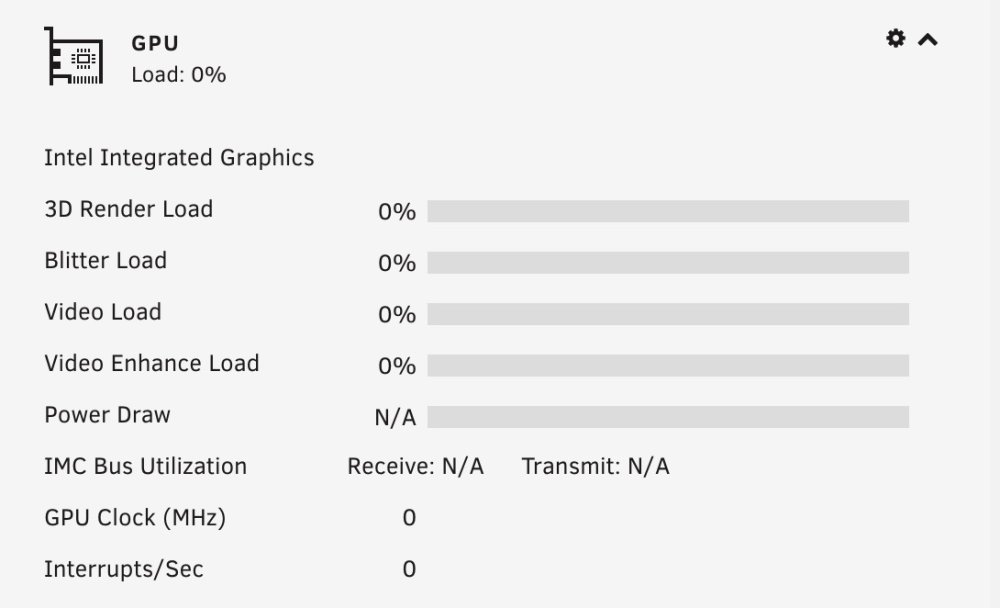
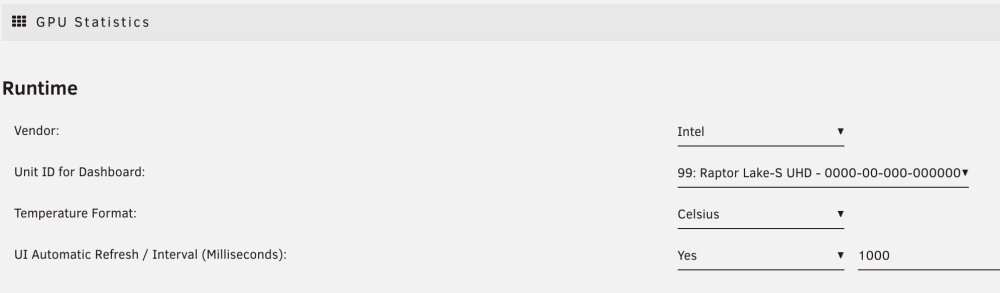
Does this support 13th gen Intel yet? I know there should be little change but I'm getting no stats - and it says Gen12. - Asus W680 board - i7 13th gen cpu - unRaid 6.11.5 (latest stable) filestor-diagnostics-20230306-0813.zip

-
Went through an unplanned USB replacement this week. Not sure where my backups were going, so I had to use an old manual .zip backup from years prior. Recovery was surprisingly painless. Backup .zip Creation: Main TAB ⇨ Flash [under Boot Device] ⇨ Flash Backup Restore burn new USB with unRaid USB Creator. Select Local Zip as version used a brand new, straight from package USB. Didn't do any extra formatting/renaming License Transfer click on Unregistered in the Header and the process is self explanatory Updated Plugins/OS and I don't appear to have lost any of the configuration. Dockers/VM's all there and current, including those I created AFTER the backup. I know they're not stored on the USB, but still a pleasant surprise.
-
Story: Decided to futz with my unRaid hardware for the first time in probably 3yrs. Something gets caught, USB gets bent, drive no longer recognized. I have no idea where I saved my most recent USB backup, but it wouldn't be up-to-date anyway. However I do find one of my first backups in Google Drive. I haven't changed hardware since the original build, so I decided to give it a shot. Burn it to a USB with the unRaid Tool [which is AMAZINGLY simple, shout out to the devs], and boot. Go to register the new key but it won't take. OS too old was my thought, better upgrade. Couldn't access the upgrade server, which is when I started to worry. Problem: Exact some symptoms as you. Network failure errors. I realized it wasn't AWS issue after clicking the Apps tab and getting some error about not being connected to the internet. Which was odd because I was connecting to unRaid via a browser. Solution: Turn off manual IPv4 address assignment. An earlier Si1 video, which I follow to the letter, changed address management from automatic to manual. Even though I rebooted my router, I thought there might be an unresolved address conflict in the router DHCP table. Setttings Tab ⇨ IPv4 address assignment ⇨ Automatic Didn't even have to reboot. Everything came back to life, even though my router didn't assign unRaid a new IP. Why it worked I may never know, but I hope your solution is just as simple.
-
Are you able to login to Synology and use Quickconnect?
-
If you can download packages you have internet. You will get a connection error if you try to login to Synology or use certain features like Quickconnect. You need to generate a working serial number to enable them.
-
Came across this thread so I thought I’d give it whirl. Used the instructions as posted by @bmac6996 and it worked right out of the box. To clarify, and my experience Download bootloader v1.03b for DS3615xs, extract synoboot.img Add VM -> CentOS BIOS: SeaBIOS Machine: Q35 (3.1 is the latest as of this post) Primary vDisk: point to synoboot.img extracted earlier Primary vDisk Bus: USB 2nd (and additional) vDisk Location: I created a 10G vDisk, Type: qcow2. Someone earlier in the thread passed-through their disks 2nd vDisk Bus: SATA UN-select the ’Start VM after creation’ box at the bottom, then Create. Edit VM in XML View Find <model type=‘virtio’/> and change 'virtio' to 'e1000e' Save and start the VM. If you view VNC it will show the bootloader screen Took about a minute but DiskStation appeared in find.synology.com From here in out I followed the Synology onscreen installation instructions. It downloaded everything it needed from Synology servers. When I went looking for the bootloader, there was mention of PAF files, etc. I didn't need any of that since it all downloaded automatically. I skipped the link Synology account - QuickConnect part. Not sure if you need to generate a unique serial, but since I’m just playing around I didn’t bother Again, read though the post by @bmac6996. He explained the reasons behind the choices
-
I followed what @dee31797 posted - here are the itemized steps: turn on netcat-openbsd in Nerd Pack, apply, and restart computer open the virt-manager docker GUI - you'll still have the error in the Docker container, go File > Add Connection Hypervisor: QEMU Select connect to remote host over SSH Hostname: the internal network IP of your server Hit connect It will then ask you to accept certificate, then for your unRaid password. Once cleared you're in
-
Had the same error, tried this and all is golden. Much appreciated
-
Edit: nvm, tried my own advice and it didn't work
-
I see delta sync is enabled by default. If I make 7 backups, then manually delete the first 6, will the 7th contain enough information to do a restore? Very happy the original script has been updated/modified to allow vdisk exclusion. Thank you!
-
Just came to share my appreciation. Any reasons for sticking with an older product line (62.x) rather than a newer or newest (65.x) version.
-
How should this browser be updated? It's on v61.0.1 - which if Wikipedia is to believed has reached EOL.
-
This is an old question but I came across the same problem. Change network adapter type e1000-82545em instead of vmxnet3. Link to the SpaceinvaderOne video.
-
Install VirtualBox and create a macOS VM. You can skip any special configuration tweaks as the most basic install will give you the App Store. Be prepared for a laggy low rez experience, but at least you'll be able to download clean OS imgs. This was my entry point. There are guides available that will point you to prebuilt VBox images.
-
Is wifi strictly required for Handoff to function? iCloud and App Store worked out of box, so I'm connecting to Apple, but the Allow Handoff checkbox is absent. While I don't use iMessage, I've seen guides that enable it withOUT wifi. Is this also possible with Handoff Basically, yes.



