






Everything posted by SimonF
-
Does intel_gpu_top show anything
-
Thanks, Will look into my Slack build script I compiled a new freeimpi package looks like that path should be excluded from the package.
-
Do you have fast boot enabled in bios?
-
Stop fan control. Then you can change
-
Thanks, but I am not the original author but was making changes for 6.12 dashboard and original dev didn't have time to look after.
-
Click on the help question mark spl147 add helptext
-
-
Sorry for the mistake.
-
Try 26b Should show normally as an update now. https://raw.githubusercontent.com/SimonFair/IPMI-unRAID/refs/heads/master/plugin/ipmi.plg
-
Try 26b I made an error in the new package load.
-
Did you restart fan control?
-
I have released 2025.01.26 but is not showing as an update yet on my systems. Works fine if I do a manual download. https://raw.githubusercontent.com/SimonFair/IPMI-unRAID/refs/heads/master/plugin/ipmi.plg
-
I have compiled my own package, does not work on 6.12 so will have to make conditional. I look to merge and create new package tomorrow.
-
Not currently but I am working on virgl for a future release.
-
Was thinking that the Sensor could be changed i.e. the following First sensor, followed by a comparison option. 1. None, 2. Spundown(HDD) 3. Max 4. Average For options 3 and 4 would work in conjunction of the secondary sensor. Override values would only be show for spindown. Thoughts. I will look at freeipmi version. You testing on 7, will need to check which versions it supports.
-
It is working ok for me. I have excluded the two pool drives
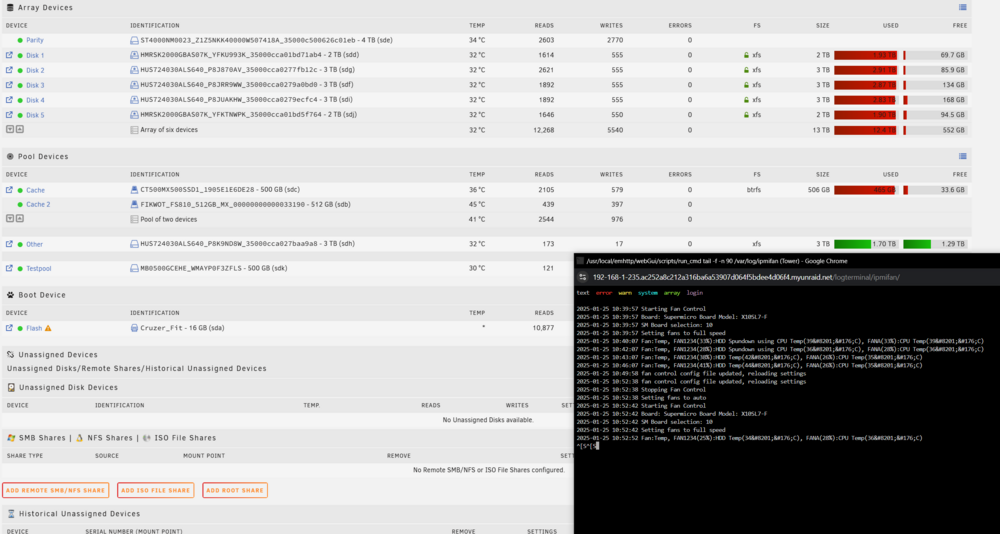
-
Yes the way snapshots work is to create an overlay file. Notice the vdisk is using the snapshot named disk. All of the changes are in the overlay file. You need to commit them back into the base image. If you delete it will break the chain and the VM will not work correctly.
-
Would you be able to provide a copy of the XML when the VM is running? virsh dumpxml "Home Assistant (HAOS)" and also cat /etc/libvirt/qemu/snapshotdb/"Home Assistant (HAOS)"/snapshots.db
-
I have compiled ipmitool and a copy of the package is here
-
The plugin uses highest drive temp. If they spin down you can select a 2nd metric to use like CPU. The override which I will rename is ranges for the 2nd metric when the disks are spun down as may need to be different.
-
Here is a patched version. ipmitool-1.8.19-x86_64-1_SBo.tgz
-
Found an issue, Will see if I can apply the patch tomorrow, but work around is the following. curl -o ~/enterprise-numbers https://www.iana.org/assignments/enterprise-numbers.txt mv ~/enterprise-numbers /usr/share/misc/enterprise-numbers
-
It is just testing/prototyping not production PHP code , There is a possible integrated backups being planned for a future release.
-
I have compiled a version of ipmitools. Copy onto you system and let me know if it works under 7 installpkg filename ipmitool-1.8.19-x86_64-1_SBo.tgz
-
I dont have a secure boot machine to test. You may need to take a copy of the nvram in /etc/libvirt/qemu/nvram/ file name uses UUID as part of the name rather than VM. I have started looking at VM Backups that may be included in future releases. This is test code where it takes disks for a non running machine and create a tar file. For running VMs I plan to snapshot and save then commit changes. Also will be a different process if snapshots exist to create a new image from the backing file chain. So this option is ShutdownNS(No Snapshots) $vm = $argoptions['vm']; $backupName= "B" . date("YmdHis"); $backup = "shutdownNS"; $backup = $argoptions['type']; echo "VMBackup $backup\n"; switch($backup) { case "shutdownNS": $disks =$lv->get_disk_stats($vm) ; $cdrom = $lv->get_cdrom_stats($vm) ; #var_dump($disks,$cdrom); file_put_contents("/tmp/filelist","/tmp/filelist\n"); foreach ($disks as $disk) { echo "{$disk['device']} {$disk['file']}\n"; if (isset($disk['file'])) file_put_contents("/tmp/filelist","{$disk['file']}\n",FILE_APPEND); echo "{$disk['device']} {$disk['partition']}\n"; if (isset($disk['partition'])) file_put_contents("/tmp/filelist","{$disk['partition']}\n",FILE_APPEND); } if (is_file("/etc/libvirt/qemu/$vm.xml")) file_put_contents("/tmp/filelist","/etc/libvirt/qemu/$vm.xml\n",FILE_APPEND); $dom = $lv->get_domain_by_name($vm); $uuid = $lv->domain_get_uuid($dom); echo "UUID $uuid\n"; file_put_contents("/tmp/filelist","/etc/libvirt/qemu/nvram/{$uuid}_VARS-pure-efi.fd\n",FILE_APPEND); #file_put_contents("/tmp/filelist","/tmp/filelist\n",FILE_APPEND); shell_exec("tar -cvf - -T /tmp/filelist | pv -ptre -s $(du -bc $(cat filelist.txt) | grep total | awk '{print $1}') | zstd -o /mnt/user/VMbackup/\"$backupName\".tar.zst"); Other options will be. case "shutdownWS": #qemu-img info vdisk1.S20240929191534qcow2 | grep backing /* # qemu-img convert -O raw root@computenode:/mnt/user/domains2/EncDebian# qemu-img convert -f qcow2 -O raw vdisk1.S20240928215938qcow2 vdisk1.bu root@computenode:/mnt/user/domains2/EncDebian# ls -l total 104016275 -rw-r--r-- 1 root root 770834432 Sep 28 22:02 vdisk1.S20240928215938qcow2 -rw-r--r-- 1 root root 53687091200 Sep 28 22:04 vdisk1.bu -rwxrwxrwx 1 root users 53687091200 Sep 28 20:21 vdisk1.img* root@computenode:/mnt/user/domains2/EncDebian# */ break; case "activeNS": break; case "activeWS": break; case "Full": break; shutdown With active nosnaps Active With Full




