






Josh.5
Members
-
Joined
-
Last visited
Everything posted by Josh.5
-
Something has gone wrong with the settings .json file. In your container appdata, edit the file in .unmanic/config/settings.json (or just delete it). The key that is wrong or missing is "get_schedule_full_scan_minutes"
-
Shortly, I will be creating a new release for Unmanic. This new release has some big changes to how libraries work along with some really cool new features. This update will require that you reconfigure your library settings. If this is something that you do not wish to do, I suggest that you do not install this update. Edit: Release v0.2.0 published. https://github.com/Unmanic/unmanic/releases/tag/0.2.0
-
I can possibly help... How did you setup the server to that /dev/dri was available in unraid?
-
If I had to guess without knowing what you have setup, the proxy is not configured to support a websocket. In nginx you need to add "proxy_http_version 1.1;"
-
Interesting. Did you write it in windows and then copy it over? Does it have windows line endings?
-
What is the contents of the kill.sh script?
-
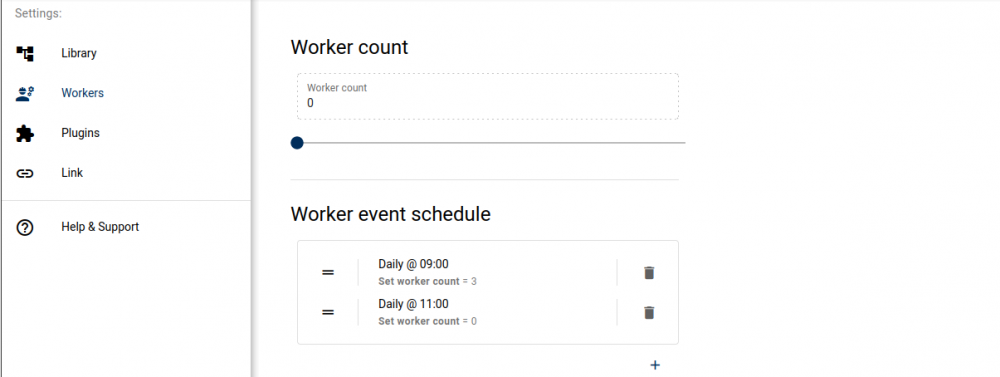
If you schedule the worker count, then that will do all of this for you. There is an old API endpoint which is not well documented for triggering the library scan, you could curl or wget that on a cron job. Or you could just let the library scan run whenever, but scale the worker count on a schedule like this: This will set 3 workers to start at 9AM and then stop them when their next task completes at 11AM by setting that value back to 0.
-
Is this in an attempt to save on resources? or to free up the port? When idle, Unmanic should have a very small footprint. Less than 100MB RAM. You can schedule the library scanner to run daily. And you can schedule the workers to start or stop throughout the day. Would these features not be the better option over starting and stopping the container? To answer your questions a bit... Unmanic has an API that can be queried to determine the state including the number of items in the pending tasks queue or what is currently being processed by the workers. It is completely safe to kill the Unmanic process. This would be best done by running 'docker stop unmanic' (if unmanic is the name of the docker container)
-
What are you using for network hardware to setup your vlans?
-
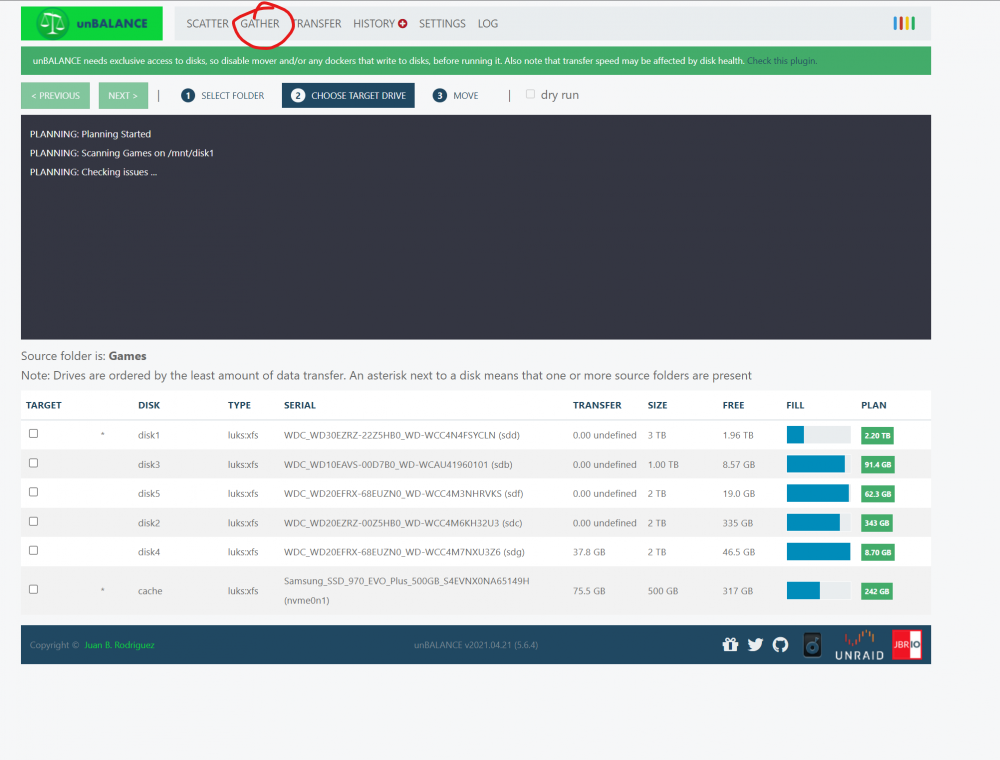
Use the unBALANCE plugin. Once you have consolidated the games, you will also want to ensure that your games share is limited to a single disk on your array. As I said, I personally have not seen this issue on my games library. So my library is scattered across a number of disks and my cache drive and it works fine. So this should only be required for people who do run into issues. You could look at specifying a separate library for those games that is a volume mounted directly from one of the disks.
-
@ich777 was just telling me that apparently some games do not like some of the magic that exists in our Linux file systems and one possibly solution is to use a direct path to the disk rather than the array. Eg: Instead of `/mnt/user/games/` use `/mnt/diskX/games/` I see that a few people have run into that XFS error. I have been unable to reproduce it on my Steam library. But if someone here is seeing that, perhaps you could give this suggestion by ich777 a shot and report back??
-
Such a change would need to be made on the host. Not inside a container.
-
I'll update the docker image to make all these ports configurable
-
What do the logs say? Possibly a port conflict with port 8083
-
I do not recommend using the docker safe permissions script on your games library.
-
Perhaps it is failing to download or install the driver
-
Oops. Change :develop to :latest I missed that when creating the template
-
The secondary container does not use host network. Why can you not start the main Steam Headless container with net=host? What errors do you get in the logs when you try?
-
I've made a second template for this docker image. This Docker image has a few little init scripts that can configure it in different ways (Intel iGPU, APD GPU, NVIDIA GPU, X Server, no X server, VNC Audio mod, etc...). One of these config sets I have dubbed "secondary mode" where it basically just runs the steam client. This is useful when you already have an X server running somewhere else. Up until this past weekend I had no use for secondary mode, so I had not put any real effort into it. But then I wanted to play a game with my wife and for her to use Steam Link I had to go to my PC first, log into the Web VNC portal, sign out of my profile, sign into hers. And then when we were done I had to reverse it. And that was just annoying. Steam Link has not capability to switch profiles when it connects and this is a feature I really want! To solve this issue I created a "Steam Headless Secondary" template which I share with you today in CA. What this template does: Allow you to run multiple instances of steam logged into different accounts. Run a second instance of steam in the same desktop as an existing Steam Headless. Run a second instance of steam in an existing desktop environment. Eg. booted Unraid in GUI mode (Untested). Uses the exact same Docker image as Steam Headless so no additional disk space is used when you run this second instance. Supports controllers and NVIDIA/AMD GPU just the same as Steam Headless. What this template does not do: Allow you to play two games at a time (We are limited by X11).
-
The latest build has the ability to be run in a simple framebuffer. To enable this, update the Mode to say "framebuffer". Obviously this mode will be useless for playing games, but it will work fine for downloading and updating games. Make sure you pull the latest docker image.

-
We have a discord community full of helpful people also available to help (myself included) https://unmanic.app/discord
-
This made me chuckle when it popped up in my email. Since you lightened my evening, let me see if I can help you... Docker will name containers with random snake case 2 word names if you do not specify a name yourself. This container was created from a command and not through the unraid UI. Perhaps you have a user script or something that executes a "docker run ..." command? If you enable the advanced toggle at the top of the docker page you will get more info on the container. You should be able to see the docker image used and that may give you a hint as to what it is.
-
If anyone is running this container with an AMD GPU, could you let us know what was required to get it working. I'm guessing: Radeon-TOP plugin installed NVIDIA `--runtime=nvidia` removed from extra params Was there any other steps required? Can everyone see /dev/dri/* without needing to pass that through to the container? I am assuming so if they are able to use VAAPI for encoding with steam.
-
Glad to hear you have it working. I'll update some of the docs with your suggestions. Thanks. I've got an arch base build ready. It just really sucks. Because of the way that the packages work for steam and Nvidia, it requires a lot of bloat. This debian release sits at around 2GB for the docker image, the arch one pushed that closer to 3 for no reason other than the arch package repos not being a good fit for docker images. I also ran into some really weird input issues that I have not solved yet. Keyboard input would not work with steam in arch, but it worked in every other app or in steam big picture. I could not figure out what I was missing. Flatpaks are possibly a solution for running things inside the arch container, but the flatpak for steam had the same kind of issues that you have with the controller, as well as some audio issues and the fact that paths are messed up and not easily shared outside of steam. I'm really on the fence now as I totally wanted to keep this inline with SteamOS 3 when it was released, but now I can't see a benefit to doing so. I've put a pin in that arch docker image for the next few months until we see SteamOS 3 released.
-
Sorry, I meant "super tux" Steam creates a virtual controller when you use remote play. That's why it works in big picture but not in the game. https://partner.steamgames.com/doc/features/steam_controller/steam_input_gamepad_emulation_bestpractices 1. That is fine. I think so long as it exists, then you are fine. 2. The udev rules will not change anything here. The init scripts are setting permissions correctly (I just triple checked a clean install of the container, running a game from my phone). 3. The input group does not exist in the container, so this would also not do anything. What may have an effect are things like: 1. Update the permissions # First check the permissions ls -la /dev/uinput # Update them to rw by everyone chmod 666 /dev/uinput 2. Try running it from another PC or device.




