






bamy
Members
-
Joined
-
Anyone know how to implement this into the Docker app that's on the Unraid appstore? Or do I need to run this off Docker Compose...
-
The graphs use the hostname in the title. For example "Last 3 hours from HOSTNAME to Domain". Looks better to have a named hostname than Docker's random one.
-
Is it possible to assign a hostname to this Docker container via Unraid? Saw this question asked on the Github but solution was to set it via the Compose file. https://github.com/linuxserver/docker-smokeping/issues/96 EDIT: Solved - had to enable 'Advanced View', then add the following in Extra Parameters: --hostname="DESIRED_HOSTNAME"
-
bamy changed their profile photo
-
Thanks for the info. I am on Debian 10 and it also makes sense re: lack of resources... Will try and find another VPS to use... Edit: migrated over the binarylane VPS [AU], debian 11 2core 4gb memory and all working 😃 Thank you
-
I'm getting the following error when running the Valheim SteamCMD server: /opt/scripts/start-server.sh: line 255: 65 Trace/breakpoint trap (core dumped) ${SERVER_DIR}/valheim_server.x86_64 -name "${SRV_NAME}" -port ${GAME_PORT} -world "${WORLD_NAME}" -password "${SRV_PWD}" -public ${PUBLIC} ${GAME_PARAMS} > /dev/null Trying to run it on an OVH VPS (1 core 2GB memory). Is there somewhere I can trace the log and see what is causing this issue?
-
I can't seem to get this working with my TorGuard generated OVPN file. It seems to run fine up until the connection point with OpenVPN. It loops with the following: 2021-04-29 19:21:23,743 DEBG 'start-script' stdout output: 2021-04-29 19:21:23 OpenVPN 2.5.1 [git:makepkg/f186691b32e68362+] x86_64-pc-linux-gnu [SSL (OpenSSL)] [LZO] [LZ4] [EPOLL] [PKCS11] [MH/PKTINFO] [AEAD] built on Feb 24 2021 2021-04-29 19:21:23 library versions: OpenSSL 1.1.1j 16 Feb 2021, LZO 2.10 2021-04-29 19:21:28,743 DEBG 'start-script' stdout output: 2021-04-29 19:21:28 NOTE: the current --script-security setting may allow this configuration to call user-defined scripts 2021-04-29 19:21:28,743 DEBG 'start-script' stdout output: 2021-04-29 19:21:28 TCP/UDP: Preserving recently used remote address: [AF_INET]193.XXX.XXX.XXX:1912 2021-04-29 19:21:28,744 DEBG 'start-script' stdout output: 2021-04-29 19:21:28 UDP link local: (not bound) 2021-04-29 19:21:28 UDP link remote: [AF_INET]193.XXX.XXX.XXX:1912 2021-04-29 19:22:28,441 DEBG 'start-script' stdout output: 2021-04-29 19:22:28 [UNDEF] Inactivity timeout (--ping-restart), restarting 2021-04-29 19:22:28,442 DEBG 'start-script' stdout output: 2021-04-29 19:22:28 SIGHUP[soft,ping-restart] received, process restarting 2021-04-29 19:22:28,442 DEBG 'start-script' stdout output: 2021-04-29 19:22:28 DEPRECATED OPTION: ncp-disable. Disabling cipher negotiation is a deprecated debug feature that will be removed in OpenVPN 2.6 2021-04-29 19:22:28 WARNING: file 'credentials.conf' is group or others accessible Any ideas? I've tested the same config using OpenVPN GUI on my PC and it connects fine. EDIT; It ended up connecting after sometime. I'll continue to monitor the connection.
-
Is anyone able to get Grafana's Image Renderer plugin working with this Docker? After installing it through the console & restarting, it doesn't work :[ Grafana v7.0.5 (efbcbb838b) https://grafana.com/grafana/plugins/grafana-image-renderer/installation t=2020-07-08T11:22:52+0800 lvl=eror msg="Stopped RenderingService" logger=server reason="Failed to start renderer plugin: Unrecognized remote plugin message: \n\nThis usually means that the plugin is either invalid or simply\nneeds to be recompiled to support the latest protocol." t=2020-07-08T11:22:52+0800 lvl=warn msg="plugin failed to exit gracefully" logger=plugins.backend pluginId=grafana-image-renderer t=2020-07-08T11:22:52+0800 lvl=info msg="Stopped Stream Manager" t=2020-07-08T11:22:52+0800 lvl=info msg="HTTP Server Listen" logger=http.server address=[::]:3000 protocol=http subUrl= socket= t=2020-07-08T11:22:52+0800 lvl=eror msg="A service failed" logger=server err="Failed to start renderer plugin: Unrecognized remote plugin message: \n\nThis usually means that the plugin is either invalid or simply\nneeds to be recompiled to support the latest protocol." t=2020-07-08T11:22:52+0800 lvl=eror msg="Server shutdown" logger=server reason="Failed to start renderer plugin: Unrecognized remote plugin message: \n\nTh EDIT: I got it working. Had to create a new Docker container following advice from https://grafana.com/docs/grafana/latest/administration/image_rendering/#remote-rendering-service, then adding extra enviroment variables (GF_RENDERING_SERVER_URL: http://UNRAID_IP:8081/render,GF_RENDERING_CALLBACK_URL: http://UNRAID_IP:3000/,GF_LOG_FILTERS: rendering:debug) to the Grafana Docker.
-
Thanks, I'll do that. I'm not configuring Nextcloud so the setup is probably different. Have you had a look at Spaceinvader One's tutorial on YouTube? https://www.youtube.com/watch?v=I0lhZc25Sro It's covered in the YouTube tutorial. Inside the AppData folder of the letsencrypt docker (/appdata/letsencrypt/nginx/proxy-confs)
-
I managed to get it working. I had to remove the trailing '/' from proxy_pass https://$upstream_znc:6501/; Thanks for the help!!
-
Over https I changed proxy_pass http://$upstream_znc:6501/; to proxy_pass https://$upstream_znc:6501/; and now i'm able to see the ZNC login (without css, though). Once I log in, I get "403 Access denied POST requests need to send a secret token to prevent cross-site request forgery attacks." Yeah that's all good from me.
-
No unfortunately it's not working still, even with that extra parameter described in the znc wiki. I still get 502 bad gateway
-
Could somebody create a NGINX template for Linuxserver.io - ZNC? I've tried but ended up with 502 Bad Gateway server { listen 443 ssl; listen [::]:443 ssl; server_name znc.*; include /config/nginx/ssl.conf; client_max_body_size 0; # enable for ldap auth, fill in ldap details in ldap.conf #include /config/nginx/ldap.conf; location / { # enable the next two lines for http auth #auth_basic "Restricted"; #auth_basic_user_file /config/nginx/.htpasswd; # enable the next two lines for ldap auth #auth_request /auth; #error_page 401 =200 /login; include /config/nginx/proxy.conf; resolver 127.0.0.11 valid=30s; set $upstream_znc znc; proxy_pass http://$upstream_znc:6501/; proxy_set_header X-Forwarded-For $proxy_add_x_forwarded_for; } } I added proxy_set_header X-Forwarded-For $proxy_add_x_forwarded_for; per https://wiki.znc.in/Reverse_Proxy , without it I still get 502. Thanks!
-
It's working for me on the newest update (tag: 156).
-
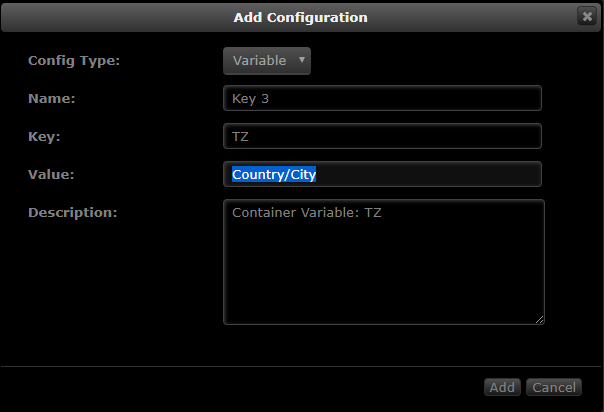
Make sure your Timezone is correctly set. Use this website and find your appropriate TZ, which should be formatted like Country/City
-
hi, i'm guessing the maintainers are aware of the vulnerability released by Tavis Ormandy? https://arstechnica.com/information-technology/2018/01/bittorrent-users-beware-flaw-lets-hackers-control-your-computer/ https://github.com/transmission/transmission/pull/468



