geeksheikh
Members
-
Joined
-
Last visited
Everything posted by geeksheikh
-
Hey Josh, I'm PMing you a video link of me refreshing the screen and going into the console and showing the debug profiles. Perhaps this will help you understand where it's struggling. The refresh takes 55 seconds. The Pending tasks list comes up immediately 35 seconds to load completed tasks 40 seconds for the workers to begin loading This client has a 3900x with 32GB mem and an rtx 2070 gpu, the server specs are in my signature. I hope the video helps you figure out where the delays are coming from. If there's anything specific you'd like for me to export to help you further, please let me know.
-
Sorry to resurrect this older thread but did we ever find the solution to this? This is happening to me too. It appears that the mover kicks of and starves the pool of I/O. The parity disks are at max throttle (write). I do have an NVME cache disk, I'd like to be able to specify max throughput of mover to like 85MB/s or something rather than 140 MB/s which just crushes my pool to the point that plex can't even read a single bit. I saw the mover priority plugin, is that still the best route for this? I do have reconstruct write turned on with the "turbo write" enabled as well. Perhaps I need to put turbo write on a schedule and/or tune my reconstruct write settings? Thanks.
-
Hi Josh, great job on this project. Any way to change the db from SQLite to something more robust like MariaDB? With 1000s of files it just seems like SQLite is really struggling. If not, any thoughts on adding support?
-
Wow! haha -- I guess I was overcomplicating it. I was building a cert chain for my CA in the certs dir (certificates_bundle.pem) so that the CA-signed cert would be trusted. I was then ALSO creating the server cert and key bundle and adding that the certs dif (server_unraid_bundle.pem)...which seems like the right thing to do...but evidently it wasn't. The final answer was to remove the certificantes_bundle.pem. Seems like everything is working now. Thanks again for your help.
-
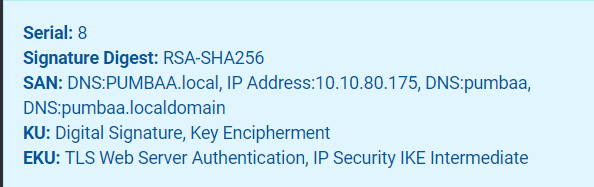
Yes, it does the same thing in other browsers. Yeah I was thinking that too but seems right...as far as I can tell (I did also try a client cert but got same error) Appreciate the help. FYI the certs/keys were created and signed in pfsense and I just downloaded them and concat'd them
-
ok, so there was a signature issue and that's why it wouldn't restart. I got that fixed...now nginx has been restarted and is healthy. So now there's no unraid.net let'sEncrypt cert reference and my public ACME certs are working on public domain now (via reverse proxy) -- I think this can be ignored for the purpose of this issue. Local IP https cert appears to be invalid -- "ERR_SSL_KEY_USAGE_INCOMPATIBLE" I have 2 pem bundles in the /boot/config/ssl/certs/ dir: certificate_bundle.pem (soft linked from unraid_bundle in /etc/ssl/certs) <server>_unraid_bundle.pem These two bundles were create as such certificate_bundle.pem root_ca private key file root_ca cert intermediate_ca cert <server>_unraid_bundle.pem server_cert.key server_cert Anything sticking out to you that seems wrong?

-
Yeah that's what I started with and had the same error. /etc/rc.d# ./rc.nginx restart Checking configuration for correct syntax and then trying to open files referenced in configuration... nginx: [emerg] invalid number of arguments in "return" directive in /etc/nginx/conf.d/emhttp-servers.conf:39 nginx: configuration file /etc/nginx/nginx.conf test failed Invalid configuration, Nginx not restarted
-
Ha, you know what, I didn't. I tried to restart the nginx process but it says my nginx.conf file is invalid. What's the right way to restart/reload nginx for unraid? /etc/nginx# /etc/rc.d/rc.nginx restart ./nginx.conf Checking configuration for correct syntax and then trying to open files referenced in configuration... nginx: [emerg] invalid number of arguments in "return" directive in /etc/nginx/conf.d/emhttp-servers.conf:39 nginx: configuration file /etc/nginx/nginx.conf test failed Invalid configuration, Nginx not restarted
-
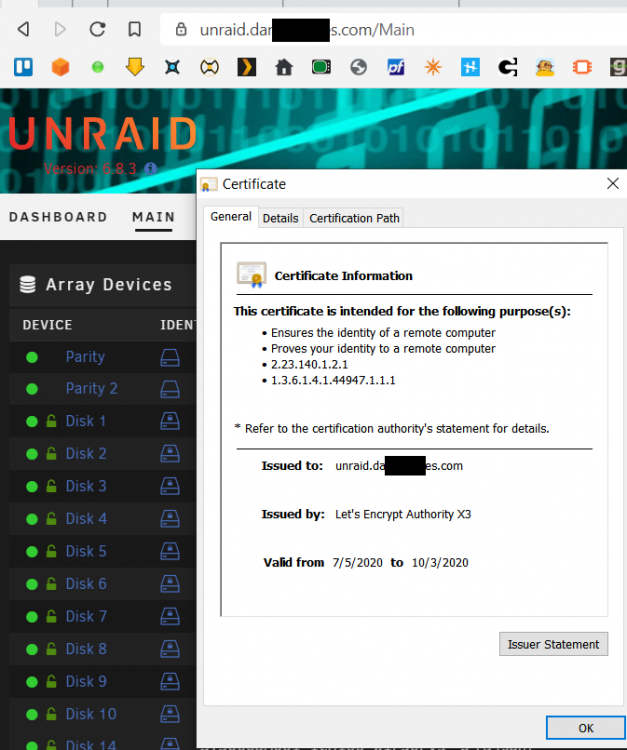
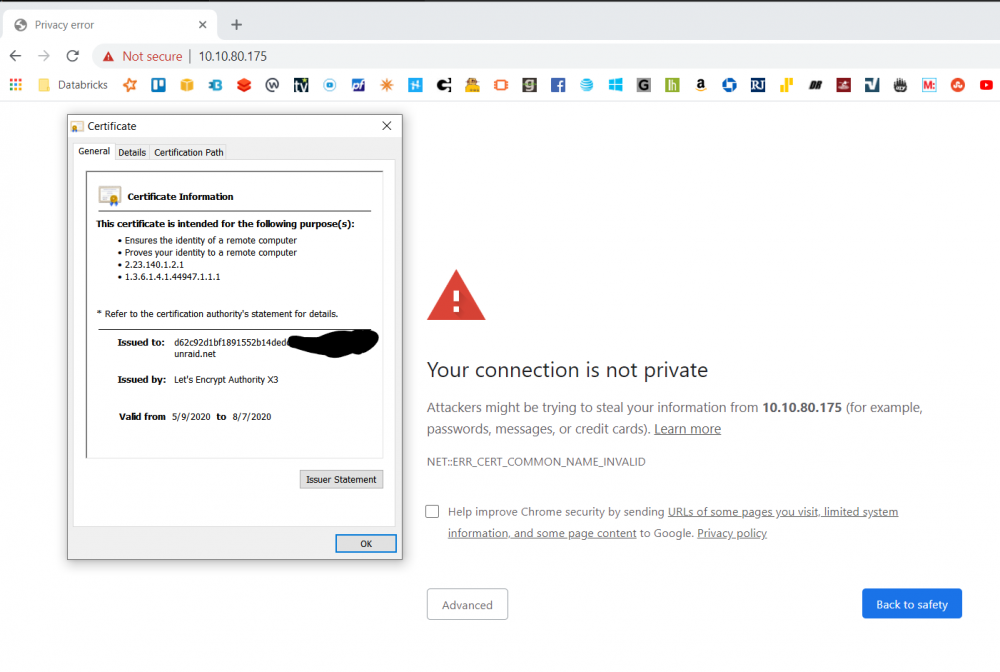
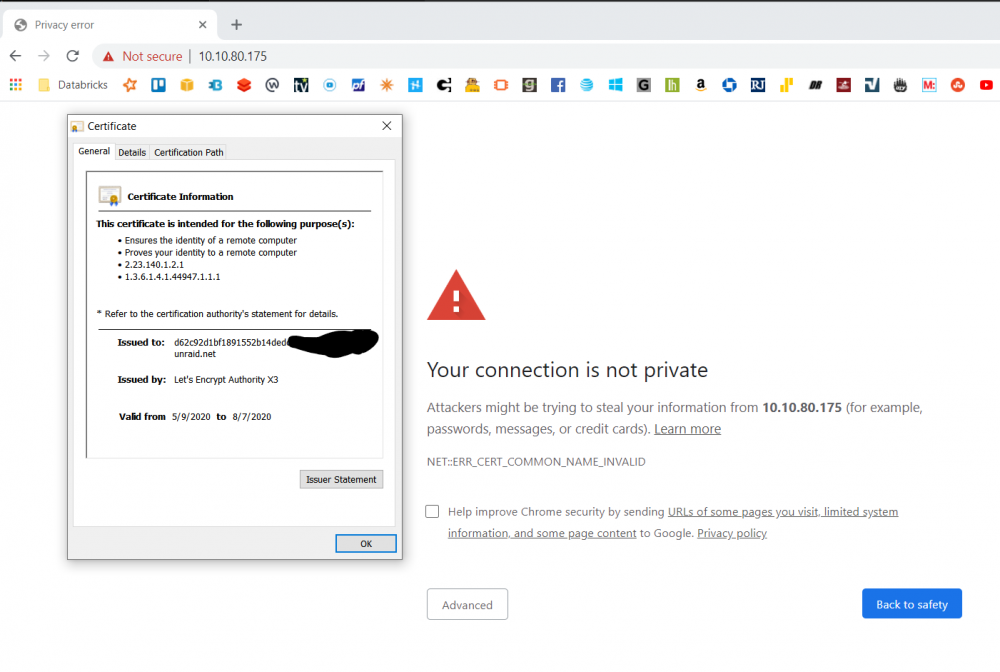
Thanks, yeah I read that and got my own certs to work...it's just that now the private IP is still provisioned with unraid.net's let'sEncrypt cert. So unraid.mydomain.com cert is correct but the 10.10.80.175 local ip still uses the unraid cert...trying to figure out how to deprovision my local IP from the unraid cert.
-
Hello, I've just switched from letsEncrypt to using my own certs, signed by my own CA. Everything is working with the public domains, but the local IP still appears to be registered with unraid and is pulling the let's encrypt cert from unraid.net. How can one deprovision their private ip and clean up the link with unraid's letsencrypt? Thanks
-
Hello, I've just switched from letsEncrypt to using my own certs, signed by my own CA. Everything is working with the public domains, but the local IP still appears to be registered with unraid and is pulling the let's encrypt cert from unraid.net. How can one deprovision their private ip and clean up the link with unraid's letsencrypt? Thanks
-
Same happened to me... Do a diff on the files after you make changes and you can see that a lot more changes than what space invader says in his video. I tried to add a graphics card and wow...if you're new to this stuff you definitely started in about the hardest spot. The diff between XMLs did help though as you can see what is actually changing unexpectedly. Good luck.
-
@Squid, my plex library has grown to 500G over the past several years...I'd like to move plex to dedicated drive (ssd - not cache) drive but would like to ensure managed backup...preferably through CA Backup, is this possible yet? I know I can run an rsync and schedule cron, but itd be nice to have it run along with my other backups. Thank you.
-
I am trying to use MacInABox to get the MacVM to work but...I am getting strange issues. The main difference between the video example and what I have is that I am using an SSD for VMs. Here is my setup and process and issues...anyone see what I'm doing wrong? Add Docker Image Edit Docker image - OSX == catalina | Image Location == /mnt/disks/MacOSVM | full install | vdisk == raw Run the docker image Restart the array - the disk images appear as expected and the new VM config XML shows up in the /etc/libvirt/qemu as does the nvram associated ** ERROR IF - i edit the XML to change the location to /mnt/user/domains to the vm location then restart the array, the /mnt/cache never gets unmounted due to "target busy" errory. the only thing I can think of is that the libvirt.img is on /mnt/system/, which sits on the cache drive, is still busy...the only way to get the array to stop is to "umount -l /mnt/cache" but then the libvirt service will never start again on array restart. The only way to get the vm service to restart is to delete the libvirt image, restart the array and then it works...this of course results in all my VMs disappearing. After the Array is restarted I then edit the XML to: Change 6 references to /mnt/user/domains to point them all to /mnt/disks/MacOSVM location - SAVE Change the br0 device from virtio to e1000-82545em - SAVE Change the CPUs to the ones I want (3 total with 2 threads each for total of 6 threads) via the UI. - SAVE Remove the topology from the <cpu mode tag - SAVE Paste in the qemu:CommandLine snippet back to the bottom - SAVE Start the VM Login via VNC -- Get corrupted graphics -- see attached images Now when trying to remove the VM and restart the array the locked /mnt/cache happens again and the only way to recover is to delete the /mnt/user/system/libvirt/libvirt.img. I can also go to the settings -> VM Manager stop the vm manager, delete the libvirt.img and then restart it and that also seems to release cache drive If I start the entire process over again and ONLY change the XML to add in the new install location (ssd paths) - I can actually format the disk and install the OS...but then changing these params later results in the corrupted graphics and it never seems to fully startup. How could these param changes seemingly corrupt the graphics? Why is it locking my /mnt/cache drive? Why do I have to delete the libvirt.img file to get the VM manager to come back online? Appreciate any and all help. Thanks. ****UPDATE**** SOLVED After diffing the files it became clear that changing the CPU count changes a lot more than just the last qemu section of the file. There are MANY changes throughout (especially the header) which will clearly break it. If you diff the attached before/after .xml files you'll see what all was changed...yikes, didn't expect that to all change just by changing the CPU radio buttons. finalMacInABoxConfig.xml InitialMacinInABoxConfig.xml ImageInstallSuccess.txt