





lzrdking71
Members
-
Joined
-
Last visited
-
When trying to create a VM, the pinned cores selection in the webui is not displaying the pinned cores list correctly.
-
@vindictive-voyeur2295 Maybe this can help you, it solved my issue.
-
@bally12345@Leandres Maybe this can help you, it solved my issue.
-
@frosty_hedgehog Maybe this can help you, it solved my issue.
-
@jamie543 Maybe this can help you, it solved my issue.
-
I am on unraid 6.12.6 and am seeing this same error in my windows 11 vm logs when passing through a 3060ti gpu on and Intel 13900k system. I have the gpu stubbed out and the vm starts but have no idea how to fix the vm so the errors don't occur. @ich777 and @SimonF, I tried the below and it did not resolve the issue, any ideas? Update: If I use the commands above and install OVMF for QEMU - edk2-stable202208, the errors in the log go away. I did this working my way back from the newest version and all of the other versions did produce the errors in the log.
-
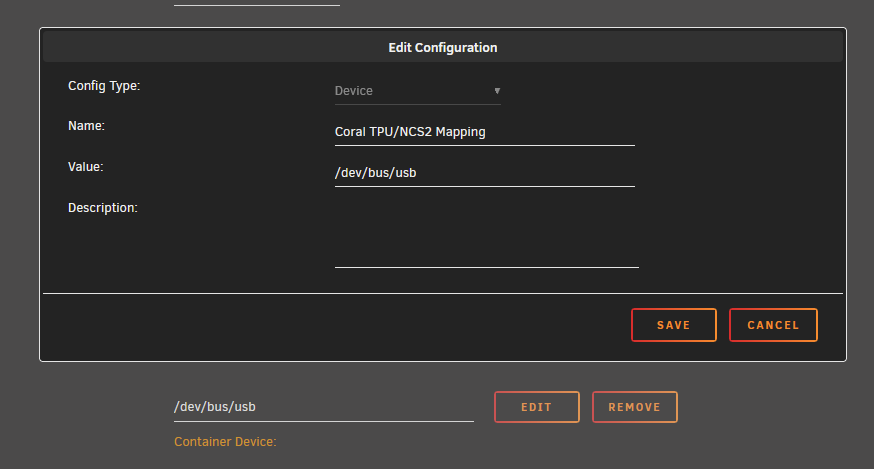
If you want to use a Coral USB TPU module, I got it to work by setting the docker to privileged....adding the device to the template (see screenshot below)....and then downloading the module in the webui. I got the idea from looking at how the Frigate template in CA handles it then doing it the same way.
-
@JM2005, it looks like there is an active issue listed on github for this https://github.com/codeproject/CodeProject.AI-Server/issues/59#issue-1857894572.
-
@slidermike You may be able to change it in another place but if you go to the main tab and then to the section where it lists your unassigned devices, click the gears settings icon. Once clicked, I added : # This will prevent this drive from spinning down hdparm -S0 $DEVICE below # This will refresh the UD webpage when the script is finished. /usr/local/sbin/rc.unassigned refresh $DEVICE above ;;
-
@martikainenIs "encrypted:" your mount name?
-
@KaizacI believe there is a typo, shouldn't it just be -vv instead of --vv?
-
I believe this to be a C-states issue on my ryzen setup and Realtek device it has on the motherboard. I disabled Global C-States in the bios and it hasn't happened since.
-
Happy birthday! Thank you Limetech for all your work over the years on Unraid.
-
May 20 17:57:24 Tower kernel: serial 0000:05:00.2: Couldn't register serial port c400, irq 37, type 0, error -28 May 20 17:57:24 Tower mcelog: ERROR: AMD Processor family 23: mcelog does not support this processor. Please use the edac_mce_amd module instead. May 20 17:58:00 Tower kernel: pci 0000:05:00.0: VPD access failed. This is likely a firmware bug on this device. Contact the card vendor for a firmware update Any clarification/help on what these problems are or how to fix them would be appreciated. tower-diagnostics-20220520-1855.zip
-
May 20 17:57:24 Tower kernel: serial 0000:05:00.2: Couldn't register serial port c400, irq 37, type 0, error -28 May 20 17:57:24 Tower mcelog: ERROR: AMD Processor family 23: mcelog does not support this processor. Please use the edac_mce_amd module instead. May 20 17:58:00 Tower kernel: pci 0000:05:00.0: VPD access failed. This is likely a firmware bug on this device. Contact the card vendor for a firmware update Any clarification/help on what these problems are or how to fix them would be appreciated. tower-diagnostics-20220520-1855.zip

