






david279
Members
-
Joined
-
Last visited
Everything posted by david279
-
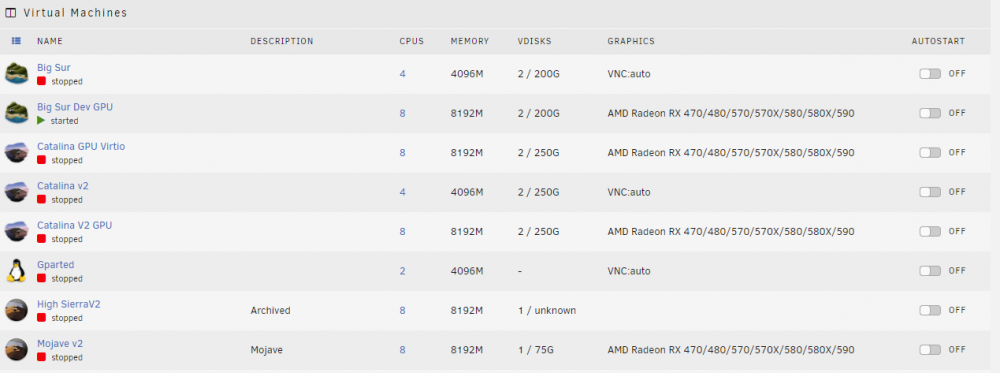
I keep different VM templates for the same VMs. So i have a Big Sir VM that uses VNC and GPU but they share the same vdisk.
-
I always start my Mac OS VMs using VNC then i add a second Mac OS VM using the GPU. That way i can go back and forth and test things. I use a efi thats somewhat based on some of the info gathered here but i do all the updating myself. Reading the differences files and making the changes as updates are released. I'm on Big Sur right now using my RX 570, motherboard audio and i have a wifi card passedthrough.
-
I have my kernel boot parameter set like this append pcie_acs_override=downstream,multifunction pcie_aspm=off kvm.ignore_msrs=1 vfio-pci.ids=1002:67df,1002:aaf0,1b21:1242,1b21:1343,8086:10bc initrd=/bzroot The vfio devices that start with 1002 is my GPU. I have a main NVIDIA GPU i use for transcoding so i do not need to dump the bios for it to work. And ACS override is enable with some extra parameters.
-
I have a rx 570 working with my VM right now. I had to stub the card from the unRAID system so it would not try to use it to get it to work though. Without that all i got was blank screens like you have. I have a sapphire rx 570.
-
Find these in the config.plist and set them to false <dict> <key>Base</key> <string>_cpu_topology_sort</string> <key>Comment</key> <string>algrey - cpu_topology_sort -disable _x86_validate_topology</string> <key>Count</key> <integer>1</integer> <key>Enabled</key> <true/> <key>Find</key> <data>6AAA//8=</data> <key>Identifier</key> <string>kernel</string> <key>Limit</key> <integer>0</integer> <key>Mask</key> <data>/wAA//8=</data> <key>MaxKernel</key> <string>19.99.99</string> <key>MinKernel</key> <string>17.0.0</string> <key>Replace</key> <data>Dx9EAAA=</data> <key>ReplaceMask</key> <data></data> <key>Skip</key> <integer>0</integer> </dict> <dict> <key>Base</key> <string></string> <key>Comment</key> <string>algrey - cpuid_set_cpufamily - force CPUFAMILY_INTEL_PENRYN</string> <key>Count</key> <integer>1</integer> <key>Enabled</key> <true/> <key>Find</key> <data>MduAPQAAAAAGdQA=</data> <key>Identifier</key> <string>kernel</string> <key>Limit</key> <integer>0</integer> <key>Mask</key> <data>/////wAAAP///wA=</data> <key>MaxKernel</key> <string>19.99.99</string> <key>MinKernel</key> <string>17.0.0</string> <key>Replace</key> <data>u7xP6njpXQAAAJA=</data> <key>ReplaceMask</key> <data></data> <key>Skip</key> <integer>0</integer> </dict> <dict> <key>Base</key> <string></string> <key>Comment</key> <string>Ranem board-id to board-ix</string> <key>Count</key> <integer>1</integer> <key>Enabled</key> <true/> <key>Find</key> <data>Ym9hcmQtaWQ=</data> <key>Identifier</key> <string>com.apple.driver.AppleGraphicsDevicePolicy</string> <key>Limit</key> <integer>0</integer> <key>Mask</key> <data></data> <key>MaxKernel</key> <string>19.99.99</string> <key>MinKernel</key> <string>19.0.0</string> <key>Replace</key> <data>Ym9hcmQtaXg=</data> <key>ReplaceMask</key> <data></data> <key>Skip</key> <integer>0</integer> </dict>
-
If you have any kernel patches in the config.plist disabled them. If they are marked as true change them to false.
-
Can you get a pic of the panic?
-
Try removing this topology line in your xml and try to boot it again. <topology sockets='1' dies='1' cores='3' threads='1'/> Also it may be fixed but hack VMs used to act funny with odd assignments of cores to the VM.
-
Yeah i have the latest release from lilu/weg. My sound started working after rebooting. I pass through my built-in audio to my VM and it works very well. <?xml version='1.0' encoding='UTF-8'?> <domain type='kvm' id='8' xmlns:qemu='http://libvirt.org/schemas/domain/qemu/1.0'> <name>Big Sur Dev GPU</name> <uuid>-----</uuid> <metadata> <vmtemplate xmlns="unraid" name="Linux" icon="OSX.png" os="linux"/> </metadata> <memory unit='KiB'>8388608</memory> <currentMemory unit='KiB'>8388608</currentMemory> <memoryBacking> <nosharepages/> </memoryBacking> <vcpu placement='static'>8</vcpu> <cputune> <vcpupin vcpu='0' cpuset='4'/> <vcpupin vcpu='1' cpuset='12'/> <vcpupin vcpu='2' cpuset='5'/> <vcpupin vcpu='3' cpuset='13'/> <vcpupin vcpu='4' cpuset='6'/> <vcpupin vcpu='5' cpuset='14'/> <vcpupin vcpu='6' cpuset='7'/> <vcpupin vcpu='7' cpuset='15'/> </cputune> <resource> <partition>/machine</partition> </resource> <os> <type arch='x86_64' machine='pc-q35-5.0'>hvm</type> <loader readonly='yes' type='pflash'>/usr/share/qemu/ovmf-x64/OVMF_CODE-pure-efi.fd</loader> <nvram>/etc/libvirt/qemu/nvram/----_VARS-pure-efi.fd</nvram> </os> <features> <acpi/> <apic/> </features> <cpu mode='host-passthrough' check='none'/> <clock offset='utc'> <timer name='rtc' tickpolicy='catchup'/> <timer name='pit' tickpolicy='delay'/> <timer name='hpet' present='no'/> </clock> <on_poweroff>destroy</on_poweroff> <on_reboot>restart</on_reboot> <on_crash>restart</on_crash> <devices> <emulator>/usr/local/sbin/qemu</emulator> <disk type='file' device='disk'> <driver name='qemu' type='qcow2' cache='none'/> <source file='/mnt/cache/domains/Big Sur/opencore.bigsurv063.qcow2' index='2'/> <backingStore/> <target dev='hdc' bus='usb'/> <boot order='1'/> <alias name='usb-disk2'/> <address type='usb' bus='0' port='1'/> </disk> <disk type='file' device='disk'> <driver name='qemu' type='qcow2' cache='none' io='native' discard='unmap'/> <source file='/mnt/disks/MKNSSDRE500GB_MK170901100386B42/Hackintosh/Sir.img' index='1'/> <backingStore/> <target dev='hdd' bus='sata'/> <alias name='sata0-0-3'/> <address type='drive' controller='0' bus='0' target='0' unit='3'/> </disk> <controller type='usb' index='0' model='ich9-ehci1'> <alias name='usb'/> <address type='pci' domain='0x0000' bus='0x00' slot='0x07' function='0x7'/> </controller> <controller type='usb' index='0' model='ich9-uhci1'> <alias name='usb'/> <master startport='0'/> <address type='pci' domain='0x0000' bus='0x00' slot='0x07' function='0x0' multifunction='on'/> </controller> <controller type='usb' index='0' model='ich9-uhci2'> <alias name='usb'/> <master startport='2'/> <address type='pci' domain='0x0000' bus='0x00' slot='0x07' function='0x1'/> </controller> <controller type='usb' index='0' model='ich9-uhci3'> <alias name='usb'/> <master startport='4'/> <address type='pci' domain='0x0000' bus='0x00' slot='0x07' function='0x2'/> </controller> <controller type='sata' index='0'> <alias name='ide'/> <address type='pci' domain='0x0000' bus='0x00' slot='0x1f' function='0x2'/> </controller> <controller type='pci' index='0' model='pcie-root'> <alias name='pcie.0'/> </controller> <controller type='pci' index='1' model='pcie-root-port'> <model name='pcie-root-port'/> <target chassis='1' port='0x8'/> <alias name='pci.1'/> <address type='pci' domain='0x0000' bus='0x00' slot='0x01' function='0x0' multifunction='on'/> </controller> <controller type='pci' index='2' model='pcie-to-pci-bridge'> <model name='pcie-pci-bridge'/> <alias name='pci.2'/> <address type='pci' domain='0x0000' bus='0x01' slot='0x00' function='0x0'/> </controller> <controller type='pci' index='3' model='pcie-root-port'> <model name='pcie-root-port'/> <target chassis='3' port='0x9'/> <alias name='pci.3'/> <address type='pci' domain='0x0000' bus='0x00' slot='0x01' function='0x1'/> </controller> <controller type='pci' index='4' model='pcie-root-port'> <model name='pcie-root-port'/> <target chassis='4' port='0xa'/> <alias name='pci.4'/> <address type='pci' domain='0x0000' bus='0x00' slot='0x01' function='0x2'/> </controller> <controller type='pci' index='5' model='pcie-root-port'> <model name='pcie-root-port'/> <target chassis='5' port='0xb'/> <alias name='pci.5'/> <address type='pci' domain='0x0000' bus='0x00' slot='0x01' function='0x3'/> </controller> <controller type='pci' index='6' model='pcie-root-port'> <model name='pcie-root-port'/> <target chassis='6' port='0xc'/> <alias name='pci.6'/> <address type='pci' domain='0x0000' bus='0x00' slot='0x01' function='0x4'/> </controller> <controller type='pci' index='7' model='pcie-root-port'> <model name='pcie-root-port'/> <target chassis='7' port='0xd'/> <alias name='pci.7'/> <address type='pci' domain='0x0000' bus='0x00' slot='0x01' function='0x5'/> </controller> <controller type='pci' index='8' model='pcie-root-port'> <model name='pcie-root-port'/> <target chassis='8' port='0xe'/> <alias name='pci.8'/> <address type='pci' domain='0x0000' bus='0x00' slot='0x01' function='0x6'/> </controller> <controller type='pci' index='9' model='pcie-root-port'> <model name='pcie-root-port'/> <target chassis='9' port='0xf'/> <alias name='pci.9'/> <address type='pci' domain='0x0000' bus='0x00' slot='0x01' function='0x7'/> </controller> <controller type='pci' index='10' model='pcie-root-port'> <model name='pcie-root-port'/> <target chassis='10' port='0x10'/> <alias name='pci.10'/> <address type='pci' domain='0x0000' bus='0x00' slot='0x02' function='0x0'/> </controller> <controller type='virtio-serial' index='0'> <alias name='virtio-serial0'/> <address type='pci' domain='0x0000' bus='0x03' slot='0x00' function='0x0'/> </controller> <interface type='bridge'> <mac address='52:54:00:b9:78:55'/> <source bridge='br0'/> <target dev='vnet1'/> <model type='e1000-82545em'/> <alias name='net0'/> <address type='pci' domain='0x0000' bus='0x00' slot='0x08' function='0x0'/> </interface> <serial type='pty'> <source path='/dev/pts/1'/> <target type='isa-serial' port='0'> <model name='isa-serial'/> </target> <alias name='serial0'/> </serial> <console type='pty' tty='/dev/pts/1'> <source path='/dev/pts/1'/> <target type='serial' port='0'/> <alias name='serial0'/> </console> <channel type='unix'> <source mode='bind' path='/var/lib/libvirt/qemu/channel/target/domain-8-Big Sur Dev GPU/org.qemu.guest_agent.0'/> <target type='virtio' name='org.qemu.guest_agent.0' state='connected'/> <alias name='channel0'/> <address type='virtio-serial' controller='0' bus='0' port='1'/> </channel> <input type='mouse' bus='ps2'> <alias name='input0'/> </input> <input type='keyboard' bus='ps2'> <alias name='input1'/> </input> <hostdev mode='subsystem' type='pci' managed='yes'> <driver name='vfio'/> <source> <address domain='0x0000' bus='0x0a' slot='0x00' function='0x0'/> </source> <alias name='hostdev0'/> <address type='pci' domain='0x0000' bus='0x05' slot='0x00' function='0x0' multifunction='on'/> </hostdev> <hostdev mode='subsystem' type='pci' managed='yes'> <driver name='vfio'/> <source> <address domain='0x0000' bus='0x0a' slot='0x00' function='0x1'/> </source> <alias name='hostdev1'/> <address type='pci' domain='0x0000' bus='0x05' slot='0x00' function='0x1'/> </hostdev> <hostdev mode='subsystem' type='pci' managed='yes'> <driver name='vfio'/> <source> <address domain='0x0000' bus='0x03' slot='0x00' function='0x0'/> </source> <alias name='hostdev2'/> <address type='pci' domain='0x0000' bus='0x07' slot='0x00' function='0x0'/> </hostdev> <hostdev mode='subsystem' type='pci' managed='yes'> <driver name='vfio'/> <source> <address domain='0x0000' bus='0x06' slot='0x00' function='0x0'/> </source> <alias name='hostdev3'/> <address type='pci' domain='0x0000' bus='0x08' slot='0x00' function='0x0'/> </hostdev> <hostdev mode='subsystem' type='pci' managed='yes'> <driver name='vfio'/> <source> <address domain='0x0000' bus='0x07' slot='0x00' function='0x0'/> </source> <alias name='hostdev4'/> <address type='pci' domain='0x0000' bus='0x00' slot='0x09' function='0x0'/> </hostdev> <hostdev mode='subsystem' type='pci' managed='yes'> <driver name='vfio'/> <source> <address domain='0x0000' bus='0x0c' slot='0x00' function='0x3'/> </source> <alias name='hostdev5'/> <address type='pci' domain='0x0000' bus='0x00' slot='0x06' function='0x0'/> </hostdev> <memballoon model='none'/> </devices> <seclabel type='dynamic' model='dac' relabel='yes'> <label>+0:+100</label> <imagelabel>+0:+100</imagelabel> </seclabel> <qemu:commandline> <qemu:arg value='-set'/> <qemu:arg value='device.sata0-0-3.rotation_rate=1'/> <qemu:arg value='-device'/> <qemu:arg value='isa-applesmc,osk=mybuddymybuddywhereeverigohegoes'/> <qemu:arg value='-smbios'/> <qemu:arg value='type=2'/> <qemu:arg value='-cpu'/> <qemu:arg value='Skylake-Client,vendor=GenuineIntel,+hypervisor,-erms,-pcid,-hle,-invpcid,-rtm,kvm=on,+topoext,+svm,+invtsc,+fma,+mmxext,+avx,+avx2,+aes,+xsave,+xsaveopt,+ssse3,+sse4_2,+popcnt,+sse4a,+bmi1,+bmi2,+arat,+abm,+3dnowprefetch,+adx,+clflushopt,+cr8legacy,+fsgsbase,+fxsr_opt,+misalignsse,+movbe,+osvw,+pclmuldq,+pdpe1gb,+rdrand,+rdseed,+rdtscp,+sha-ni,+smap,+smep,+vme,+xgetbv1,+xsavec,+perfctr-core,check'/> </qemu:commandline> </domain>
-
I just booted up dev beta six and the only issue i had at first was no sound after the first boot.
-
I had to move a installing the beta controller in a VM to adopt some early access stuff. Couldn't find a docker that goes up to 5.14. I'm on 5.14.22 now.
-
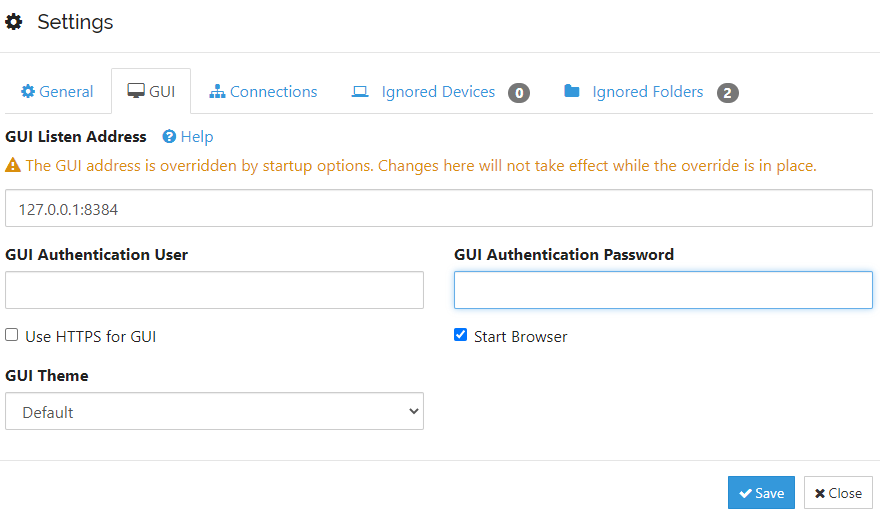
You can set the password in syncthing itself. Its in settings-GUI.
-
Janky update here too. I have the preboot only thing too..A couple people of the discord did a entire reinstall thinking there system was broke.
-
I thought we were on beta24
-
Beta25?
-
I'm doing 1440p at 144hz right now using Display port. I have Rx 570.
-
Ok i figured out what was going on with my setup. Strangely it just takes about 5 to 7 minutes for the beta installer to open to begin the install. Thats with whatever opencore i use so maybe just a quirk.
-
Because it's easy to backup and use IMG files. I like to test stuff in vnc plus I'm doing all this remotely from work so no plugging in drives.
-
Anyone want to pass a opencore qcow? Im trying to see if my Big Sur install disk is really corrupted or not.
-
For some reason i cant do a clean beta 2 install. I can boot the installer but i does not let me start the install process. Says the installer is corrupted, but the same installer works on my Pop os machine.
-
Rip SIP also i hear the system is a read only snapshot and you have to do all sorts of things to even mount it.
-
Updated to beta 2 by downloading the beta 2 installer and making a dmg and running it. Took a long 4 reboots where I had to manually select the Mac installer selection in opercore to keep it going. Thought it frooze twice but it eventually finished. So be very patient...it's still going.
-
Change your machine type to something higher than 3.1? Did you upgrade to the 6.9 beta or something?
-
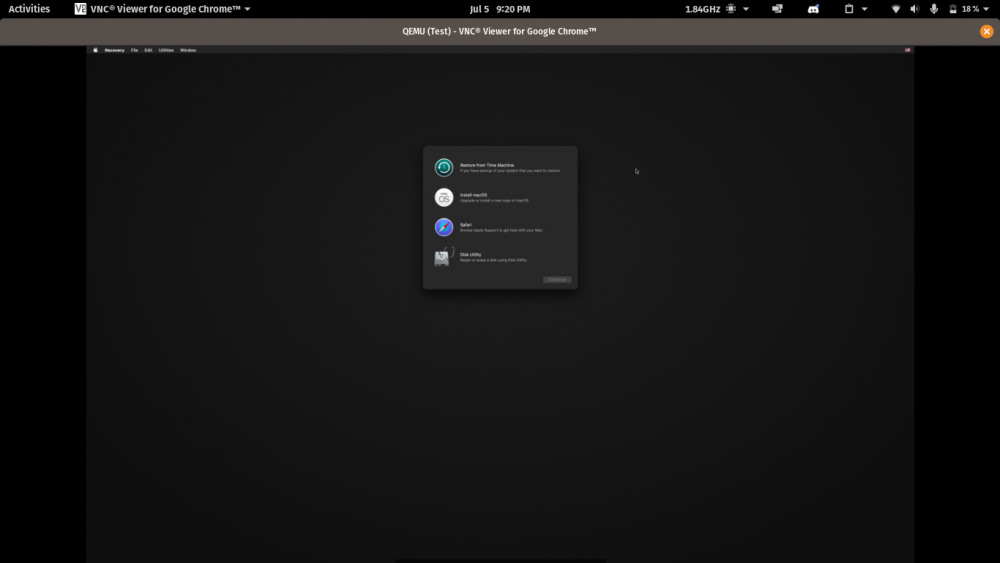
@ghost82 I got the Big Sur installer to boot with the latest master from Opencore and Lilu using the stock OVMF files.
-
It is not that simple. You can check out tonymacx86/insanelymac or the hackintosh reddit. You will need a app to mount the efi or do some terminal work to mount it, maybe clover configurator or a mac plist editor. Then you want navigate the EFI to the config.plist for clover and change the clover resolution set in there to match what you set in the OVMF UEFI. Im starting to think there should be a hackintosh 101 post or it should at least be posted with this thread to give a bit of a introduction to the quirks of dealing with hackintoshes. The hackintosh reddit is a good place to start. I even hate to send you to tonymac for info as they like to censor people who talk VMs or AMD hackintosh builds but they have a lot of information that will be helpful to everybody. .


