






david279
Members
-
Joined
-
Last visited
-
I mean it only uses it when you upload a video so most of the time it maybe idle.
-
Did you turn change the hardware acceleration setting on the immich administration settings?
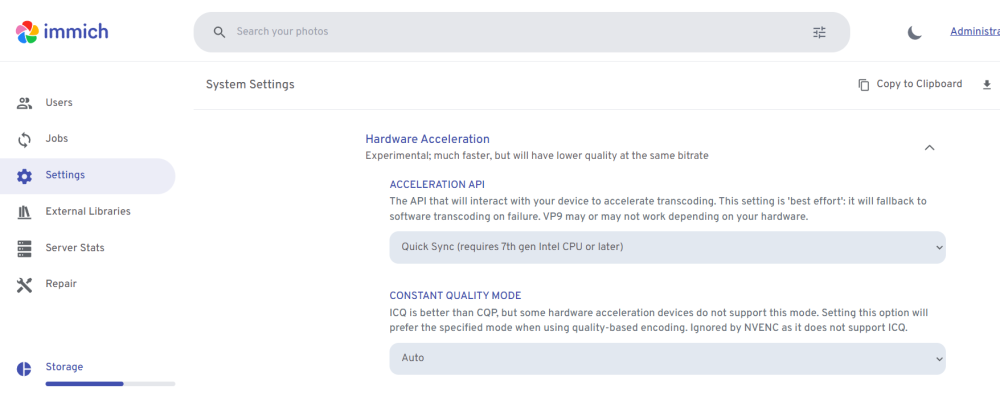
-
That worked after a force pull.
-
Im having the same issue except i can reach the GUI through my cloudflare tunnel. Going through the ip:8112 times out. Im connected thru a tailscale vpn to my server right now will try and see if it works at home.
-
https://forums.plex.tv/t/hdr-tone-mapping-with-hw-transcoding-not-working-for-12900k-cpu-on-pms-version-1-32-5-7210/845595/100 Its a know problem
-
I kinda broke on the newer verison of unraid. But its a bit more complicated than. That seems it still works with an older version of the plex media server itself. https://forums.plex.tv/t/hdr-tone-mapping-with-hw-transcoding-not-working-for-12900k-cpu-on-pms-version-1-32-5-7210/845595/69
-
Like this https://forums.unraid.net/bug-reports/stable-releases/612-unraid-webui-stop-responding-then-nginx-crash-r2451/?tab=comments
-
They are saved in a hidden .zfs folder at the root of the dataset. That's the default location that zfs uses. I don't know if you can even change that.
-
It rollsback to that point when that snapshot was taken. If its a snapshot appdata it will rollback everything to that point when the snapshot of appdata took place. Its might be better to have a dataset for each app in your appdata share that way you can rollback specific folders. You can also go into the snapshots by browsing the .zfs folder at the root of a dataset. Its hidden by default but you can just pull files from it if you want. Its read only so it cant be modified.
-
I think the command for rolling back to a snapshot is zfs rollback snapshot, its as simple as that. The zfs master plugin also allows you to rollback using a snapshot.
-
So it doesn't eat all a casual users ram without them understanding why.
-
I had the issue on 6.12.1 .2 but as of now I haven't had the issues in a while. I didn't really do anything different it just stopped happening. 🤞
-
Sounds like this https://forums.unraid.net/bug-reports/stable-releases/612-unraid-webui-stop-responding-then-nginx-crash-r2451/?tab=comments
-
https://forums.unraid.net/bug-reports/stable-releases/612-unraid-webui-stop-responding-then-nginx-crash-r2451/?tab=comments
-
zfs send receive syncoid znapzend All are ways to get it done.

