





Snipe3000
Members
-
Joined
-
Last visited
Everything posted by Snipe3000
-
I'm not sure if this is being updated anymore, but TS6 beta is available: https://community.teamspeak.com/c/announcements/7 https://hub.docker.com/r/teamspeaksystems/teamspeak6-server/tags
-
Does anyone know how to get detailed logs from the dockerfile build process?
-
I have a docker compose repo up that I forked from HaberkornJonas, which based off of ambakshi and Froyok's work. https://github.com/Snipe3000/Perforce-Server-On-Docker-For-Unreal This has the latest version of the perforce server. I also swapped out centOS for Ubuntu. CentOS seems to be going away. I'm still working on it. The plan is to get swarm setup as well.
-
I'm hoping some of you docker experts can help me out with a docker compose manager issue I'm having. I have compose setting up a perforce server on Unraid. It gets through the building steps, but seems to have an issue finding the files I've added. I have the Entrypoint set to run a run.sh script, but the container can't find it. All of the files I'm added sit in the root folder along with the Dockerfile and docker-compose.yml files that are in my /appdata/perforce-server folder. The error I get is: exec /run.sh: no such file or directory and I have no idea why the run.sh script is not ending up where it should be. Here is the full Dockerfile: # Use Ubuntu 24.04 (Noble Numbat) as the base image ARG P4_BASEIMAGE=ubuntu:24.04 FROM $P4_BASEIMAGE AS perforce-base MAINTAINER Van ENV container docker # Install required system dependencies, including gnupg for handling GPG keys RUN apt-get update && apt-get install -y \ cron \ tar \ gzip \ curl \ openssl \ sudo \ debianutils \ gnupg2 \ lsb-release && \ rm -rf /var/lib/apt/lists/* # Download and install the Perforce GPG key directly into the APT keyring RUN curl -fsSL https://package.perforce.com/perforce.pubkey | gpg --dearmor -o /usr/share/keyrings/perforce-archive-keyring.gpg # Add Perforce repository and ensure it's signed with the correct key RUN echo "deb [signed-by=/usr/share/keyrings/perforce-archive-keyring.gpg] https://package.perforce.com/apt/ubuntu noble release" > /etc/apt/sources.list.d/perforce.list # Update package lists and install Perforce server and CLI RUN apt-get update && \ apt-get install -y p4-server p4-cli && \ rm -rf /var/lib/apt/lists/* # Install necessary utilities like gosu, tini, and s6-overlay with updated download links RUN curl -fsSL https://github.com/tianon/gosu/releases/download/1.17/gosu-amd64 -o /usr/local/bin/gosu \ && curl -fsSL https://github.com/tianon/gosu/releases/download/1.17/gosu-amd64.asc -o /usr/local/bin/gosu.asc \ && gpg --keyserver hkps://keys.openpgp.org --recv-keys B42F6819007F00F88E364FD4036A9C25BF357DD4 \ && gpg --batch --verify /usr/local/bin/gosu.asc /usr/local/bin/gosu \ && rm /usr/local/bin/gosu.asc \ && chmod +x /usr/local/bin/gosu \ && gosu nobody true # ENTRYPOINT ["/init"] # Make sure the run.sh script is executable ADD ./run.sh / RUN chmod +x /run.sh # Use /run.sh as the entry point to start the container ENTRYPOINT ["/run.sh"] FROM perforce-base AS perforce-server MAINTAINER Van # Use the same P4_VERSION build argument ARG P4_VERSION=2025.1 # Install Perforce server and CLI with the version from the build argument RUN apt-get update && \ apt-get install -y p4-server p4-cli && \ rm -rf /var/lib/apt/lists/* EXPOSE 1666 ENV NAME p4depot ENV P4CONFIG .p4config ENV DATAVOLUME /data ENV P4PORT 1666 ENV P4USER p4admin VOLUME ["$DATAVOLUME"] ADD ./p4-users.txt /root/ ADD ./p4-groups.txt /root/ ADD ./p4-protect.txt /root/ ADD ./typemap.txt /root/ ADD ./setup-perforce.sh /usr/local/bin/ # Default command to run the server via run.sh or p4d #CMD ["/run.sh"]docker-compose.yml services: perforce: hostname: perforce volumes: - /mnt/user/Perforce/:/data ports: - "1666:1666" build: context: . dockerfile: Dockerfile #restart: unless-stopped # Optional: Restart the container if it stops unexpectedly Update : I think I solved this specific issue. The run.sh I was trying to run had windows line endings, so I fixed that by calling" sed -i 's/\r//' /run.sh I was also using a Shebang line that pointed to a directory that didn't exist for my bash, so I just pointed it to /bin/bash instead.
-
Oh no! I think the issue is tailscale. I'll have to figure out why its causing this issue. More importantly, why it started happening, even when tailscale settings haven't been messed with.
-
I have a dockerfile that is successfully running, but is having an issue with the scripts and the scripts are not running cause they are not found: I don't understand the issue. The run.sh script is located in the same folder as the dockerfile and docker-compose.yml. Why would it not be available from within the container. Or why would it not be making it over to the container? The only thing in the log is: exec /run.sh: no such file or directory Here is the dockerfile: # Use Ubuntu 24.04 (Noble Numbat) as the base image ARG P4_BASEIMAGE=ubuntu:24.04 FROM $P4_BASEIMAGE AS perforce-base MAINTAINER Van ENV container docker # Install required system dependencies, including gnupg for handling GPG keys RUN apt-get update && apt-get install -y \ cron \ tar \ gzip \ curl \ openssl \ sudo \ debianutils \ gnupg2 \ lsb-release && \ rm -rf /var/lib/apt/lists/* # Download and install the Perforce GPG key directly into the APT keyring RUN curl -fsSL https://package.perforce.com/perforce.pubkey | gpg --dearmor -o /usr/share/keyrings/perforce-archive-keyring.gpg # Add Perforce repository and ensure it's signed with the correct key RUN echo "deb [signed-by=/usr/share/keyrings/perforce-archive-keyring.gpg] https://package.perforce.com/apt/ubuntu noble release" > /etc/apt/sources.list.d/perforce.list # Update package lists and install Perforce server and CLI RUN apt-get update && \ apt-get install -y p4-server p4-cli && \ rm -rf /var/lib/apt/lists/* # Install necessary utilities like gosu, tini, and s6-overlay with updated download links RUN curl -fsSL https://github.com/tianon/gosu/releases/download/1.17/gosu-amd64 -o /usr/local/bin/gosu \ && curl -fsSL https://github.com/tianon/gosu/releases/download/1.17/gosu-amd64.asc -o /usr/local/bin/gosu.asc \ && gpg --keyserver hkps://keys.openpgp.org --recv-keys B42F6819007F00F88E364FD4036A9C25BF357DD4 \ && gpg --batch --verify /usr/local/bin/gosu.asc /usr/local/bin/gosu \ && rm /usr/local/bin/gosu.asc \ && chmod +x /usr/local/bin/gosu \ && gosu nobody true # ENTRYPOINT ["/init"] # Make sure the run.sh script is executable ADD ./run.sh / RUN chmod +x /run.sh # Use /run.sh as the entry point to start the container ENTRYPOINT ["/run.sh"] FROM perforce-base AS perforce-server MAINTAINER Van # Use the same P4_VERSION build argument ARG P4_VERSION=2025.1 # Install Perforce server and CLI with the version from the build argument RUN apt-get update && \ apt-get install -y p4-server p4-cli && \ rm -rf /var/lib/apt/lists/* EXPOSE 1666 ENV NAME p4depot ENV P4CONFIG .p4config ENV DATAVOLUME /data ENV P4PORT 1666 ENV P4USER p4admin VOLUME ["$DATAVOLUME"] ADD ./p4-users.txt /root/ ADD ./p4-groups.txt /root/ ADD ./p4-protect.txt /root/ ADD ./typemap.txt /root/ ADD ./setup-perforce.sh /usr/local/bin/ # Default command to run the server via run.sh or p4d #CMD ["/run.sh"]
-
I'm having a bit of trouble with RustDeskServer-AiO. The ports are forwarded to my server, but I don't seem to be able to connect from outside of my local network. On the remote device, I have the ID Server and Relay server set to rustdesk.mydomain.com, and I set the public key. When I try to connect to my PC that is local to the Rustdesk server, I get a connection error: Failed to connect via relay server. On every attempt to connect, I can see the New relay request in the RustDeskServer-AiO logs. This is just a DNS only CNAME through cloudflare. I'm guessing I don't need reverse proxy for this, so I didn't bother adding it to Nginx. Local connections work fine. I just can't connect from outside of my local network. Any idea what's going on? update: I think I fixed it. I found this to be the solution: https://www.reddit.com/r/rustdesk/comments/1d9td6u/comment/leg2nid/?utm_source=share&utm_medium=web3x&utm_name=web3xcss&utm_term=1&utm_content=share_button
-
Setting it in the hosts file didn't work for me after the restart.
-
@botwinka I was able to get his working from docker hub as well, but it's pulling a very old version of the software. I'm starting to play around with Docker Compose Manager on Unraid to see if I can set something up for the latest version of perforce. Not quite sure how to use it yet. I have to figure out how to get the setup files in there.
-
Hello, When trying to add a docker container from docker hub I'm getting this error: Error response from daemon: failed to create task for container: failed to create shim task: OCI runtime create failed: runc create failed: unable to start container process: error during container init: exec: "./docker-entrypoint.sh": stat ./docker-entrypoint.sh: no such file or directory: unknown. I'm not sure what it is trying to tell me. I would expect all of this to be handled in the "docker file" ? Here is the docker I'm trying to add: https://hub.docker.com/layers/jamesbrooks/perforce-server/latest/images/sha256-7c687f1e19cca773b8c2b05db55cd3b55960ca505ddb87a54696a14bb58d07e8 Here is the full log: docker run -d --name='perforce-server' --net='bridge' --pids-limit 2048 -e TZ="America/Los_Angeles" -e HOST_OS="Unraid" -e HOST_HOSTNAME="Unraid01" -e HOST_CONTAINERNAME="perforce-server" -e 'NAME'='perforce-server' -e 'P4NAME'='master' -e 'P4TCP'='1666' -e 'P4PORT'='1666' -e 'P4USER'='admin' -e 'P4PASSWD'='pass12349ers' -e 'P4CASE'='-C0' -e 'P4CHARSET'='utf8' -e 'JNL_PREFIX'='master' -e 'P4HOME'='/p4' -e 'P4ROOT'='/p4/root' -e 'P4DEPOTS'='/p4/depots' -e 'P4CKP'='/p4/checkpoints' -e 'Community_Applications_Conversion'='true' -l net.unraid.docker.managed=dockerman -l net.unraid.docker.icon='' -p '1666:1666/tcp' -v '/mnt/user/Perforce/':'/p4':'rw' -v '/mnt/user/Perforce/':'/data':'ro' 'jamesbrooks/perforce-server:latest' c8a9b5b637fe33858c1dc7a82062c0c944d4733e9925df3721aa9f1ea9a05f15 docker: Error response from daemon: failed to create task for container: failed to create shim task: OCI runtime create failed: runc create failed: unable to start container process: error during container init: exec: "./docker-entrypoint.sh": stat ./docker-entrypoint.sh: no such file or directory: unknown. The command failed. when I inspect the image I see this: root@Unraid01:~# docker image inspect jamesbrooks/perforce-server:latest [ { "Id": "sha256:7ea652a7b1f880ccba18899cc1196199354988639bf4715b3a20a5fb48d4a70a", "RepoTags": [ "jamesbrooks/perforce-server:latest" ], "RepoDigests": [ "jamesbrooks/perforce-server@sha256:7c687f1e19cca773b8c2b05db55cd3b55960ca505ddb87a54696a14bb58d07e8" ], "Parent": "", "Comment": "buildkit.dockerfile.v0", "Created": "2025-05-15T11:08:52.237953333+09:30", "DockerVersion": "", "Author": "", "Config": { "Hostname": "", "Domainname": "", "User": "", "AttachStdin": false, "AttachStdout": false, "AttachStderr": false, "ExposedPorts": { "1666/tcp": {} }, "Tty": false, "OpenStdin": false, "StdinOnce": false, "Env": [ "PATH=/usr/local/sbin:/usr/local/bin:/usr/sbin:/usr/bin:/sbin:/bin", "NAME=perforce-server", "P4NAME=master", "P4TCP=1666", "P4PORT=1666", "P4USER=admin", "P4PASSWD=pass12349ers", "P4CASE=-C0", "P4CHARSET=utf8", "JNL_PREFIX=master", "P4HOME=/p4", "P4ROOT=/p4/root", "P4DEPOTS=/p4/depots", "P4CKP=/p4/checkpoints" ], "Cmd": null, "Healthcheck": { "Test": [ "CMD-SHELL", "p4 info -s > /dev/null || exit 1" ], "Interval": 120000000000, "Timeout": 10000000000 }, "Image": "", "Volumes": { "/p4": {} }, "WorkingDir": "", "Entrypoint": [ "./docker-entrypoint.sh" ], "OnBuild": null, "Labels": { "maintainer": "Joe Chen ([email protected])", "org.opencontainers.image.ref.name": "ubuntu", "org.opencontainers.image.version": "20.04", "vendor": "Sourcegraph" } }, "Architecture": "amd64", "Os": "linux", "Size": 246442726, "GraphDriver": { "Data": null, "Name": "btrfs" }, "RootFS": { "Type": "layers", "Layers": [ "sha256:470b66ea5123c93b0d5606e4213bf9e47d3d426b640d32472e4ac213186c4bb6", "sha256:860af793411e0855b6d159885ff16611117eb991f03758760d1b29e1bc153991", "sha256:c962e835273a76da6a9547c42ce7b1b58d3735ef3ffdfe42640d69c0a4ea8c3e", "sha256:fefc3d207f470aa6dcb07a2cf957c6195b6abe475d2a3030cc0c9419e7489646", "sha256:20a173453f94e831ae83d7f1e9b082d7f2ef6ea46e62832a4c9c175ee3dbd40e", "sha256:c042112255e331101355d8bbc676aad6237d7a9b9e973c5922f463d6d2b2c51d", "sha256:63dda9147763c762c62d35d7900bfa0574dc49583f3d3d041b09b3cec8fcefa6", "sha256:e3e1b1d90234d45f9893298bf1f84e2cd7b295103a5916e7a49871b4b41be375" ] }, "Metadata": { "LastTagTime": "0001-01-01T00:00:00Z" } } ]
-
Yeah I think pinning it to quick access will work for now. Very strange issue. Thanks
-
I'm trying to setup this docker from Docker Hub: https://hub.docker.com/layers/jamesbrooks/perforce-server/latest/images/sha256-7c687f1e19cca773b8c2b05db55cd3b55960ca505ddb87a54696a14bb58d07e8 Which is based off this: https://github.com/ambakshi/docker-perforce I think the main issue I'm having is that I have no idea how to setup the paths for the container to work properly. Should I be making some new shares for this? or does the docker take care of that? Here are the results of my poor attempt to let CA convert it: docker run -d --name='perforce-server' --net='bridge' --pids-limit 2048 -e TZ="America/Los_Angeles" -e HOST_OS="Unraid" -e HOST_HOSTNAME="Unraid01" -e HOST_CONTAINERNAME="perforce-server" -e 'NAME'='perforce-server' -e 'P4NAME'='master' -e 'P4TCP'='1666' -e 'P4PORT'='1666' -e 'P4USER'='admin' -e 'P4PASSWD'='pass12349ers' -e 'P4CASE'='-C0' -e 'P4CHARSET'='utf8' -e 'JNL_PREFIX'='master' -e 'P4HOME'='/p4' -e 'P4ROOT'='/p4/root' -e 'P4DEPOTS'='/p4/depots' -e 'P4CKP'='/p4/checkpoints' -e 'Community_Applications_Conversion'='true' -l net.unraid.docker.managed=dockerman -l net.unraid.docker.icon='' -p '1666:1666/tcp' -v '/mnt/user/appdata/perforce-server/':'/p4':'rw' -v '/mnt/user/appdata/perforce-server/logs/':'/opt/perforce/servers/server-instance/logs/':'ro' 'jamesbrooks/perforce-server:latest' df8aeaeb05806897b60bb8893d24da060c16869c03683de1c8b093ed59454d80 docker: Error response from daemon: failed to create task for container: failed to create shim task: OCI runtime create failed: runc create failed: unable to start container process: error during container init: exec: "./docker-entrypoint.sh": stat ./docker-entrypoint.sh: no such file or directory: unknown. The command failed.
-
@Frank1940 I added another windows desktop (windows 10) to the network and that PC can use the unraid server via the dns name just fine. I'm guessing that makes it an issue with this PC specifically (Windows 11).
-
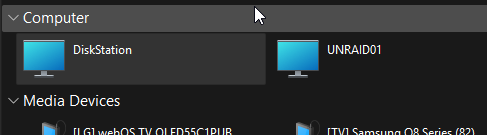
I should word that a bit differently. I'm able to access my other NAS (Synology) and its shared folders from my windows PC. Only one client computer is involved. The only Server with the problem is the Unraid server. I'm only able to access the Unraid shared folders if I use the IP address instead of the server name "UNRAID01"
-
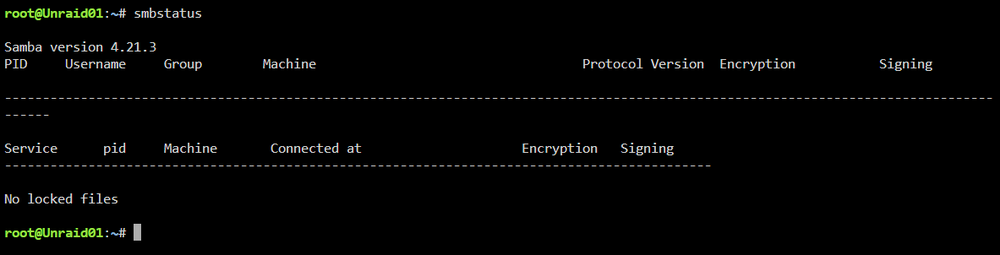
Here is what I'm seeing: And nothing returns when I use the Get-SmbConnection command in a admin powershell terminal.
-
Attached. Oh, and my network connections are already set to private. unraid01-diagnostics-20250529-1604.zip
-
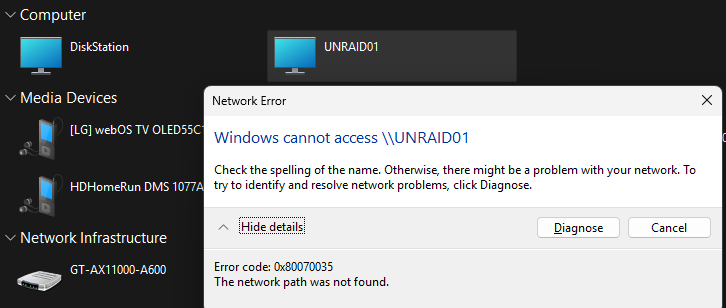
I should probably mention that the Unraid server is discoverable in file explorer, it pops up with the DNS name and everything. I just can't access anymore through the discovered network share.
-
Starting about a month ago, I lost the ability to access my Unraid shares using the DNS name. I have no idea why or how to get it back. I'm able to access the shares with the IP though. I ran through the basic troubleshooting step like flushing my DNS, I restarted the server, updated it to the latest version, deleting the unraid server from my Credential Manager in windows, but still getting the same results. I'm able to access my shares from other machines with their DNS names just fine, something has gone wrong with just this Unraid server.
-
I'm starting to look into this myself. I'm surprised there is no information available for it. Has anyone had any luck?
-
This still isn't in the CA store? thats wild.
-
Any idea on how to clear the log of a container?
-
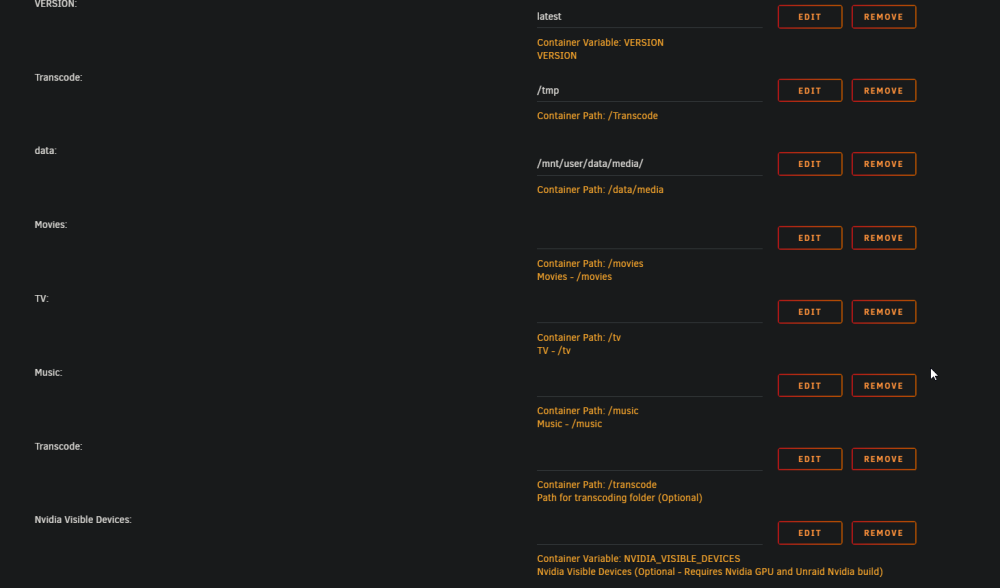
I'm running into this same issue. For some reason I have two transcode settings in my plex docker config. Does that mean something is wrong with my linuxserver version of plex? Is there a way to clear the /tmp folder? I'm guessing this is something I have to do periodically, sense plex isnt doing it. /tmp in the root of Unraid doesnt have anything plex related in it.
-
running "ls /dev/serial/by-id" says "No such file or directory" The diagnostics are attached unraid01-diagnostics-20230411-1649.zip
-
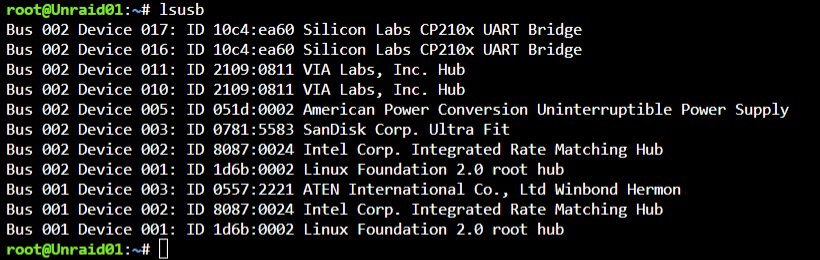
Using lsusb I get this: The issues Im having is my zooz zwave stick works fine if I don't use the serial only option, but Z-Wave JS UI doesnt work unless I use serial only. If I do use serial only, zwave doesnt work in HA's integrations area anymore. Then theres my skyconnect stick, Ive never been able to get it work properly, it always fails configuation, been trying for weeks. Currently I flashed it with Multi-pan firmware, but not having much luck there either. This has all been very messy
-
virsherror = "" virsherror = 1 virsh = "error: Failed to attach device from /tmp/libvirthotplugusbbybusHome Assistant-002-017.xml error: internal error: unable to execute QEMU command 'chardev-add': Failed to add chardev 'charua-serial002017': Could not open '/dev/serial/by-id/': Is a directory virsherror = 1 virsh = "error: Failed to attach device from /tmp/libvirthotplugusbbybusHome Assistant-002-016.xml error: internal error: unable to execute QEMU command 'chardev-add': Failed to add chardev 'charua-serial002016': Could not open '/dev/serial/by-id/': Is a directory I see that whenever I try to connect my two devices as serial




