





Bastian
Members
-
Joined
-
Last visited
Everything posted by Bastian
-
Did some research and stumbled upon this post on SE. Tl;dr: For zfs, redundant configuration (mirror, raidz, raidz2, raidz3) can correct themself at read, single disks have to set copies to 2 or higher to correct errors. The part about striped I didn't understand 😕
-
What. The actual. F! This little comment on the bug report had the solution and I don't know how that could be missed. The global setting for NFS doesn't get regarded. I once used NFS, but disabled it globally after I had no use for it anymore. Enabled NFS -> Changed all NFS Export Settings -> (Disabled NFS again) -> Restarted the array and the symlinks are working now.
-
Stopped both the array and the server multiple times that since I moved the files and made the configuration changes.
-
Just triple-checked all disks and pools, it only exists on that one pool.
-
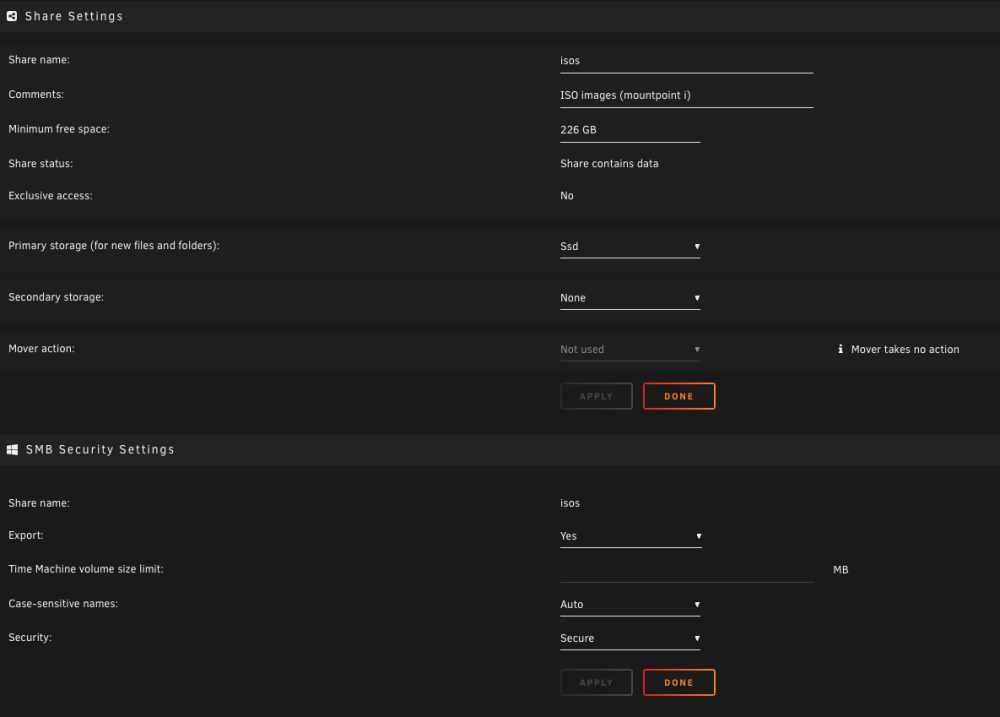
Hi all, I've tried to move all my ISOs to an all SSD pool (raidz1 of 6 x 500GB) and use it as exclusive share. I've moved all the data to the pool through the share config and mover I verified that all data is only stored on the pool Stopped the array Enable exclusive shares (they have been disabled on my server, I usually don't use /mnt/user/) Started the array Based on the tooltip, all requirements are met. The share primary is set to the pool secondary is set to none The data only exists on the pool NFS is completely disabled On two of my shares, which are also only located on pools, it works, but not on the ISOs share. My share configuration: A compute in the share overview, showing the exclusive on another share and that there is no other data on another drive The server and array have been restarted multiple times in the meantime. I am at wits end, has anyone an idea? Thanks in advance! alpha-diagnostics-20231225-2035.zip

-
+1 With docker compose labals unraid could still save all necessary metadata directly on the stack.
-
Just to make sure, the truncate only happens if you open the log in browser. If you open the log through the shell (usually located in /var/lib/docker/containers/), it is the full log, without any truncating. Since the file is located in /var/ it is only stored in memory and doesn't take up any space on the docker image. This also means you loose any log on reboot.
-
As you already said, /var/log is mostly logging of the host system. There you can find the log of unraid itself (syslog), the log of the docker engine (I presume, docker.log) and the log of various tools running on the host. As stupid as it sounds, there is none. What you see in `docker logs` (or the UI) is what you get. You have to take into consideration that docker is no normalised ecosystem. It us up to each application and image maintainer how much and what they want to log. There are ways to extend the applications logging. For example, most server (Spring, Asp, etc) have different log levels, controlled through environment variables, but that depends very heavy on the exact implementation. So, what to do if a container fails? Does it fail on creation (unraid will prompt a "command failed" on saving)? You should get a pretty telling exception message from docker with the reason. Does it exit with a non-zero code after creation? Check the docker logs. If the creator printed something, it should be in there. Otherwise you have to contact the creator (through an application thread here in the forum, github issue, etc) and attach both the docker log and docker run command (as printed by unraid on saving). They wrote the application and might see more than a third-party can. There could be additional resources, like an internal log file, a configuration file created by the application, etc, but that varies from application to application. I just noticed that the UI only shows the last 100 or so lines. For the full log you can check the actual log file handled by docker. To get the path just run `docker inspect --format='{{.LogPath}}' <container id>`. I hope it helped and could clear up your question somewhat
-
In my defence, I am not a front-end developer and worked with HTML the last time 10 years ago. <script /> is not valid syntax, has to be <script></script>.
-
Thanks for the reply Sorry, I should have mentioned it, that is the content of a js files which I load in a page file. The matching page file looks like the following Menu="Docker" --- <script src="/plugins/docker.ui-runcmd/include/docker.ui-runcmd.js" /> I wanted to split page file and actual code so syntax highlighting in vscode works like expected. For completion, my plg file looks like the following <?xml version="1.0" standalone="yes"?> <!DOCTYPE PLUGIN [ <!ENTITY name "docker.ui-runcmd"> <!ENTITY author "Bastians-Bits"> <!ENTITY version "2023.06.03j"> <!ENTITY github "Bastians-Bits/unraid.docker"> <!ENTITY plugdir "/usr/local/emhttp/plugins/&name;"> <!ENTITY pluginURL "https://raw.githubusercontent.com/&github;/main/&name;/&name;.plg"> <!ENTITY md5 "40f329a921c9965eed0f027adc693c4b"> ]> <PLUGIN name="&name;" author="&author;" version="&version;" pluginURL="&pluginURL;" icon="docker" support="https://github.com/Bastians-Bits/unraid.docker" min="6.11.5"> <CHANGES> ###0000.00.02 - Test 1 Block ###0000.00.01 - Test 2 Blocks ###0000.00.00 - Initial Release </CHANGES> <!-- Installation --> <!-- Remove the old version --> <FILE Run="/bin/bash"> <INLINE> rm -f $(ls /boot/config/plugins/&name;/&name;*.txz 2>/dev/null | grep -v '&version;') </INLINE> </FILE> <!-- Download the new file --> <FILE Name="/boot/config/plugins/&name;/&name;-&version;.txz" Run="upgradepkg --install-new"> <URL>https://raw.github.com/&github;/main/archive/&name;/&name;-&version;.txz</URL> <MD5>&md5;</MD5> </FILE> <!-- Post installation --> <FILE Run="/bin/bash"> <INLINE> echo "" echo "----------------------------------------------------" echo " &name; has been installed." echo " Version: &version;" echo "----------------------------------------------------" echo "" </INLINE> </FILE> <!-- De-installation --> <!-- Remove the plugin and all files --> <FILE Run="/bin/bash" Method="remove"> <INLINE> removepkg &name;-&version; rm -rf &plugdir; rm -rf /boot/config/plugins/&name; </INLINE> </FILE> </PLUGIN>
-
I started to get into plugin development and for my first one I wanted to create a simple one with only one button on the docker page. Adding the button works like a charm, but afterwards the button "Container Size" stops working. This is my whole plugin code at the moment: $('<input/>', { type: 'button', onclick: 'openShowRunCommandDialog()', value: 'Show Run Command', style: 'display:none' }).insertAfter('div.content > input:last'); function openShowRunCommandDialog() { alert("Works!"); } The exception thrown in the console: The plugin in question: docker.ui-runcmd. Since the insert does exactly what it supposed to do, I am a little bit lost. I guess I am missing something, but I followed other plugins and can't find it Any help is appreciated, thank you

-
Hello everyone, I am currently trying to shutdown my server, but I have a stale process of /usr/local/sbin/move accessing /mnt/user. The process runs for 9 days (pretty much the whole uptime of the server) and is stuck in an uninterruptible sleep (d-state). I know that d-state processes are impossible to kill from the user space, but has someone figured out a workaround for stale mover processes? Or can I somehow check on which resources the process is waiting? I can't be the first one to have that problem and I really don't want to cold shutdown and trigger yet another parity check oO Any help is appreciated, thank you Additional information: lsof | grep mnt move 119294 root 4r DIR 0,44 142 1 /mnt/user ps aux | grep 119294 root 107269 0.0 0.0 4052 2268 pts/2 S+ 18:00 0:00 grep 119294 root 119294 0.0 0.0 2568 1584 ? D May20 0:19 /usr/local/sbin/move
-
+1 This would be awesome
-
56GB memory. (yeah, I am one stick short) Docker in idle uses around 4GB. Under load (Plex, Paperless, Handbrake, Docker Cache) I have seen it going up to around 10GB. But mostly virtualization. One VM to run a Docker System with 20 container for work, my different web-server and my Unifi controller. I use around 13GB in idle. My work VM alone can take up to 30GB of memory.
-
2 server in my case. My main server and a backup server.


