





Bastian
Members
-
Joined
-
Last visited
Everything posted by Bastian
-
Greetings from 2026, thank you @wgstarks ! Your post helped me the most! For anyone finding this, also make sure to disable IP Address Assignment for the VLAN and set the Docker Custom Network Type to ipvlan.
-
After upgrading to 7.2 I have noticed that shares are not shown to be located on the correct pool (bastian should be on pool data and exported as privat) The configuration for that share still looks correct cat /boot/config/shares/Bastian.cfg # Generated settings: shareComment="Bastians private Share (mountpoint b)" shareInclude="" shareExclude="" shareUseCache="only" shareCachePool="data" shareCOW="auto" shareAllocator="highwater" shareSplitLevel="" shareFloor="3391160319" shareExport="e" shareCaseSensitive="auto" shareSecurity="private" shareReadList="uwe" shareWriteList="bastian" shareVolsizelimit="" shareExportNFS="-" shareExportNFSFsid="102" shareSecurityNFS="private" shareHostListNFS=""This happens both for shares Bastian and Uwe, both are the only shares with a config written with the first letter in upper-case. For testing, I stopped the array, renamed the shares manually to lowercase and started the array again. Afterwards it works again I can't be sure if this is a bug introduced with 7.2, as I am having trouble with my server for months now. This definitely worked in the past, so I think it is a regression bug. Those shares are old, like really old.
-
A little bit of everything. NAS, Game Service, Docker Services, experimenting in Virtual Machines, Plex of course. With the electricity prices the uptime is getting kinda expensive, but I haven't found hardware with enough PCI lanes to replace my Threadripper
-
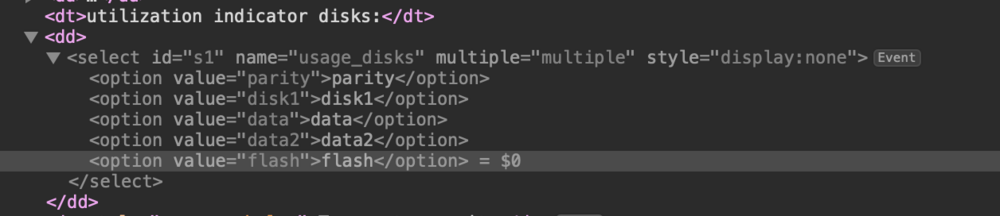
Hey Everyone, I am pretty new to the Plugin Development in Unraid and PHP in general. Currently I am trying to write a Disk Selector comparable to the Include/Exclude Disks in the Share Creation. What I have so far: DisplaySettings.page _(utilization indicator disks)_: : <select id="s1" name="usage_disks" multiple="multiple" style="display:none"> <?foreach ($disks as $disk):?> <?=mk_option_check(_var($var,'usage_disks'),_var($disk,'name'),_var($disk,'name'))?> <?endforeach;?> </select> Within the Page I can see that the selector gets correctly generated. But unlike the Share Creation Page, I am unable to create the span with the actual Selector Box. I can't find any hint within the Share Page where it is generated. Note: I am using mk_option_check on purpose, I don't want to limit it to diskN. The limitation to the correct disks will follow at a later point. Thank you very much in Advance!
-
A local pull-through cache could be used for Docker Images.
-
For better or worse, Lime Tech created their own Compose Notation to store the Run Configuration. Those are stored within /boot/config/plugins/dockerMan/templates-user. The way I would go with it (though never done it myself): Enable "Preserve Docker Networks" in the Docker Configuration in Unraid Create a new Docker Network using the CLI docker network create somedockernetwork Edit Swag and attach it to said network using the UI The network is available from the dropdown list in the UI Edit Swag and create the alias using the "Post Argument" (Advanced View) && docker network connect --alias cloud.domain.com --alias collabora.domain.com somedockernetwork swag
-
Unraids Web UI has no build in function do configure Docker Networks. Unraid automatically creates a new docker network for bonded interfaces and has the flag to preserve Docker Networks on restart (though it still can fail). If you need to add some additional network configuration, you will have to use the CLI. After the network is created, you can normally select in the Dropdown on editing the template. A lot of people edit the Template and add something along the line of && docker network blah for the Post Argument to have the configuration persistent.
-
That is hard to tell, as every container is written differently and has to be operated differently. If your docker image utilisation grows slowly, something has to write data to a non-mount-bind path. Here, you're part start: Collect data, a lot of it. I would start by cleaning the system, get it back to the origin state. Get a full report of the utilisation. Wait until it fills up again, make anther snapshot of the data. At this point you have two states you can compare against each other and draw conclusions. That done, you can start a more in-depth analysis. Why is that specific container filling up? I do not know if Docker has a build in function to list the Containers file-system by size, probably not. Check the known configuration for logs, temp data, etc. Check it against your container if it could be the case. At that point you also have something more specific you could ask the community. Based on the image you provided so far, your AI-Server takes most of the storage. Don't know the specific container, but it sounds like a candidate to eat through a lot of space.
-
The IP label can stay as it is. The label is only used by unraid for the Web UI Link in the Docker Tab. [IP] gets translated to the servers IP and the port gets translated to the external port from the mapping. It has no functionality for the container whatsoever. The docker run command compromises of docker run [options] image [command] [args]. command and args have to be in that order and command can't be omitted if you want to pass args. That is exactly what you are doing. You are passing the argument --with-database directly after the image, so it is a command. Since there is no executable called --with-database within the container, it fails. The maintainer already thought of that, as you can see in the template docker-compose file. Just fill the variable ADDITIONAL_PARAMETER with the parameters you want to set and remove them from the post arguments. Edit: The links on docker run aren't meant to be there, the forum auto. adds them oO
-
In the default configuration, the Docker Image is virtual storage storing all Images, Containers and Volumes. If a container is miss-configured or not really well written, it could happen that it write more data in than the virtual storage is able to store. In that case you get "No Space left on Device" exception. Or there are just too many running container, that could also happen. The first case can be check via the Container Size Button on the Docker Page. It lists all container by file system size. Someone else has to chime in, but I believe that excludes mount-bind paths. If all your containers are running, you could try a docker system prune -af --volumes. This deletes all unused volumes, pending images und stopped containers. Note: Run it at your own risk! To increase the size of the virtual disk, you have to stop your array, head over to Settings -> Docker and increase Docker vDisk size. This will delete all your Docker Data, so make sure everything important is (as it should be) mount-bind into the host system.
-
Sounds more like a configuration issue on your part. From that list I only know Plex and that should be able to survive a re-creation. Sometime the online service gets confused and you have to pin the libraries anew, but not the entire setup. Best to check your mount-bind against the official documentation. You can easily test it by just deleting the service. After creation from the template it should be like before.
-
The Docker Tab only shows Docker Containers. They are runtimes created from Docker Images. I don't want to exclude any fault on unraids part, but it can happen from time to time, that the Docker Daemon just can't start them. Nowadays less often, but you can still find bug reports about it. Happened with my Containers once or twice, with Docker Networks from time to time. Docker Containers aren't meant to be long-living or have sensitive data within their filesystem. They are meant to be able to be destroyed and re-created any time. That's why all the important stuff has to be mounted to the host filesystem. That's also why we have the templates. They store all the information on how the Container gets created. Keep your templates clean and tidy and you can recover such a case by just spinning all Containers back up again. A template is comparable to a runtime of an image (that's why you ca have multiple template for the same image, they just have to be named differently).
-
-v erzeugt automatisch den Ordner im Host-System, wenn er nicht bereits existiert. Woher weiß Docker, dass es ein Ordner und nicht eine Datei ist? Einfach, gar nicht. Docker erzeugt immer einen Ordner. Es hat also den Ordner /mnt/user/appdata/telegraf/telegraf.conf erzeugt und versucht ihn nun auf die Datei /etc/telegraf/telegraf.conf im Container zu binden. Daher auch die Fehlermeldung "Are you trying to mount a directory onto a file (or vice-versa)?". Lösche den Ordner im Host-System und passe den Pfad an, sodass er nur die Ordner und nicht die Datei beinhaltet. Die Datei kann nur eingebunden werden, wenn sie bereits zuvor im Host-System erstellt wurde.
-
I don't think that would be a feasible endeavour for two main reasons: Docker images aren't that static and an update, especially to latest, can often be missed Or the other way around, the maintainer pushes like crazy new images Project maintainer themself don't often publish changelogs themself. So more often than not, there is no way to make a list of changes We would end up with a database with a lot of holes, probably maintained by a few people for a handful of images. Without dis-validating your idea, the base of it is already flawed (sorry to say it that blunt ). In my opinion, Docker gave the false sense of security that any application can handle rolling updates. They can't. Especially databases, especially nextcloud, apparently also frigate. I can't really say "in the old days", I am not that old, but I know from my job to always use pinned versions. You never wan't to have any dependency or application change on its own without your influence or knowledge. Pin your application, watch the project on Github or whatever service they are using and backup -> update your application on a new release.
-
I would like to extend that to n tier, so everyone is satisfied. There shouldn't be much difference between two, three, four or even more tiers. I don't think it makes sense to run all the tiers in parallel, that isn't the intention of tiers, but to have them chained or run at different times. Three workflows I can think of The schedule of the mover hasn't been overwritten Run all the tiers in series The times have been overwritten (e.g. tier 2 daily (nvme -> ssd), tier 3 every week (ssd -> hdd)) Run them according to the cron jobs A mix of overwritten and default Group them according to their times and run serial inside the groups The most dangerous one, the user would have to make sure the groups don't overlap for best results That could be extended indefinitely.
-
I would love to see improvements in the UI and the tech stack behind it. Unraids front face is the UI and yet it is lacking in so many points. I can‘t say that I know if PHP is still relevant these days, as pure backend developer I don‘t have much contact with the front end, but there have to be more modern, simple and easier extendable UI frameworks in the wild? Maybe even use the new API server to split backend and frontend? Lastly, what about different compose manager? I don‘t talk about the engine, but the composer. I think a lot if people would be more happy (I know I would), if we could choose between unraid templates, docker-compose and docker compose.
-
Unraids own compose files are stored within /boot/config/plugins/dockerMan/templates-user. Though notice, unraid does not utilise compose files like you would expect them from Docker or Docker-Compose, but its own format.
-
Would be interesting, I have played with the idea to upload my flash backup to the cloud. What I came up with after a quick search: There already is a project to have a running desktop environment in Docker: dorowu/ubuntu-desktop-lxde-vnc. It is based on a lightweight X11 environment, so maybe it is enough for iCloud for Linux, which requires an X11 server. I bet stuff like login can't be automated (and to be fair, I wouldn't want to have my Apple credentials in some config file), because of 2FA. That would have to be done manually. I also don't think it not worth for more than iCloud drive, I would guess everything else is in some way encrypted or in an inaccessible format. I have a long weekend coming ahead, maybe I will play with it
-
After some more digging: both properties are actually share configurations (source: smb.conf) A property defined in [Global] is applied to any share (THE GLOBAL SECTION parameters in this section apply to the server as a whole, or are defaults for sections which do not specifically define certain items. (source: manpage)). The cross-reference in PARAMETERS furthermore states: Note that all S parameters can also be specified in the [global] section - in which case they will define the default behavior for all services.) In conclusion, Global can define share properties, in which case they are applied to all shares. After your post I also was a bit confused why it worked at all
-
You have to differentiate on which system your shells are running. User Scripts run in Unraids shell, which doesn't contain any rclone binary. If you open a Terminal on the Docker Tab, you actually start a session within the Container. To replicate that behaviour you have to actually execute the command within the Container. The responsible command is called docker exec. A possible User Scripts could look like docker exec $(docker ps --filter=name=<NAME> -q) /bin/bash -c "YOUR COMMAND"
-
Since the containers still exist, but are only in the exited status, you can start all of them via docker start $(docker ps -q --filter "status=exited") For someone with some knowledge in bash that is pretty easy. It is just some text processing. All information are stored in the template in /boot/config/plugins/dockerMan/templates-user. I am doing something similar with description of the shares.
-
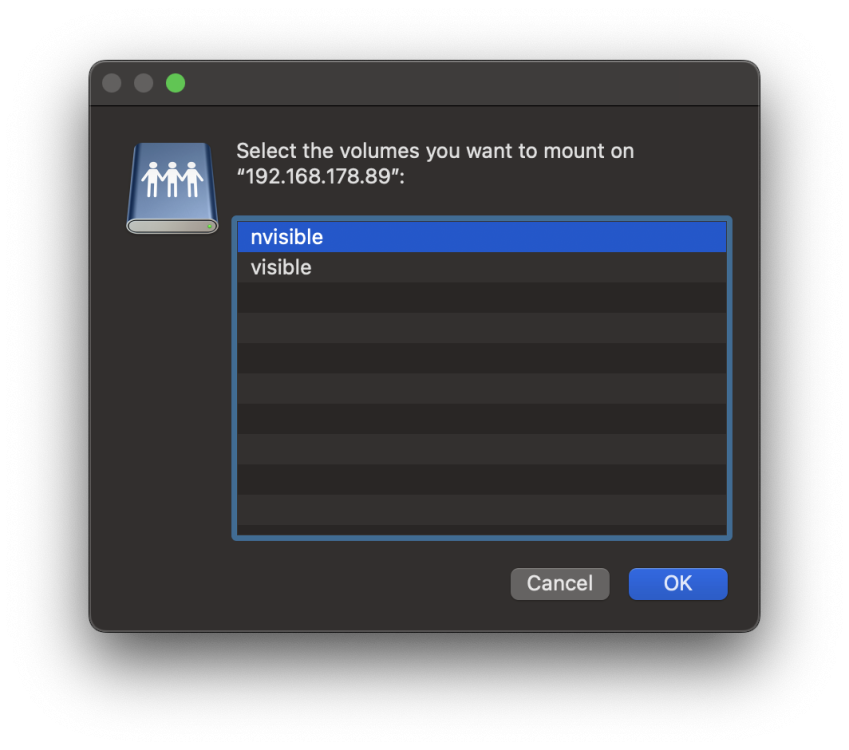
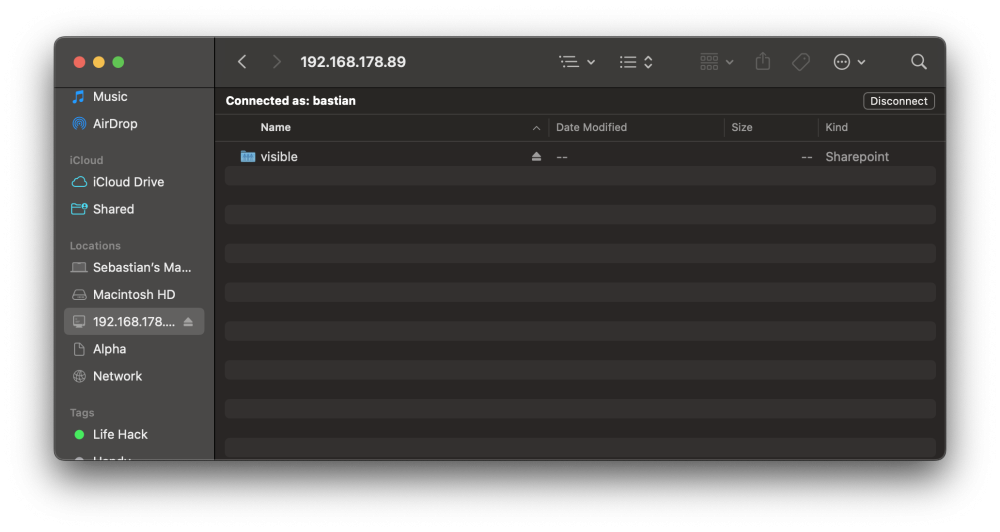
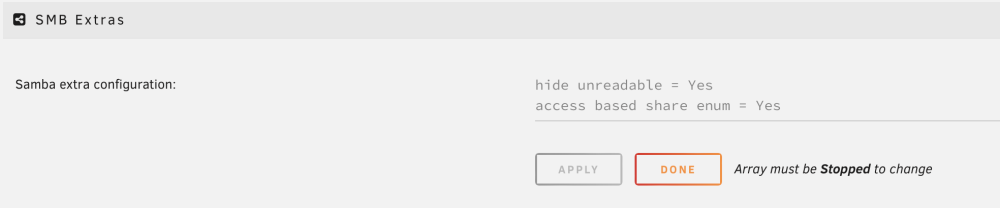
Some quick testing with @gluebabys suggestion. I created two shares: visible: Export = Yes, Security = Private, my user has read/write access nvisible: Export = Yes, Security = Private, my user has no access Without any modification to SMB: Both shares are visible. After applying ABE like described in this article: I just added those two settings to the SMB configuration: It probably needs more testing to figure out any edge-case, drawbacks, etc., but it seems to be technically possible.
-
So, I just noticed that my UI isn't working anymore. ssh still works so I could dig a little bit through, though I can't make much of it. What makes it more weird, most commands related to the disks don't work anymore: I can't list the content of one of my pools (raidz1 of 5 SSDs) df -h does not work zfs list does not work docker ps does not work diagnostics also does not work (otherwise I would have attached it) My first idea was to just reboot the server, but powerdown -r also doesn't work. iostat (l to p are the SSDs) Linux 6.1.82-Unraid (Alpha) 04/02/2024 _x86_64_ (24 CPU) avg-cpu: %user %nice %system %iowait %steal %idle 4.79 0.01 7.05 0.72 0.00 87.44 Device tps kB_read/s kB_wrtn/s kB_dscd/s kB_read kB_wrtn kB_dscd loop0 0.00 0.07 0.00 0.00 35844 0 0 loop1 0.02 0.38 0.00 0.00 198260 0 0 loop2 0.00 0.01 0.00 2.04 2776 276 1055424 nvme0n1 0.30 17.15 15.68 15.53 8888813 8129196 8046948 sda 0.02 1.49 0.00 0.00 770227 1467 0 sdb 0.44 13.40 7.59 0.00 6946975 3933300 0 sdc 0.43 13.84 7.59 0.00 7171563 3933736 0 sdd 23.08 7554.26 15.33 0.00 3915211556 7945944 0 sde 128.23 625.13 613.32 351.97 323990385 317869372 182419128 sdf 22.98 7538.51 15.40 0.00 3907046351 7980860 0 sdg 18.93 5734.18 0.01 0.00 2971900352 7404 0 sdh 18.69 5680.79 0.01 0.00 2944232616 6432 0 sdi 18.65 5669.81 0.01 0.00 2938540916 6860 0 sdj 19.35 5672.81 0.01 0.00 2940097268 7720 0 sdk 18.54 5669.16 0.01 0.00 2938205876 6500 0 sdl 130.58 614.48 584.03 351.97 318473885 302689744 182419128 sdm 132.93 654.28 613.38 352.09 339097085 317901404 182479608 sdn 124.78 574.18 584.05 352.08 297587537 302698432 182473900 sdo 126.98 607.63 584.17 352.09 314922621 302761532 182479608 sdp 133.15 658.90 613.38 352.08 341491741 317899456 182473900 syslog looks more frightening and is also the part I can't make anything out of it Apr 2 00:24:54 Alpha kernel: Modules linked in: vhci_hcd usbip_host usbip_core xt_CHECKSUM ipt_REJECT nf_reject_ipv4 ip6table_mangle iptable_mangle vhost_net vhost vhost_iotlb xt_nat veth xt_conntrack nf_conntrack_netlink nfnetlink xfrm_user xfrm_algo xt_addrtype br_netfilter nvidia_uvm(PO) md_mod xt_MASQUERADE xt_tcpudp xt_mark iptable_nat tcp_diag inet_diag ip6table_nat nf_nat nf_conntrack nf_defrag_ipv6 nf_defrag_ipv4 tun nct6775 nct6775_core hwmon_vid ip6table_filter ip6_tables iptable_filter ip_tables x_tables macvtap macvlan tap bridge stp llc atlantic igb i2c_algo_bit nvidia_drm(PO) nvidia_modeset(PO) zfs(PO) edac_mce_amd edac_core intel_rapl_msr zunicode(PO) intel_rapl_common iosf_mbi zzstd(O) zlua(O) kvm_amd zavl(PO) nvidia(PO) icp(PO) kvm zcommon(PO) crct10dif_pclmul crc32_pclmul znvpair(PO) crc32c_intel ghash_clmulni_intel sha512_ssse3 sha256_ssse3 spl(O) video sha1_ssse3 btusb aesni_intel drm_kms_helper btrtl crypto_simd nvme btbcm cryptd btintel input_leds wmi_bmof mxm_wmi rapl drm Apr 2 00:24:54 Alpha kernel: led_class nvme_core joydev bluetooth mpt3sas backlight k10temp i2c_piix4 syscopyarea raid_class sysfillrect ccp sysimgblt ecdh_generic i2c_core ahci scsi_transport_sas fb_sys_fops ecc libahci wmi button acpi_cpufreq unix [last unloaded: atlantic] Apr 2 00:24:54 Alpha kernel: ---[ end trace 0000000000000000 ]--- Apr 2 00:24:54 Alpha kernel: RIP: 0010:kmem_cache_alloc+0xa4/0x14d Apr 2 00:24:54 Alpha kernel: Code: 04 24 74 05 48 85 c0 75 1a 45 89 f0 4c 89 f9 83 ca ff 44 89 e6 48 89 ef e8 2a fc ff ff 48 89 04 24 eb 25 8b 4d 28 48 8b 7d 00 <48> 8b 1c 08 48 8d 8a 00 01 00 00 65 48 0f c7 0f 0f 94 c0 84 c0 74 Apr 2 00:24:54 Alpha kernel: RSP: 0018:ffffc9002f26bb80 EFLAGS: 00010202 Apr 2 00:24:54 Alpha kernel: RAX: 6932001749ec0f1c RBX: ffff888108ef0800 RCX: 0000000000000800 Apr 2 00:24:54 Alpha kernel: RDX: 0000000059a4be0c RSI: 0000000000042c20 RDI: 0000606fc0e0f9e0 Apr 2 00:24:54 Alpha kernel: RBP: ffff888103e8ac00 R08: 0000000000042c20 R09: 0000000000000000 Apr 2 00:24:54 Alpha kernel: R10: 0000000000000000 R11: 0000000000000002 R12: 0000000000042c20 Apr 2 00:24:54 Alpha kernel: R13: ffff888103e8ac00 R14: 0000000000001000 R15: ffffffffa1017efb Apr 2 00:24:54 Alpha kernel: FS: 0000153d9fffe6c0(0000) GS:ffff88903d300000(0000) knlGS:0000000000000000 Apr 2 00:24:54 Alpha kernel: CS: 0010 DS: 0000 ES: 0000 CR0: 0000000080050033 Apr 2 00:24:54 Alpha kernel: CR2: 00001468e0cf2110 CR3: 000000021cbee000 CR4: 00000000003506e0 Apr 2 00:29:30 Alpha agetty[54078]: tty1: input overrun Apr 2 00:33:33 Alpha kernel: general protection fault, probably for non-canonical address 0x6932001749ec171c: 0000 [#33] PREEMPT SMP NOPTI Apr 2 00:33:33 Alpha kernel: CPU: 12 PID: 55442 Comm: worker Tainted: P D O 6.1.82-Unraid #1 Apr 2 00:33:33 Alpha kernel: Hardware name: To Be Filled By O.E.M. To Be Filled By O.E.M./X399 Professional Gaming, BIOS P3.80 12/04/2019 Apr 2 00:33:33 Alpha kernel: RIP: 0010:kmem_cache_alloc+0xa4/0x14d Apr 2 00:33:33 Alpha kernel: Code: 04 24 74 05 48 85 c0 75 1a 45 89 f0 4c 89 f9 83 ca ff 44 89 e6 48 89 ef e8 2a fc ff ff 48 89 04 24 eb 25 8b 4d 28 48 8b 7d 00 <48> 8b 1c 08 48 8d 8a 00 01 00 00 65 48 0f c7 0f 0f 94 c0 84 c0 74 Apr 2 00:33:33 Alpha kernel: RSP: 0018:ffffc9004f6bf7b8 EFLAGS: 00010202 Apr 2 00:33:33 Alpha kernel: RAX: 6932001749ec0f1c RBX: ffff888108ef0800 RCX: 0000000000000800 Apr 2 00:33:33 Alpha kernel: RDX: 0000000059a4be0c RSI: 0000000000042c20 RDI: 0000606fc0e0f9e0 Apr 2 00:33:33 Alpha kernel: RBP: ffff888103e8ac00 R08: 0000000000042c20 R09: 0000000000000000 Apr 2 00:33:33 Alpha kernel: R10: 0000000000000000 R11: 0000000000000003 R12: 0000000000042c20 Apr 2 00:33:33 Alpha kernel: R13: ffff888103e8ac00 R14: 0000000000001000 R15: ffffffffa1017efb Apr 2 00:33:33 Alpha kernel: FS: 0000153da01ff6c0(0000) GS:ffff88903d300000(0000) knlGS:0000000000000000 Apr 2 00:33:33 Alpha kernel: CS: 0010 DS: 0000 ES: 0000 CR0: 0000000080050033 Apr 2 00:33:33 Alpha kernel: CR2: 00001468b8cc4270 CR3: 000000021cbee000 CR4: 00000000003506e0 Apr 2 00:33:33 Alpha kernel: Call Trace: Apr 2 00:33:33 Alpha kernel: <TASK> Apr 2 00:33:33 Alpha kernel: ? __die_body+0x1a/0x5c Apr 2 00:33:33 Alpha kernel: ? die_addr+0x38/0x51 Apr 2 00:33:33 Alpha kernel: ? exc_general_protection+0x30f/0x345 Apr 2 00:33:33 Alpha kernel: ? asm_exc_general_protection+0x22/0x30 Apr 2 00:33:33 Alpha kernel: ? spl_kmem_cache_alloc+0x45/0x4b4 [spl] Apr 2 00:33:33 Alpha kernel: ? kmem_cache_alloc+0xa4/0x14d Apr 2 00:33:33 Alpha kernel: ? kmem_cache_alloc+0x4e/0x14d Apr 2 00:33:33 Alpha kernel: spl_kmem_cache_alloc+0x45/0x4b4 [spl] Apr 2 00:33:33 Alpha kernel: ? srso_return_thunk+0x5/0x10 Apr 2 00:33:33 Alpha kernel: ? percpu_counter_add_batch+0x85/0xa2 Apr 2 00:33:33 Alpha kernel: abd_alloc_linear+0x63/0x8f [zfs] Apr 2 00:33:33 Alpha kernel: vdev_raidz_map_alloc+0x22c/0x2e9 [zfs] Apr 2 00:33:33 Alpha kernel: vdev_raidz_io_start+0x35/0x2d7 [zfs] Apr 2 00:33:33 Alpha kernel: ? vdev_mirror_rebuilding+0x65/0x65 [zfs] Apr 2 00:33:33 Alpha kernel: zio_vdev_io_start+0x22b/0x23d [zfs] Apr 2 00:33:33 Alpha kernel: zio_nowait+0xf0/0x10a [zfs] Apr 2 00:33:33 Alpha kernel: vdev_mirror_io_start+0x1d9/0x1e0 [zfs] Apr 2 00:33:33 Alpha kernel: zio_vdev_io_start+0x22b/0x23d [zfs] Apr 2 00:33:33 Alpha kernel: zio_nowait+0xf0/0x10a [zfs] Apr 2 00:33:33 Alpha kernel: arc_read+0xd78/0xf60 [zfs] Apr 2 00:33:33 Alpha kernel: ? dbuf_rele_and_unlock+0x4ef/0x4ef [zfs] Apr 2 00:33:33 Alpha kernel: dbuf_read_impl.constprop.0+0x49d/0x51c [zfs] Apr 2 00:33:33 Alpha kernel: dbuf_read+0x2c6/0x4da [zfs] Apr 2 00:33:33 Alpha kernel: dmu_buf_hold_array_by_dnode+0x1be/0x41c [zfs] Apr 2 00:33:33 Alpha kernel: dmu_read_uio_dnode+0x4e/0xe7 [zfs] Apr 2 00:33:33 Alpha kernel: ? srso_return_thunk+0x5/0x10 Apr 2 00:33:33 Alpha kernel: ? srso_return_thunk+0x5/0x10 Apr 2 00:33:33 Alpha kernel: ? zfs_rangelock_enter_impl+0x48a/0x4b5 [zfs] Apr 2 00:33:33 Alpha kernel: dmu_read_uio_dbuf+0x41/0x59 [zfs] Apr 2 00:33:33 Alpha kernel: zfs_read+0x283/0x33a [zfs] Apr 2 00:33:33 Alpha kernel: zpl_iter_read+0xb7/0x149 [zfs] Apr 2 00:33:33 Alpha kernel: vfs_read+0x105/0x19f Apr 2 00:33:33 Alpha kernel: ksys_pread64+0x64/0x84 Apr 2 00:33:33 Alpha kernel: do_syscall_64+0x6b/0x81 Apr 2 00:33:33 Alpha kernel: entry_SYSCALL_64_after_hwframe+0x64/0xce Apr 2 00:33:33 Alpha kernel: RIP: 0033:0x153ec4bc6e07 Apr 2 00:33:33 Alpha kernel: Code: 08 89 3c 24 48 89 4c 24 18 e8 15 50 f8 ff 4c 8b 54 24 18 48 8b 54 24 10 41 89 c0 48 8b 74 24 08 8b 3c 24 b8 11 00 00 00 0f 05 <48> 3d 00 f0 ff ff 77 31 44 89 c7 48 89 04 24 e8 65 50 f8 ff 48 8b Apr 2 00:33:33 Alpha kernel: RSP: 002b:0000153da01fdca0 EFLAGS: 00000293 ORIG_RAX: 0000000000000011 Apr 2 00:33:33 Alpha kernel: RAX: ffffffffffffffda RBX: 0000153daa6a3920 RCX: 0000153ec4bc6e07 Apr 2 00:33:33 Alpha kernel: RDX: 0000000000001000 RSI: 0000153e78ce4000 RDI: 000000000000000c Apr 2 00:33:33 Alpha kernel: RBP: 0000153e78ce4000 R08: 0000000000000000 R09: 0000000000000001 Apr 2 00:33:33 Alpha kernel: R10: 0000000122198000 R11: 0000000000000293 R12: 0000000000000000 Apr 2 00:33:33 Alpha kernel: R13: 000056230cca4c45 R14: 0000153ec2da5378 R15: 0000153d9ffff000 Apr 2 00:33:33 Alpha kernel: </TASK> What else can I do? I am at wits end
-
+1 from me, sounds like an awesome idea, though probably hard to implement with docker, samba and VMs running in the background
-
I am not op, just a by-passer adding his 5 cents ^^ Reading your post I was curious how zfs would behave in that scenario and posted my findings. True, I might have missed the original questions a bit 😅






