





paperblankets
Members
-
Joined
-
Last visited
Everything posted by paperblankets
-
Based on that I think waiting for a stable 3.0 sounds reasonable even if that's a month out. I can check for a more verbose error option in the container (I have a vague memory of a path flag that increases the verbosity of some of the service logging). I could also go to static IPs to rule out DNS as well. That's maybe where I should start.
-
Hi @KluthR! Thanks for your work on the new plugin. I see a v3 is coming soon and could wait for that if thats best, or test it if you think what I'm about to bring up might already be addressed. I have some containers that fail to restart after backup. Frigate is one this happens with consistently. I believe this happens because of the extra options this container is started with. The container starts with Extra Parameters: `--runtime=nvidia --shm-size=5G`, which, by itself is not to crazy. But it also has a coral AI/TPU (device) passed in. The weird thing, is the backup thinks the container starts successfully from what I see. ... [08.04.2023 03:00:13] Stopping frigate-nvidia... done! (took 4 seconds) ... [08.04.2023 04:08:32] Starting frigate-nvidia... (try #1) done! but the container just stops right after starting (In this case, I started it myself at 11:29): [2023-04-08 04:08:36] frigate.app INFO : Starting Frigate (0.10.1-83481af) Starting migrations [2023-04-08 04:08:36] peewee_migrate INFO : Starting migrations There is nothing to migrate [2023-04-08 04:08:36] peewee_migrate INFO : There is nothing to migrate [2023-04-08 11:29:36] frigate.app INFO : Starting Frigate (0.10.1-83481af) 23-04-08 11:29:36] peewee_migrate INFO : There is nothing to migrate [2023-04-08 11:29:36] frigate.app INFO : Output process started: 227 [2023-04-08 11:29:36] ws4py INFO : Using epoll ... I really don't know why this is happening, but thought I would share some of the weird in case something jumps out, or someone else is experiencing the same issues. Maybe causes: My DNS server (a container) might be down, maybe frigate is silently erroring trying to access cameras. If it is that the DNS server container has not started yet, is there a quick solution to this? Like a pre start script that starts my DNS server container. I have not tried that since I thought the backup script would error trying to start the DNS server when it was already started. Thanks for any thoughts or ideas, and the work to improve the backup plugin.
-
It was the username I could not figure out, but admin worked. 🙌
-
HI there, for PhotoPrism, what is the default user? I can't seem to initially login. I'm using the internal database in your image. text error warn system array login time="2022-11-06T12:31:34-06:00" level=info msg="PhotoPrism® needs your support!" time="2022-11-06T12:31:34-06:00" level=info msg="Visit https://photoprism.app/membership to learn more." time="2022-11-06T12:31:34-06:00" level=info msg="migrate: executing pre migrations" time="2022-11-06T12:31:34-06:00" level=info msg="migrate: executing main migrations" time="2022-11-06T12:31:34-06:00" level=info msg="webdav: /originals/ enabled, waiting for requests" time="2022-11-06T12:31:34-06:00" level=info msg="webdav: /import/ enabled, waiting for requests" time="2022-11-06T12:31:34-06:00" level=info msg="server: tls disabled" time="2022-11-06T12:31:34-06:00" level=info msg="server: listening on 0.0.0.0:<port> [4.706171ms]" started 221105-jammy as root (amd64-prod) init: updating filesystem permissions PHOTOPRISM_DISABLE_CHOWN="true" disables permission updates Problems? Our Troubleshooting Checklists help you quickly diagnose and solve them: https://docs.photoprism.app/getting-started/troubleshooting/ file umask....: "0002" (u=rwx,g=rwx,o=rx) home directory: /photoprism assets path...: /opt/photoprism/assets storage path..: /photoprism/storage config path...: default cache path....: default backup path...: /photoprism/storage/backups import path...: /photoprism/import originals path: /photoprism/originals switching to uid 99:100 /opt/photoprism/bin/photoprism start I don't see any errors, I just don't know what username to use on the `<ip>/library/login` page.
-
Hey @binhex (or anyone else), do you have a recommended way to stop the plex service inside the container for maintenance? According to this thread linuxio containers have some shell scripts baked in to handle it. MiB Mem : 32016.9 total, 3851.5 free, 7303.9 used, 20861.4 buff/cache MiB Swap: 0.0 total, 0.0 free, 0.0 used. 22613.4 avail Mem PID USER PR NI VIRT RES SHR S %CPU %MEM TIME+ COMMAND 81 nobody 35 15 64504 44196 9884 S 0.3 0.1 0:03.03 Plex Script Host 64 nobody 20 0 224 4 0 S 0.0 0.0 0:00.00 start.sh 65 nobody 20 0 112784 63856 37464 S 0.0 0.2 0:02.55 Plex Media Server 123 nobody 20 0 40176 11508 10096 S 0.0 0.0 0:00.19 Plex Tuner Server 180 nobody 20 0 109852 89760 10712 S 0.0 0.3 0:06.29 Plex Script Host 182 nobody 20 0 86324 62296 11448 S 0.0 0.2 0:03.14 Plex Script Host 185 nobody 20 0 66720 46852 10096 S 0.0 0.1 0:03.66 Plex Script Host 290 nobody 20 0 4316 3364 2848 S 0.0 0.0 0:00.01 Plex Relay 331 nobody 20 0 63192 43300 9908 S 0.0 0.1 0:01.87 Plex Script Host ... I'm sure I could just pkill -9 all these pids, but there is likely a better way than that right? Edit: For anyone following along `kill <pid of start.sh>` seems to have taken down the other plex services, the script may have an exit hook that takes those things down. I may check later. I'm a little worried supervisord might bring it all back up mid maintenance of database...
-
@randomninjaatk Is there an AMVD support thread somewhere? I'm having trouble getting videos from AMVD formatted named properly for plex to recognize.
-
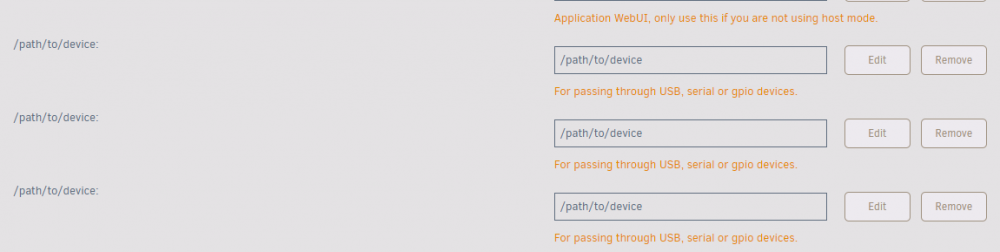
Apologies if this has been talked about/just let me know and I will dig in more. I'm running the ghcr.io/linuxserver/homeassistant container, found via the app store. In addition to that container, I use zwavejs2mqtt. Every time the homeassistant container is updated, unraid brings back the `/path/to/device` template values. Which I do not use. This causes the container not to boot. Does anyone have any advice on this? Is their a null device path I can add for these 3 values or something? Deleting these after each update is rough. Thanks for your time.
-
Does unRAID have app armor or selinux enabled? This pending vulnerability looks like it can be negated by either. https://nvd.nist.gov/vuln/detail/CVE-2022-0492
-
In my case the container complains returns the following error after updating these permissions: <Timestamp> INF Starting tunnel tunnelID=<UUID> Tunnel credentials file 'home/nonroot/.cloudflared/<UUID>.json' doesn't exist or is not a file That file seems to be properly shared: ls -li /mnt/user/appdata/cloudflared/ total 12 <size> -rwxrwxrwx 1 nobody users 188 Nov 27 01:09 <UUID>.json* <size> -rwxrwxrwx 1 nobody users 1938 Nov 27 01:08 cert.pem* <size> -rwxrwxrwx 1 nobody users 249 Nov 27 01:13 config.yaml* Anyone have any ideas? Could someone tell me what their permissions look like on those files and what line endings those files have? Also what version of the container is working for you at this point might be helpful. Thanks for your time.
-
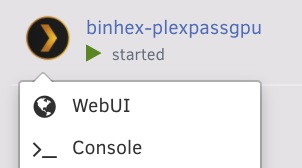
You should be able to open the console from the docker tab: Alternatively, the uri is something like: https://<host>/dockerterminal/<container-name> You can then run `top` to list all processes running, and then you can `pkill -9 <pid>` That should leave you with the container running, but no plex if you shut down all the plex services before they start up again.
-
@limetech I think add_header Cache-Control: no-cache, no-store Would be a safe change. I opened a pull request for this change to get feedback: https://github.com/novnc/noVNC/pull/1532 If I'm overlooking something I imagine they will call it out there.
-
I'll upgrade this evening and take a look at that line and get back to you. `no-store` will help in cases where a user has setup a reverse proxy/vpn that they access novnc based containers through if unraids intent is to make sure the user always gets the must up to date front end build. Currently ISP level caches will cache the novnc files, only browsers respect the `no-cache` header. https://codeburst.io/demystifying-http-caching-7457c1e4eded#885d Outside of the reverse proxy use case I believe you guys are properly cache busting for NOVNC. 🎉 I made a note to ask the novnc guys if they think they should add `no-store` to the embedding docs or if it's too much of an edge case for all users.
-
@limetech I saw this in the fixes. Do these requests also have `max-age=0` set to guarantee the stale content is flushed? If not 'no-cache' will simply lock the stale cache in place indefinitely/until the age is hit. Edit: It looks like `cache-control: max-age=0` is set in 6.9.0 (Woot, not an issue). Is the intent never to have NoVNC resources cached, so Unraid can guarantee updated front end bundles? If so you may want to add `no-store` in addition to `no-cache` so anyone using a reverse proxy to access noVNC will not end up with resources cached at a higher level like their ISP.
-
I'm almost a year late to the party but I would also love to see the docker daemon ripped out and replaced with podman.
-
Over the years I've had different plex client/hardware combos behave differently as far as audio codecs. I had a really bad time getting a fire tv to support the same things as my receiver, and eventually went to an Nvidia shield (At this point I'm not even sure what codecs are being used I just know I am getting 5.1 out, and I don't want to fiddle with anything and risk having to try to resolve things). I would be curious to see if the exact same files play with audio if you transcode them, or optimize the files first. Good luck though!
-
As a bad, quick solution you could add a user script to: rm -rf /mnt/user/appdata/binhex-plexpass/Plex\ Media\ Server/Codecs/ (Or wherever your appdata is) Set it to run on array start, or on a schedule.
-
I have nothing to back up this is your issue, but docker made a large change on November 2nd. They are no longer allowing unlimited downloads from dockerhub hosted repositories. I suspect this could introduce unexpected bugs into how unraid checks for and applies docker updates. https://docs.docker.com/docker-hub/download-rate-limit/ Either way I don't have any good ideas to try. You could forcibly click the check for updates button, and maybe connect over a vpn (Or if you are on a vpn, try connecting off the vpn, you could be being rate limited because others are hitting dockerhub from the same vpn). Hopefully someone else has a better idea of what the cause might be.
-
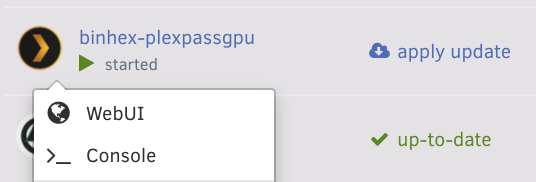
Like it's gone from the dropdown? That's weird/I have not experienced that before. I might make a new container for binhex-plexpass, (stop the old one) point the new container at your old /config and see if the option shows up in the dropdown after that. If it does maybe just use that new container.
-
I have not been passing through a gpu to a vm in the last few months. Eventually I will be transitioning to a Ryzen build and may be able to help more. I suspect some things have changed but I don't know what they are at this time.
-
That typically means you are offline I think (Or can't get a connection to the cloud services/docker images that are trying to be checked)? If you are online you should be able to click check for updates I think.
-
Silly question, have you tried restarting your server (and making sure the linux.io container does not start automatically)? Maybe the linux.io container is not letting go of the gpu for some reason and a system restart will help? I don't see any configuration changes between our systems beyond that you are passing the gpu between docker containers.
-
I just pulled it from the plex ui
-
I'm not sure what else to try here, the only other related thing I have is an nvidia driver patch. Nvidia Driver: 440.59 Plex Version: 1.20.0.3181 Nvidia Unraid Version: 6.8.3
-
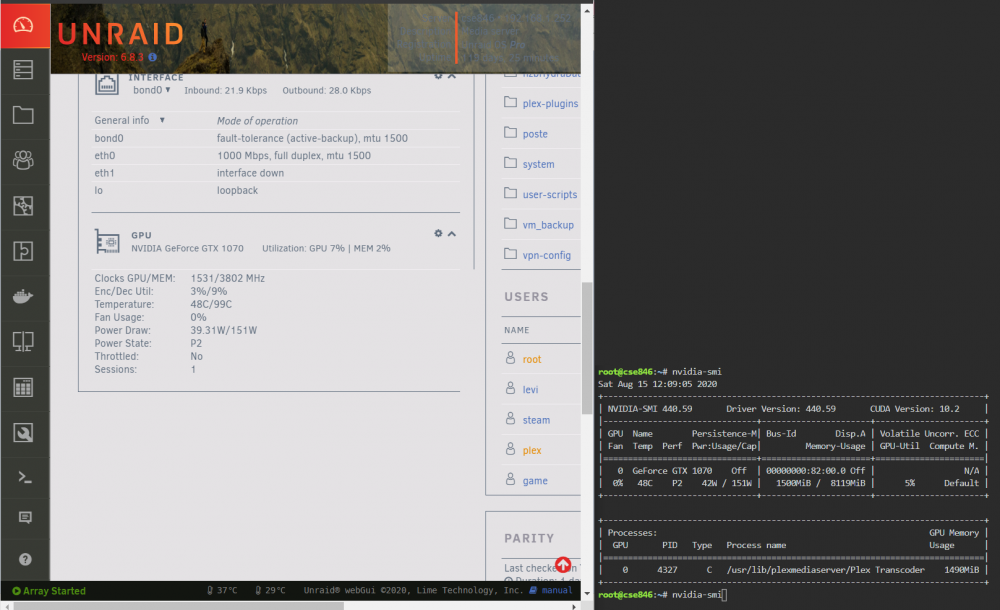
Ah, there we go: I had to encode something really heavy though, a 4k file. The above screenshot is using the GPU Statistics plugin: https://github.com/b3rs3rk/gpustat-unraid and the right is just nvidia-smi.
-
My container params look like so: Do you have both of those set?






