





comet424
Members
-
Joined
-
Last visited
Everything posted by comet424
-
the only other work around other then what i been doing is run another Unraid that only has the virtual smbshares and those are mapped to the main unraid server this way that server only shows the user names as the root shares and it doesnt congest my own server with all the users so my main would have 20 shares i use.. and the other unraid would say hand 100 root username shares pointing to the main unraid and they wont see my main server shares.. all they see the user shares... i guess that would act like an active directory i know i asking alot i just been trying to make things more advanced then just for a few users and sorry in advance i got dyslexia so what sounds good in my head explaining doesnt always come out right
-
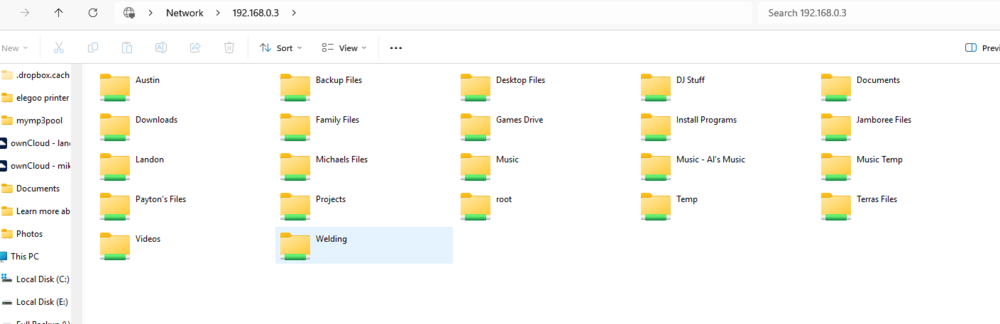
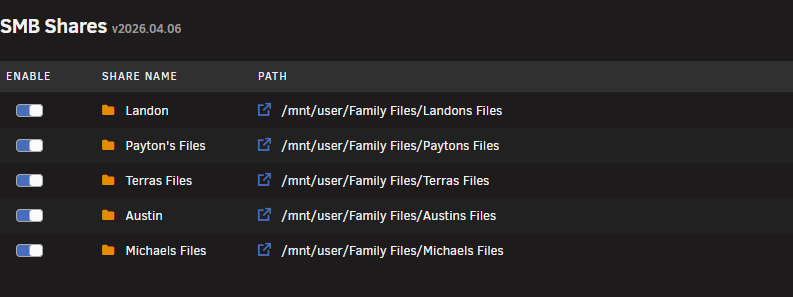
so currently i only added a few users now they all under the root folder.. but since i also wanting to do my kids and there kids and cousins to be able to backup or map to i going to have like 50 60 root folders including my own so each person gets a folder under "Family Files" and i dont want anyone to access it so then i wanted like a Root share "Family" and those root shares austin terras files, landon they all go under "Family" so then each user can access there own user name to backup too or is that too advanced? like i guess maybe its active directly or back in the day cogeco internet when you went to network you would see user/sdfgf user/ewriuwqie user/dsfgdsfg and each user was there computer id like something like that but each user cant access each other i have this setup with SFTPGO and a program that maps a drive letter logging into sftpgo but was hoping something simplier i been playing around trying to find something like how ZiamOS works but its only good for 1 user
-
ya i already have it installed and such i didnt see the symlinkshare but thats the problem i dont want it to be under root as i dont wanna see it on my own server nore so say if i add a user for 20 family members that means i have 20 root shares on top of my 30 root shares i wanna take those 20 root family member shares and place them under a sub share ill get screen shots what i mean
-
is there a way to have nested shares? so instead of say Shares , Landon, michael,michelle,lisa, joe blow they can go under Family Files/landon Family Files/Michael and so on but each user can only access that shared folder so instead of them all showing up in the Root location \\192.168.0.10\landon it be \\192.168.0.10\family files\landon and if not what is it called, what program do i need is it a windows program etc... that allows them the only access to that location i guess like a home directory like you can do in sftpgo each use case as i added like 10 family members so far and the root of my smb server is getting swamped of all the user share folders so i wanna be able to put them all under Family Files and those user names show under there so i dont have like 50 root samba shares .. or if there is some other program also be nice if i can hide all the other folders to that specific user too.. since everything is visiable
-
so how do you do it then? as i know i have that problem you always get with windows and unraid now if you dont have the same user name on unraid as the user of windows the password wont work.. how do you work around it? as i remmeber in the past it was ok then i guess smb version changed and what was it unraid gave issues to match windows user id to match unraid user as i set up custom samaba shares so like landon <user> his root folder is /mnt/user/family files/landon files and the share is landon and i did that for all the family members so they get there own folder but cant access any other folders but i wanna be able to mount a drive letter to it or just access with the password without it throwing a fit windows name isnt the same how do you work around that then? as id still like to be able to have the user change there password too but baby steps lol
-
so i have family members added to the unraid users i have the new smb custom plugin.. so each user gets there own smb share... since i dont see a way for a non root user to login unraid just to be able to change there password like pfsense has a group policy so they can log into pfsense and only thing they can do is change there password does unraid have anything like this to be able to login and change it? i tried searching community apps.. but it be nice if a future unraid be able to allow non root login to the gui just to be able to change there own password also to be able to change there user name i give them so if they change there windows user name they can change unraid username so then you dont have the windows /unraid issues mapping drive letters etc
-
@tjb_altf4 thank you for your help
-
update.. i found System monitor and there was a tab for File System.. and it shows total 33.1 available 12.7 so it did work i apreciate your help as i wasnt sure
-
so i did the install and i found a manual mode and shows resize.. i did resize it and i shut down and edit the template to remove the iso from booting and booted up.. it seemed to work i dont get the error.. but i dont know if it truly worked as i dont know how to see a visualation like in windows you have disk management but i assume it worked
-
so i found i had a iso 24.04 desktop iso i put it in and i set Boot 1 and vm to Boot 2 i guess you use numbers and not letters as i never know there is no info on Boot setting so it gave me desktop and icon Install Ubuntu 20.04 LTS so i guess thats live mode? or least install mode do you happen to know how to properly extend with fdisk? and if not a link to exactly extend it then so i dont bugger up the vm ill also duplicate it incase it breaks
-
ok so that means put the iso back in to put it to boot right its been like 4 years or so since i installed vm just updates ill see if i got a iso of ubuntu 24 then and see what hte live mode does
-
so i dont know ubuntu or linux that great been using windows mostly 40 years but the ubuntu vm i have was saying low diskspace i only use it for Amazon Orders.. but its 19gb of 20.. i did reset the VMs image from 20gb to 32gb and thought it was self fix i saw several regular setups but not for a VM i did tried "sudo parted -l" and says it found more diskspace unused if you like to use it type "Fix" but that didnt do anything read only but how do you resize it in a VM imm running like ubuntu 24 something.. i didnt wanna mess it up so i figured id ask here first before i try anything more
-
so definitely something broken in unraid the dhcp is broken dhcp works with a laptop running windows when i deleted network.cfg network-rules.cfg rebooted unraid couldnt get an ip on either network card i restored network.cfg and rebooted no ips worked just 169 i restored network-rules.cfg and rebooted i was able to access server again dhcp vlans dont work when i deleted the configs when i restored the files the dhcp on vlan restored so there is something funky going on.. the only difference i know of back prior to 7 is i swaped the interfaces of eth0 and eth1 so thats about it so something is funky going on
-
only 1 dhcp server.. pfsense can wol the server but it cant give the static reserved ip address.. or the dhcp server doesnt work.. but once i manually set ip and set to 24 then boom its back working.. i did notice after i upgraded from 7.1.3 to 2.4 version unraid reported corrupted network-rules... so i deleted and rebooted... i did google unraid cant get a dhcp and the ai said there are issues with unraid 7.x and if things dont work delete the network.cfg and networks-rules.cfg and let it re reset itself havent dont that yet just the rules... plus talked about bonding and binding of vms or dockers but everything set for fiber card... so cant figure it out? the fiber card gets dhcp ip address.. but the onboard cant.. i figured it was a realtek issue and 2.4 version so i installed the realtek driver... but that didnt help then next sugesstion was to reboot the unraid twice after installing driver... but that didnt help if i plug a laptop in the same port of the server i get a dhcp so i figured it was a driver issue.. i guess i should try the delete network.cfg and network.rules again and reboot and see if that helps?
-
so i found my wake on lan was having issues after i upgraded to 7.2.4 i found on my realtek card its not getting a dhcp address.. just 169 i figured was cable but tested with a laptop and cable is fine... if i set the realtek to a static ip give it 30 seconds and i can ping that ip address... turn back dhcp and reboot... as if you dont do a reboot the dhcp doesnt try to get a new ip it just keeps the static ip;.. same with port down and back up but when you reboot set to dhcp again it comes up with the 169 so something is wrong its not getting a dhcp ip here is my diagnostics backupserver-diagnostics-20260404-2015.zip
-
@JorgeB ah ok ill stop the dockers currently running on 7.4.2 and i removed the disk 8 and currently doing a party rebuild so thats going to take 15 hours.. so ill monitor it if it comes back through out the day... this last one came on at 4:23 am not dont remember what the others came on at... but will keep monitoring @trurl ah ok ya since the common fix problem cant run currently thats why i dont see those extra warnings... learn something new everyday
-
so i guess i solved it... the pool overlap was due to the vlans not getting an ip address and just getting 169.x when i figured out my switch wasnt trunking my server... i fixed it rebooted server and the pool overlap is gone and the vlans back to getting seperate ips
-
@JorgeB so i deleted the docker image rebooted.. reinstalled the dockers reboot but that overlap pool still there have to figure out also why my vlans arent getting ip address's either they should get an ip but getting 169 so cant find dhcp server i guess k-9-diagnostics-20260324-0747.zip
-
@JorgeB so in safe mode i was once again bombarded with the memstore here is the logs i currently upgrading to 7.4.2 some reason my notifications for latest updates were turned off so maybe its something to do with os and i dunno... but gonna upgrade and see wat happens i also removed and re paritying my array as disk 8 has some errors and re paritying maybe that will fix this issue maybe cuz of disk 8 nothing on it but dunno tardis-diagnostics-20260324-0729.zip
-
@miicar ya ive play with proxmox on a spare comp havent liked it yet but i dont play with it much yet
-
@miicar ya in the 90s we didnt have much just disketts and then cds then trying to use like XP to be a file server or windows 2000 and then i got a 4 bay acer server that i got like 2006 hosted by windows home server 2003 i quickly out grew it hard drives werent big enough back then and i tried to do 2 of the servers to host but ran out.. and no communty apps just windows apps back then all you cared about central spot for files.. ya i plan to get a 7 unraid server but with hard drives and ssds not coming down in price i wont be doing that in the next little while hopefully this year... as i got some other ideas i wanna do so need another unraid
-
@miicar i find it alot of hit and miss i used to use before unraid windows home server which worked great uses 2003 and 2011 but then no more versions and updates were no more.. so i was finding new os so even with these errors and such i get i still like it better then like freenass as its very simple coming from windows home server... sure some issues but still happier then trying to get truenas to work but its always something lol so far pretty happy with the os over all running 6 unraid servers. now like 6 7 years something like that now.... just wish hds and ssds were cheaper cuz its just going up and i need to get some more hard drives lol
-
@JorgeB ok i booted into safe mode.. how long do you wait to say that its probably one of the plugins doing it.. since safe mode doesnt load the plugins... i do notice that some of the warnings dont show up in the system logs.. less warnings so i guess some of the plugins cause warnings and a couple causes the error i forget which one it is but was told thats normal errors from i think unraid connect.. so i let it run 24 hours before i rule out it has to be a plugin?
-
@miicar i dont get it anymore well i do and i dont if i remember correctly what i kinda did was i made sure not to leave unraid dashboard loaded all the time just sitting idle i like to do that but that seems to be one of the problems as i always working on it turning on a docker etc.. so i found that causes some of the authlimits another thing i did back then too was in windows, goto the credientials manager.. and delete the creditials of the windows i using and make a user account on the unraid so if your windows acount is joeblow.. make a user on unraid joeblow.. and to your shares you want... that also seemed to fix it... i still get loss of connection and i think its just cuz windows 11 is so terrible, from the Explorer \\tardis i do and it doesnt erase the drop down. you gotta click the window then back to address bar.. to other problems... in windows 10 seemed better... and i found for large file transfers its hit and miss with windows and not to use jumbo frames it just screws things up.. i currently having other errors so i dealing with that... but give those 2 things a try .. mainly dont leave it open.. and me i actually have like 3 different browswer brands open and leave somethings 1 or 3 of the same unraid dashboard open on different pages same time... so that could be a result to it... that might solve your issue... so thats what i think i did back then 100% cant remember but give that a try seee what happens.. as google doesnt always help and i find some of these error names no one has answers for or you cant even track them down i found out sometimes
-
@JorgeB and can you tell exactly what program did it? as i cant tell since my guess was appdata backup but i no expert and i cant tell from the system logs


