





comet424
Members
-
Joined
-
Last visited
Everything posted by comet424
-
@bmartino1 that link didnt help either just only shows about clicking the circles but i appreciate your help.. i also going to try google more someone has had to solve this issue
-
@bmartino1 ya that code didnt help either Script location: /tmp/user.scripts/tmpScripts/Keep Hard Drives Spun Up/script Note that closing this window will abort the execution of this script curl: (2) no URL specified curl: try 'curl --help' or 'curl --manual' for more information ok ill check out that link
-
@itimpi i wouldnt know i googled how to keep array disks spun up in unraid command line and the google AI spit out those commands for unraid.. but since didnt work thats why i figured id ask here how to do it
-
so it didnt like that code Script location: /tmp/user.scripts/tmpScripts/Keep Hard Drives Spun Up/script Note that closing this window will abort the execution of this script curl: (2) no URL specified curl: try 'curl --help' or 'curl --manual' for more information
-
ah ok.. so these commands are obsolete then.. ill try your code there
-
ill try that what i currently have /root/mdcmd spinup disk1 /root/mdcmd spinup disk2 /root/mdcmd spinup disk3 /root/mdcmd spinup disk4 /root/mdcmd spinup disk5 /root/mdcmd spinup disk6 /root/mdcmd spinup disk7 but that doesnt work
-
@bmartino1 supposedly from the google AI search you just type for disknum in ls /dev/md* | sed "sX/dev/mdXX"; do /root/mdcmd spinup $disknum; done and that spins up the array of all the disks but it doesnt like the mdcmd
-
but i guess its gotta be in the script to run so ill try a copy and paste in a script
-
k that code doesnt work i copy and pasted the line root@Tardis:~# log "Spinning up all array disks..." curl -sS -k --fail -e "http://localhost/Main" \ -c "$COOKIE" -b "$COOKIE" \ --data "csrf_token=${CSRF}&cmdSpinupAll=Spinup" \ http://localhost/update.htm \ || curl -sS -k --fail -e "https://localhost/Main" \ -c "$COOKIE" -b "$COOKIE" \ --data "csrf_token=${CSRF}&cmdSpinupAll=Spinup" \ https://localhost/update.htm bash: log: command not found curl: option -c: blank argument where content is expected curl: try 'curl --help' or 'curl --manual' for more information curl: option -c: blank argument where content is expected curl: try 'curl --help' or 'curl --manual' for more information root@Tardis:~# curl -sS -k --fail -e "http://localhost/Main" -c "$COOKIE" -b "$COOKIE" --data "csrf_token=${CSRF}&cmdSpinupAll=Spinup" http://localhost/update.htm || curl -sS -k --fail -e "https://localhost/Main" -c "$COOKIE" -b "$COOKIE" --data "csrf_token=${CSRF}&cmdSpinupAll=Spinup" https://localhost/update.htm curl: option -c: blank argument where content is expected curl: try 'curl --help' or 'curl --manual' for more information curl: option -c: blank argument where content is expected curl: try 'curl --help' or 'curl --manual' for more information root@Tardis:~#
-
so like /root/mdcmd spinup disk1 should make disk 1 spin up but doesnt and this line for disknum in ls /dev/md* | sed "sX/dev/mdXX"; do /root/mdcmd spinup $disknum; done supposed to spin up all the drives from standby but it complains about the mdcmd
-
@bmartino1 so i looked at the link that is just for stop and starting the array but thats not what i want what i trying to do is keep the array disks always spun up and not go to standby mode. sorry if my dislexia screwed things up in my orginal post i was saying i wanna keep the array disks spun up between 9am to 9pm after that it can go into standby mode after 15 min and that i already got the crontab to run every 10 min between 9 to 9
-
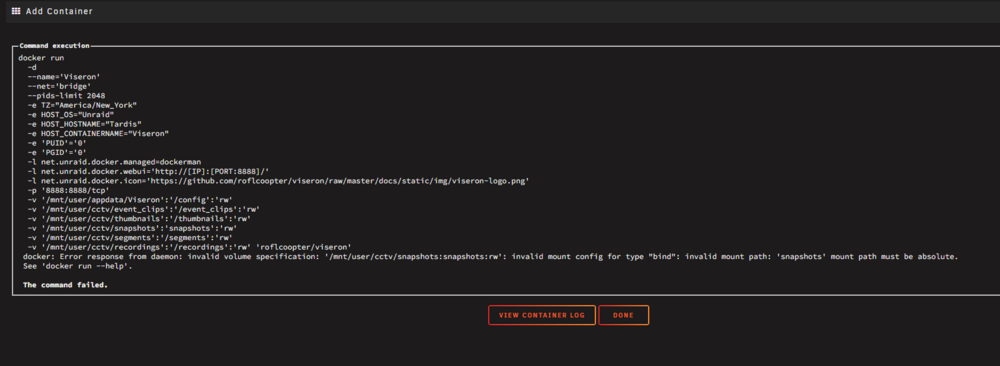
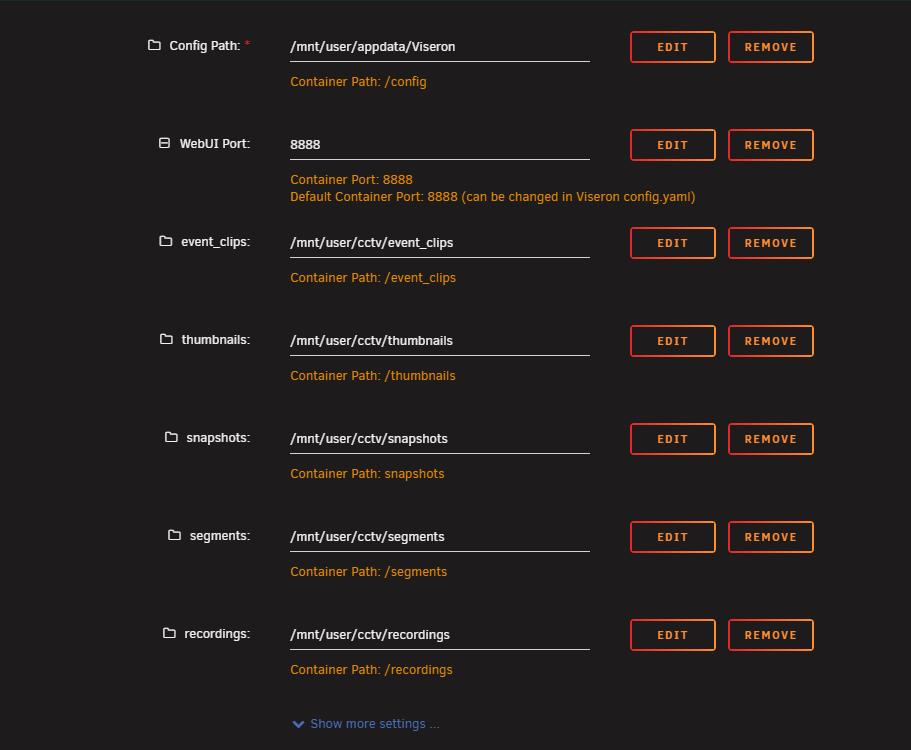
@Porkey how did u set it up do you have any pics ? i thought i did what you did but it just errors out and orphans the container
-
@Doak Steezy sorry delay.. what i ment was i tried both Unraid Docker Ubuntu Docker so a dedicated pc running Ubuntu with docker installed and visereon installed and i tried Unraid Docker... now the logs above are from the Unraid Docker version ok ill try the porks settings those are the ones you set in the template right?
-
so i trying to make the array keep spun up between 9am to 9pm and then after that 15 min spin down i got the crontab settings but when i google how to do the code it doesnt work ive tried this root@Tardis:~# /root/mdcmd spinup disk1 bash: /root/mdcmd: No such file or directory root@Tardis:~# mdcmd usage: mdcmd <command> [arg ... ] root@Tardis:~# mdcmd spinup disk1 /usr/local/sbin/mdcmd: line 35: echo: write error: Invalid argument root@Tardis:~# sudo mdcmd spinup disk1 /usr/local/sbin/mdcmd: line 35: echo: write error: Invalid argument root@Tardis:~# for disknum in ls /dev/md* | sed "sX/dev/mdXX"; do /root/mdcmd spinup $disknum; done bash: /root/mdcmd: No such file or directory bash: /root/mdcmd: No such file or directory bash: /root/mdcmd: No such file or directory bash: /root/mdcmd: No such file or directory bash: /root/mdcmd: No such file or directory bash: /root/mdcmd: No such file or directory bash: /root/mdcmd: No such file or directory root@Tardis:~# for disknum in ls /dev/md* | sed "sX/dev/mdXX"; do mdcmd spinup $disknum; done /usr/local/sbin/mdcmd: line 35: echo: write error: Invalid argument /usr/local/sbin/mdcmd: line 35: echo: write error: Invalid argument /usr/local/sbin/mdcmd: line 35: echo: write error: Invalid argument /usr/local/sbin/mdcmd: line 35: echo: write error: Invalid argument /usr/local/sbin/mdcmd: line 35: echo: write error: Invalid argument /usr/local/sbin/mdcmd: line 35: echo: write error: Invalid argument /usr/local/sbin/mdcmd: line 35: echo: write error: Invalid argument root@Tardis:~# ^C so not sure how you make it work
-
hi i struggling to get the sonarr to rename files and place it in the directory it found it... the search will download a show and it places it just in the transmission download folder but it wont renamed it even though i got the chexk box Checked to rename... and then if i rename it and dont place it in the season folder by the time sonar rescans it re downloads the same file... what do you need to do to make sure it renames? and places the files in the directory season its supposed to do?
-
hi i tried to install this on ubuntu server and it didnt install right . and i installed the docker version and it doesnt work either... the log i guess complains about storage? here is the logs but so far ive not been able to install it on docker ubuntu or docker unraid so much for seemless installi lol text error warn system array login File "/usr/local/lib/python3.10/dist-packages/voluptuous/schema_builder.py", line 281, in __call__ return self._compiled([], data) File "/usr/local/lib/python3.10/dist-packages/voluptuous/schema_builder.py", line 625, in validate_dict return base_validate(path, data.items(), out) File "/usr/local/lib/python3.10/dist-packages/voluptuous/schema_builder.py", line 458, in validate_mapping raise er.MultipleInvalid(errors) voluptuous.error.MultipleInvalid: required key not provided @ data['logger'] 2025-09-29 16:38:13.171 [ERROR ] [viseron.components] - Setup of component logger failed 2025-09-29 16:38:13.171 [ERROR ] [viseron.components] - Failed setup of component logger 2025-09-29 16:38:13.172 [INFO ] [viseron.components] - Setting up component storage 2025-09-29 16:38:13.172 [ERROR ] [viseron.components] - Error validating config for component storage: The /event_clips folder does not exist. Please mount it to the container.. Got {} Traceback (most recent call last): File "/usr/local/lib/python3.10/dist-packages/voluptuous/schema_builder.py", line 281, in __call__ return self._compiled([], data) File "/usr/local/lib/python3.10/dist-packages/voluptuous/validators.py", line 251, in _run return self._exec(self._compiled, value, path) File "/usr/local/lib/python3.10/dist-packages/voluptuous/validators.py", line 381, in _exec raise e if self.msg is None else AllInvalid(self.msg, path=path) File "/usr/local/lib/python3.10/dist-packages/voluptuous/validators.py", line 379, in _exec v = func(path, v) File "/usr/local/lib/python3.10/dist-packages/voluptuous/schema_builder.py", line 855, in validate_callable return schema(data) File "/src/viseron/components/storage/config.py", line 600, in validate_tiers _validate_recorder_tiers(component_config) File "/src/viseron/components/storage/config.py", line 545, in _validate_recorder_tiers _check_tier(_tier, previous_tier, paths, CONFIG_RECORDER) File "/src/viseron/components/storage/config.py", line 473, in _check_tier _check_path_exists(tier, category) File "/src/viseron/components/storage/config.py", line 436, in _check_path_exists raise vol.Invalid( voluptuous.error.Invalid: The /event_clips folder does not exist. Please mount it to the container. During handling of the above exception, another exception occurred: Traceback (most recent call last): File "/src/viseron/components/__init__.py", line 131, in validate_component_config return component_module.CONFIG_SCHEMA(self._config) File "/usr/local/lib/python3.10/dist-packages/voluptuous/schema_builder.py", line 285, in __call__ raise er.MultipleInvalid([e]) voluptuous.error.MultipleInvalid: The /event_clips folder does not exist. Please mount it to the container. 2025-09-29 16:38:13.173 [ERROR ] [viseron.components] - Setup of component storage failed 2025-09-29 16:38:13.173 [ERROR ] [viseron.components] - Failed setup of component storage 2025-09-29 16:38:13.174 [ERROR ] [root] - Uncaught exception Traceback (most recent call last): File "/usr/lib/python3.10/runpy.py", line 196, in _run_module_as_main return _run_code(code, main_globals, None, File "/usr/lib/python3.10/runpy.py", line 86, in _run_code exec(code, run_globals) File "/src/viseron/__main__.py", line 55, in <module> sys.exit(init()) File "/src/viseron/__main__.py", line 51, in init return main() File "/src/viseron/__main__.py", line 40, in main viseron = setup_viseron() File "/src/viseron/__init__.py", line 214, in setup_viseron vis.storage = vis.data[STORAGE_COMPONENT] KeyError: 'storage' error: list of process IDs must follow -p Usage: ps [options] Try 'ps --help <simple|list|output|threads|misc|all>' or 'ps --help <s|l|o|t|m|a>' for additional help text. For more details see ps(1). 2025-09-29 16:38:13.426 EDT [531] LOG: received fast shutdown request 2025-09-29 16:38:13.460 EDT [531] LOG: aborting any active transactions 2025-09-29 16:38:13.463 EDT [531] LOG: background worker "logical replication launcher" (PID 567) exited with exit code 1 2025-09-29 16:38:13.463 EDT [562] LOG: shutting down 2025-09-29 16:38:13.771 EDT [531] LOG: database system is shut down [viseron-finish] Viseron exit code 1 [viseron-finish] Shutdown completed at Mon Sep 29 16:38:13 EDT 2025 [cont-finish.d] executing container finish scripts... [cont-finish.d] 10-postgres: executing... Wait for Viseron to stop... Viseron has stopped! Stopping PostgreSQL... waiting for server to shut down.... done server stopped Waiting for PostgreSQL Server to stop... /var/run/postgresql:5432 - no response PostgreSQL Server has stopped! [cont-finish.d] 10-postgres: exited 0. [cont-finish.d] done. [s6-finish] waiting for services. [s6-finish] sending all processes the TERM signal. [s6-finish] sending all processes the KILL signal and exiting.
-
so on my Pool Drive i trying to move a folder into an existing same name folder but it will not let me.. you can COPY but you can not MOVE example \Main\Test123 <=== if i have files in the directory \Main\New\Test123 <== if i have a folder here with files or if its blank now if i try to do MOVE \Main\Test123 to \Main\New\ it does nothing the check box un highlights and does nothing.. but COPY works but Move just cancels out
-
hi i unable to install this right... it starts with {port:8096} i changed it to like 8018 as you gotta change it there http://[IP]:[PORT:8018]/ the host port 1 field does nothing but still goto port 8096 so when i open window to 192.168.0.3:8018 it doesnt load up a page how do i get this to setup right? logs show docker run -d --name='EmbyServer' --net='host' --pids-limit 2048 -e TZ="America/New_York" -e HOST_OS="Unraid" -e HOST_HOSTNAME="Tardis" -e HOST_CONTAINERNAME="EmbyServer" -e 'TCP_PORT_8018'='8018' -e 'UID'='2' -e 'GID'='2' -e 'GIDLIST'='2' -l net.unraid.docker.managed=dockerman -l net.unraid.docker.webui='http://[IP]:[PORT:8018]/' -l net.unraid.docker.icon='' -v '/mnt':'/mnt':'rw' -v '/mnt/user/appdata/EmbyServer':'/config':'rw' 'emby/embyserver:latest' cbaec2aeb363f363b7f0673851a612c66c89bdc45bd056126544e271da1e4f57 The command finished successfully! text error warn system array login Info FfmpegManager: ProcessRun 'ffmpeg -hide_banner -filters' Execute: /bin/ffmpeg -hide_banner -filters Info FfmpegManager: ProcessRun 'ffmpeg -hide_banner -filters' Process exited with code 0 - Succeeded Info FfmpegManager: FfmpegValidator.Validate complete Info SoftwareCodecProvider: h264, libx264, x264, V-E-libx264 Info SoftwareCodecProvider: hevc, libx265, x265, V-E-libx265 Info SoftwareCodecProvider: mpeg4, mpeg4, MPEG-4 part 2, V-E-mpeg4 Info SoftwareCodecProvider: msmpeg4v3, msmpeg4, MPEG-4 part 2 (MS Variant 3), V-E-msmpeg4 Info SoftwareCodecProvider: vp8, libvpx, libvpx VP8, V-E-libvpx Info SoftwareCodecProvider: h264, libx264, x264, V-E-libx264 Info SoftwareCodecProvider: hevc, libx265, x265, V-E-libx265 Info SoftwareCodecProvider: mpeg4, mpeg4, MPEG-4 part 2, V-E-mpeg4 Info SoftwareCodecProvider: msmpeg4v3, msmpeg4, MPEG-4 part 2 (MS Variant 3), V-E-msmpeg4 Info SoftwareCodecProvider: vp8, libvpx, libvpx VP8, V-E-libvpx Info VaapiCodecProvider: ProcessRun 'ffdetect_vaencdec' Execute: /bin/ffdetect -hide_banner -show_program_version -loglevel 48 -show_error -show_log 40 vaencdec -print_format json Info VaapiCodecProvider: ProcessRun 'ffdetect_vaencdec' Process exited with code 0 - Succeeded Info QuickSyncCodecProvider: ProcessRun 'ffdetect_qsvencdec' Execute: /bin/ffdetect -hide_banner -show_program_version -loglevel 48 -show_error -show_log 40 qsvencdec -print_format json Info QuickSyncCodecProvider: ProcessRun 'ffdetect_qsvencdec' Process exited with code 0 - Succeeded Info NvidiaCodecProvider: ProcessRun 'ffdetect_nvencdec' Execute: /bin/ffdetect -hide_banner -show_program_version -loglevel 48 -show_error -show_log 40 nvencdec -print_format json Info NvidiaCodecProvider: ProcessRun 'ffdetect_nvencdec' Process exited with code 1 - Failed Info App: Completed deleting obsolete AncestorIds2 records Info TaskManager: Queueing task RefreshChannelsScheduledTask Info TaskManager: Executing Refresh Internet Channels Info TaskManager: Refresh Internet Channels Completed after 0 minute(s) and 0 seconds Info ServerConfigurationManager: Saving system configuration Info App: Setting default culture to en-US Info TaskManager: Queueing task RefreshChannelsScheduledTask Info TaskManager: Executing Refresh Guide Info ServerConfigurationManager: Saving system configuration Info App: Starting entry point Emby.PortMapper.ExternalPortForwarding Info App: Setting default culture to en-US Info App: Entry point completed: Emby.PortMapper.ExternalPortForwarding. Duration: 0.0010948 seconds Info App: Starting entry point Emby.Security.PluginSecurityManager Info App: Entry point completed: Emby.Security.PluginSecurityManager. Duration: 2.34E-05 seconds Info App: Starting entry point Emby.Server.CinemaMode.IntrosEntryPoint Info App: Entry point completed: Emby.Server.CinemaMode.IntrosEntryPoint. Duration: 7.59E-05 seconds Info App: Starting entry point Emby.Webhooks.MigrationEntryPoint Info App: Entry point completed: Emby.Webhooks.MigrationEntryPoint. Duration: 0.0018787 seconds Info App: Starting entry point MovieDb.Security.PluginStartup Info App: Entry point completed: MovieDb.Security.PluginStartup. Duration: 0.0006206 seconds Info App: Starting entry point NfoMetadata.EntryPoint Info App: Entry point completed: NfoMetadata.EntryPoint. Duration: 0.0002716 seconds Info App: Starting entry point Tvdb.EntryPoint Info App: Entry point completed: Tvdb.EntryPoint. Duration: 2.65E-05 seconds Info App: Starting entry point MBBackup.ServerEntryPoint Info App: Entry point completed: MBBackup.ServerEntryPoint. Duration: 3.2E-05 seconds Info App: Starting entry point Emby.Server.Implementations.Udp.UdpServerEntryPoint Info App: Entry point completed: Emby.Server.Implementations.Udp.UdpServerEntryPoint. Duration: 0.0005996 seconds Info App: Starting entry point Emby.Server.Implementations.Playlists.PlaylistUpgradeEntryPoint Info ServerConfigurationManager: Saving system configuration Info App: Entry point completed: Emby.Server.Implementations.Playlists.PlaylistUpgradeEntryPoint. Duration: 0.0017851 seconds Info App: Starting entry point Emby.Server.Implementations.Library.DeviceAccessEntryPoint Info App: Setting default culture to en-US Info App: Entry point completed: Emby.Server.Implementations.Library.DeviceAccessEntryPoint. Duration: 0.0002197 seconds Info App: Starting entry point Emby.Server.Implementations.IO.LibraryMonitorStartup Info LiveTV: Loading live tv data from /config/data/livetv/seriestimers Info App: Entry point completed: Emby.Server.Implementations.IO.LibraryMonitorStartup. Duration: 0.0028133 seconds Info App: Starting entry point Emby.Server.Implementations.EntryPoints.AutomaticRestartEntryPoint Info App: Entry point completed: Emby.Server.Implementations.EntryPoints.AutomaticRestartEntryPoint. Duration: 0.0002942 seconds Info App: Starting entry point Emby.Server.Implementations.EntryPoints.KeepServerAwake Info App: Entry point completed: Emby.Server.Implementations.EntryPoints.KeepServerAwake. Duration: 7.96E-05 seconds Info App: Starting entry point Emby.Server.Implementations.EntryPoints.LibraryChangedNotifier Info App: Entry point completed: Emby.Server.Implementations.EntryPoints.LibraryChangedNotifier. Duration: 0.0006107 seconds Info App: Starting entry point Emby.Server.Implementations.EntryPoints.ServerEventNotifier Info LiveTV: Loading live tv data from /config/data/livetv/timers Info TaskManager: Refresh Guide Completed after 0 minute(s) and 0 seconds Info App: Entry point completed: Emby.Server.Implementations.EntryPoints.ServerEventNotifier. Duration: 0.0013428 seconds Info App: Starting entry point Emby.Server.Implementations.EntryPoints.StartupWizard Info App: Entry point completed: Emby.Server.Implementations.EntryPoints.StartupWizard. Duration: 0.0001281 seconds Info App: Starting entry point Emby.Server.Implementations.EntryPoints.SystemEvents Info App: Entry point completed: Emby.Server.Implementations.EntryPoints.SystemEvents. Duration: 0.0001783 seconds Info App: Starting entry point Emby.Server.Implementations.EntryPoints.UserDataChangeNotifier Info App: Entry point completed: Emby.Server.Implementations.EntryPoints.UserDataChangeNotifier. Duration: 5.28E-05 seconds Info App: Starting entry point Emby.Server.Implementations.Channels.ChannelsEntryPoint Info App: Entry point completed: Emby.Server.Implementations.Channels.ChannelsEntryPoint. Duration: 0.0012026 seconds Info App: Starting entry point Emby.LiveTV.EntryPoint Info App: Entry point completed: Emby.LiveTV.EntryPoint. Duration: 0.0007094 seconds Info App: Starting entry point Emby.LiveTV.RecordingNotifier Info App: Entry point completed: Emby.LiveTV.RecordingNotifier. Duration: 0.0010416 seconds Info App: Starting entry point Emby.ActivityLog.ActivityLogEntryPoint Info App: Entry point completed: Emby.ActivityLog.ActivityLogEntryPoint. Duration: 0.0015089 seconds Info App: Starting entry point Emby.Server.MediaEncoding.Api.EncodingManagerEntryPoint Info App: Entry point completed: Emby.Server.MediaEncoding.Api.EncodingManagerEntryPoint. Duration: 0.0005365 seconds Info App: Starting entry point Emby.Notifications.NotificationManagerEntryPoint Info Notifications: Registering event nofitier Emby Server User Notifications Info App: Entry point completed: Emby.Notifications.NotificationManagerEntryPoint. Duration: 0.0064769 seconds Info App: Starting entry point Emby.Server.Sync.SyncNotificationEntryPoint Info App: Entry point completed: Emby.Server.Sync.SyncNotificationEntryPoint. Duration: 0.0008764 seconds Info App: Starting entry point EmbyServer.Windows.LoopUtilEntryPoint Info App: Entry point completed: EmbyServer.Windows.LoopUtilEntryPoint. Duration: 4E-05 seconds Info App: All entry points have started
-
so i run home assistant on VM i use there automatic backup and use the Backup option and i point to \Homeassistant Backups folder and i user the /mnt/unraid_files/Homeassistant Backups as the folder the unraid _files is my nvme that runs the isos vms etc.. but it wont stop the array drives.. i figured when you use /mnt.unraid files it wouldnt spin up the drives but its like home assistant when it access's \home assistant backups folder that its like spinning up all the samba folders is there anyway to stop it.. i even had a share that was cache drive first and then array but it still keeps the drives spinning and i narrowed it down to HA as i had all vms off and all dockers,.. and when i load HA it spins up the entire array i guess when it connects to the \homeassistant backup folder are there any options? that anyone might have done if they in same situation
-
i had a question about the cpu pinning.. ive always done from years ago i skipped the first core for unraid and then started on the 2nd core for vms etc.. i just checked out the cpu pinning page as i havent been there in years now you can cpu pin dockers and cpu isiolation but with the cpu isolation i tried to google but there isnt much information for cpu isolation do you check the first core and reboot and thats dedicated to the OS.. or you hightlight all the cores after the first core.. when i google i read kind if you isolate that cpu no vms or the unraid server can use that cpu.. so how should i do it then or you dont touch cpu isiolation is that for when a cpu is broken?
-
@itimpi ok but i never have that many files open at once... maybe 1 to 10 files open at once ... so far the issue hasnt come back so hopefully things fix it self but i did do a reboot too
-
i had to google what a fuse file descriiptor is or what it does.. the little description doesnt tell anything on how it works what it does to the array. what you physically see what do you see in cpu usage etc. if it will stop lock up i googleed it told me A file descriptor is a unique identifier or reference that the operating system assigns to a file when it is opened. It allows programs to interact with files, sockets, or other input/output (I/O) resources. but still doesnt help me understand what that does but i set it to 6572290 so fingers crossed and ill adjust the cpu pinning stuff and look into adding 128 gig ram from 64 ecc
-
@JorgeB so there isnt a way to exactly know for sure then like not possible to truly narrow it down its a hit and miss kinda thing so ill try that the pinning i havent used pinning just for the vms but i dont use the settings/ cpu pinning thats just at default all un checked as for the number of fuse its set at 40960 so i should set it to 6572290 and what does that actually do? and the flash drive activity shows 4,070,260 reads 455 writes in 1 day 14 hours 49 min up time
-
so i wasnt able to access my unraid i couldnt ssh in.. and took a while when i was able to and went to system logs i see a bunch of php-fpm[10604]: [WARNING] [pool www] child 3703928 exited on signal 9 (SIGKILL) what is it and do the diags show what caused it etc and how can i prevent it tardis-diagnostics-20250807-1920.zip
-
hi i dunno if this will work for my needs or not.. i installed flaresolver... i have Home assistant that runs Gas Buddy plugin.. and it always has cloudflare issues due to wanting it to use a browser;... the programmer of the plugin doesnt know how to use it in a proxy but i just curious is there a way for the gasbuddy plugin connect to the flaresolver.. or link the home assistant? or the programmer has to figure it out?

