





comet424
Members
-
Joined
-
Last visited
Everything posted by comet424
-
ok ill have to re look into it all what you mentioned... you use the sftp to send.. can you do that in a user script?? as i set them in a user script. and i also use the --delete to delete and files to change.. but i guess thats no good for the reduncy backups is there one better then the other? so i can learn another backup solution.. ive played with the syncthing but i never liked it.. so i just stuck with the rsync but found the issues of the file problem problem why i found some videos messed up on the backup server... so running it like this for now rsync -avzue ssh --partial --append-verify --checksum --progress user@server:/source/ /destination/ will that always check the file. i did try rsync -avzue ssh --checksum --progress user@server:/source/ /destination/ --delete it did go slow but i dont know if it repairs that file that is only 10% copied yet still retians its fully done.. when you do rsync -avzue ssh --partial --append-verify --checksum --progress user@server:/source/ /destination/ and it finishes it when you re run it again will it go slow or will it go fast the next time like without the checksum? like does it keep a record that it fully copied the first time wth the checksum? so that the 2nd time it will just zip through.. as i also backup files to my sisters unraid and uses a 3mbp/s connection. so like i found issues i mentioned over the network and then i also update over slow internet as offsite... so i just trying to find the best of both worlds.. is 1 better over then the other? like i know the snapshots but thats really only on truenas and i dont use it cuz i wanted to be able to add hard drives as i go not need all the hard drives same size at once... ill look into borgbackup and restic... is one better then the other?
-
is there a Rsync option when copying files to make sure the file is copied correctly? the situation i found is ... if rsyncing script and if i copying a file from 1 server to another and when it hasnt reached that folder yet.. and the file is only transfered say 10% of the file.. then rsync sees it copys the 10% of the file but copys the time and file stamp and pretends the file is completed... so when you re run rsync and the file is completed... rsync skips over that file thinking its done even though its a false flag that file is only 10% done with a stamp of complete... my question is is there a option that verifies all the file bits are actually sent over like a true file integrity check? i currently use ``` rsync -avzue ssh ``` and if say rsync isnt a good file backup solution what is a better file server backup does everyone recommend as i rsync 80tb+ as backups but who knows now if some files never got replicated correctly.. and i looking for a solution if i make a file and it backup and i made a new change a few times like 3 times and backups but i want that first change is there a way to get backup copy of the 3 changes or i need 3 serveers 1 for daily weekly monthy so it has like different backups?
-
my problem i noticed is i rsync from one server to backup server.. now on the backup server 1 drive failed i had to run the xfs_repair -L after googling. but i didnt know drive lost its partition so its been rysncing to the rest of the drives and filled it up.. as i noticed the server on too long and the rysncing showed out of disk space.. as what i backing up is only 43TB total array is 56TB and when i fixed the drive its 1TB free and its 55TB used not 43TB used... i deleted the lost+found folder but it deleted 2gb.. i ran the rysnc --delete but i guessing duplicated files are now on the other drives cuz of the 1 failure... so say this is my movie.mp4 was on the failed drive but now its on the other drives... buy the rysnc --delete doesnt delete the 2 copies now is there a way to force rysync to delete the duplicate copies.. i tried looking at ubalance but it didnt have any feature like that.. or do you just format all the drives and resync over to get back to 43tb instead.. i guess thats what they call symb links as it points the file to a certain drive but now i have 2 copies of same file... and is there a way to Unraid when a drive fails.. to text me to Send to HOME ASSISTANT... or an email or so.. or is there a way to not allow Rsync to run on the host side when the remote side a Drive failed... is there any options like that out there?
-
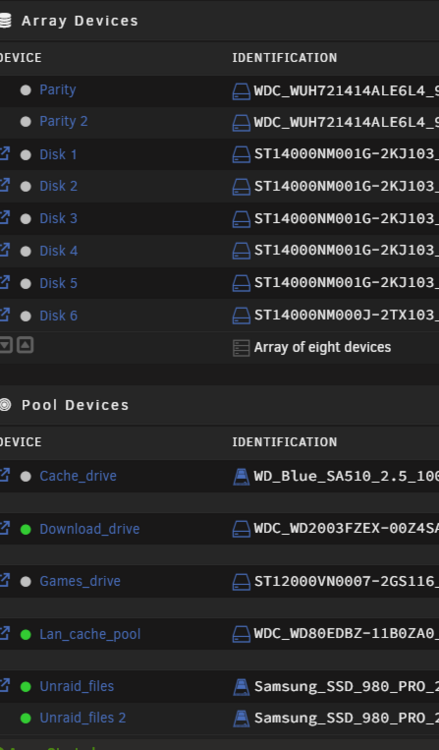
my main server is a ryzen 5800x 8 core cpu and 32gig ecc ram so my drives are like this in the pic.. but i still find is slow as molasses even if you play a video off the array it can be slow even if the drives are spinning and not sleeping so i have 1 drive for Cache sata, 1 drive for Lan Cache, as my internet slow less then 5megbit so i use a lanche.. a download drive for misc downloads and then i move to array games drive i was playing with for network share so you only have to install game 1 location but have a dual boot windows 10 11 and point to it was playing with it and then i have dual 2tb nvms for my unraid files.. iso, vms, appdata as i found plex was always slow and still slow at times... i using a Asus ROG STRIX X570-E motherboard so only has 2 nvmes on there your setup i take it ur using 4 nvmes? and if so how do you do it... and do you know if the iperf test is getting 10 gig cuz i confused about 1.25 and what i get is 1 or its the 9... and ya its so annoying when you copy a file it will even stop the video or it wont even allow a video to start in vlc it will just keep running that yellow line for loading and it may stay stuck 5 min... till the copying is stuck.. is that all due to the copying straight to the array.. i guess truenas doesnt have this issue? but being free wasnt fezable since i needed to buy 1 drive at a time and ended up buying 5 unraid licenses just so i can go 1 2 drives when they affordable and now western digital has 32TB drives could use a couple of those and just use my 14tb drives for something else lol and would mirror 2 sata ssds improve things? or 4 or i seen you can put 2 nvme in 1 single sata slot with the enclosure would that improve things or still capped at 500mbs
-
ok i just have 1 1TB sata SSD for cache drive is that good enough or do you need to have like 2 to mirror them.. and will that speed up copying too if your copying from a pool drive like a download or a cctv drive pool to the array... as i try to speed up things like with the 10gig nic but i find if i move files 2 moving large files and trying to stream 1 video on the same desktop i didnt think there be any slow downs as i have 10gig nics so it would max out the hard drive speeds.. so when copying files to the array is taxing the system on IO is that the same for like TrueNas with there raid stuff does it get taxed the same or is it different? not like i cant run truenas anyways as i cant afford 3 or 4 large hard drives in one shot so that i cant really test just curious.. so if 2 streams are accessing 1 hard drive do you see chunking? and is there anyway to fix that... do you guys recommend like moving Media Files to a 2nd server just for watching movies tv shows.. and the main server keeps a back up of the videos does the backups of kids files, documents photos etc.. and i tried googling. above about the 10gig stuff i think its saying my 10gig nick only operating at 1gb as the 9Gbit/s is should be least 90Gbits to get close to the 10Gig network so how do you 2 guys setup your media server to get the best out of the system... like all in one i have or like 2 seperate... as i have 5 unraid servers i bought 3 are home servers and 2 are off site at sisters house. this way i have off site backup too.. but always looking to get best speed as i can.. without spending a fortune on needing the same hard drives like with truenas
-
also what is the pnpm error too how you fix that?
-
@DanielMayers for me i got it to work i had to re format the drive.. somehow unraid or UD plugin or just a freak of nature the SSD lost its partition lucky i didnt have anything on it.. but for me i didnt know and i do not know if it will loose it again but thats what i found i had to click the X to clear the disk and re format it.. but unclear how it lost the partition as it is a automount and script i have auto dismounts after copying so its not like pulling the drive while its running.. it gets unmounted.. so very confused but its working again but who knows when or howlong till the next time.. but thats how i was able to get it back to working
-
auto and probably cuz i dont copy everything it a cache drive.. and just straight to the array.. and for me i have it set for auto for turbo mode probably why also if i copy a couple files i cant even watch a movie off the same computer even with 10gig cards it stutters and stops and here i figured i should be able to do both without stuttering or not playing... if you wanted a media server for streaming to say 5 people without stuttering would you want only 1 computer to to have like plex and it does nothing else and i guess no parity drives? as i trying to get best performance but i guess you loose best performance to the feature i wanted different sized hard drives and add hard drive when i can afford it where as truenas you gotta buy all the drives at first but i guess it has better performance and do you know from the ipfers what speed am i getting is it 10gig or is 1gig or is it inbetween not sure how to understand all that info
-
i not 100% sure on the readings.. i used the iperf3.. and i wanna know is it copying at 10gig network speed or 1gig network speeds. since i bought 10 gig cards and a switch... but it seems when i copying unraid to unraid my spinning hds only getting 33megs/s its howing on reading.. and i disabled my onboard nics as i use it for management port to turn on the servers.. but if this is wrong readings for 10gig what should the values look like? i noticed issues as it was copying 100 gig unraid back files to my main server.. and it was taking more then an hour ^Ciperf3: interrupt - the server has terminated root@Rambo:~# iperf3 -c 192.168.0.3 Connecting to host 192.168.0.3, port 5201 [ 5] local 192.168.0.23 port 41202 connected to 192.168.0.3 port 5201 [ ID] Interval Transfer Bitrate Retr Cwnd [ 5] 0.00-1.00 sec 1.07 GBytes 9.18 Gbits/sec 61 467 KBytes [ 5] 1.00-2.00 sec 1.07 GBytes 9.17 Gbits/sec 93 478 KBytes [ 5] 2.00-3.00 sec 1.07 GBytes 9.16 Gbits/sec 4 532 KBytes [ 5] 3.00-4.00 sec 1.07 GBytes 9.19 Gbits/sec 6 484 KBytes [ 5] 4.00-5.00 sec 1.07 GBytes 9.16 Gbits/sec 27 478 KBytes [ 5] 5.00-6.00 sec 1.06 GBytes 9.11 Gbits/sec 10 478 KBytes [ 5] 6.00-7.00 sec 1.06 GBytes 9.08 Gbits/sec 401 464 KBytes [ 5] 7.00-8.00 sec 1.06 GBytes 9.10 Gbits/sec 43 509 KBytes [ 5] 8.00-9.00 sec 1.08 GBytes 9.24 Gbits/sec 0 535 KBytes [ 5] 9.00-10.00 sec 1.07 GBytes 9.17 Gbits/sec 13 509 KBytes - - - - - - - - - - - - - - - - - - - - - - - - - [ ID] Interval Transfer Bitrate Retr [ 5] 0.00-10.00 sec 10.7 GBytes 9.16 Gbits/sec 658 sender [ 5] 0.00-10.00 sec 10.6 GBytes 9.15 Gbits/sec receiver iperf Done. root@Rambo:~# iperf3 -c 192.168.0.3 Connecting to host 192.168.0.3, port 5201 [ 5] local 192.168.0.23 port 51466 connected to 192.168.0.3 port 5201 [ ID] Interval Transfer Bitrate Retr Cwnd [ 5] 0.00-1.00 sec 1.07 GBytes 9.19 Gbits/sec 405 458 KBytes [ 5] 1.00-2.00 sec 1.06 GBytes 9.11 Gbits/sec 0 526 KBytes [ 5] 2.00-3.00 sec 1.06 GBytes 9.10 Gbits/sec 82 665 KBytes [ 5] 3.00-4.00 sec 1.06 GBytes 9.14 Gbits/sec 8 450 KBytes [ 5] 4.00-5.00 sec 1.07 GBytes 9.16 Gbits/sec 98 452 KBytes [ 5] 5.00-6.00 sec 1.06 GBytes 9.14 Gbits/sec 7 447 KBytes [ 5] 6.00-7.00 sec 1.07 GBytes 9.15 Gbits/sec 72 472 KBytes [ 5] 7.00-8.00 sec 1.07 GBytes 9.17 Gbits/sec 1 461 KBytes [ 5] 8.00-9.00 sec 1.07 GBytes 9.23 Gbits/sec 94 535 KBytes [ 5] 9.00-10.00 sec 1.06 GBytes 9.13 Gbits/sec 179 5.66 KBytes - - - - - - - - - - - - - - - - - - - - - - - - - [ ID] Interval Transfer Bitrate Retr [ 5] 0.00-10.00 sec 10.7 GBytes 9.15 Gbits/sec 946 sender [ 5] 0.00-10.00 sec 10.6 GBytes 9.14 Gbits/sec receiver and here the diganostics of the 2 servers rambo-diagnostics-20250415-1214.zip tardis-diagnostics-20250415-1214.zip
-
on my one unraid server i getting some errors and not sure how to fix them or whats causing it? and not sure of these other errors too i did google and found i guess its about the connect app for the one but not sure about the others Apr 15 11:49:06 Rambo kernel: x86/split lock detection: #AC: crashing the kernel on kernel split_locks and warning on user-space split_locks Apr 15 11:49:06 Rambo kernel: ACPI: Early table checksum verification disabled Apr 15 11:49:06 Rambo kernel: floppy0: no floppy controllers found Apr 15 11:50:03 Rambo mcelog: failed to prefill DIMM database from DMI data Apr 15 11:51:32 Rambo rc.local: ERR_PNPM_META_FETCH_FAIL GET https://registry.npmjs.org/@pnpm%2Flinux-x64: request to https://registry.npmjs.org/@pnpm%2Flinux-x64 failed, reason: Apr 15 11:51:32 Rambo rc.local: This error happened while installing a direct dependency of /root/.local/share/pnpm/.tools/@pnpm+linux-x64/10.7.1_tmp_3200 Apr 15 11:51:32 Rambo rc.local: ERROR Command failed with exit code 1: /usr/local/bin/pnpm add @pnpm/[email protected] --loglevel=error --allow-build=@pnpm/exe --config.node-linker=hoisted --config.bin=/root/.local/share/pnpm/.tools/@pnpm+linux-x64/10.7.1_tmp_3200/bin Apr 15 11:51:35 Rambo rc.local: Interface "tunl0" added. Warning: no bandwidth limit has been set. Apr 15 11:52:14 Rambo root: Error [ERR_MODULE_NOT_FOUND]: Cannot find package 'execa' imported from /usr/local/unraid-api/dist/cli.js rambo-diagnostics-20250415-1155.zip
-
im guessing it lost its partition table.. i found the disk log i guess it lost its ntfs is reason its grayed out i guess? ``` Apr 13 08:05:24 mitchsserver kernel: ata5: SATA max UDMA/133 abar m131072@0xfce80000 port 0xfce80300 irq 52 Apr 13 08:05:24 mitchsserver kernel: ata5: SATA link up 6.0 Gbps (SStatus 133 SControl 300) Apr 13 08:05:24 mitchsserver kernel: ata5.00: ATA-11: WDC WDS100T2B0A-00SM50, 401020WD, max UDMA/133 Apr 13 08:05:24 mitchsserver kernel: ata5.00: 1953525168 sectors, multi 1: LBA48 NCQ (depth 32), AA Apr 13 08:05:24 mitchsserver kernel: ata5.00: Features: Dev-Sleep Apr 13 08:05:24 mitchsserver kernel: ata5.00: configured for UDMA/133 Apr 13 08:05:24 mitchsserver kernel: sd 5:0:0:0: [sdc] 1953525168 512-byte logical blocks: (1.00 TB/932 GiB) Apr 13 08:05:24 mitchsserver kernel: sd 5:0:0:0: [sdc] Write Protect is off Apr 13 08:05:24 mitchsserver kernel: sd 5:0:0:0: [sdc] Mode Sense: 00 3a 00 00 Apr 13 08:05:24 mitchsserver kernel: sd 5:0:0:0: [sdc] Write cache: enabled, read cache: enabled, doesn't support DPO or FUA Apr 13 08:05:24 mitchsserver kernel: sd 5:0:0:0: [sdc] Preferred minimum I/O size 512 bytes Apr 13 08:05:24 mitchsserver kernel: sdc: sdc1 Apr 13 08:05:24 mitchsserver kernel: sd 5:0:0:0: [sdc] Attached SCSI disk Apr 13 08:07:34 mitchsserver emhttpd: online: WDC_WDS100T2B0A-00SM50_200802A003DE (sdc) 512 1953525168 Apr 13 08:07:37 mitchsserver emhttpd: read SMART /dev/sdc Apr 13 08:07:59 mitchsserver unassigned.devices: Partition '/dev/sdc1' does not have a file system and cannot be mounted. Apr 13 08:22:59 mitchsserver emhttpd: spinning down /dev/sdc Apr 13 09:56:25 mitchsserver emhttpd: read SMART /dev/sdc Apr 13 10:11:26 mitchsserver emhttpd: spinning down /dev/sdc Apr 13 17:42:46 mitchsserver emhttpd: spinning up /dev/sdc Apr 13 17:42:46 mitchsserver emhttpd: read SMART /dev/sdc ``` gonna format and see if it fixes itself
-
is there a temp fix to make a drive mountable so i can copy files to it.. since no fix yet is there a command line that i can run that force it to mount as id like to be able to copy files to a removable hot swap drive but right now i cant since its locked me out
-
all my unraid servers have this error ``` warning: `cat' uses wireless extensions which will stop working for Wi-Fi 7 hardware; use nl80211 ``` is it something to worry about or just ignore it.. and can cat command be upgraded to not throw this warning? and i thought cat command is for displaying inside files? but if its nothing to worry about i just ignore it but i figured id ask
-
im guessing it might be the plugin how it has changed in the plugins folder it used to be r8168.plg but when i reinstalled it it is now unraid-r8168.plg and also has its own sub folder r8168-driver..maybe cuz things changed caused the issue lease its working now
-
so i had the right plugin installed in the first place then so i have to re install it.. it is working now with 8125 from the link you sent.. downgrading didnt fix the UD issues so i guess its a new bug .. so maybe cuz i deleted the r8168 plugin it made it work? as i back up and running if i known id told my sister to delete that plugin lol so wouldnt had to drive so much lol but its working.. i appreciate the help so far.. i guess i can re upgrade back to 7.0.1 must have had a glitch when downgrading
-
i seen i had the file unraid-r8168.plg on the usb drive guess that was the wrong one.. i just downloaded the file and copied to the usb and ill get back to ya if it works or not.. weird how the downgrade caused these issues
-
nvm i seen deeper in the link to download the file and copy it to the usb
-
and how do i install that plugin
-
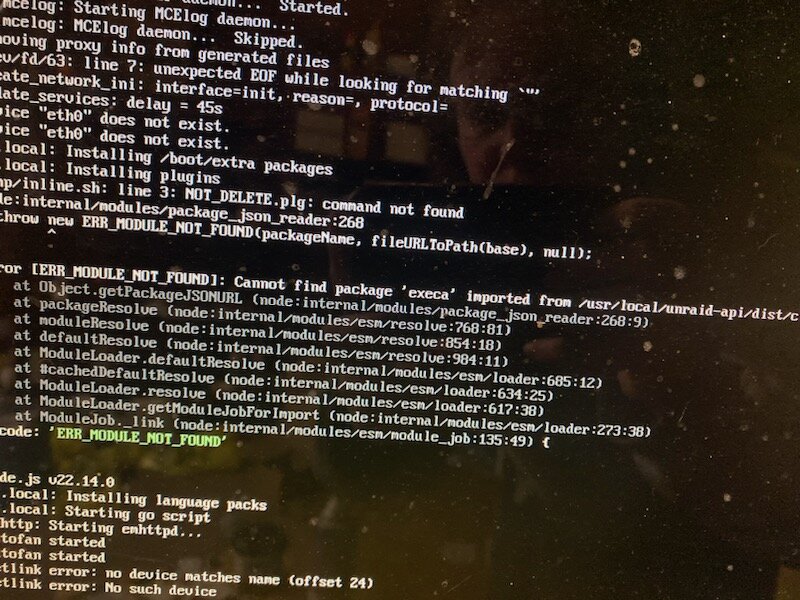
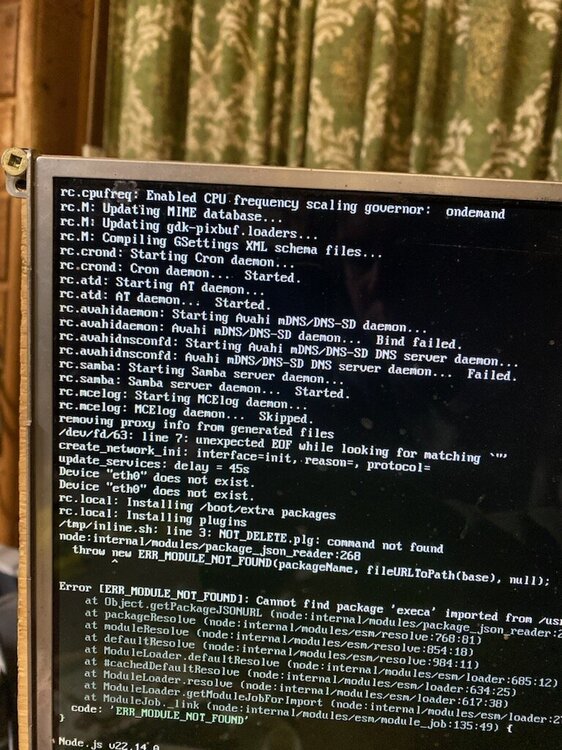
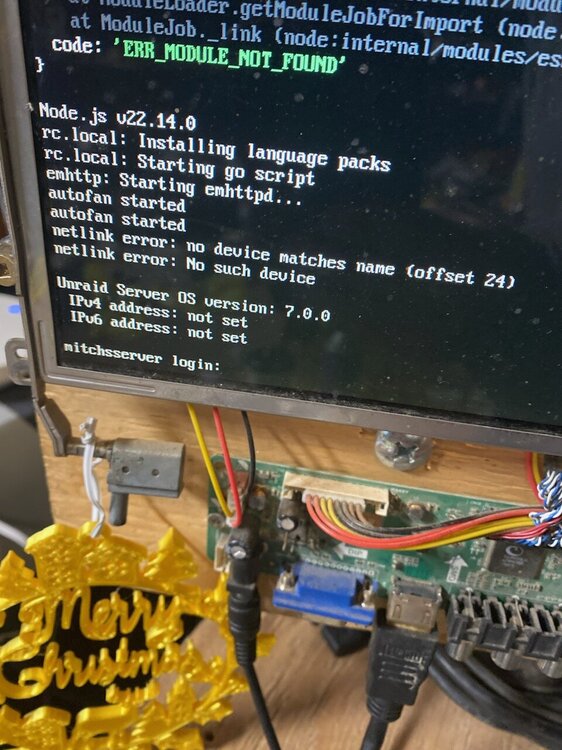
mitchsserver-diagnostics-20250411-2005.zipmitchsserver-diagnostics-20250412-1328.zip so here 2 diagnostics sorry delay i had to drive 6 hours to get you this diagnostic file.. youll notice the network.cfg we altered and the networkbackup.cfg is the orginal as we tried to google options to alter network.cfg file to work hopefully it has info how to fix things
-
on my one server i was having issues with the UD Devices plugin showing drives unable to mount.. so i decided to downgrade from 7.0.1 to 7.0.0 i did and rebooted.. and it never recovered.. it boots up and login but ip is always 169 i tried editing the network.cfg to set a static ip and still got 169 i tried deleting the network.cfg same issue but there is some errors above the login i wondering if it corrupted downgrading?
-
my one unraid server running 7.0.1 when you have and ssd shoved in for removable it automaticlly goes grayed out mount... if you do a reboot of the computer when you log back in its still grayed out not sure whats going on? any logs tell ya anything and on my main server i found my one 5TB drive shows up and sometimes disappears and i dont see anything in the logs as i also rebooted and sometimes come back it just hides itself in the historical area.. ill get diagnostics when it happens again mitchsserver-diagnostics-20250411-2005.zip

-
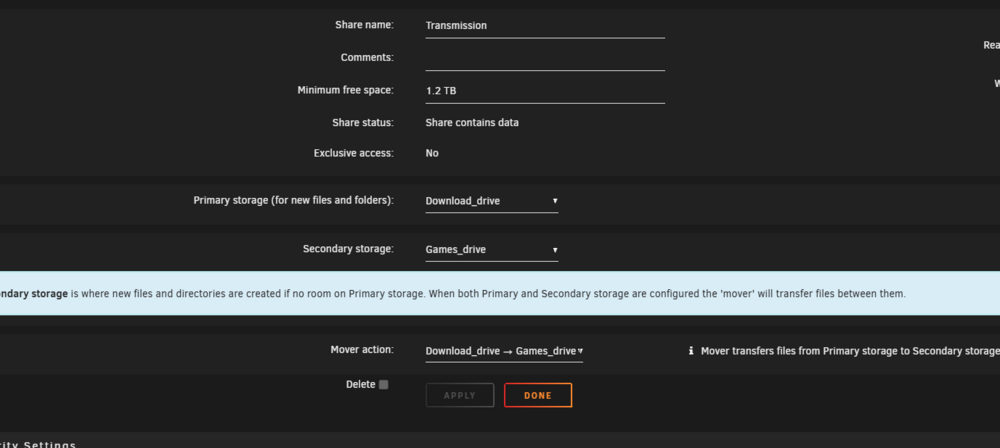
i guess you can call this a bug its throwing error saying files are on my games drive which is true cuz i set it as secondary storage.. so fCP shouldnt be picking this as an error and i seen there is a glitch when you add a second storage.. it defaulted min space to 1.2TB i was wondering why all the files moved from my download drive to the games drive... so thats messed just noticed that now yet have set the 2nd storage months ago

-
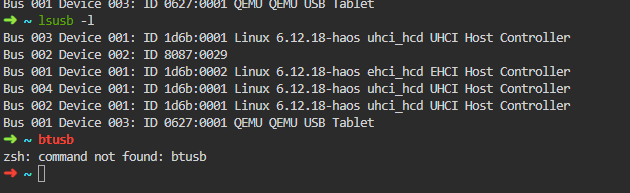
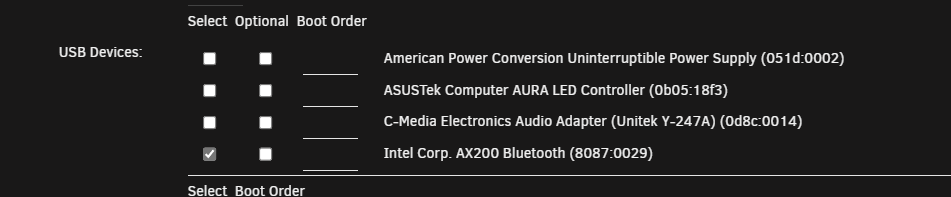
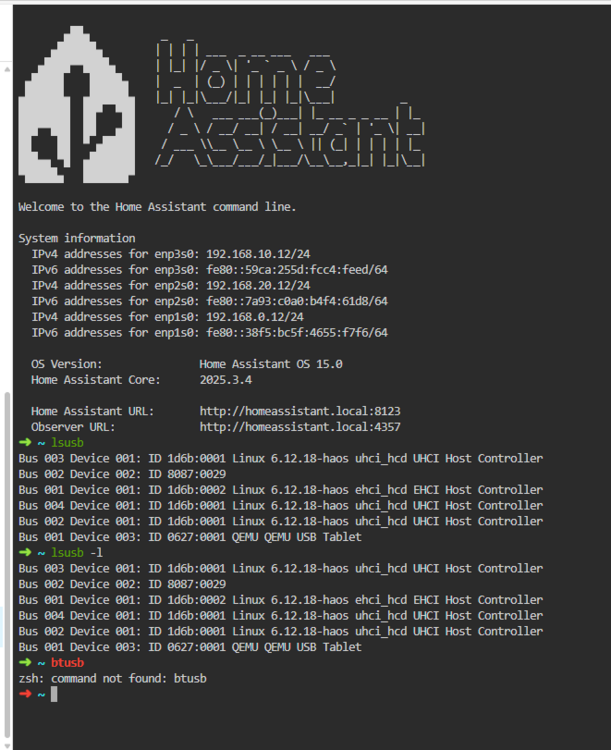
on my motherboard i have an onboard bluetooth... in the vm page i add the check box.. to pass through it.. but im the vm it doesnt see it and i ran the lsusb from i read about usb dongles it doesnt see it there either i just get how does one able to pass through so it can see it ? i think its the blank spot in the home assistant that is the bluetooth but it doesnt pass the bluetooth info??
-
i seemed to fixed it i guess i ended up uninstalling unraid 7.0.0 back to 6.0.14 then a reboot... then re instal 7.0.0 download it... then reboot and then that seemed to fix it its not closing vnc so not sure why that fixed it or what went wrong must been a glitch in the OS download i dunno
-
on my one unraid system i wanted to setup a Windows 11 machine.. but the VNC connection will not stay on i connect and maybe after 30seconds 1min the mouse doesnt move and then VNC disconnects... i currently using unraid 7 so whats causing this issue? i dont see nothing wrong in logs for errors... how you fix this annoying thing


