





sittingmongoose
Members
-
Joined
-
Last visited
Everything posted by sittingmongoose
-
Hmmm still didnt work...weird. Something is funky, nvidia isnt showing up either and that works perfectly in plex and tdarr. Odd.
-
I thought you shouldnt use modprobe if you are on 6.9.2?
-
Thanks, didnt work for me still. I am actually trying with emby not Plex. But I also cant get emby working with nvidia either...using settings from tdarr that work and trying my plex docker settings. running 6.9.2 so not sure whats going on. Plex works with nvidia currently.
-
So I removed the lines from my go file. How did you go about creating the empty file? I am a complete noob so I am struggling here.
-
So I got v2 setup and the node. Added the nvidia parameters to my node docker(plex works with my p2000). Selected the Winsome H265 NVENC plugin, turned on a gpu worker is its "working" but unraid isnt showing any processes on nvenc. So i am not quite sure if its actually working on GPU. I have a cpu worker disabled currently. To add to it, if I increase GPU workers, it works and my cpu usage doesnt go up.
-
So I am trying to create a windows 10 VM. I am using 6.9 beta 25 and an Intel 9900k. I am trying to pass through the iGPU to the VM. When I select it in the template, click update, it just goes back to VNC. When I go into edit again, it has VNC as GPU 1 and iGPU as GPU 2...I dont get any errors or anything and I have tried a reboot. I have gotten this working with another windows 10 vm before. Not sure what happened now. iGPU is not doing anything else. The weirder thing is when it changes it to make the iGPU the 2nd GPU, it boots, and windows sees the iGPU. But its as a second monitor... I also can't change my vdisk location from auto to manual. If I change it, hit update, it just reverts back to auto. Not getting any errors about any of this. syslog.txt
-
Switched from Sweden to CA-Montreal and now PIA via OpenVPN works as expected. Thanks! Looking forward to moving to wireguard in the future.
-
So I have been using this build of qbittorrent and it worked fine up until a day or so ago. Are you saying there is another build that should work?
-
So if we use PIA and this container it just won't work currently? My current config isn't working, but moving to next gen configs seem like they don't work for different reasons? Anyone have a solution for PIA users?
-
Os usb is of course excluded from my statement about usb. you might need at least 1 drive to start the array. But if you use the 2 sata ports your golden.
-
It has been extremely good for me. No problems at all. Only thing you need to be aware of is unraid doesn’t like usb hard drives in the array. It will work, but it can finicky because the naming can change on reboot. This isn’t a problem with the odroid though. 10/10 would recommend.
-
I have my H2+ running Unraid. Are you able to boot into gui mode or memtest from the flash drive? I havent been able to get that to work....not that its really needed it just bugged me. I am also having a problem with temp and fan sensors not being recognized after I click apply in system temp..but I think thats a plugin problem. Otherwise my experience is pretty good. Stable as hell, and pretty speedy. I am comparing it to my 9900K overclocked to 5ghz with very fast nvme storage and a ton of ram. I am currently waiting for preclear to "erase" my drives so in a day or so I will be able to test vms and a handful of dockers.
-
Im 4thing this issue....When I first load in the plugin, it detects everything. Then when I hit apply, all of my sensors and fan disappear. Cant get it back until I completely wipe it out. Running beta 25.
-
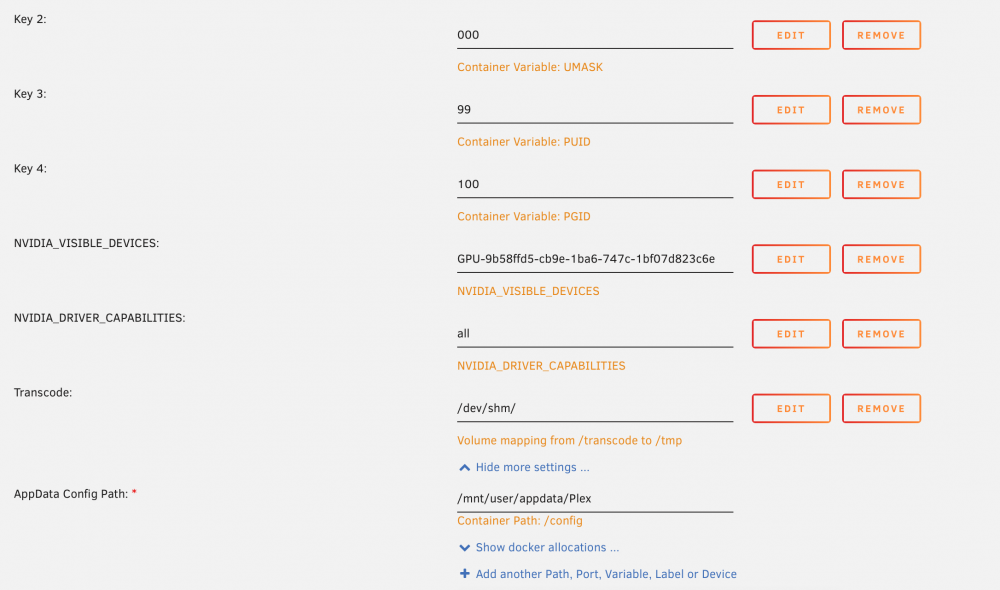
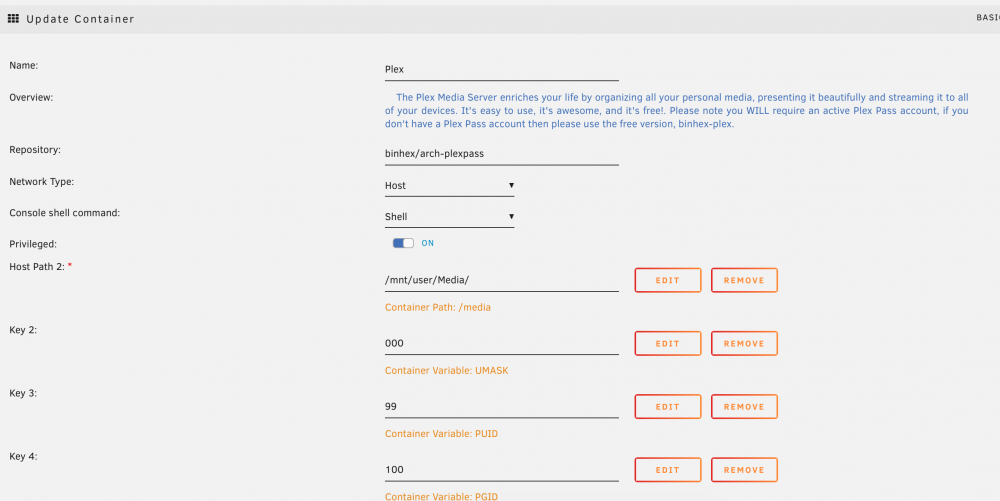
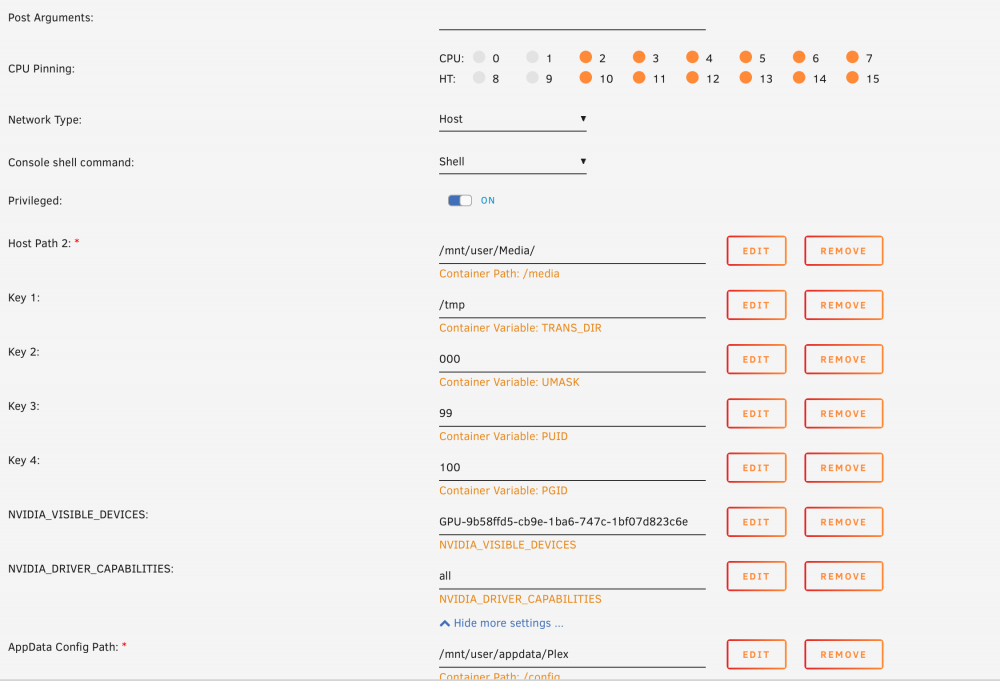
I am having an issue getting ram transcoding working again in Plex. I did, for the last year, have it just set to /tmp. Then I was in one of these forums and it was advised to change it to another way that maps /tmp. Which didn't work for me. Then I tried going back to straight /tmp and it is no longer working. I currently have it set to /dev/shm/ but that doesn't seem to be working. I am getting not enough space error when many people are transcoding. I have 64gb of ram though, so space isn't an issue. I just think its mapped wrong. In Plex its set to /transcode. I am attaching screen shots of my docker config.
-
I get my h2+ today. I’m am going to put it through it’s paces in windows and then I’m converting it to unraid to replace my pi4 with diet pi. I’ll post my feedback here at some point in the week.
-
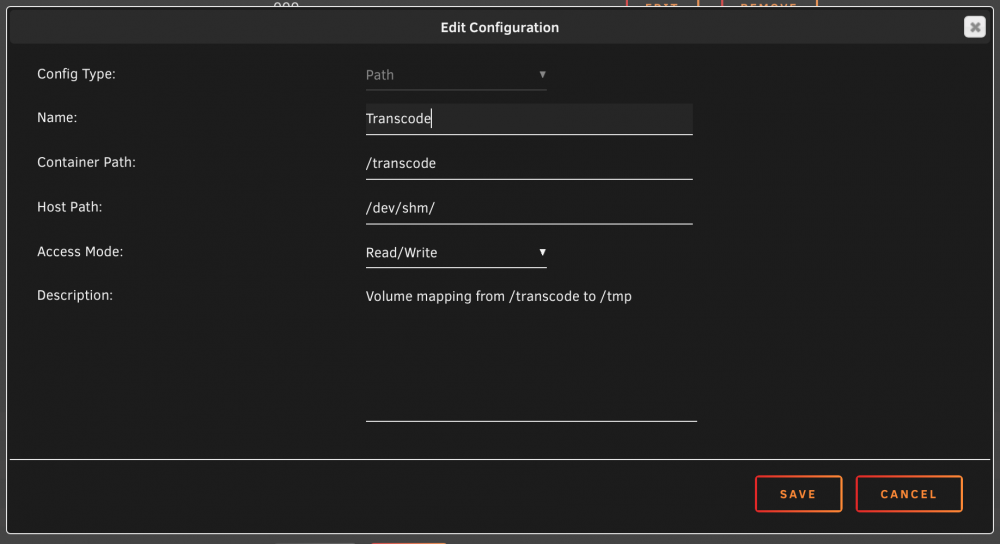
Still getting lots of errors, no plugins and I adjusted the /tmp stuff. 2020-07-15 00:48:30,983 DEBG 'plexmediaserver' stderr output: ERROR: Could not open the input file (No such file or directory) Edit: Also, followed that guide above to "fix" transcoding to ram. didn't work though. I ended up mapping /dev/shm to /transcode and pointing Plex to /transcode. Still getting the above error though. In the image is now what I have for ram transcoding, I think its working but its kinda hard to tell.
-
I removed subzero and also changed my transcode directory as indicated above. I will note though that my Plex transcodes were hitting ram. So that's weird, but I changed them to match what paper blankets posted. Hopefully I don't get more errors. Edit: No errors so far! Edit 2: errors are back.......
-
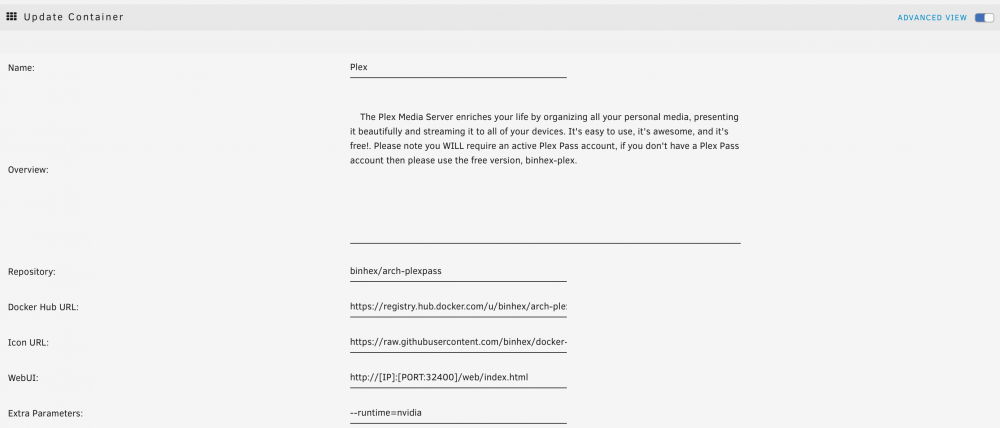
I have subzero and trakt installed as plugins. I uninstalled Trakt to see if that does it. Here are my settings for docker.
-
Yea I'm still getting this error.
-
I am running version 21 Stable. It is working like 85% of the time. Its just a bunch are stuck with a few MBs left. Edit: I also tried using Binhex and it has the same problem. Edit 2: Also tried the Testing branch and that didn't help.
-
I have had NZBGET running well for a long time now. I have like 8 servers to feed it and normally don't have any problems. I have noticed recently though many of my downloads are stuck with like 1MB left to download. The only error I get is "[ERROR] Could not read from TLS-Socket: Connection closed by remote host". My servers all are up and working. Any help would be awesome!
-
Just wanted to note, I am having this issue as well. None of the suggestions above helped me.
-
Thanks!
-
2020-06-02 19:23:42,027 DEBG 'plexmediaserver' stderr output: ERROR: Could not open the input file (No such file or directory) Getting this error in Plex now...Plex keeps going down every half an hour or so.
-
Is there a way to send data from my current drives in my array (22 disks) to my 1 new drive? I would like to pull some data off the current ones I have are almost full and I keep getting warnings saying they're filling up. Adding a new 14tb now so it would be nice to syphon the data from my array into it. I don't see a way to select multiple sources though in unbalance.


