





rutherford
Members
-
Joined
-
Last visited
Everything posted by rutherford
-
@wcg66 pihole huh. I can relate to that, and perhaps that does have something to do with some Roon discovery issues. Short story for ya! I was also running pihole under a docker. I was doing it because I wanted it the DNS level blocking, it's terrific, if a bit restrictive. I also had pihole doing dhcp because my router, at the time, didn't support manually specified DNS servers. Everything was running swimmingly, until a power outage, and my ups didn't make it through. On restart, unraid wasn't getting an ip for its main interface from pihole docker! Duh. Ended up actually just buying a raspberrypi and running pihole as intended, never looked back. Also had to upgrade router to one that would work Century Link fiber vlan201, and allow me to specify DNS (Netgear R7000 with some firmware from somewhere). Now that the setup is as it is, Roon, and most everything else works fine. I haven't had to specify any special ports for Roon, the R7000 is doing routing, while pihole is DNS. I changed unraid to a static IP.
-
Terrific, great. Ya, I wish some of those things were filled out for me! Thank you.
-
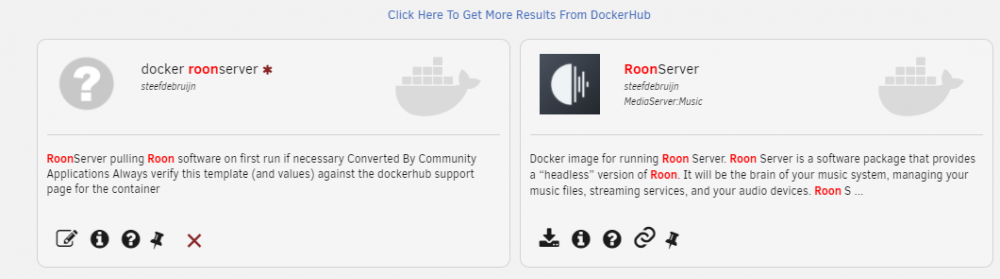
@xthursdayx really cool. Before I dump this one, and switch to yours, can you tell me about it? I only have a remedial understanding of Docker and how that works, and it appears that you're using the same image that "roon-server" uses? Why is one different than the other? Thanks again!
-
@realdiel Ahh, not an unRaid docker at all. Right on. Yup, once you have a linux install running, it should be pretty straight forward getting it up and running. I had an ubuntu VM going for a while. Worked fine.
-
@NickAll what's the ROCK Image? Never heard of that. The docker is a little strange, it runs differently from others. It will come up with a little green Running icon, but doesn't have a web interface or port you can connect to. Just run a client on the network, tell it to look for the server, and check that it's up that way.
-
@realdiel Why not go the VM route? I stuck an Ubuntu VM on there before, ran a linux version of Roon, worked pretty good as I recall. At least it would keep your electricity bill lower, and cut down on boxes. Maybe you can screenshot that up and guinea pig that process I'll start a new thread about updating. Or find the one I already posted somewhere. With a memory like mine, these posts are mostly notes-to-myself when I need to redo stuff.
-
@realdiel nuked the install. Removed /mnt/user/appdata/RoonGoer/ and /mnt/user/appdata/RoonServer. Re-installed, it's build 610 now. Attempting to do a restore from the previous build version. Aaaaand nope: it's nerfed. Going back and rebuilding from scratch, again. I wish these updates didn't break it -> nuke it and start from scratch. Perhaps I have some settings wrong somewhere.
-
A couple of things to note here. I've ran Roon in a VM and as a docker. For me, the VM created some of its own problems. It worked, but I felt like it was an excessive resource hog, just to run Roon server. At the moment I'm on the Steef docker. I use Roon client on several different devices. The client on my windows 10 machine recently (9/6/20) prompted me to update my server. I hit okay, and lost everything. I tried to restore from backup, and that crashed the whole docker. Even though I have a bunch of backups, it looks like if I want to latest version, I'll have to nuke it and rebuild. I've had this upgrading issue consistently, but the docker author hasn't been able to replicate my issues. https://forums.unraid.net/topic/82714-roon-docker-unraid-roon-support-steefdebruijndocker-roonserver/?do=findComment&comment=860931 I haven't spent the time on the latest version, but I'll update... Something, when I get some update time to throw at it. Lastly, and I only learned this myself a few months ago, is that a docker being updated or not doesn't mean you won't get the latest version of that package. I imagine the docker package being a series of steps to grab, install (or grab and update) the necessary package. It doesn't come with the software, it only tells the thing to go to A Place, grab latest version and install it. So, so long as the docker is working, there isn't any reason to update it. That's my understanding anyhow.
-
@Chenhan did you setup the network path in the container setting like above? here
-
I fell into this thread by searching for an email solution on unRaid docker. I feel all the comments in here for sure. I used to host my own email server, and it was a bit of a nightmare with spam, and Squirrelmail interfaces, or IMAP POP desktop applications, it was rough. Constant work. BUT, and this strays from the Original Post, what about folks who want ultimate privacy with their email? A self hosted email solution seems like the way to go. The data is in your own personal closet, and it will totally protect you if you run for office one day. Some other things that can be self-hosted solutions: Nextcloud, Bitwarden, a webserver. I didn't see anyone mentioning any of those solutions on here. Any suggestions? The APPS search for 'email' comes back with only a handful of results: OnlyOffice email post.io
-
@SPOautos Yes. You would probably choose unRaid because of it being unRaid, google other options and see what you think. I have been able to run the Roon Core as a docker (this thread) on my unRaid server successfully. It works great. While I appreciate your end game there: Roon to a Chromecast controlling via android and iPhone, and you should certainly keep your eye on the prize! There are many pieces that have to fall into place for this string of technology to work well together!
-
[FIXED] Not sure what the issue was with the update, but I rehashed the install and update and it worked fine. I detailed that over at Roon Forums here. @xrqp Yes, you're right. At the moment, I'm running an Ubuntu VM on unRaid. On that VM I'm running the Roon Core. It's a virtual computer, inside a computer. You can run whatever you want on it, provided it doesn't use up all the resources allocated to the VM and make it run slow as molasses. That's finer points of VM, which I know nothing about! @mikela This thread, the Original Post, is about the docker. During an update, I had some issues I outlined above, and moved an Ubuntu VM instead of the Docker container. And I'll update it the thread when I get a chance to start messing with the steefdebruijn docker again! It was probably operator error Reply from steefdebruijn over at Roonlabs Forums
-
Update: while the "Sign Up" button is still there, after filling out the form, it says "signups disabled." So I guess that's all good. Has anyone addressed these other setup issues I saw in the Bitwarden log file? Spaceinvader does talk about disabling Signups (?) in the video, but doesn't hit on these other things.
-
[FIXED]Not sure what the issues was. Went back to Docker version of Roon Server, and it updated fine. On Docker v1.7 build 555. 6/6/20 Just got a note this evening to update some software. I did the update, and my Roon client software couldn't find the server again. I reconnected, had to re-login with Roon credentials, and it seems to have lost all my metadata. Thankfully, I had a previous backup I could restore. Just be warned. I believe this is Roon Server version 1.7 build 555 The backup was from 1.7 build 553, and it doesn't work. I'll have to nuke it and rebuild all metadata. Yay. I also had to remove RAATServer/, RoonGoer/, and RoonServer from the appdata directory to get it to come back. The build the Docker pulls is 1.7 build 537. I'm going to leave it at that older version for a while before attempting an upgrade. Maybe see if anyone else has any luck before I try and hack it up. Updated to version 1.7 build 555, aaaaand lost library And restore breaks docker. has mp3float: 1, aac_fixed: 0 Running Not running Initializing Started Not responding Unhandled Exception: System.IO.IOException: Directory /data/RoonServer/.restore_old/Appliance is not empty at System.IO.Directory.Delete (System.String path) [0x0006f] in <370a0c27f4b74d1a81431037df6d75bf>:0 at System.IO.Directory.RecursiveDelete (System.String path) [0x00051] in <370a0c27f4b74d1a81431037df6d75bf>:0 at System.IO.Directory.RecursiveDelete (System.String path) [0x00024] in <370a0c27f4b74d1a81431037df6d75bf>:0 at System.IO.Directory.Delete (System.String path, System.Boolean recursive) [0x00009] in <370a0c27f4b74d1a81431037df6d75bf>:0 at Sooloos.Client.ApplicationCommon.Init2 (System.String[] argv, System.Boolean supportupdates, System.String lockname) [0x001dc] in <71f2fca491de4b978badec69f164d711>:0 at Sooloos.Application.Main (System.String[] argv) [0x00220] in <07df41d5902a4aa2abb521c06bca9560>:0 [ERROR] FATAL UNHANDLED EXCEPTION: System.IO.IOException: Directory /data/RoonServer/.restore_old/Appliance is not empty at System.IO.Directory.Delete (System.String path) [0x0006f] in <370a0c27f4b74d1a81431037df6d75bf>:0 at System.IO.Directory.RecursiveDelete (System.String path) [0x00051] in <370a0c27f4b74d1a81431037df6d75bf>:0 at System.IO.Directory.RecursiveDelete (System.String path) [0x00024] in <370a0c27f4b74d1a81431037df6d75bf>:0 at System.IO.Directory.Delete (System.String path, System.Boolean recursive) [0x00009] in <370a0c27f4b74d1a81431037df6d75bf>:0 at Sooloos.Client.ApplicationCommon.Init2 (System.String[] argv, System.Boolean supportupdates, System.String lockname) [0x001dc] in <71f2fca491de4b978badec69f164d711>:0 at Sooloos.Application.Main (System.String[] argv) [0x00220] in <07df41d5902a4aa2abb521c06bca9560>:0 /app/RoonServer/start.sh: line 50: /app/RoonServer/Server/RoonServer: Permission denied /app/RoonServer/start.sh: line 34: kill: (16767) - No such process /app/RoonServer/start.sh: line 50: /app/RoonServer/Server/RoonServer: Permission denied /app/RoonServer/start.sh: line 34: kill: (11) - No such process /app/RoonServer/start.sh: line 50: /app/RoonServer/Server/RoonServer: Permission denied /app/RoonServer/start.sh: line 34: kill: (11) - No such process /app/RoonServer/start.sh: line 50: /app/RoonServer/Server/RoonServer: Permission denied /app/RoonServer/start.sh: line 34: kill: (11) - No such process /app/RoonServer/start.sh: line 50: /app/RoonServer/Server/RoonServer: Permission denied /app/RoonServer/start.sh: line 34: kill: (11) - No such process removed image root@rubble:/mnt/user/appdata# rm -Rf RAATServer/ RoonGoer/ RoonServer/ Re-install via APPS > Previous Apps Doing a restore from 1.7 build 537 to version 1.7 build 537 And that doesn't work either. Welp... might be time to re-think this approach. Went through an Ubuntu VM 20.04 LTS, got that going. Did install via the Roonlabs instructions, that has a script that pulls the download from http://download.roonlabs.com/builds/RoonServer_linuxx64.tar.bz2 and now that that's on there, it's version 1.7 build 537. Which is not build 555 Did the update and it took. Made sure the vdisk is on the m.2 ssd drive and I think it's running faster and smoother in the VM vs the docker. I'll stick with this for now!
-
I had some trouble with my Nextcloud installation after changing out my cache drive. I used the Settings > User Utilities > Backup/Restore Appdata. If I recall, it simply wouldn't connect to the server, and I'd get Bad Gateway 502 errors. Something happened with Nextcloud losing the connection to the database backend. MariaDB did no lose any of the DB settings, but Nextcloud wasn't talking to it correctly. Re-initialize Nextcloud setup. You can do this by moving or deleting the default conf file. For me this was in: /mnt/user/appdata/nextcloud/www/nextcloud/config Once you get rid of that file, and hit the default setup page again, you can pick up Spaceinvader's video again right here on youtube https://help.nextcloud.com/t/how-do-you-restart-the-install-wizard/6579
-
came across this thread for docker utilization: "what's taking up all my docker.img space in there?" "Resource Monitor" in Community Applications has been replaced by cAdvisor, which is in the APPS tab. Go to SERVER:8085, click Docker Containers, at the top, scroll to bottom, and sort by Virtual Size. You can see in the image below, Krusader is hogging up 2.29GB
-
Anyone experience problems searching within a network share? Seems like, from windows, searching doesn't work at all.
-
I had some issues with my router before, but ran into those issues when I was setting up Letsencrypt. My old router wouldn't let me redirect port 80 to a different port, like the Space invader Letsencrypt video instructed. Replaced the thing with a Netgear R7000 a nighthawk that could do all those things, worked great. Also a modified static DNS, a pihole server.
-
@ghost82I assume that's the TOWER/domains/MacinaboxCatalina/Clover.qcow2 file? And, when I nuke this thing, and bring it back, at what point do I restore the qcow2 file? I didn't see any Opencore files around; but then, I'm also not sure what, exactly, I'm looking for. thanks!
-
@Sheepster I'd also mention that the docker has VNC built in and running. Installing VNC server on the macos is a bit redundant. Unless you want it signed into your VNC account.
-
I'm having some problems getting my VM to start. I went through quite a bit of rigamarole getting iMessage working, and when I roll back this installation, or nuke&reinstall, I want to be sure the codes (Serial Number, Board Serial Number, Product Name, Family) stay the same so I don't have to re-do all the steps with iMessage (Calling Apple support and speaking with two levels of technicians). What stuff should I delete to roll this back and get started again? https://www.tonymacx86.com/threads/an-idiots-guide-to-imessage.196827/
-
I used the exact file Spacedinvader uses on the youtube instructions. It's linked at Google Drive I'm perusing the video again, he doesn't actually change anything. This code is unmodified from his linked download, and it's what I'm using. https://pastebin.com/SPvY7UD4 For my website, I use Host Gator for both my DNS and web-host. If you decide to get your own website URL, you'll only need DNS, not hosting. It should be cheap, like $10/year so long as you can pick an obscure enough name. In my DNS at Host Gator, I setup a CNAME record, that points to drewshome.duckdns.org Looks like this: Ah, and that reminds me, I also have the Duckdns docker installed setup and running in unRaid spaceinvader on youtube howto. None of this stuff is outside of what Spaceinvader put forward in his video. It worked for me. I'm pretty sure these are the bits you were asking for.
-
it's weird that it works with one browser, but not with another. ?? Might be a browser issue. There are two different setups duckdns, letsencrypt, and bitwarden/nextcloud 1. owning your own domain name and using sub-domains WITH your own domain name: start at time 15:59 2. not owning your own domain name and using individual entries for each service you have. WITHOUT your own domain name: start at time 13:44 DUCKDNS setup at time 7:27 Above you mentioned "mynamebitwaeden.duckdns.org" And you also said you had spelled everything right, that's good. And will be important. There are many typos other posts, so just be extra careful. Maybe time for a break? You're getting close! I'd focus on the: letsencrypt, and duckdns entries. Yes, my setups are working correctly, but I followed the "I have my own domain" instructions that involves my own DNS entries, which I don't think you deal with. Good luck, keep plugging away. You'll get there.
-
@ssinseeme did you get letsencrypt setup correctly? You should have something like this in the letsencrypt settings: If you don't then you'll also need to wade your way through the letsencrypt video that spaceinvader did here
-
I've been getting too many redirects errors ERR_TOO_MANY_REDIRECTS When I try to access the web version of the password vault. Did I screw something up in the settings? I recall this worked for a little while, but then stopped. I'm using bitwardenrs with my own domain, with a duckdns subdomain, bitwarden.kerlee.com. I added the CNAME for the subdomain, and followed all the other steps including the Letsencyrypt video instructions. Bitwarden works fine on my android phone. Any idea on where to start? Thanks! rubble-diagnostics-20200416-2139.zip



