






Goldmaster
Members
-
Joined
Everything posted by Goldmaster
-
It currently at 31,779,000 files and still going. Im fairly certain something is wrong, but the docker mappings and all that are correct. It's running in dry run anyhow, and my /mnt/ which the container sees is actually /mnt/user/ is set to read only. Well if i did not have that bug i mentioned earlier then it would have done the job fine. I might leave it and if it gets to when i go bed then i will have to turn the server off (s3 sleep plugin doesnt work).
-
For some reason I have never been able to get this work. I remember following Spaceinvaderone video on how to remotly start and connect to a vm and it worked fine when I had the x299 motherboard. but now, i have never been able to get wake on a vm to work. I have got the wake on lan plugin along with the python 2 moduale installed and it does say running. I have port forwarded 7 to unraid I know of the mac address and my public ip ( will want to to get duckdns to work, but need to pin down the issue) Wake on lan is enabled in bios The only thing i can think of why wake on lan is not working, is due to having the network model as virtio so i can access network shares from my other laptop. I wonder if i could do a local internal wake up rather than using depricaus to pin down the cause.
-
I haven't synced for quite some time. I had a 2tb drive that was full and couldn't take any more. So the temporary solution was to exclude less important folders, until i could not do much else. I have now got an 8tb drive, moved the copied stuff over from the old 2tb drive and let it synced.
-
Yeah, thank you. I think I just need to be patient. Trouble is that I can't leave my server running over night, as its next to where I sleep. So I am wondering if I could somehow resume building filelist? It's not practical to leave it running all the time. The s3 sleep plugin doesn't put the server to sleep, only shut it down.
-
What does this mean in luckybackup? I am syncing just over 2tb of stuff and had to leave overnight, I came to take a look at the progress and see this after leaving luckybackup running for several hours. 2238700 files... <a name="error1"></a><font color=red>The process reported an error: "Crashed"</font> So i have start the whole building file list again. Never knew lucky backup to take this long when syncing around the same amount. I'm wondering weather to switch to dirsync pro as that can scan, then compare, similar to goodsync.
-
Hi there, I had come across this post https://perfectmediaserver.com/01-overview/overview and had known of the website for quite some time. But essentially, this post https://perfectmediaserver.com/01-overview/faq/#what-about-unraid-openmediavault-or-freenas is basically saying that the perfect media server is something open source. I have found a comparisment here https://perfectmediaserver.com/01-overview/faq/#what-about-unraid-openmediavault-or-freenas. But what I dont want is that in 30 years time something happens to unraid, and it shuts down or something like that. I hope it does last until the 24th century. I know it is built atop open source, but I have heard some people say unraid is not open source? i don't know if unraid is open source and the only part that is closed source is the payment system? If unraid is not open source, it would be a great feature to have, considering it's about self-hosting and people want things to last.
-
It was taken from the krusader video That was on the old drive, the one that is showing hardly full, is the newer, larger drive. That's not a problem, as i don't need to access the drive over a network, only physically on the machine. It is strange how It's decided to work fine (for now).
-
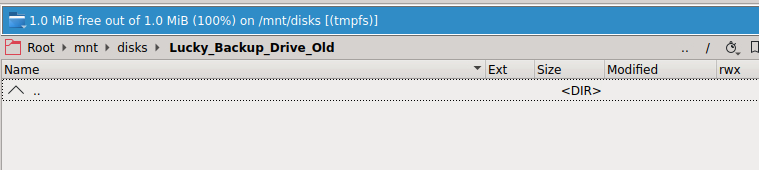
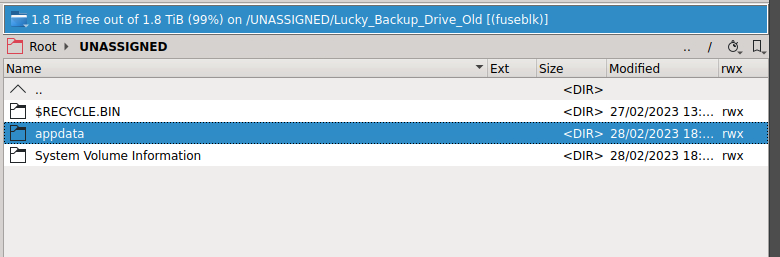
Hi there, this is quite an annoying issue I have seen. I have 2 external drives that seam to not be showing up. i use luckybackup to mirror my shares onto the external drive. the external drive has filled and I have moved over to newer hard drive with larger capacity. So I dont have to change anything in my docker container, I had renamed the old hard drive by adding old to the end, and the newer larger hard drive named as my original hard drive. Problem is that both dont seam to want to show up. They both show up fine on another Windows pc and will show up without issue when passed though to windows 11 vm. But in krusader when I go to access the drives, i get nothing showing up for ages. i know it takes quote some time but never as long as this. This is what I am getting, its as if the drive is mounted but nothing is showing? Why was there such a long delay when windows would normally show drives instantly and now seams to not be working at all? The hard drive names are not conflicting at all. If i try and browse to the hard drive in terminal, i would get i/o error. External drives in the docker container of krusader are set to rw slave. I will add that it seems similar to this issue and have added my diagnostics file. Ok this is strange how generating a diagnostics file seams to have made the hard drive contents show up but krusader is quote slow. it seems that I am able to access the content though an unassigned folder, not via mnt/disks Can someone please explain this phenomena? hammerthread-diagnostics-20230301-1019.zip
-
Yes I have, I think its something to do with the docker container using the default https port that unraid uses, so there is a conflict. Update The network setting has to be Custom : br0 and then just put in a port value. Not sure why the docker opens at port 8080 still?
-
Just a quick question, for some reason when I press the web ui globe icon, the megasync docker container opens to port 8080. Even though I have changed to a completely different port. I can't remember how I was able to access the web ui. I have tried custom docker network and bridge.
-
Running the plugin right now and is very useful to have. A useful feature would be a feature to shut down or put a server to sleep once the pre clear is done? The plugin could tell dynamix s3 sleep not to shut the server down or put it to sleep if a pre clear is running
-
Will there be a fix in the container so that this doesn't have to be added. Took me ages to figure out that I had to add this to extra parameters. Could be useful to add the info into the docker container.
-
sadly this seams to not start as well checked ports and everything else. been running for an hour and nothing
-
Hi there, im getting the issue of directory bread errors found. unraid starts fine without any issue. I have tried file check without issue. I can only assume that my usb stick drops offline and then reconnected itself. cable is ok as i wont be getting this issue. I have got my diagnostic file. hammerthread-diagnostics-20221122-1137.zip
-
Thank you. only issue is that some files have seamed to copy. Maybe duplicate but running mover doesn't move and replace. is there a way to say run say sudo mv -r /mnt/cache /mnt/disk1 or something like that? idearly in gui frendly way. Issue was that my server had gone to sleep, so hasn't been able to move everything in a whole go?
-
Thank you. So its a case of copy stuff off the samsung drive to the wd drive. but im not sure how this cache pool thing works, I take it is a case of set wd drive as cache, then stop vm and docker service and copy stuff from samsung drive to wd drive. Unassign Samsung drive from unraid. install windows or debian on the drive?
-
Humm. Didn't think of that. Not sure how I would go about moving appdata, domains ect off the Samsung drive to the wd drive. There is space to do it.
-
Iam afraid not. it is the only m.2 drive I have, and the other is used for cache. I have tried Debian install and I still have the exact same error. I am on bios version 0701.
-
I hope @limetech can add this as default as a slight fix. Just testing Windows 11 as a vm and this fix solved it for me as i had code 43 errors. i take it that nvidia is making it much harder to run gpus in a vm envioment?
-
I have tried 6.11 and I am still getting issues. its deafeningly the m.2 drive. I don't know why or how.
-
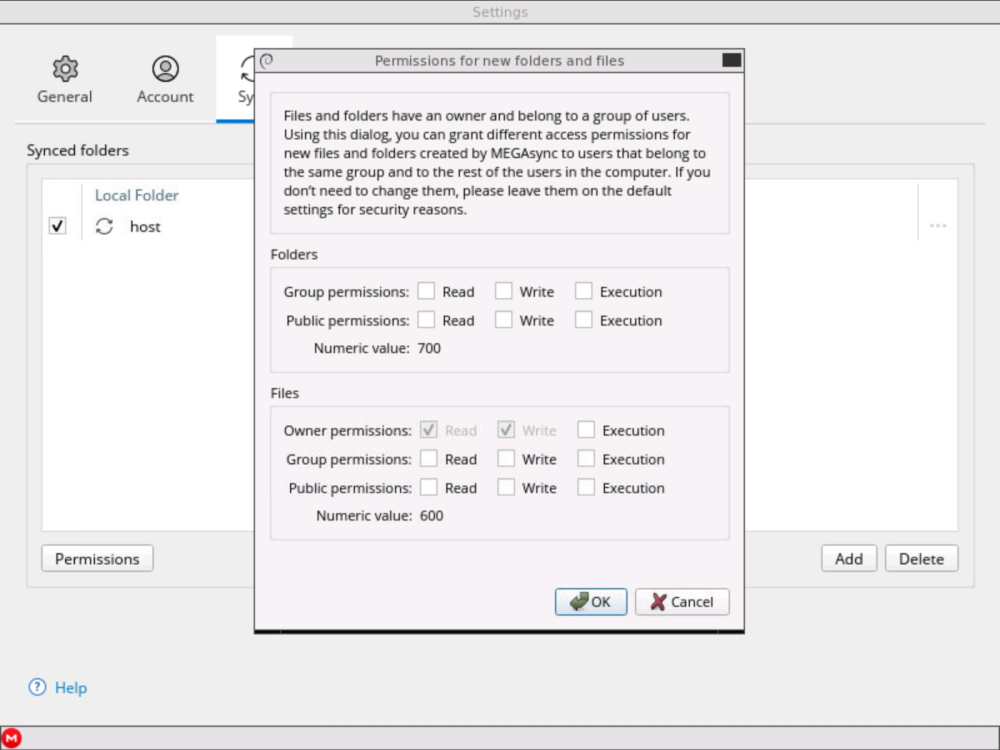
yes there is, so not sure if group permissions for folders are meant to have read, write and execution ticked and files for owner set to execution as well? I think all the tick boxes are ment to be ticked so that the numeric value for folders and files is 777?
-
the files are being downloaded from mega onto the unraid server and it is being ran with uid 99, gid 100, and umask 000. the files are not corrupted or anything as i can view them fine in the mega app
-
Sorry, its the megasync docker container
-
hi there just a minor issue. for files that have been synced down onto a shared folder, the files are showing as rw and thats it instead of rw rw rw. so when i access the share in windows, i can't open any of the files. I guess I have to chmod 777 the folder and files? any chance of a fix or what might be causing this issue?
-
Im having same issues with the web. page doesnt load, but only in inconeto.

