





mwoods98
Members
-
Joined
-
Last visited
Everything posted by mwoods98
-
So as I mentioned , I had never set this up but would be willing to do so if this will help me performance wise.
-
Name Container Writable Log --------------------------------------------------------------------- binhex-krusader 1.92 GB 35.6 MB 23.4 kB binhex-plexpass 1.62 GB 247 MB 4.60 kB binhex-lidarr 1.59 GB 131 MB 130 kB RDP-Calibre 1.49 GB 22.5 MB 32.6 kB binhex-delugevpn 1.35 GB 1.04 MB 52.2 kB DiskSpeed 1.23 GB 5.54 kB 45.1 kB binhex-sonarr 1.04 GB 35.2 MB 31.3 kB ApacheGuacamole 1.01 GB 48.7 MB 22.0 kB binhex-radarr 947 MB 133 MB 35.0 kB binhex-sabnzbd 869 MB 12.4 MB 289 kB overseerr 647 MB 8.92 kB 1.64 MB FileBot 494 MB 28.0 kB 22.5 kB swag 365 MB 2.07 MB 10.6 kB HDDTemp 339 MB 0 B 0 B HandBrake 324 MB 39.1 kB 1.03 MB gaps 311 MB 238 B 19.9 kB lazylibrarian 259 MB 16.5 MB 8.78 MB mylar 253 MB 36.6 MB 6.97 kB JDownloader2 227 MB 3.89 MB 36.6 kB FileZilla 221 MB 23.8 kB 20.4 kB Grafana 213 MB 0 B 5.50 kB telegraf 184 MB 41.5 MB 38.5 kB Influxdb 183 MB 0 B 914 kB cops 170 MB 24.7 MB 4.69 kB tautulli 158 MB 38.7 MB 22.2 kB youtube-dl-server 149 MB 327 kB 1.86 kB cadvisor 69.6 MB 0 B 1.21 kB Varken 56.2 MB 70.7 kB 2.73 MB syncthing 49.8 MB 9.22 kB 8.86 kB duckdns 26.4 MB 9.81 kB 10.2 kB --------------------------------------------------------------------- Total size 17.8 GB 831 MB 16.0 MB Container size as requested
-
Post new diagnostics New Diags as requested - tower-diagnostics-20210831-1728.zip
-
Why would your server automatically empty your cache of files you might want for later? Excellent point, I just thought things were loaded into cache at boot up time. Currently the cache drive is at 21% utilization. @trurl - I really want to thank you for your help today. I know this is not your job and I just wanted to say thanks for helping me today.
-
Have you deleted any of those appdata folders that you no longer need? Full honesty, I thought that once rebuilding things the cache drive would have been emptied but doing this bit of work now
-
So I removed emby and only installed the ones I was used. I didn't re-install those that were installed at one point but were not being used. The cache drive is still listed as 96% full
-
@trurl - It took a while but here are the Diags tower-diagnostics-20210831-1544.zip
-
Thanks for that. Restoring now. Would you like another diag log drop when done?
-
You have to delete and recreate it. https://wiki.unraid.net/Manual/Troubleshooting#How_do_I_recreate_docker.img.3F https://wiki.unraid.net/Manual/Troubleshooting#Restoring_your_Docker_Applications Ok, I have deleted it, and restated the docker services. None show up. Docker says there are no installed containers. I have rebooted the server and still don't see any dockers. Updated diags posted. tower-diagnostics-20210831-1410.zip
-
I don't use that, but its size seems ridiculous. I thought emby was a media server. That would normally mean your media is located in some other user shares not living on cache. Have you put your media into its appdata? Does it have DVR capability and you are saving recordings into its appdata? Plex appdata seems to large too. Why are you running both emby and plex? When I first setup this server, I was trying to decide between Plex and Emby. I did install both. Plex is preferred so I can kill emby and save a bunch of space The media is on a different share, its not in appdata I run 16 dockers and they use about half of the 20G I have given docker.img Using the suggestion, I dropped the size of the docker image to 50G. However, the docker service will not start. Do I need to remove the image that is in the cache? that's still 100G and still there. You can delete the appdata folders for any docker you don't need anymore. Of course, nzbget for example, will only give you back 76K. Do you understand docker volume mapping? I think I do but I could always have a hole in my knowledge. I'm more than happy to apply suggestions to get this fixed. Thanks
-
Update: Ok this is the final result of the command listed above: root@Tower:~# du -h -d 1 /mnt/user/appdata 1.8M /mnt/user/appdata/DiskSpeed 132K /mnt/user/appdata/Dolphin 3.9M /mnt/user/appdata/FileBot 1.1M /mnt/user/appdata/FileZilla 4.5M /mnt/user/appdata/HandBrake 233M /mnt/user/appdata/JDownloader2 332K /mnt/user/appdata/MediaInfo 296K /mnt/user/appdata/RDP-Calibre 724K /mnt/user/appdata/beets 77M /mnt/user/appdata/binhex-delugevpn 666G /mnt/user/appdata/binhex-emby 34G /mnt/user/appdata/binhex-krusader 602M /mnt/user/appdata/binhex-lidarr 76K /mnt/user/appdata/binhex-nzbget 74G /mnt/user/appdata/binhex-plexpass 541M /mnt/user/appdata/binhex-radarr 120M /mnt/user/appdata/binhex-sabnzbd 1.7G /mnt/user/appdata/binhex-sonarr 540K /mnt/user/appdata/cops 0 /mnt/user/appdata/data 149M /mnt/user/appdata/lazylibrarian 652K /mnt/user/appdata/lazylibrarian-calibre 235M /mnt/user/appdata/mylar 308M /mnt/user/appdata/syncthing 4.6G /mnt/user/appdata/tautulli 0 /mnt/user/appdata/tdarr 0 /mnt/user/appdata/ubuntudata 0 /mnt/user/appdata/unmanic 1.2M /mnt/user/appdata/xteve 36K /mnt/user/appdata/xteve_zap 5.0M /mnt/user/appdata/binhex-plex 0 /mnt/user/appdata/macinabox 13M /mnt/user/appdata/calibre 40K /mnt/user/appdata/filestash 0 /mnt/user/appdata/airsonic-advanced 813M /mnt/user/appdata/binhex-airsonic 143M /mnt/user/appdata/ApacheGuacamole 3.0M /mnt/user/appdata/swag 14G /mnt/user/appdata/influxdb 592K /mnt/user/appdata/telegraf 12M /mnt/user/appdata/grafana 94M /mnt/user/appdata/Varken 11M /mnt/user/appdata/overseerr 13M /mnt/user/appdata/gaps 796G /mnt/user/appdata
-
Ok I will right now that docker won't start... grrr
-
I'm not sure why Krusader has such a large size? I use that to sometimes move stuff over internally, is there a way to shrink it down? I also can decrease the docker size. Please note: the command that I ran has not returned - Plex would probably be the biggest resource on here and the terminal has just pause after nzb-get Any idea why this would happen? Also, there are a number of dockers that I tried but removed, (nzbget for example) I thought they had been removed from the system, what would be the best way to remove these ?
-
@trurl Thanks for getting back to me/ To answer the first question, I don't remember what happened but I had an issue where I had to expand the docker size. I really wish I could remember what it was but I expanded the docker image to what it is now. I think I may have gone a bit overboard. Its still reading to send that info but here is what has posted so far: root@Tower:~# du -h -d 1 /mnt/user/appdata 1.8M /mnt/user/appdata/DiskSpeed 132K /mnt/user/appdata/Dolphin 3.9M /mnt/user/appdata/FileBot 1.1M /mnt/user/appdata/FileZilla 4.5M /mnt/user/appdata/HandBrake 233M /mnt/user/appdata/JDownloader2 332K /mnt/user/appdata/MediaInfo 296K /mnt/user/appdata/RDP-Calibre 724K /mnt/user/appdata/beets 77M /mnt/user/appdata/binhex-delugevpn 666G /mnt/user/appdata/binhex-emby 34G /mnt/user/appdata/binhex-krusader 602M /mnt/user/appdata/binhex-lidarr 76K /mnt/user/appdata/binhex-nzbget I will post the complete list when its done.
-
Hi, So I checked my server today and I noticed the cache drive was full. Last night it was in the green but this morning its full. I'm not sure what is taking up the majority of the space or why it ballooned over night. I tried manually running mover and nothing has changed. I also don't have anything major being copied to the cache drive. I did check in the domain folder and I saw some old VM's which I removed but still 97% of the space is being taken up.tower-diagnostics-20210831-1049.zip - I have included diags - What I want to know is what is taking up all of the space on the cache drive.
-
Never mind, some how I missed the impi section in the telegraph conf. It's all working good now!
-
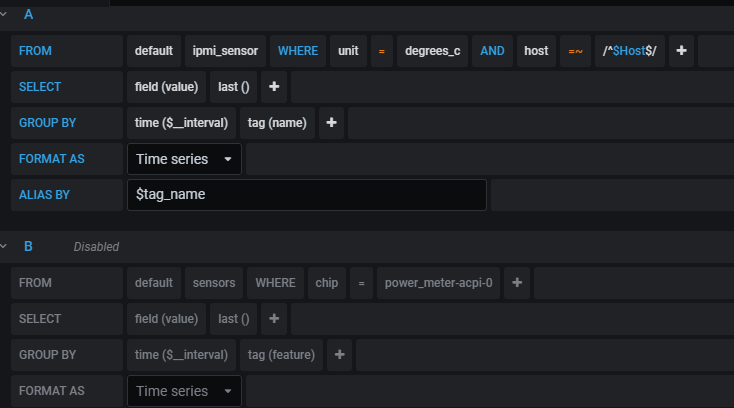
So I have followed the excellent guide on YouTube by Nate Harris. I have also adjusted the graphs to fit my setup but I'm still haven't trouble with a little missing data from some fields. I'm still not able to pull System Temps, Fan Speed and System Power. What they are not critical they are nice to haves if possible. For system temps 'B' is disabled - I have a feeling that if I get one of these working all 3 will work. Any help is appreciated. Thanks
-
I just fired up Filezilla after using it a lot. Nothing has changed but I see this when starting the docker. When I hover over the x it says server disconnected code 1006 The logs on the server have this: ** (filezilla:926): WARNING **: 13:02:02.643: invalid source position for vertical gradient ** (filezilla:926): WARNING **: 13:02:02.671: invalid source position for vertical gradient ** (filezilla:926): WARNING **: 13:02:02.671: invalid source position for vertical gradient ** (filezilla:926): WARNING **: 13:02:02.682: invalid source position for vertical gradient ** (filezilla:926): WARNING **: 13:02:02.682: invalid source position for vertical gradient ** (filezilla:926): WARNING **: 13:02:02.747: invalid source position for vertical gradient ** (filezilla:926): WARNING **: 13:02:02.747: invalid source position for vertical gradient ** (filezilla:926): WARNING **: 13:02:02.755: invalid source position for vertical gradient ** (filezilla:926): WARNING **: 13:02:02.755: invalid source position for vertical gradient 29/08/2020 13:17:52 Got connection from client 127.0.0.1 29/08/2020 13:17:52 other clients: 29/08/2020 13:17:52 Got 'ws' WebSockets handshake 29/08/2020 13:17:52 - webSocketsHandshake: using base64 encoding 29/08/2020 13:17:52 - WebSockets client version hybi-13 29/08/2020 13:17:52 Disabled X server key autorepeat. 29/08/2020 13:17:52 to force back on run: 'xset r on' (3 times) 29/08/2020 13:17:52 incr accepted_client=1 for 127.0.0.1:59822 sock=10 29/08/2020 13:17:52 webSocketsDecodeHybi: got frame without mask 29/08/2020 13:17:52 rfbProcessClientProtocolVersion: read: I/O error 29/08/2020 13:17:52 client_count: 0 29/08/2020 13:17:52 Restored X server key autorepeat to: 1 29/08/2020 13:17:52 Client 127.0.0.1 gone 29/08/2020 13:17:52 Statistics events Transmit/ RawEquiv ( saved) 29/08/2020 13:17:52 TOTALS : 0 | 0/ 0 ( 0.0%) 29/08/2020 13:17:52 Statistics events Received/ RawEquiv ( saved) 29/08/2020 13:17:52 TOTALS : 0 | 0/ 0 ( 0.0%)

-
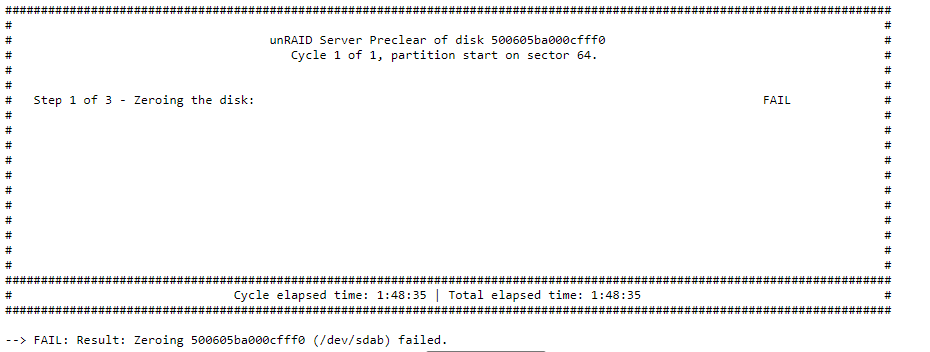
Hi have been getting some errors when trying to run preclear. So, with my new shiny Easystore 14TB drive freshly shucked. I put it in my Disk Array (NetApp DS4246 Disk Array Shelf) to get precleared and working to add to the array. Well, that didn't go to well. Here is a snip from the log when trying to preclear. Jul 29 19:21:17 Tower kernel: Buffer I/O error on dev sdai, logical block 197112883, lost async page write Jul 29 19:21:17 Tower kernel: Buffer I/O error on dev sdai, logical block 197112884, lost async page write Jul 29 19:21:17 Tower kernel: Buffer I/O error on dev sdai, logical block 197112885, lost async page write Jul 29 19:21:17 Tower kernel: Buffer I/O error on dev sdai, logical block 197112886, lost async page write Jul 29 19:21:17 Tower kernel: Buffer I/O error on dev sdai, logical block 197112887, lost async page write Jul 29 19:21:17 Tower kernel: Buffer I/O error on dev sdai, logical block 197112888, lost async page write Jul 29 19:21:17 Tower kernel: Buffer I/O error on dev sdai, logical block 197112889, lost async page write Jul 29 19:21:17 Tower kernel: Buffer I/O error on dev sdai, logical block 197112890, lost async page write Jul 29 19:21:17 Tower kernel: Buffer I/O error on dev sdai, logical block 197112891, lost async page write Jul 29 19:21:17 Tower kernel: Buffer I/O error on dev sdai, logical block 197112892, lost async page write Jul 29 19:21:17 Tower kernel: print_req_error: I/O error, dev sdai, sector 1576904088 Jul 29 19:21:17 Tower kernel: print_req_error: I/O error, dev sdai, sector 1576905112 Jul 29 19:21:17 Tower kernel: print_req_error: I/O error, dev sdai, sector 1576906136 Jul 29 19:21:17 Tower kernel: print_req_error: I/O error, dev sdai, sector 1576907160 Jul 29 19:21:17 Tower kernel: print_req_error: I/O error, dev sdai, sector 1576908184 Jul 29 19:21:17 Tower kernel: print_req_error: I/O error, dev sdai, sector 1576909208 Jul 29 19:21:17 Tower kernel: print_req_error: I/O error, dev sdai, sector 1576910232 Jul 29 19:21:17 Tower kernel: print_req_error: I/O error, dev sdai, sector 1576911256 Jul 29 19:21:17 Tower kernel: print_req_error: I/O error, dev sdai, sector 1576912280 Jul 30 01:58:00 Tower kernel: Buffer I/O error on dev sdai, logical block 197865984, lost async page write Jul 30 01:58:00 Tower kernel: Buffer I/O error on dev sdai, logical block 197865985, lost async page write Jul 30 01:58:00 Tower kernel: Buffer I/O error on dev sdai, logical block 197865986, lost async page write Jul 30 01:58:00 Tower kernel: Buffer I/O error on dev sdai, logical block 197865987, lost async page write Jul 30 01:58:00 Tower kernel: Buffer I/O error on dev sdai, logical block 197865988, lost async page write Jul 30 01:58:00 Tower kernel: Buffer I/O error on dev sdai, logical block 197865989, lost async page write Jul 30 01:58:00 Tower kernel: Buffer I/O error on dev sdai, logical block 197865990, lost async page write Jul 30 01:58:00 Tower kernel: Buffer I/O error on dev sdai, logical block 197865991, lost async page write Jul 30 01:58:00 Tower kernel: Buffer I/O error on dev sdai, logical block 197865992, lost async page write Jul 30 01:58:00 Tower kernel: Buffer I/O error on dev sdai, logical block 197865993, lost async page write Jul 30 01:58:00 Tower preclear_disk_9RJ8E21C[6825]: Zeroing: dd if=/dev/zero of=/dev/sdai bs=2097152 seek=820609286144 count=13179910356992 conv=notrunc iflag=count_bytes,nocache,fullblock oflag=seek_bytes Jul 30 01:58:26 Tower preclear_disk_9RJ8E21C[6825]: Zeroing: dd output: dd: error writing '/dev/sdai': No space left on device Jul 30 10:34:24 Tower kernel: sd 6:0:25:0: [sdai] Spinning up disk... Jul 30 10:34:40 Tower kernel: sd 6:0:25:0: [sdai] 27344764928 512-byte logical blocks: (14.0 TB/12.7 TiB) Jul 30 10:34:40 Tower kernel: sd 6:0:25:0: [sdai] Write Protect is off Jul 30 10:34:40 Tower kernel: sd 6:0:25:0: [sdai] Mode Sense: 8b 00 00 08 Jul 30 10:34:40 Tower kernel: sd 6:0:25:0: [sdai] Write cache: disabled, read cache: enabled, doesn't support DPO or FUA Jul 30 10:34:40 Tower kernel: sd 6:0:25:0: [sdai] Attached SCSI disk Jul 30 13:19:24 Tower kernel: sd 6:0:28:0: [sdai] Spinning up disk... Jul 30 13:19:39 Tower kernel: sd 6:0:28:0: [sdai] 27344764928 512-byte logical blocks: (14.0 TB/12.7 TiB) Jul 30 13:19:39 Tower kernel: sd 6:0:28:0: [sdai] Write Protect is off Jul 30 13:19:39 Tower kernel: sd 6:0:28:0: [sdai] Mode Sense: 8b 00 00 08 Jul 30 13:19:39 Tower kernel: sd 6:0:28:0: [sdai] Write cache: disabled, read cache: enabled, doesn't support DPO or FUA Jul 30 13:19:39 Tower kernel: sd 6:0:28:0: [sdai] Attached SCSI disk Now Preclear does see the device but when I click on it to start it just pauses. I have tried this with the tape trick and without, the result is still the same. I'm very curious about the no space left on the drive line. Any suggestions and I have attached diags to this for review. Update: I swapped the shelf just to see if by any chance if it was a specific tray that was in error and preclear started Then it failed at 6% Logs for this attempt: Jul 30 01:58:27 preclear_disk_9RJ8E21C_6825: error encountered, exiting... Thu Jul 30 15:17:02 EDT 2020: PHP Warning: unlink(/tmp/preclear_stat_sdab): No such file or directory in /usr/local/emhttp/plugins/preclear.disk/Preclear.php on line 430 Jul 30 15:17:14 preclear_disk_9RJ8E21C_28163: Command: /usr/local/emhttp/plugins/preclear.disk/script/preclear_disk.sh --notify 1 --frequency 4 --cycles 1 --skip-preread --skip-postread --no-prompt /dev/sdab Jul 30 15:17:14 preclear_disk_9RJ8E21C_28163: Preclear Disk Version: 1.0.16 Jul 30 15:17:14 preclear_disk_9RJ8E21C_28163: S.M.A.R.T. info type: default Jul 30 15:17:14 preclear_disk_9RJ8E21C_28163: Disk size: 14000519643136 Jul 30 15:17:14 preclear_disk_9RJ8E21C_28163: Disk blocks: 27344764928 Jul 30 15:17:14 preclear_disk_9RJ8E21C_28163: Blocks (512 bytes): 27344764928 Jul 30 15:17:14 preclear_disk_9RJ8E21C_28163: Block size: 512 Jul 30 15:17:14 preclear_disk_9RJ8E21C_28163: Start sector: 0 Jul 30 15:17:15 preclear_disk_9RJ8E21C_28163: Zeroing: emptying the MBR. Jul 30 15:17:16 preclear_disk_9RJ8E21C_28163: Zeroing: dd if=/dev/zero of=/dev/sdab bs=2097152 seek=2097152 count=14000517545984 conv=notrunc iflag=count_bytes,nocache,fullblock oflag=seek_bytes Jul 30 15:17:16 preclear_disk_9RJ8E21C_28163: Zeroing: dd pid [29334] Jul 30 17:05:45 preclear_disk_9RJ8E21C_28163: Zeroing: dd output: 409167+0 records out Jul 30 17:05:45 preclear_disk_9RJ8E21C_28163: Zeroing: dd output: 858085392384 bytes (858 GB, 799 GiB) copied, 5695.68 s, 151 MB/s Jul 30 17:05:45 preclear_disk_9RJ8E21C_28163: Zeroing: dd output: 409168+0 records in Jul 30 17:05:45 preclear_disk_9RJ8E21C_28163: Zeroing: dd output: 409168+0 records out Jul 30 17:05:45 preclear_disk_9RJ8E21C_28163: Zeroing: dd output: 858087489536 bytes (858 GB, 799 GiB) copied, 5802.18 s, 148 MB/s Jul 30 17:05:45 preclear_disk_9RJ8E21C_28163: Zeroing: dd output: 409169+0 records in Jul 30 17:05:45 preclear_disk_9RJ8E21C_28163: Zeroing: dd output: 409169+0 records out Jul 30 17:05:45 preclear_disk_9RJ8E21C_28163: Zeroing: dd output: 858089586688 bytes (858 GB, 799 GiB) copied, 5908.68 s, 145 MB/s Jul 30 17:05:45 preclear_disk_9RJ8E21C_28163: Zeroing: dd output: 409170+0 records in Jul 30 17:05:45 preclear_disk_9RJ8E21C_28163: Zeroing: dd output: 409170+0 records out Jul 30 17:05:45 preclear_disk_9RJ8E21C_28163: Zeroing: dd output: 858091683840 bytes (858 GB, 799 GiB) copied, 6015.17 s, 143 MB/s Jul 30 17:05:45 preclear_disk_9RJ8E21C_28163: Zeroing: dd output: 409171+0 records in Jul 30 17:05:45 preclear_disk_9RJ8E21C_28163: Zeroing: dd output: 409171+0 records out Jul 30 17:05:45 preclear_disk_9RJ8E21C_28163: Zeroing: dd output: 858093780992 bytes (858 GB, 799 GiB) copied, 6123.96 s, 140 MB/s Jul 30 17:05:45 preclear_disk_9RJ8E21C_28163: Zeroing: dd output: 409172+0 records in Jul 30 17:05:45 preclear_disk_9RJ8E21C_28163: Zeroing: dd output: 409172+0 records out Jul 30 17:05:46 preclear_disk_9RJ8E21C_28163: Zeroing: dd output: 858095878144 bytes (858 GB, 799 GiB) copied, 6230.45 s, 138 MB/s Jul 30 17:05:46 preclear_disk_9RJ8E21C_28163: Zeroing: dd output: 409173+0 records in Jul 30 17:05:46 preclear_disk_9RJ8E21C_28163: Zeroing: dd output: 409173+0 records out Jul 30 17:05:46 preclear_disk_9RJ8E21C_28163: Zeroing: dd output: 858097975296 bytes (858 GB, 799 GiB) copied, 6336.95 s, 135 MB/s Jul 30 17:05:46 preclear_disk_9RJ8E21C_28163: dd process hung at 858100072448, killing.... Jul 30 17:05:46 preclear_disk_9RJ8E21C_28163: Continuing disk write on byte 858097975296 Jul 30 17:05:46 preclear_disk_9RJ8E21C_28163: Zeroing: dd if=/dev/zero of=/dev/sdab bs=2097152 seek=858097975296 count=13142421667840 conv=notrunc iflag=count_bytes,nocache,fullblock oflag=seek_bytes Jul 30 17:05:46 preclear_disk_9RJ8E21C_28163: Zeroing: dd pid [16519] Jul 30 17:05:49 preclear_disk_9RJ8E21C_28163: Zeroing: dd - wrote 858097975296 of 14000519643136. Jul 30 17:05:49 preclear_disk_9RJ8E21C_28163: Zeroing: elapsed time - 1:48:17 Jul 30 17:05:49 preclear_disk_9RJ8E21C_28163: Zeroing: dd command failed, exit code [1]. Jul 30 17:05:49 preclear_disk_9RJ8E21C_28163: Zeroing: dd output: dd: error writing '/dev/sdab': No space left on device Jul 30 17:05:49 preclear_disk_9RJ8E21C_28163: Zeroing: dd output: 1+0 records in Jul 30 17:05:49 preclear_disk_9RJ8E21C_28163: Zeroing: dd output: 0+0 records out Jul 30 17:05:49 preclear_disk_9RJ8E21C_28163: Zeroing: dd output: 0 bytes copied, 0.00130157 s, 0.0 kB/s Jul 30 17:05:49 preclear_disk_9RJ8E21C_28163: error encountered, exiting... I'm not sure if it's the drive or something else. I'm going to see if I can just connect to a PC to see if it mounts and reads tower-diagnostics-20200730-1417.zip
-
Thanks @paperblankets - This is very helpful!
-
@binhex Quick question: What's the best way to see what the changes are in the versions of plex that are listed for update?
-
Update: So, the challenge will be: the calibredb program is not in the LL docker it is on the calibre docker in /user/bin I know the ideal would be to have this on the same machine but I don't think I can install calibre from inside the LL docker or vice versa, or can I? Or can I copy over the calibredb and use it on LL? Anyone have any experience with this?
-
Hello all, I have been trying to get LL and Calibre to play nice but I'm still stuck at the step of importing LL content into Calibre. I have followed the directions on this thread which have been great but I'm getting an error at the point where we try to test the calibredb. The error that I get is: calibredb communication failed: runScript exception: FileNotFoundError [Errno 2] No such file or directory: '/opt/calibre/calibredb': '/opt/calibre/calibredb' I am using RDP-CAlibre - https://registry.hub.docker.com/u/aptalca/docker-rdp-calibre The LL docker I am using is here - https://hub.docker.com/r/linuxserver/lazylibrarian/ Has anyone been able to get this auto importing working? LL it doing its part and I'm mainly trying to get Magazines imported into calibre. Thanks in Advance for your help.
-
@wgstarks Would that be as simple as just browsing to the flash drive and just copying everything over? to a backup folder?
-
I have a quick question: To be cautious as a lot of us have invested lots of time in our Unraid setups and configuration, what would be the best suggestion to backup unraid before attempting an upgrade? Just in case something goes wrong. Also, are there any suggestions on running chkdsk or anything before attempting the update? Thanks


