





Everything posted by dmtalon_
-
Thanks for this... I've gone out and tried to figure a way to get my MBA M1 to print to my Brother MFC, never managing to get it working until tonight after installing this Docker. Pretty straight forward setup.
-
Good evening all, I've just gotten a notice of a parity check running as well as a notice from fix common problems that errors were found (on my phone). Server is pretty new, however has been ROCK solid since going live. Replaced old hardware about 10 months ago. The fix common problems suggest installing 'mcelog' via NerdPack which I *just* did. So, I guess if it happens again I'll have additional logging. Server's been back up for ~2h now, all green dots, and parity hasn't found any errors yet. My signature has my current build specs. That said, I do see the following in the syslog, but that appears to have appeared *at* boot, and not the cause? I assume the logs were wiped at reboot which is what the mcelog will protect if this happens again? Mar 15 19:01:13 NAS1 kernel: ACPI: Early table checksum verification disabled Mar 15 19:01:13 NAS1 kernel: IOAPIC[0]: apic_id 25, version 33, address 0xfec00000, GSI 0-23 Mar 15 19:01:13 NAS1 kernel: IOAPIC[1]: apic_id 26, version 33, address 0xfec01000, GSI 24-55 Mar 15 19:01:13 NAS1 kernel: Kernel command line: BOOT_IMAGE=/bzimage initrd=/bzroot Mar 15 19:01:13 NAS1 kernel: Memory: 65630376K/67017592K available (10242K kernel code, 1183K rwdata, 2348K rodata, 1120K init, 1596K bss, 1386960K reserved, 0K cma-reserved) Mar 15 19:01:13 NAS1 kernel: Console: colour VGA+ 80x25 Mar 15 19:01:13 NAS1 kernel: Calibrating delay loop (skipped), value calculated using timer frequency.. 7585.67 BogoMIPS (lpj=3792837) Mar 15 19:01:13 NAS1 kernel: smpboot: CPU0: AMD Ryzen 9 3900X 12-Core Processor (family: 0x17, model: 0x71, stepping: 0x0) Mar 15 19:01:13 NAS1 kernel: mce: [Hardware Error]: Machine check events logged Mar 15 19:01:13 NAS1 kernel: mce: [Hardware Error]: CPU 0: Machine Check: 0 Bank 7: bea020000004017b Mar 15 19:01:13 NAS1 kernel: mce: [Hardware Error]: TSC 0 ADDR 100a05f20 MISC d012000500000000 SYND 9e3f1d470707 IPID 700b020350000 Mar 15 19:01:13 NAS1 kernel: mce: [Hardware Error]: PROCESSOR 2:870f10 TIME 1647385258 SOCKET 0 APIC 0 microcode 8701021 Any help / advice would be greatly appreciated. nas1-diagnostics-20220315-2049.zip
-
Anyone here running this docker successfully? I've got a PC running beside my current OLD unRAID build, but was considering trying to use this on my new build (AMD FX chip from 2014) to a Ryzen 9 3900x (testing now) Would be nice to move BI into unraid and decommission the extra PC, but I don't see a lot of talk in here. Also, can the latest BI.exe be moved in to keep it updated?
-
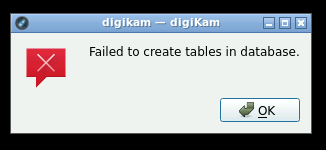
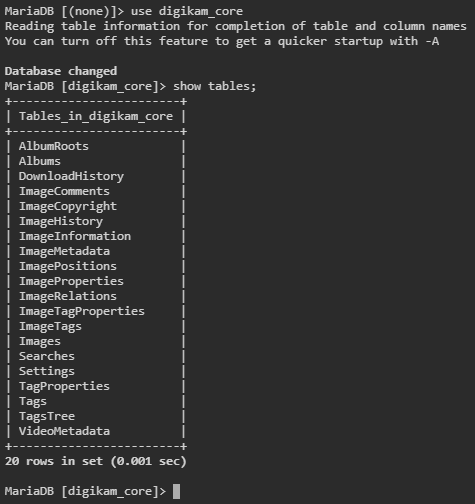
Anyone get this working using mysql remote (MariaDB)? I keep getting "Failed to create tables in database" I've tried using the suggested single database (selecting defaults fills the 4 databases with the name digikam) and I just tried naming them separately by using digikam_core, digikam_face etc... The database connection test passes, and database tables are created, but then I get the message. My latest attempt did create tables in digikam_core the other ones blank (digikam_thumbs, digikam_face, and digikam_similar). When I used the same db "digikam" for all 4 database the same 20 tables were created.
-
I don't understand this reply? I had a docker update and it is now no longer starting with the same error(s) EDIT: Neverminded. I found the post above that shows how to fix. 2021-03-30 13:18:28.402298 [info] WEBUI_CONSOLE_TITLE defined as 'Minecraft Java' 2021-03-30 13:18:28.442013 [info] CUSTOM_JAR_PATH not defined,(via -e CUSTOM_JAR_PATH), defaulting to '/config/minecraft/minecraft_server.jar' (Mojang Minecraft Java) 2021-03-30 13:18:28.479940 [info] JAVA_VERSION not defined,(via -e JAVA_VERSION), defaulting to '8' '/usr/lib/jvm/java-8-openjdk/jre' is not a valid Java environment path
-
I'd already started that process just to see. It appears it did not change anything. ~# fstrim -v /mnt/cache fstrim: /mnt/cache: the discard operation is not supported
-
my SSD is definately not plugged into the external. I just verified. It's plugged into 1 of the two SATA ports labeled as "ASMedia® PCIe SATA controller". I'm 99.85% sure I didn't touch any existing drives when installing the card. Just for the two new 4TB Red's I added. I have 1 spot open on the other set labeled "AMD SB950 controller : 6 x SATA 6Gb/s port(s), brown" I could swap too.
-
This may or may not be related, but it seems since installing 6.8.0 (12/27). I have been getting the following email from unRAID. fstrim: /mnt/cache: the discard operation is not supported I have had the Dynamix SSD Trim for some time w/o issues. Could anything related to 6.8.0 cause this? The only other thing I've done to my server recently is install this expansion card to add two more HDD's but I did not move my SSD off the MB controller. https://www.ebay.com/itm/162958581156?ViewItem=&item=162958581156

-
look back like 3 posts on how to roll back. Something in the latest release(s) removed unpack portion of the settings. Also for those that want to roll back DO NOT copy/paste that tag into Repository, type it in. Copy/Paste (at least for me) broke this docker. Clearly something was getting captured in the copy.
-
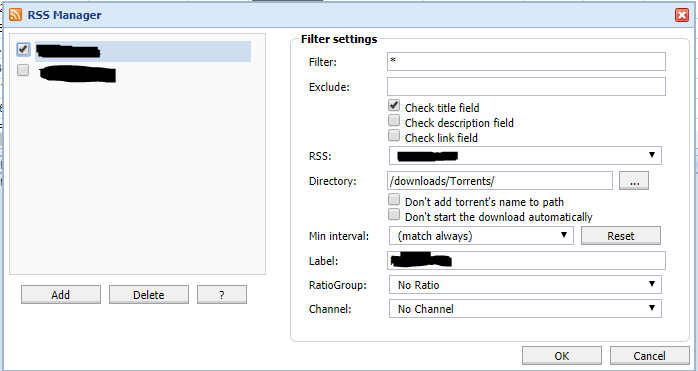
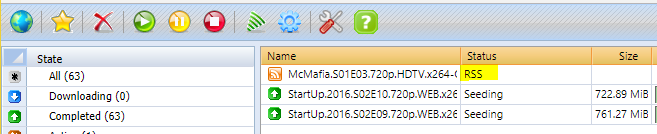
should RSS be able to auto-download? I thought I had this setup working but now it's doesn't seem to. Torrents come in via RSS as a status of RSS and I have to manually click on them to load them.
-
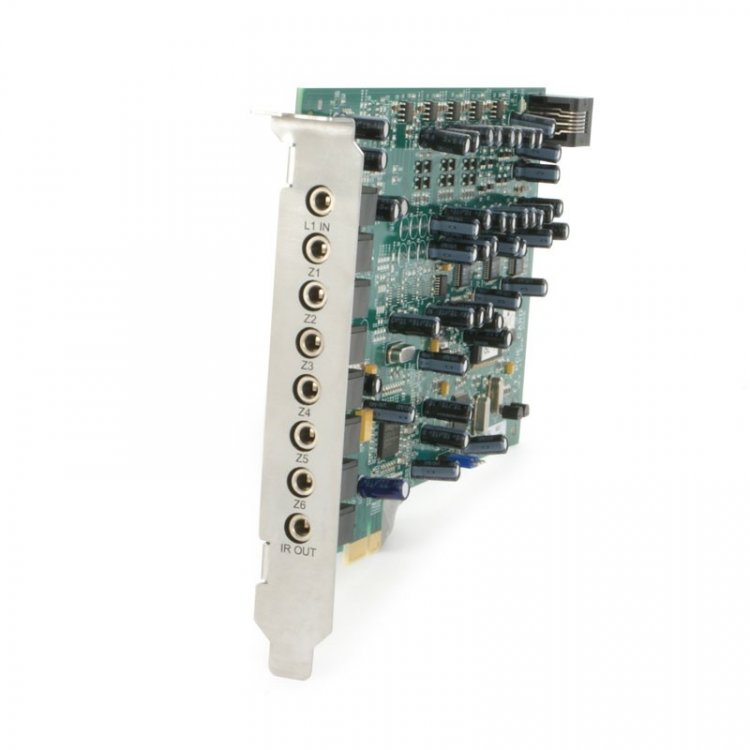
07:00.0 PCI bridge: Creative Labs [sB X-Fi Xtreme Audio] CA0110-IBG PCIe to PCI Bridge 08:00.0 Audio device: Creative Labs [sB X-Fi Xtreme Audio] CA0110-IBG 08 is what I'm passing through to my windows 7 VM. This is (I believe) a custom version of the SB X-Fi Xtreme card. It is a PCI card, and is for my whole house audio (Casatunes). Its a 6 channel audio card with an aux in and IR out. /usr/local/sbin/vfio-bind 0000:08:00.0
-
Removed both unmenu lines from the go file and rebooted however trying to manually start cache_dirs from telnet gives the same result: Try this... In cache_dir script, find "ulimit -v 5000" and change it to "ulimit -v 15360" I just downloaded the latest script and tried running it and got the same messages as you. But I saved my old version and did an sdiff and the only difference was the change above for the shell, and the ulimit. Changing that allowed it to run for me. EDIT Well cache_dir's is running BUT while still connected to my server via ssh I started getting: awk: error while loading shared libraries: libdl.so.2: failed to map segment from shared object: Cannot allocate memory awk: error while loading shared libraries: libdl.so.2: failed to map segment from shared object: Cannot allocate memory So I'm guessing my fix isn't a complete fix.




