2Piececombo
Members
-
Joined
-
Last visited
Everything posted by 2Piececombo
-
Ive recently set up a new server (dual x5687, 24gb RAM) and have issues with nextcloud performance. Ive got 2 cache pools in my server. first is 2x256gb m.2 sata ssds (called 'cache'), the other are 2x16GB optane drives (called syspool) - both in raid 1 for redundancy. my docker img lived on the cache poo, and i put app data on the optane pool thinking it might make nextcloud a bit faster. and at first, it was! I have another very simialr server with nextcloud running, and the performance on the new server was just slightly faster than the old server. I then decided I wanted to try putting the docker img on the optane drives too, just to see what sort of difference that made. I deleted all the dockers/img/appdata to start with a clean slate, stopped docker service, and changed from btrfs img to directory (due to limited space on the optanes) and mapped it accordingly. I set up mariadb and nextcloud again, and suddenly the performance was slow as hell. easily 2-3 times slower than it was before. I again deleted everything and changed from directory to btrfs.img again to see if that made a difference (leaving it on the optane pool) but still just as slow. So again I deleted everything and set it back to how I originally had it. but still, its horribly slow. I then decided to try out postgressql as per this thread, but that made absolutely zero difference. i have no idea why it's suddenly so slow when before it was so fast. But nothing I do seems to work. Has anyone had any luck tracking down performance issues with nextcloud?
-
Set up a new unraid server today, and once again ran into this issue. Weird thing for me is that it's not a matter of which USB drive you use, or which port you plug into, its the computer running the creator tool. My main PC simply WILL NOT run through the tool successfully, and each previous time I've used another computer to do it. Found the video that someone posted about reformatting/renaming the drive mid-flash and it worked. Can't believe that after this many years of this being a problem, the creators of an entire operating system have not found a fix for this? Kinda blows me away that you can make an amazing server OS, but not a tool that installs it properly? lol Anyway the formatting option does work. Never bothered with the manual way, because why would I when theres a tool to do it for me
-
I am having trouble creating a connection to my unraid server via ssh. I provided the correct IP/port/username/password, but when I attempt the connection it hangs at "Connected to Guacamole. Waiting for response..." I can connect via putty so I know ssh is working properly. And other ssh connections I've got in guac work fine. Just not to unraid itself.
-
I'd just given up and moved everything off the cache until a real fix was found. Applied the fix last night and so far everything looks good, I'll keep an eye on it over the next week and post back if anything happens. Cheers!
-
Fair enough. Was a fun experiment at the very least.
-
Why? Well, partially just because I wanted to see if it was possible. And I figured it added a bit of extra security? I somehow overlooked the port thing, I'll see what I can do
-
I don't know exactly where the problem is exactly, so maybe someone smarter than me can give me some direction here.. I've got binhex-teamspeak isntalled. did a test connect to it locally and it was good so I bumped it over to "proxy-net" (thanks spaceinvader) Created a new cname record: ts.mydomain.tech and made a new teamspeak.subdomain.conf file for Swag and made the necessary changes to the the Swag container. server { listen 443 ssl; listen [::]:443 ssl; server_name ts.*; include /config/nginx/ssl.conf; client_max_body_size 0; location / { include /config/nginx/proxy.conf; resolver 127.0.0.11 valid=30s; set $upstream_app teamspeak; set $upstream_port 443; set $upstream_proto https; proxy_pass $upstream_proto://$upstream_app:$upstream_port; proxy_max_temp_file_size 2048m; } } Swag starts fine, I get "Server Ready" which tells me there's no problem there. But I cannot connect to the server. Anyone got any suggestions?
-
can confirm this works on Windows Server 2019
-
Ahh, I get it now. Cheers friend
-
I did not realize the subdomain had to be the same name as the docker. My docker is just named "guacamole" but the subdomain I intended to use was 'remote' I added a new cname record for 'guacamole'. Immediately I was able to access it with guacamole.mydomain.com. So if my observation is correct, the docker (or whatever form the server itself takes) has to share the name of the subdomain being used to point traffic too it? I suppose that makes enough sense, I just didnt realize how that worked.. Anyway cheers for helping me be less dumb
-
If I go to https://remote.mydomain.com I get the screen linked in the first post. if I go to https://remote.mydomain.com:8089 (the port I gave to guacamole) I get ERR_CONNECTION_TIMED_OUT. Accessing via local IP works fine
-
yes, following spaceinvaderones guide I'm using proxynet
-
I've followed everything I could find, but I'm still not able to get access via swag. I have a proper cname. I have the proper ports forwarded on my firewall (pfsense) I changed the dockername to have no uppercase letters, and edited the swag conf file to reflect that. But still no access via domain name. Can get to it fine via LAN ip. Swag shows no errors. My nextcloud is fine and accessible from the internet, just not guac. I've got the port number on the docker set to 8089. When i go to remote.mydomain.com:8089 I get no response. When I go to remote.mydomain.com I get this. which is the same thing you get when going to the swag webui, making me think the problem lies within a config file, and the traffic is not being forwarded. Here's my swag .conf: # make sure that your dns has a cname set for guacamole and that your guacamole container is not using a base url server { listen 443 ssl; listen [::]:443 ssl; server_name apacheguacamole.*; include /config/nginx/ssl.conf; client_max_body_size 0; # enable for ldap auth, fill in ldap details in ldap.conf #include /config/nginx/ldap.conf; # enable for Authelia #include /config/nginx/authelia-server.conf; location / { # enable the next two lines for http auth #auth_basic "Restricted"; #auth_basic_user_file /config/nginx/.htpasswd; # enable the next two lines for ldap auth #auth_request /auth; #error_page 401 =200 /ldaplogin; # enable for Authelia #include /config/nginx/authelia-location.conf; include /config/nginx/proxy.conf; resolver 127.0.0.11 valid=30s; set $upstream_app apacheguacamole; set $upstream_port 8080; set $upstream_proto http; proxy_pass $upstream_proto://$upstream_app:$upstream_port; proxy_buffering off; } }
-
I notice your examples are using UDP openvpn connection.. Is there a preferred method? The PIA OpenVPN config page has many options and ive never been sure if one method is better than another? Also, is there any reason to use fourth gen config files over the third gen?
-
Seems that the webui ONLY works when set to port 8080. changing it to anything else results in not being able to get to the gui. what gives?
-
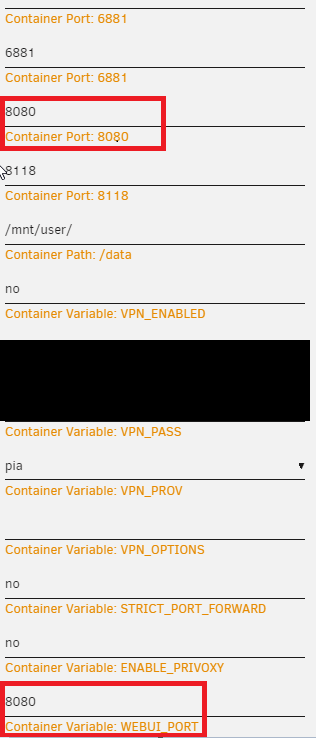
okay i lied, it did work after disabling the vpn, i guess I didn't give it enough time. But I have a new question. When editing the settings there are 2 areas that have port 8080, one labeled WebGUI and one not. What is the non gui port for? I Assume I only need to change the gui one to affect which port the gui is accessed from?
-
I'll check, but I also disabled VPN/Privoxy/PF and still no GUI.
-
I'm no longer able to access the WebUI. I went so far as to delete in reinstall it, making sure to use the most current PIA vpn config files. It just wont load the login page. I've tried changing the webUI port to something other than the default 8080 but still nothing. I'm not sure where to start investigating.
-
I was able to get everything working after some tinkering. I deleted the successful/failed conversions files, changed the preset to one from the general group, and restarted the docker. It now seems to be working properly. Will post again if I run into more issues.
-
Handbrake is no longer auto converting files in watch folder. I drop a file in the folder and it will momentarily show the dialogue box that it's converting, then it closes and does nothing. I've restarted both the container and the whole server. I can still manually convert, but this defeats the whole point of having a watch folder. Any suggestions? EDIT: adding more info.. I noticed the changes to presets and modified mine in the docker template. Still doesn't work. Also, does changing the preset via the GUI actually do anything? If that preset doesn't match the docker settings, what does it use?
-
Lets say for a minute that I don't want to access it via file browser. I still see no way to add files. You've not really answered that question. What's the point of running this docker on my unraid server if I can't add files from the server? I have resilio running as a docker container on my server. A few friends have it running on their PCs in various places. I want to share a file with them. I've created the folder in resilio, shared it with them, but now how do I get files into it? I suppose Krusadrer would work? But it seems silly to have this as a docker and have no way to manage files without something else like Krusader. Now to permissions for network access.. "You have to map the sync folder as a user share." I've attempted this 2 ways. First I created a user share in unraid, then in the template for resilio i mapped /sync to the share (/mnt/user/resiliotest) I Tried all the share security settings (public, secure, and private) and none of them allowed me proper permissions from over the network. (i should note my windows pc username/password is the same as the credentials i used when creating an user in resilio upon first launch, and are also the same for my share in unraid) Then I deleted resilio and started over from scratch. (removed the appdata for it as well to be sure there was no left over config files that may cause problems) This time I did NOT create a user share before installing resillio. I mapped /sync to /mnt/user, then from within resilio created a new folder (which in turn created a new user share in unraid) Same result, no permissions to move files to the folder. The whole point of me running this on my server is to avoid installing it on my PC (and the files I want to share are on my array anyway) I don't know any other way to configure share permissions to allow this to work. What am I missing? Disregard.. I have solved my problem.. for now.
-
I'm not sure I get what youre saying. Resilio desktop version allows me to create a folder and I can move things into that folder. The container appears to have no way to actually add files to any created folders. Lets say I have my unraid server and a desktop in another location entirely. I want to share some files from my unraid server and have them sync to the desktop in another location. From the container, how am I meant to add those files so they can be sync'd to the other system? I cannot find a way to do it from with the GUI, I can't do it over LAN from another machine.. So how would I get those files to the other machine? I hope I'm explaining that in a way that makes sense. Is there a way that I can grant permissions so I can write to the share over LAN?
-
Maybe I'm not understanding the point of this program.. I set it up, mapped the /sync to /mnt/user then within resilio created a new folder. I can map that folder from my pc, but cannot move files to it. I see no way to upload files from within the GUI of the docker. How am I meant to add files?
-
In Qbittorrent, change it to "pause torrent" sonarr/radarr will actually remove it from both qbittorrent and from your downloads folder when it's finished. I made this mistake at first too. No need for user scripts here.
-
I have 2 questions about the Listening Port under the connection tab. I am using PIA for my VPN. I found out what port my PIA desktop app was using (connecting to the same server as qbittorrent of course) and used that. But it does not seem to retain it, even after hitting save. It will save til the next restart, then it's back to some random port (and yes, "Use different port on each startup" is unchecked) Should I be using a specific port? Also, is there some way to force it to keep a specific port so I don't have to manually change it on each reboot.