





Stubbs
Members
-
Joined
-
Last visited
Everything posted by Stubbs
-
Where can new icons be submitted? Here? The github page? I want to submit one for YunoHost.
-
About 3 years ago when I built my server, I chose an Asus B450M-A + Ryzen2400G because I figured that's all I needed at the time. I've since decided I want to both expand my storage array with an HBA Card and pass through a NIC so I can virtualize my router. Maybe even throw in a GPU too. The problem is the B450M only has one PCIe slot so I'm going to have to upgrade at some point. Some questions I have: Does ECC work with consumer-grade Ryzen CPUs? I've heard conflicting information on this. I just bought x2 16TB drives and I'm looking to set up a new array for important data, so ECC is something I'm looking into, but I'd rather not invest in an expensive server-grade motherboard + CPU (all server motherboards seem to be expensive where I live). Is DDR5 worth it for Unraid? What are some good value for money motherboards that offer good power efficiency and lots of room for PCIe expansion?
-
I just updated this container, and it broke it. My log keeps showing the message s6-supervise pihole-dot-doh (child): fatal: unable to exec run: Permission denied
-
It had been a while since I last made a VM in Unraid, and when assigning a vdisk size, I forgot you're supposed to postfix it with the letter "G" to assign it in gigabytes.
-
Problem solved. Yet another case of dumb user error. Close this awful thread.
-
root@Tower:~# ls -lah /mnt/cache/system/docker total 25G drwxrwxrwx 1 nobody users 20 Aug 21 23:53 ./ drwxrwxrwx 1 nobody users 26 Dec 21 2019 ../ -rw-rw-rw- 1 nobody users 25G Sep 1 22:40 docker.img root@Tower:~# ls -lah /mnt/disk2/system/docker total 25G drwxrwxrwx 2 nobody users 24 Nov 23 2019 ./ drwxrwxrwx 3 nobody users 20 Nov 23 2019 ../ -rw-rw-rw- 1 nobody users 25G Aug 21 23:53 docker.img root@Tower:~# I guess I had a docker image on disk 2 after all. Not that it's of big consequence, after all the persistent data is fine.
-
Thanks! Sorry for bothering you with this dumb user error.
-
The log shows this being repeated: time="2022-09-01T16:02:17+10:00" level=fatal msg="default addr for network '192.168.1.5:3306/photoprism' unknown" started 220730-bookworm as root (amd64-prod) init: updating filesystem permissions PHOTOPRISM_DISABLE_CHOWN="true" disables permission updates Problems? Our Troubleshooting Checklists help you quickly diagnose and solve them: https://docs.photoprism.app/getting-started/troubleshooting/ file umask....: "0002" (u=rwx,g=rwx,o=rx) home directory: /photoprism assets path...: /opt/photoprism/assets storage path..: /photoprism/storage config path...: default cache path....: default backup path...: /photoprism/storage/backups import path...: /photoprism/import originals path: /photoprism/originals switching to uid 99:100 /opt/photoprism/bin/photoprism start Both are on Bridge.
-
Yeah, I created a database called photoprism, a user called photoprism, and granted all privileges to the user. Did the exact same thing for my Nextcloud database. How do you ping from Photoprism? Also as a side note, when I open both the console and the log window for Photoprism, the window always crashes after about 5-10 seconds.
-
The PhotoPrism container isn't working for me. I configured a database for it in mariadb and the MySQL Database Connection field looks like this: photoprism:[email protected]:3306/photoprism/photoprism?parseTime=true But the WebUI won't load. Also it doesn't seem to have created anything in the database folder in my mariadb appdata directory.
-
Yeah sorry about that. Parity did sync and I sort of forgot about this thread. I came back and replied because I was also asking about a VM-related issue on the VM forum. I did have a "disk2 has read errors error" yesterday, although I haven't noticed anything wrong besides that. They all look fine on the array menu. tower-diagnostics-20220831-2114.zip
-
root@UnraidServer:~# ls -lah /mnt/cache/system total 16K drwxrwxrwx 1 nobody users 26 Dec 21 2019 ./ drwxrwxrwx 1 nobody users 102 Aug 31 14:40 ../ drwxrwxrwx 1 nobody users 20 Aug 21 23:53 docker/ drwxrwxrwx 1 nobody users 22 Dec 21 2019 libvirt/ root@UnraidServer:~# ls -lah /mnt/disk2/system total 0 drwxrwxrwx 3 nobody users 20 Nov 23 2019 ./ drwxrwxrwx 10 nobody users 137 Aug 31 14:40 ../ drwxrwxrwx 2 nobody users 24 Nov 23 2019 docker/ root@UnraidServer:~#
-
This tutorial no longer works. The PfSense VM simply cannot load the installation screen while Primary vDisk Bus is set to SATA.
-
I have narrowed the problem down, but still don't have a solution. The problem seems to be the "Primary vDisk Bus" setting, which is set to SATA, as demonstrated in the tutorial. If I change it to the default "VirtIO", the PfSense setup wizard shows up, but as I proceed through the installer, it cannot detect any disks. Does anyone know what the issue is? Is there any additional information I should provide?
-
I followed this tutorial on youtube (except with the updated Unraid 6.9 IOMMU separation): But when I boot up the VM, it won't get to the installation part. This is an excerpt of the Unraid VM log: -sandbox on,obsolete=deny,elevateprivileges=deny,spawn=deny,resourcecontrol=deny \ -msg timestamp=on char device redirected to /dev/pts/1 (label charserial0) qxl_send_events: spice-server bug: guest stopped, ignoring 2022-08-31T01:56:15.267578Z qemu-system-x86_64: vfio-pci: Cannot read device rom at 0000:03:00.0 Device option ROM contents are probably invalid (check dmesg). Skip option ROM probe with rombar=0, or load from file with romfile= 2022-08-31T01:56:15.269074Z qemu-system-x86_64: vfio-pci: Cannot read device rom at 0000:03:00.1 Device option ROM contents are probably invalid (check dmesg). Skip option ROM probe with rombar=0, or load from file with romfile= 2022-08-31T01:56:15.270696Z qemu-system-x86_64: vfio-pci: Cannot read device rom at 0000:04:00.0 Device option ROM contents are probably invalid (check dmesg). Skip option ROM probe with rombar=0, or load from file with romfile= 2022-08-31T01:56:15.272388Z qemu-system-x86_64: vfio-pci: Cannot read device rom at 0000:04:00.1 Device option ROM contents are probably invalid (check dmesg). Skip option ROM probe with rombar=0, or load from file with romfile= and here is a screenshot of what the VM is displaying: [EDIT] I have narrowed the problem down, but still don't have a solution. The problem seems to be the "Primary vDisk Bus" setting, which is set to SATA, as demonstrated in the tutorial. If I change it to the default "VirtIO", the PfSense setup wizard shows up, but as I proceed through the installer, it cannot detect any disks. Does anyone know what the issue is? Is there any additional information I should provide?
-
You were right, worked just fine through the CLI. Thanks. The web based updater has given me so many problems in the past. Finally I never have to use it again.
-
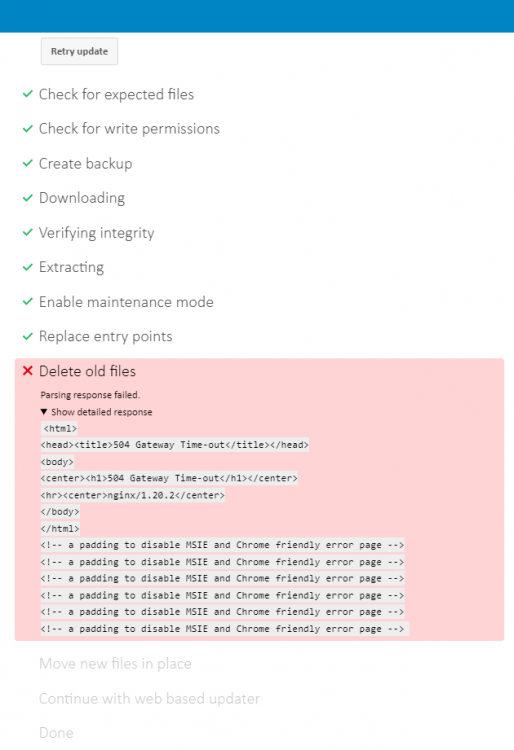
When I try to update the Nextcloud container from within the Nextcloud UI, it always errors out at "Delete old files". Is there a way to fix this? This is what it looks like: Delete old files Parsing response failed. Show detailed response <html> <head><title>504 Gateway Time-out</title></head> <body> <center><h1>504 Gateway Time-out</h1></center> <hr><center>nginx/1.20.2</center> </body> </html> <!-- a padding to disable MSIE and Chrome friendly error page --> <!-- a padding to disable MSIE and Chrome friendly error page --> <!-- a padding to disable MSIE and Chrome friendly error page --> <!-- a padding to disable MSIE and Chrome friendly error page --> <!-- a padding to disable MSIE and Chrome friendly error page --> <!-- a padding to disable MSIE and Chrome friendly error page --> Simply waiting does not fix it. By the time this error occurs, it's deleted most of the files inside my nextcloud appdata directory, and I have to retrieve the backup from the nextcloud data share. To further illustrate, see the attached image.
-
And sorry, I can't really remember exactly what it said when the parity disk was not functioning, but I was getting a barrage of errors/warnings like this in my server log: Warning: mkdir(): Input/output error in /usr/local/emhttp/plugins/dynamix.docker.manager/include/DockerClient.php on line 349 Warning: file_put_contents(/var/lib/docker/unraid/images/sonarr-icon.png): failed to open stream: Input/output error in /usr/local/emhttp/plugins/dynamix.docker.manager/include/DockerClient.php on line 93 Warning: mkdir(): Input/output error in /usr/local/emhttp/plugins/dynamix.docker.manager/include/DockerClient.php on line 349 Warning: file_put_contents(/var/lib/docker/unraid/images/swag-icon.png): failed to open stream: Input/output error in /usr/local/emhttp/plugins/dynamix.docker.manager/include/DockerClient.php on line 93 Warning: mkdir(): Input/output error in /usr/local/emhttp/plugins/dynamix.docker.manager/include/DockerClient.php on line 349 Warning: file_put_contents(/var/lib/docker/unraid/images/tautulli-icon.png): failed to open stream: Input/output error in /usr/local/emhttp/plugins/dynamix.docker.manager/include/DockerClient.php on line 93 Warning: mkdir(): Input/output error in /usr/local/emhttp/plugins/dynamix.docker.manager/include/DockerClient.php on line 349 Warning: file_put_contents(/var/lib/docker/unraid/images/wikijs-icon.png): failed to open stream: Input/output error in /usr/local/emhttp/plugins/dynamix.docker.manager/include/DockerClient.php on line 93
-
Sorry I'm kind of stuck with photos right now because my internet isn't working (currently posting from mobile data). Here is my current diagnostics though. tower-diagnostics-20220822-0512.zip
-
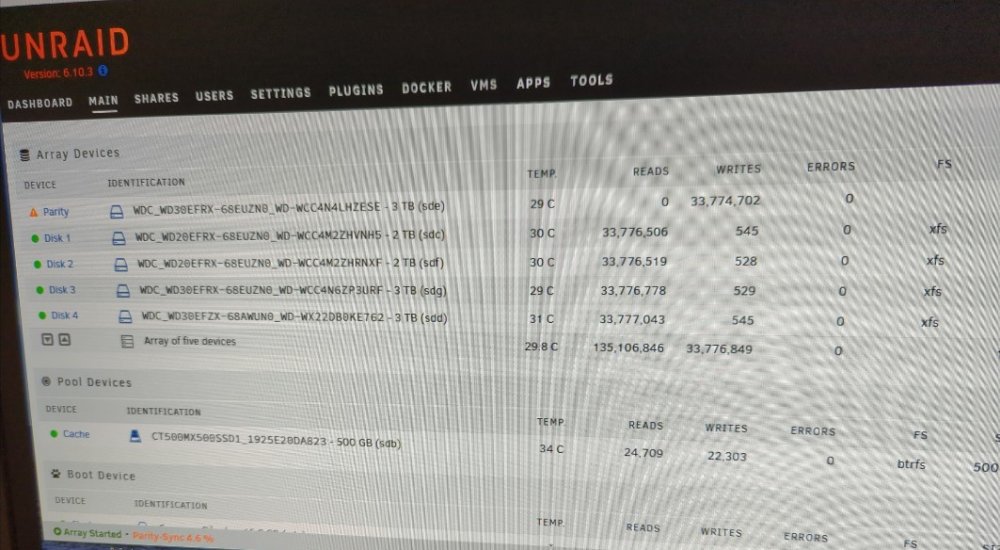
As seen here, its rebuilding with no disk 2 or 3 errors. If I hover over the parity exclamation point widget, it says "parity is invalid", but I assume that will go away once it rebuilds.
-
It said something like parity was invalid. The parity disk wasn't coming back on even after a server restart, and the only option seemed to be a parity sync, which lead to disk 2 showing an error. At first it showed all disks were fine but then disk 2 started returning an error. I'm doing a parity sync right now. I haven't noticed any data missing in my network share so I'm hoping it will all work out, except my apps seem to be gone for good. I reinstalled jellyfin, and when opening the webUI, it looked exactly like it was before, so I assume its retaining everything from the appdata directory. My docker is definitely on my cache drive too, so I don't know how it got wiped simply because the parity disk stopped working.
-
I'm rebuilding parity again, but my apps are still gone. When I try to install a new container, its inaccessible from the WebUI. I'm losing my mind over this. I just don't understand wtf is going on.
-
I recently had a series of electricity outages and it seems to have taken a toll on my array. My parity drive had read errors, but all my other drives seemed to be fine. So I shut down the array, tried to rebuild it (which started a parity sync) but now all of a sudden, my Disk 2 in the array has read errors, and shows up as "Unmoumtable filesystem: wrong or no filesystem" in the array tab, even though it clearly says "xfs" to the left. Worse yet: literally all my docker apps disappeared. I don't understand why, aren't docker containers stored on the cache drive? My appdata folder is still accessible, yet my apps randomly got deleted. Are they gone forever? I'm pretty sure I backed my server up a few months back but not sure how the newer system works. I attached the diagnostics .zip. Also on my server's log I see these two errors: Aug 21 23:55:44 Tower kernel: ata9.00: exception Emask 0x10 SAct 0x1c0 SErr 0x90202 action 0xe frozen Aug 22 00:03:13 Tower root: Fix Common Problems: Error: disk2 (WDC_WD20EFRX-68EUZN0_WD-WCC4M2ZHRNXF) has read errors tower-diagnostics-20220822-0024.zip
-
I tried updating using the built in updater, which I've done several times before, but this time it completely broke the container. It's stuck on Step 6 is currently in process. Please reload this page later. Which is the "Extracting" segment. It just stays on that forever.
-
Alright, I'm not 100% sure this is what caused it, but when removing the tray, I noticed the front two screws holding the hard drive in had slightly thicker heads than the back two. It was still connected to the SATA and power connecter in the drive bay, but it probably wasn't the most stable connection. I replaced those two thicker screws with the correct thinner-head ones, and all of a sudden it works fine.



