





jazzy192
Members
-
Joined
-
Last visited
Everything posted by jazzy192
-
Ok sure. Shall I let the read check finish running or is that pointless?
-
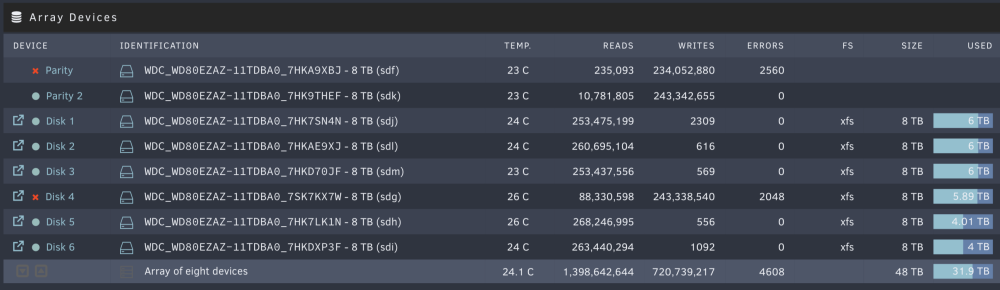
Hi all, Never had any disk errors before apart from cache had a few but still fine. Never any on my array discs. Not sure if it's related but I upgraded to 6.12.0-rc2 a few days ago. Had some files on my cache so evoked mover and then loads of errors came up on Parity disk 1 and now disk 4. Not sure if it's related to the update. All my array disks are WD Reds. It's just doing a read test now and looks like it's going to take a few hours but have attached logs for both disks now as at first, it was just disk 1. Also attached are the diagnostics logs. Cheers WDC_WD80EZAZ-11TDBA0_7HKA9XBJ-20230321-0231.txt WDC_WD80EZAZ-11TDBA0_7SK7KX7W-20230321-0242.txt tower-diagnostics-20230321-0246.zip
-
Interested also, good shout out @Alexandro
-
Cheers! Almost bought it!! I found a replacement 2 port (8 drive) like my last and I already have an expander so will use that unless the expander slows everything down. If so can you recommend any good 4 port (16 drive) cards that are under £100 or around that used? Cheers
-
Hi all, My hardware has changed so much over the years from a i9 and 3080Ti setup so I could also game under a VM etc but now I have settled for the following: Current Intel i5-8400 Z390 Gigabyte Aorus Pro 32GB DDR4 RAM 1060 6GB GPU M.2 240 SSD (For Windows VM - Blue Iris etc)) M.2 240 SSD (For Docker) 2 x 500GB SSD (2 for Cache) LSI HBA in IT (to the 8 x 8TB via backplanes) I have run out of PCIe planes and I either want to buy a separate gaming PC or have a combined server and gaming VM (one before that worked well). If I was going to go down the gaming route I was thinking of using Ryzen for more lanes and two GPU's, one Intel Arc of Plex transcoding and a 4090 for gaming VM. I could also add the following which his not possible before Option 1 (Ryzen NAS/Gaming) Ryzen CPU (high spec) Creator-type motherboard with loads of PCIe slots 64GB DDR4 RAM M.2 240 SSD (For Windows VM - Blue Iris etc)) M.2 240 SSD (For Docker) 2 x 1TB SSD (2 for Cache) Intel Arc GPU (for Quickstream) Nvidia 4090 (for Windows VM) Dual 10gbe SFP+ card - MIGHT NOT BE NEEDED IF M'Board has 10gbe (I have two other computers around the house that have 10gbe ethernet sockets as they are plugged into the 10gbe switch) LSI expander card (I have more than 8 drives now and the current LSI HBA only has room for 8 drives without an expander) Most people will say that due to being a VM it will suffer but last time using a 10900k (IIRC) and 3080Ti there was less than 5% drop in performance over bare metal. Also, when not using the VM or Plex I take it the Intel Arc and Nvidia GPU would not use much power unless being used? I know using a Ryzen would be more over than a i5-8400 but that's manageable. If I was not to bother with a combined unit then I guess I could alter my original setup to add in the 10gbe NIC and Expander like below. Would I have enough lanes for everything including the M.2 drives?: Option 2 (modification of current) Intel i5-8400 Z390 Gigabyte Aorus Pro 32GB DDR4 RAM M.2 500 SSD (Cashe) M.2 240 SSD (For Docker) LSI HBA in In IT mode LSI expander card Dual 10gbe SFP+ card Using the above I would lose access to my windows VM which is not the end of the world but would have been nice to keep it going. I would LOVE to run a 12900k with the following but I don't think I have enough lanes (20) to make it happen: Option 3 (Intel NAS/Gaming) Intel i9 12900 Creator-type motherboard with loads of PCIe slots 64GB DDR5 RAM M.2 240 SSD (For Windows VM - Blue Iris etc)) M.2 240 SSD (For Docker) 2 x 1TB SSD (2 for Cache) Nvidia 4090 (for Windows VM) Dual 10gbe SFP+ card - MIGHT NOT BE NEEDED IF M'Board has 10gbe (I have two other computers around the house that have 10gbe ethernet sockets as they are plugged into the 10gbe switch) LSI HBA in IT mode LSI expander card (I have more than 8 drives now and the current LSI HBA only has room for 8 drives without an expander) I would really love to have a mixed-use server with all the expansions I need and don't really want to spend another £1K+ on a second build really. Running Windows or Linux under a VM has always been great for me but I dont think the Intel CPU's have enough lanes and Ryzen has no Quicksync so would have to add a Intel Arch card or older unlocked Nvidia for Plex and run two cards. Intel i9 12900 would be perfect but as im using M.2's and quite a few expansions then I think I would limit the speeds somewhat? Any advise would be grand! PS, I would LOVE a motherboard with IMPI instead of having to make the cold trip outside and all the way to the garage to reboot/troubleshoot so I think that would mean a Xeon CPU? Happy with that also but again, intel or unlocked Nvidia would be needed as I would want to run a 4090 also. Cheers also!
-
Hey all, I have been looking around for a 4 port LSI controller for my 4 backplanes which each hold 4 drives (16 total). Don't want to spend the earth so found this: https://www.ebay.co.uk/itm/394104990001?hash=item5bc27ce931:g:Ps4AAOSwQrhinf0u&amdata=enc%3AAQAHAAAA4K5AU54BbvMQ%2BJ777JEmhKS%2FV0bMsHpbqu47vcTocUjCKkSdTRMGM%2Fg3C0p4TV72SBoMH1h%2FStEoqFCyYwb9QNsCvbcY91JCbq2jbjyUlWr495Y%2FB9Y5oYI3sOiwMATtXe1B38p0MCkd50x9qUEy5wbxmiGMBlY2jTYlyDiue%2FvBtJGBXD6H4R7aV%2BszjAzGwIwa9G3pwdMdDQs2%2FZd%2FrQ25%2Fe1anGu08HFvjSsCU8VGOHerV4EFNVZxpjdMyascVEoCzjg%2Bw3oYL3RXALOuV0fvy9y6nM0TrKJxyYKnbcNo|tkp%3ABk9SR_r6veWdYQ Is it possible to flash this to IT mode for Unraid? I have looked around and cannot find a definitive answer. Cheers
-
Enabled Syslog Server but still holding fast so far.
-
I guess that's after doing a hard reset in person? I dont have IMPI.
-
As above, this has happened 3 time now. The first time I had to do manual via power button. Second it worked the following day (possible reboot but unsure, I forgot so didn't check logs). Now it's on its third time in about a month. Currently all my dockers and VM are working fine but the Web GUI, SSH and Samba shares are not working for any users including root and looks like I will have to do a manual power restart again. I can watch Plex just fine but cannot access shares via OSX or Windows but my Plex Clients can along with the Web Plex.
-
I have the same problem. I can mount the drive but as soon as I click backup it does the same
-
Many thanks, it's also to do with how my appdata is set to disk etc from a tutorial about 4 years old etc. Lots of other stuff is broken so feel starting fresh would be best.
-
If the possible ( I'm sore it is) to wipe clean my everything but the contents of the Array, well everything but my media section, (also clean it up as there two downloads folders etc. I would also keep most of the .iso's in the (iso folder), delete everything in the downloads folders, (System) folder will stay, So I am left with (Backup's (Downloads) > > > > (Complete) > > > > > > > > > General Storage) (Media) > > > > > > (movies) (tvshows) (music) (ISO's). > > > > > > (Win ISO's) (Linux ISO's) (PVR) > > > > > > (Recordings) (system) > > > > ( t-darr cache (windows disk) I dont mind re-downloading dockers again etc. I just think mines got a bit miss mass and would benefit from starting clean even though I will have to download/setup all the docker images and Plugins etc. I also get random problems like when lrying to open a new window of Unraid it just comes up with some login errors etc. Also, with the new cache pools I wanted to do some changes like remove my current Cache pool of 2 500GB SD drives and create a new cache pool with one of my 1TB NVME M.2 Drives etc. (The two 500gb drives have been in there for about 4/5 years from my urial config. I wanted to reargue a few other things like my appdata, backup and system are on a old SSD called ua_docker which was from a tutorial ages ago about moving your docker stuff (appdata) to a separate SSD. Cheers
-
Hello, I just posted about using my Nvidia 1060 6GB for transcoding stuff in Plex but was recommended to stick with the onboard Intel GPU (Quicksync). I'm fine with that but then it brings me to another question now regarding not HTPC. Nvidia Streaming to my Nvidia Shields is the house. Let me explain... So my sitting room is next to my garage. I have CAT6a all over the house thankfully and ceiling speakers in most rooms through my Control4 matrix including Atmos in the sitting room as I have a Marantz NR1711 7.1 (a total of 4 ceiling speakers in there). I intended to use my Unraid server in the rack for streaming Plex, Homebridge, Downloading etc. I also wanted to have a windows 10 or 11 VM (I have 10 installed on my Unraid server currently, not used it in a while due to illness). I need the VM as I have a Macbook Pro M1 and I need to use some windows programs so I use Parsec of Moonlight for it. One program I need to use quite a lot is my Control4 Composer Pro (editing my C4 setup, adding devices, automation etc) so I remote into the VM using my Macbook Pro M1 and it is so good it's like having full windows on your mac like BootCamp. I also use the LG Ultrafine Mac-orientated display so I normally have windows on one screen and macOS on the other. This brings me to my living room HTPC, it's way more powerful than the server as it has the following: Intel i7-10700K Water cooled CPU (not a full water system, just does the CPU) Gigabyte Z490 Aorus Master Motherboard 32GB DDR4 RAM Nvidia RTX 3080 Ti Samsung 970 EVO Plus 1 TB x 2 NZXT Case with loads of airflow Well I was thinking, is it worth putting the HTPC parts in the Unraid server?: Intel i5-8400 >>> Intel i7-10700K Gigabyte Z390 Pro Motherboard >>> Gigabyte Z490 Aorus Master Motherboard 32GB DDR4 Ram >>> would upgrade to 64GB Ram Nivida 1060 6GB >>> Nvidia RTX 3080 Ti (For Windows VM) Samsung SSD 970 EVO Plus 250GB >>> Samsung 970 EVO Plus 1 TB x 2 (For Windows VM) 8 x 8TB Western Digital HD (Array) Samsung SSD 860 Evo 500GB (Cache) HP 2 port 10GB NIC (connects to my Unifi US-16-XG) PCI 4 Port USB card (For Windows VM) Then I was thinking of just using the Intel GPU for Plex etc and then using a VM of Windows 10 or 11 for when I want to game. How much of a performance hit would I have compared to bare metal? It wouldn't be that hard to do as I would but all the HTPC parts in the current Unraid server case and sell the old current Unraid server parts. I have most of the parts like a 10-meter optical HDMI cable (easily long enough) and a USB extender. So I could have a nice wall socket (with HDMI, ethernet, USB) hidden behind the wall-mounted 75" OLED LG TV. By selling the current Unraid server parts I could possibly upgrade the Intel i7-10700K and Gigabyte Z490 Aorus Master to the newer generation? Opinions on going VM over bare metal and just having the one machine?
-
Hello, I followed Spaceinvader Ones great video for this but when I try and upload it to my server with ssh-copy-id [email protected] it asks for my root password which I assume is the web-guy login but it doesn't work? I dont have a ssh password setup for Unraid yet as this is what I'm trying to do. ANy ideas?
-
Attached is the diagnostics I just downloaded for you. Thanks by the way. tower-diagnostics-20220815-1855.zip
-
Yep, checked and all good, I can Read/Write into ISO's dir and a few other but not anything in the media dir?
-
Will do that now cheers
-
On macOS by the way. I have tried multiple ways to get this going, I have tired: I have made a new user in unraid: jamie password: xxxxxxx Made sure all the user perms are correct read/write etc I can connect to the root share fine but cannot upload files from my laptop? Or if I connect directly to the folder I want 'media' for example it wont let me write to folder still? Any ideas why?
-
My MacBook is having trouble accessing my Unraid shares. My Windows PC's are fine and the MacBook was also until a while ago it suddenly stopped working. I can see the server on the network but when I click on it it says 'connection failed' and if I do the 'connect as' it doesn't give me the chance to try to input them, it just says 'There was a problem connection to the server "Tower". Contact your.....' I have tried connecting via IP and via smb but the sam thing still happens? Any ideas?
-
Happens on my MacBook Pro 16 in Safari. I mentioned it a while ago either here or Reddit and people basically just thought I was dumb or something. Its fine in Chrome on my Windows 10 VM though
-
Ah ok, no worries. What is the VFIO-PCI CGF sorry? I am also on 6.9.0-beta25 currently.
-
Hey, I don't suppose you have had a 1080Ti or similar before? I have one in my Unraid build running; AsRock X570 Taichi, Ryzen 3950x, 32GB RAM, Nvidia 1080Ti etc for my Windows 10VM which I use parsec to stream to my MacBook for PC software and some occasional gaming. Just wanted to know how the 2080Ti compares to the 1080Ti while running in a virtual machine environment.
-
PS my XML is: <?xml version='1.0' encoding='UTF-8'?> <domain type='kvm'> <name>Windows 10</name> <uuid>a781c519-e8bf-3b12-2dfb-dd39bead760f</uuid> <description>Nvidia 1080 Passed Through</description> <metadata> <vmtemplate xmlns="unraid" name="Windows 10" icon="windows.png" os="windows10"/> </metadata> <memory unit='KiB'>16777216</memory> <currentMemory unit='KiB'>16777216</currentMemory> <memoryBacking> <nosharepages/> </memoryBacking> <vcpu placement='static'>24</vcpu> <cputune> <vcpupin vcpu='0' cpuset='4'/> <vcpupin vcpu='1' cpuset='20'/> <vcpupin vcpu='2' cpuset='5'/> <vcpupin vcpu='3' cpuset='21'/> <vcpupin vcpu='4' cpuset='6'/> <vcpupin vcpu='5' cpuset='22'/> <vcpupin vcpu='6' cpuset='7'/> <vcpupin vcpu='7' cpuset='23'/> <vcpupin vcpu='8' cpuset='8'/> <vcpupin vcpu='9' cpuset='24'/> <vcpupin vcpu='10' cpuset='9'/> <vcpupin vcpu='11' cpuset='25'/> <vcpupin vcpu='12' cpuset='10'/> <vcpupin vcpu='13' cpuset='26'/> <vcpupin vcpu='14' cpuset='11'/> <vcpupin vcpu='15' cpuset='27'/> <vcpupin vcpu='16' cpuset='12'/> <vcpupin vcpu='17' cpuset='28'/> <vcpupin vcpu='18' cpuset='13'/> <vcpupin vcpu='19' cpuset='29'/> <vcpupin vcpu='20' cpuset='14'/> <vcpupin vcpu='21' cpuset='30'/> <vcpupin vcpu='22' cpuset='15'/> <vcpupin vcpu='23' cpuset='31'/> </cputune> <os> <type arch='x86_64' machine='pc-q35-4.2'>hvm</type> <loader readonly='yes' type='pflash'>/usr/share/qemu/ovmf-x64/OVMF_CODE-pure-efi.fd</loader> <nvram>/etc/libvirt/qemu/nvram/a781c519-e8bf-3b12-2dfb-dd39bead760f_VARS-pure-efi.fd</nvram> <boot dev='hd'/> </os> <features> <acpi/> <apic/> <hyperv> <relaxed state='on'/> <vapic state='on'/> <spinlocks state='on' retries='8191'/> <vendor_id state='on' value='none'/> </hyperv> </features> <cpu mode='host-passthrough' check='none'> <topology sockets='1' cores='24' threads='1'/> </cpu> <clock offset='localtime'> <timer name='hypervclock' present='yes'/> <timer name='hpet' present='no'/> </clock> <on_poweroff>destroy</on_poweroff> <on_reboot>restart</on_reboot> <on_crash>restart</on_crash> <devices> <emulator>/usr/local/sbin/qemu</emulator> <disk type='file' device='cdrom'> <driver name='qemu' type='raw'/> <source file='/mnt/user/isos/virtio-win-0.1.160-1.iso'/> <target dev='hdb' bus='sata'/> <readonly/> <address type='drive' controller='0' bus='0' target='0' unit='1'/> </disk> <controller type='usb' index='0' model='ich9-ehci1'> <address type='pci' domain='0x0000' bus='0x00' slot='0x07' function='0x7'/> </controller> <controller type='usb' index='0' model='ich9-uhci1'> <master startport='0'/> <address type='pci' domain='0x0000' bus='0x00' slot='0x07' function='0x0' multifunction='on'/> </controller> <controller type='usb' index='0' model='ich9-uhci2'> <master startport='2'/> <address type='pci' domain='0x0000' bus='0x00' slot='0x07' function='0x1'/> </controller> <controller type='usb' index='0' model='ich9-uhci3'> <master startport='4'/> <address type='pci' domain='0x0000' bus='0x00' slot='0x07' function='0x2'/> </controller> <controller type='pci' index='0' model='pcie-root'/> <controller type='pci' index='1' model='pcie-root-port'> <model name='pcie-root-port'/> <target chassis='1' port='0x8'/> <address type='pci' domain='0x0000' bus='0x00' slot='0x01' function='0x0' multifunction='on'/> </controller> <controller type='pci' index='2' model='pcie-root-port'> <model name='pcie-root-port'/> <target chassis='2' port='0x9'/> <address type='pci' domain='0x0000' bus='0x00' slot='0x01' function='0x1'/> </controller> <controller type='pci' index='3' model='pcie-root-port'> <model name='pcie-root-port'/> <target chassis='3' port='0xa'/> <address type='pci' domain='0x0000' bus='0x00' slot='0x01' function='0x2'/> </controller> <controller type='pci' index='4' model='pcie-root-port'> <model name='pcie-root-port'/> <target chassis='4' port='0xb'/> <address type='pci' domain='0x0000' bus='0x00' slot='0x01' function='0x3'/> </controller> <controller type='pci' index='5' model='pcie-root-port'> <model name='pcie-root-port'/> <target chassis='5' port='0xc'/> <address type='pci' domain='0x0000' bus='0x00' slot='0x01' function='0x4'/> </controller> <controller type='pci' index='6' model='pcie-root-port'> <model name='pcie-root-port'/> <target chassis='6' port='0xd'/> <address type='pci' domain='0x0000' bus='0x00' slot='0x01' function='0x5'/> </controller> <controller type='pci' index='7' model='pcie-root-port'> <model name='pcie-root-port'/> <target chassis='7' port='0xe'/> <address type='pci' domain='0x0000' bus='0x00' slot='0x01' function='0x6'/> </controller> <controller type='pci' index='8' model='pcie-to-pci-bridge'> <model name='pcie-pci-bridge'/> <address type='pci' domain='0x0000' bus='0x01' slot='0x00' function='0x0'/> </controller> <controller type='virtio-serial' index='0'> <address type='pci' domain='0x0000' bus='0x02' slot='0x00' function='0x0'/> </controller> <controller type='sata' index='0'> <address type='pci' domain='0x0000' bus='0x00' slot='0x1f' function='0x2'/> </controller> <interface type='bridge'> <mac address='52:54:00:61:46:e8'/> <source bridge='br0'/> <model type='virtio'/> <address type='pci' domain='0x0000' bus='0x03' slot='0x00' function='0x0'/> </interface> <serial type='pty'> <target type='isa-serial' port='0'> <model name='isa-serial'/> </target> </serial> <console type='pty'> <target type='serial' port='0'/> </console> <channel type='unix'> <target type='virtio' name='org.qemu.guest_agent.0'/> <address type='virtio-serial' controller='0' bus='0' port='1'/> </channel> <input type='tablet' bus='usb'> <address type='usb' bus='0' port='1'/> </input> <input type='mouse' bus='ps2'/> <input type='keyboard' bus='ps2'/> <hostdev mode='subsystem' type='pci' managed='yes'> <driver name='vfio'/> <source> <address domain='0x0000' bus='0x0f' slot='0x00' function='0x0'/> </source> <rom file='/mnt/user/General Storage/NVIDIA.GTX1080Ti.11264.170118.rom'/> <address type='pci' domain='0x0000' bus='0x04' slot='0x00' function='0x0'/> </hostdev> <hostdev mode='subsystem' type='pci' managed='yes'> <driver name='vfio'/> <source> <address domain='0x0000' bus='0x0f' slot='0x00' function='0x1'/> </source> <address type='pci' domain='0x0000' bus='0x05' slot='0x00' function='0x0'/> </hostdev> <hostdev mode='subsystem' type='pci' managed='yes'> <driver name='vfio'/> <source> <address domain='0x0000' bus='0x01' slot='0x00' function='0x0'/> </source> <address type='pci' domain='0x0000' bus='0x06' slot='0x00' function='0x0'/> </hostdev> <memballoon model='none'/> </devices> </domain>
-
Cheers the fast reply. The video your talking of, is that the generic setting up Windows as a daily driver from a few years ago? If so then I have already done that many times as I had dual Xeon build before my Ryzen. Hmm, if I try and have them on the same BUS then I cannot create the VM? Mine have to be on 4 and 5. The error is like below if I try and change the sound card part to 4 also: Its not in the video about the unknown device but I have not looked on the forums really yet. Im also 99% sure it wasn't there after installing the VirtIO drivers. Im pretty sure it was when I changed from UEFI to Legacy. Mine was working fine on UEFI, I just changed it after watching the recent SpaceInvader video.
-
Thanks for the write up. I also have the same motherboard but the CPU is the 3950x. After creating the VM did you manage to installed the motherboard drives from ASRock? It won’t let me as it says it’s not a compatible device? I guess it’s because it’s a VM. Where the slots both the same for your GPU? Again, mine is similar being a 1080 Ti with both slots 0 and and bus different. Lastly, in device manager the only thing which isn’t installed is a unknown device? I cannot work out what it is? The other PCIe items installed and working ‘in unraid’ is a SFP+ card, LSI controller and then the USB controller but that’s passed through to Windows. I find it simply easier to use a PCIe USB controller entirely passed through instead of working out which motherboard ones are for which. Cheers
