





JesterEE
Members
-
Joined
-
Last visited
Everything posted by JesterEE
-
Tried this today on my Bazzite Linux VM with Back 4 Blood and the solution is not working. Looks like in the future before I buy a game, I'm going to have to cross reference these lists to see if it's going to give me issues: https://steamdb.info/tech/AntiCheat/EasyAntiCheat/ https://steamdb.info/tech/AntiCheat/BattlEye/
-
@SpaceInvaderOne I finally got around to giving this plugin a try today and I am having the same problem as the users above. As reported by the plugin, I have 8 LUKS devices: 6 on my main array (4 with LUKS V1 and 2 with LUKS V2) and 2 on my cache pool (both LUKS V2). The plugin would not assign the hardware-derived key on slot 31 to any of my array drives, but it did assign the hardware-derived key on slot 31 to my cache pool drives. I'm not sure if the LUKS version matters, but I don't understand how my array drives got a mix of V1 and V2. All drives were encrypted by various releases of Unraid V6. Judging by which of my drives have which LUKS version, it looks like somewhere in the mid-late Unraid V6 releases (maybe 6.9 or 6.10) the default was changed to V2, and then reverted back to V1 in later releases. Though, this is speculation and I have nothing more than this anecdotal evidence. Also, an additional bug to report, when I removed the Auto-Unlock functionality (since it wasn't going to work for me in this state anyway), it did not remove the Slot 31 hardware-derived key from the cache pool drives! I have a before and after LUKS analysis from your plugin I will share with you, with server diagnostics, via PM. IMHO, this plugin is great and I really hope I get to use it. Happy to help you debug this issue, as long as my data is sufficiently safe as we do it! Thanks JesterEE
-
Sounds like the driver is fighting for control of the fans on the backend and getting stuck in an odd state. Have you disabled motherboard control of all fans except your CPU? Do you have any other plugins or containers installed that poll the fans?
-
Oddly enough, I just saw this on my Community Apps feed today. Looks like there's a timely solution for us though I have not tried it yet.
-
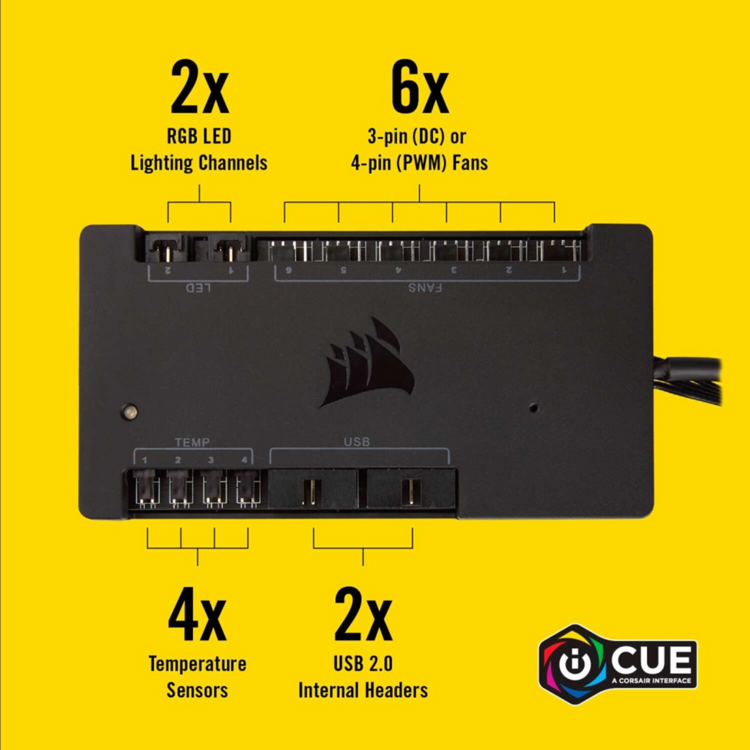
I use the Corsair iCUE Commander Pro for my fan controller. This controller (shown in the image attached) has connectors for 4 temperature sensors that you can route throughout your case. On Linux, the individual temperature readings are easily read by the sensors command with the fan speeds as shown in my previous post. Currently, FanCrtl Plus doesn't read these temperatures to adjust fan curves, but I'm holding out hope @CkChong sees the value in reading external temperature sensors and adds that functionality in a future release.
-
How did this topic go from asking about a removed feature and potentially asking for it to be reintroduced by the Limetech Dev team from a previous build to using AI to vibe code a solution to recreate the wheel?? Respectfully, I know you're trying to help but without the Dev team contributing to the conversation, outside of creating a plug-in to sideload the feature, I'm not sure there's a conversation to be had. Join works well, and I never had an issue with it, but I'll probably move on to an Unraid supported mechanism if it has been dropped. As for flexing, some Dev muscles to create a plug-in for the community, more power to you. I'm not sure there's a need for this one as only two of us users have commented on this and it's probably been removed for a while, so the reach will be fairly minimal. Join as an Android application and service seems to be in maintenance mode, and that is being generous. There's no reason for active development by the Join Dev since it has worked the same since Android v10, but the last Android app update was in June 2024. @limetech @ljm42 @SpencerJ Thoughts on the OP? Was this agent removed for a reason? Just looking for some clarification since I didn't see anything in any change logs.
-
This is a known issue with the way the plugin functions. You can not update a container which creates a network for other containers with this plugin because you can not ensure the dependent containers will be restarted after the update. This is required by docker networking since the network references become stale, still being linked to the previous container ID for actively running dependant containers. From what I understood when I looked into this myself over a year ago, it has to do with the Docker Unraid UI page itself which maintains the functionality to trigger the restart of the dependent containers rather than a universal backend mechanism. This is why it works on the Unraid UI when manually updating and not with the plugin. I personally deactivated the auto update for my VPN container and either update it manually or use the Backup/Restore Appdata plugin to trigger a dependent update once a week during the automated backup task maintenance. If you do the later method, you can create a start order of your VPN and dependant containers so they start in the correct order after a backup and update.
-
Hello Unraiders, I recently had my server offline for a while (~5 months) due to some technical issues and updated from 7.0 -> 7.1.4 when I was able to get it back online. Since it was so long since I had the server on, I was giving it a bit of a configuration cleaning; going through all the options to make sure things are set up correctly after the gap in updates. When I went in the Notifications Settings (Settings -> User Preferences -> Notification Settings), I noticed that the Join agent I am using was no longer listed as an option. Since I had this agent configured before it was removed somewhere along the line, I am still getting notifications via this agent with my previous settings intact and valid (/boot/config/plugins/dynamix/notifications/agents/Join.sh). I did a search on the Unraid forum and Unraid OS change logs to see when this feature was depreciated, but I could not find anything referencing Join. Does anyone have any ideas on why this agent was removed? Was there something malicious I should be worried about? I am open to switching notification services, but other than running my own Gotify server to ensure true security by not having another service in the middle, none of the options seem any more appealing than Join.
-
I came across your plugin today and immediately downloaded it! I have been hoping to incorporate this functionality native in Unraid for a while and I'm really happy you developed this application and it's continued development. Up till now I have been using liquidctl with the LaaC docker to control my fans with a Corsair Commander Pro, but this lets me also track drive temps for cooling. This is great especially when running array intensive tasks like array parity checks which gives me much more piece of mind. One thing I miss is the ability to also use the temperature sensors I have scattered around my case to add additional temperature dependency for my fan curves. Specifically, my temperature sensors from my ASUS motherboard and my Corsair Commander Pro. I have included the output from the sensors command on my system to illustrate the outputs I'm getting on these drivers, and also to highlight how the ASUS reporting driver differs from the k10 temp driver I'm currently using to supply FanCrtl Plus with data. Thanks again and I will continue to track this project! root@SERVER:~# sensors ... corsaircpro-hid-3-2 Adapter: HID adapter in0: 12.03 V in1: 5.05 V in2: 3.45 V fan1 4pin: 1240 RPM fan2 4pin: 1302 RPM fan3 4pin: 1110 RPM fan4 4pin: 939 RPM fan5 4pin: 1253 RPM fan6 4pin: 1316 RPM temp1: +28.4°C temp2: +21.2°C temp3: +22.5°C temp4: +24.8°C k10temp-pci-00c3 Adapter: PCI adapter CPU Temp: +61.1°C MB Temp: +54.0°C Tccd2: +31.5°C asusec-isa-0000 Adapter: ISA adapter CPU Core: 1.44 V Chipset: 3199 RPM Chipset: +64.0°C CPU: +51.0°C Motherboard: +30.0°C T_Sensor: +35.0°C CPU: 36.00 A nvme-pci-0100 Adapter: PCI adapter Composite: +40.9°C (low = -273.1°C, high = +81.8°C) (crit = +84.8°C) Sensor 1: +40.9°C (low = -273.1°C, high = +65261.8°C) Sensor 2: +44.9°C (low = -273.1°C, high = +65261.8°C)
-
Quick little pro-tip for forum posterity. I force updated the LaaC image today because I was doing some system maintenance (don't ask, I didn't need to do it, but I did), and afterward I was getting this error in the LaaC docker log on container start: ERROR: no device matches available drivers and selection criteria Thinking I messed the image up, I deleted my template and reinstalled from Community Apps, though I was met with the same error. The device was still recognized on the host in the /sys/bus/usb/devices/X-Y and /dev/bus/usb/XXX/YYY locations (I use the former in my template) so it wasn't an availability issue. On a lark, I thought that the device might not have been let go correctly by docker when I force updated the image and the device is now bound to an invalid endpoint (or something like that). So I stopped the running LaaC container, and ran these commands in a su terminal: echo 'X-Y' | tee /sys/bus/usb/drivers/usb/unbind echo 'X-Y' | tee /sys/bus/usb/drivers/usb/bind Upon restarting the LaaC container, my Corsair Commander was once again able to be seen by liquidctl. Hope this helps someone in the future!
-
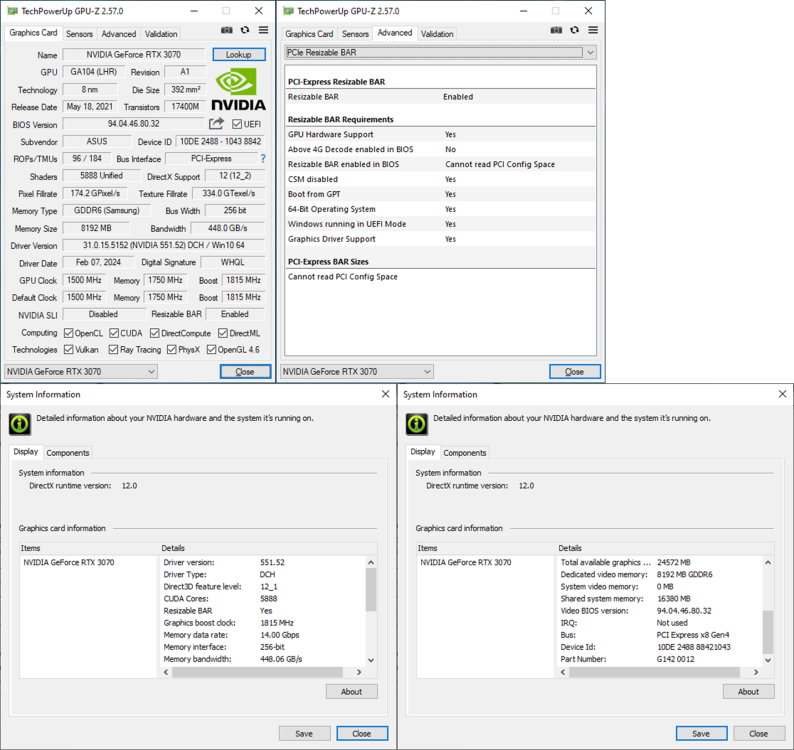
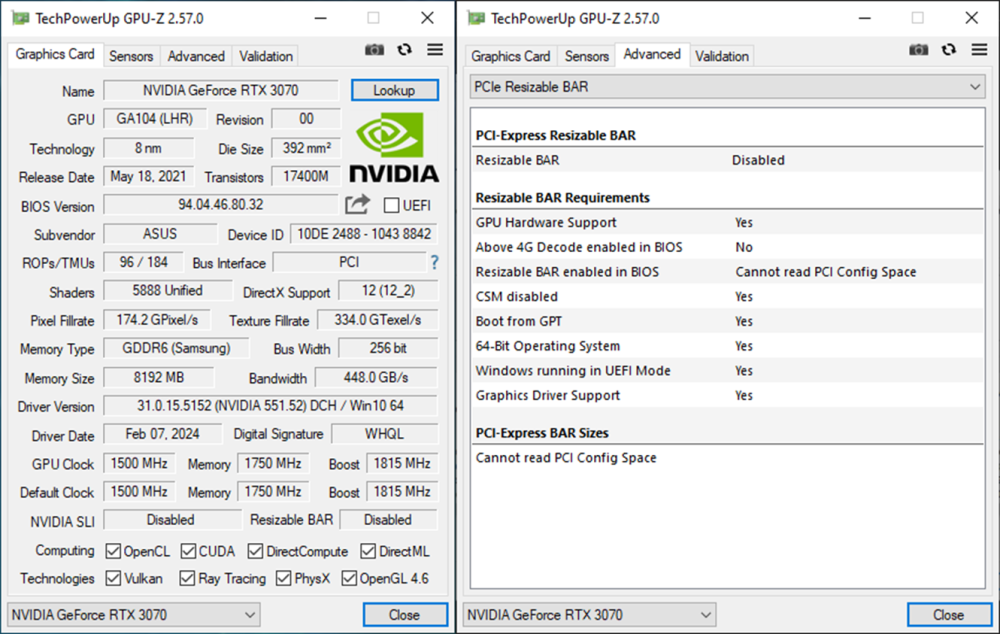
With the Unraid 6.12 series on Linux kernel 6.1 natively, I decided to finally revisit this topic with my update to 6.12.8. After the OS update, I checked the lspci output to see if the OS was correctly assigning the correct memory size allocation for my ASUS KO GeForce RTX 3070 V2 OC Edition 8GB. I was pleasantly surprised that without doing anything, it was assigning the resource space to the maximum video memory allotment my card is able to provide (i.e. 8GB) (see full lspci output at bottom of this post). # lspci -vvvs 0c:00.0 0c:00.0 VGA compatible controller: NVIDIA Corporation GA104 [GeForce RTX 3070 Lite Hash Rate] (rev a1) (prog-if 00 [VGA controller]) Subsystem: ASUSTeK Computer Inc. GA104 [GeForce RTX 3070 Lite Hash Rate] Capabilities: [bb0 v1] Physical Resizable BAR BAR 0: current size: 16MB, supported: 16MB BAR 1: current size: 8GB, supported: 64MB 128MB 256MB 512MB 1GB 2GB 4GB 8GB BAR 3: current size: 32MB, supported: 32MB Note the BAR 1 size is set to 8GB. Before the kernel update (and with the kernel patch referenced in the earlier pages of this thread), it was set to a default of 256MB. All is looking good so far! I followed the these baseline steps ✅ Host BIOS UEFI w/o CSM ✅ Host BIOS Enable ReBAR support ✅ Host BIOS Enable 4G Decoding ⬛ Enable & Boot Custom Kernel syslinux configuration (near beginning of this thread) not needed anymore Before modifying my Windows 10 Pro VM configuration, I booted up the VM to see if anything was needed for the Guest OS to recognize ReBAR. I did make sure my guest bios was set to OVMF TPM (regular OVMF provided the same result as shown below though). Windows booted without issue and I ran both GPU-Z 2.57.0 and the NVIDIA Control Panel to check ReBAR support: This is what I saw: GPU-Z reported ReBAR as Enabled, but when I went into the Advanced settings, 4G Decode was shown as Disabled in BIOS. NVIDIA Control Panel shows ReBAR an Enabled and shows it's correctly allocating 8GB of dedicated video memory with an additional 16GB of shared memory for 24GB total. If I close the apps and relaunch them, GPU-Z reports differently, showing ReBAR as Disabled with the same advanced details (NVIDIA Control Panel stays reporting ReBAR Enabled with the same details). I shut down the VM and tried the XML edits noted in this thread and other online spaces talking about VFIO ReBAR: <domain type='kvm'> ➡️ <domain type='kvm' xmlns:qemu='http://libvirt.org/schemas/domain/qemu/1.0'> <qemu:commandline> <qemu:arg value='-fw_cfg'/> <qemu:arg value='opt/ovmf/X-PciMmio64Mb,string=65536'/> </qemu:commandline> After relaunching the VM, I found the results to be the same. So, this is interesting in that the XML may not be required for ReBAR anymore either. However, since I'm getting inconsistent reporting using GPU-Z and the NVIDIA Control Panel, I can't be sure. I think I trust NVIDIA Control Panel more than GPU-Z on this one even though GPU-Z has never steered me wrong in the past. I figure the hardware vendors driver information software probably knows better and GPU-Z is looking at some inconsistent information and reporting incorrectly. But, I think putting a synthetic benchmark to test Host BIOS setting differences is probably called for in this scenario (ReBar and 4G Decoding On vs Off). I'll report some of that in a follow-up post. Anyone else see something similar to what I'm seeing and have verified ReBAR functional in their VM? -JesterEE # lspci -vvvs 0c:00.0 0c:00.0 VGA compatible controller: NVIDIA Corporation GA104 [GeForce RTX 3070 Lite Hash Rate] (rev a1) (prog-if 00 [VGA controller]) Subsystem: ASUSTeK Computer Inc. GA104 [GeForce RTX 3070 Lite Hash Rate] Control: I/O+ Mem+ BusMaster+ SpecCycle- MemWINV- VGASnoop- ParErr- Stepping- SERR- FastB2B- DisINTx+ Status: Cap+ 66MHz- UDF- FastB2B- ParErr- DEVSEL=fast >TAbort- <TAbort- <MAbort- >SERR- <PERR- INTx- Latency: 0, Cache Line Size: 64 bytes Interrupt: pin A routed to IRQ 141 IOMMU group: 30 Region 0: Memory at fb000000 (32-bit, non-prefetchable) [size=16M] Region 1: Memory at 7c00000000 (64-bit, prefetchable) [size=8G] Region 3: Memory at 7e00000000 (64-bit, prefetchable) [size=32M] Region 5: I/O ports at f000 [size=128] Expansion ROM at fc000000 [disabled] [size=512K] Capabilities: [60] Power Management version 3 Flags: PMEClk- DSI- D1- D2- AuxCurrent=0mA PME(D0+,D1-,D2-,D3hot+,D3cold-) Status: D0 NoSoftRst+ PME-Enable- DSel=0 DScale=0 PME- Capabilities: [68] MSI: Enable+ Count=1/1 Maskable- 64bit+ Address: 00000000fee00000 Data: 0000 Capabilities: [78] Express (v2) Legacy Endpoint, MSI 00 DevCap: MaxPayload 256 bytes, PhantFunc 0, Latency L0s unlimited, L1 <64us ExtTag+ AttnBtn- AttnInd- PwrInd- RBE+ FLReset+ DevCtl: CorrErr+ NonFatalErr+ FatalErr+ UnsupReq+ RlxdOrd+ ExtTag+ PhantFunc- AuxPwr- NoSnoop- FLReset- MaxPayload 256 bytes, MaxReadReq 512 bytes DevSta: CorrErr- NonFatalErr- FatalErr- UnsupReq- AuxPwr- TransPend- LnkCap: Port #0, Speed 16GT/s, Width x16, ASPM L0s L1, Exit Latency L0s <512ns, L1 <16us ClockPM+ Surprise- LLActRep- BwNot- ASPMOptComp+ LnkCtl: ASPM Disabled; RCB 64 bytes, Disabled- CommClk+ ExtSynch- ClockPM- AutWidDis- BWInt- AutBWInt- LnkSta: Speed 2.5GT/s (downgraded), Width x8 (downgraded) TrErr- Train- SlotClk+ DLActive- BWMgmt- ABWMgmt- DevCap2: Completion Timeout: Range AB, TimeoutDis+ NROPrPrP- LTR- 10BitTagComp+ 10BitTagReq+ OBFF Via message, ExtFmt- EETLPPrefix- EmergencyPowerReduction Not Supported, EmergencyPowerReductionInit- FRS- AtomicOpsCap: 32bit- 64bit- 128bitCAS- DevCtl2: Completion Timeout: 50us to 50ms, TimeoutDis- LTR- 10BitTagReq- OBFF Disabled, AtomicOpsCtl: ReqEn- LnkCap2: Supported Link Speeds: 2.5-16GT/s, Crosslink- Retimer+ 2Retimers+ DRS- LnkCtl2: Target Link Speed: 16GT/s, EnterCompliance- SpeedDis- Transmit Margin: Normal Operating Range, EnterModifiedCompliance- ComplianceSOS- Compliance Preset/De-emphasis: -6dB de-emphasis, 0dB preshoot LnkSta2: Current De-emphasis Level: -3.5dB, EqualizationComplete+ EqualizationPhase1+ EqualizationPhase2+ EqualizationPhase3+ LinkEqualizationRequest- Retimer- 2Retimers- CrosslinkRes: unsupported Capabilities: [b4] Vendor Specific Information: Len=14 <?> Capabilities: [100 v1] Virtual Channel Caps: LPEVC=0 RefClk=100ns PATEntryBits=1 Arb: Fixed- WRR32- WRR64- WRR128- Ctrl: ArbSelect=Fixed Status: InProgress- VC0: Caps: PATOffset=00 MaxTimeSlots=1 RejSnoopTrans- Arb: Fixed- WRR32- WRR64- WRR128- TWRR128- WRR256- Ctrl: Enable+ ID=0 ArbSelect=Fixed TC/VC=01 Status: NegoPending- InProgress- Capabilities: [258 v1] L1 PM Substates L1SubCap: PCI-PM_L1.2+ PCI-PM_L1.1+ ASPM_L1.2+ ASPM_L1.1+ L1_PM_Substates+ PortCommonModeRestoreTime=255us PortTPowerOnTime=10us L1SubCtl1: PCI-PM_L1.2- PCI-PM_L1.1- ASPM_L1.2- ASPM_L1.1- T_CommonMode=0us LTR1.2_Threshold=0ns L1SubCtl2: T_PwrOn=10us Capabilities: [128 v1] Power Budgeting <?> Capabilities: [420 v2] Advanced Error Reporting UESta: DLP- SDES- TLP- FCP- CmpltTO- CmpltAbrt- UnxCmplt- RxOF- MalfTLP- ECRC- UnsupReq- ACSViol- UEMsk: DLP- SDES- TLP- FCP- CmpltTO- CmpltAbrt- UnxCmplt- RxOF- MalfTLP- ECRC- UnsupReq- ACSViol- UESvrt: DLP+ SDES+ TLP- FCP+ CmpltTO- CmpltAbrt- UnxCmplt- RxOF+ MalfTLP+ ECRC- UnsupReq- ACSViol- CESta: RxErr- BadTLP- BadDLLP- Rollover- Timeout- AdvNonFatalErr- CEMsk: RxErr- BadTLP- BadDLLP- Rollover- Timeout- AdvNonFatalErr+ AERCap: First Error Pointer: 00, ECRCGenCap- ECRCGenEn- ECRCChkCap- ECRCChkEn- MultHdrRecCap- MultHdrRecEn- TLPPfxPres- HdrLogCap- HeaderLog: 00000000 00000000 00000000 00000000 Capabilities: [600 v1] Vendor Specific Information: ID=0001 Rev=1 Len=024 <?> Capabilities: [900 v1] Secondary PCI Express LnkCtl3: LnkEquIntrruptEn- PerformEqu- LaneErrStat: 0 Capabilities: [bb0 v1] Physical Resizable BAR BAR 0: current size: 16MB, supported: 16MB BAR 1: current size: 8GB, supported: 64MB 128MB 256MB 512MB 1GB 2GB 4GB 8GB BAR 3: current size: 32MB, supported: 32MB Capabilities: [c1c v1] Physical Layer 16.0 GT/s <?> Capabilities: [d00 v1] Lane Margining at the Receiver <?> Capabilities: [e00 v1] Data Link Feature <?> Kernel driver in use: vfio-pci Kernel modules: nvidia_drm, nvidia
-
Has this plugin been delisted from CA? Fix Common Problems is showing this after upgrade to 6.12.8 from 6.11.

-
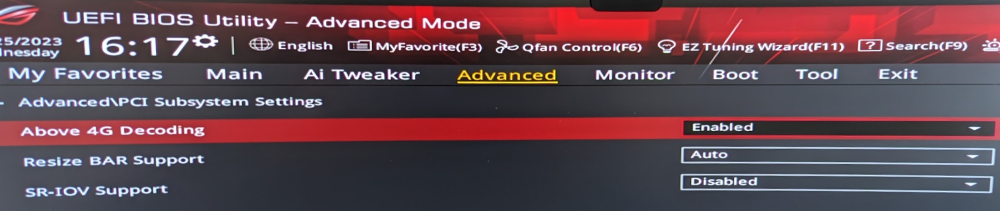
Yes. Above 4G Decoding: Enabled Resize BAR Support: Auto (other option is Disabled)
-
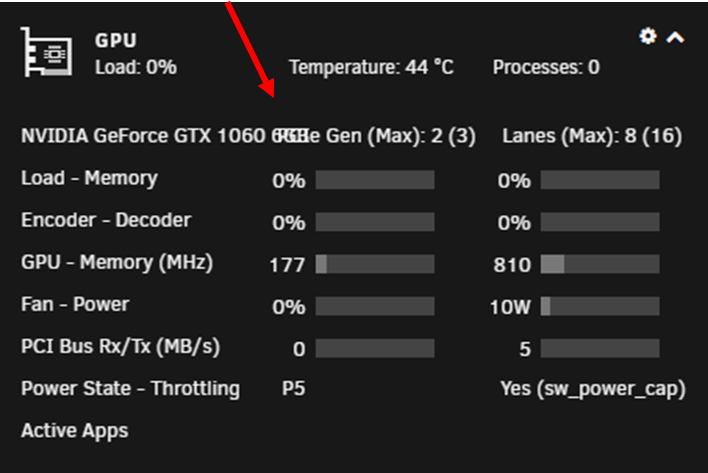
Started using a new video card in Unraid this week and noticed the card name and PCIe Gen columns on the first line are overlapping for may card with a long name. Can the card name be truncated depending on the width of the window (and subsequently the column)?
-
Yup, messed that up in the copypasta while experimenting. Anyway, not a big deal...it works for me if I want to set the ReBAR to acceptable values lower than the default 256MB (for my card [64MB, 128MB, 256MB]) ... But it will not set them higher (for my card [512MB, 1GB, 2GB, 4GB, 8GB]). If I try and set it to a value lower than 64MB or higher than 256MB I will get the error. # -bash: echo: write error: Device or resource busy Here is the is the memory allocation info for my card # lspci -vvvs 0b:00.0 0b:00.0 VGA compatible controller: NVIDIA Corporation GA104 [GeForce RTX 3070 Lite Hash Rate] (rev a1) (prog-if 00 [VGA controller]) ... Region 0: Memory at fb000000 (32-bit, non-prefetchable) [size=16M] Region 1: Memory at d0000000 (64-bit, prefetchable) [size=256M] Region 3: Memory at c8000000 (64-bit, prefetchable) [size=32M] ... Physical Resizable BAR BAR 0: current size: 16MB, supported: 16MB BAR 1: current size: 256MB, supported: 64MB 128MB 256MB 512MB 1GB 2GB 4GB 8GB BAR 3: current size: 32MB, supported: 32MB Thanks for publishing the patch and modified kernel even though it didn't work for me completely. Hope others give it a shot too to report their mileage.
-
No, I changed the addressed on my side, but I posted the command so it could easily be referenced from your post. Here is my version: #!/bin/bash echo -n "0000:0b:00.0" > /sys/bus/pci/drivers/vfio-pci/unbind echo 14 > /sys/bus/pci/devices/0000\:0b\:00.0/resource1_resize # <<<< Gets stuck here echo -n "10de 2488" > /sys/bus/pci/drivers/vfio-pci/new_id || echo -n "0000:0b:00.0" > /sys/bus/pci/drivers/vfio-pci/bind
-
@Skitals So I tried the script commands you specified in your previous post, but got stuck when actually sizing the ReBar with: # echo 14 > /sys/bus/pci/devices/0000\:0d\:00.0/resource1_resize # -bash: echo: write error: Device or resource busy Did some searching and I couldn't find a way to correct this. Not looking for tech support necessarily, just reporting my experience. On my system, the video card is bound to VFIO and the system is booting with a syslinux config including ... video=efifb:off ...
-
Tried your patch today with my ASUS KO RTX 3070 and a Windows 10 VM. GPU-Z is still reporting Resizeable Bar as Disabled. Was there any additional setup needed to set the initial state of the Bar or should it be on by default with the patched kernel?
-
Cross linking to an Unraid support thread where libtorrent (used by deluge) is causing a kernel error on the 6.11 release series. If you are on 6.11.* and see your syslog contain the error shown in this thread accompanied by your deluge/Unraid webUI being unresponsive, you may also be experiencing the same issue. This is not unique to Unraid, but seemingly all distros utilizing newer versions of the Linux v5 kernel.
-
Some of us over in this thread would appreciate some of this 6.11 series bug squashing love: -JesterEE
-
Glad you got something working but I'd hardly consider this a solution given that just 1 OS version before didn't show a hardware issue. So unless the update somehow messed up the physical power supply electronics (extremely unlikely) I'm skeptical this is it. There are a lot more of us with this issue and I doubt that everyone has faulty hardware. You can track the problem thread here:
-
@JorgeB Thanks for raising this issue up. I will mark this tread as solved while it is tracked on the bug report you created. As an aside, @trurl pointed a couple of us to his Unraid 6 FAQ in another thread with concern to the Ryzen processor family and stability issues. I have been running a Ryzen 7 3800x for 3 years without issue before my upgrade to a Ryzen 9 5950x. Though to be complete and check the boxes, I under clocked my memory (2133 MHz which is the Auto setting my board sets) and modified the default Auto C-State setting which worked on my 3800x, to the "typical current idle". The same bug showed up so I believe this is unrelated. I am currently letting my server do a 4th parity check due to all the dirty shutdowns in Safe Mode with the RAM set to 2133MHz and the C-State setting back in Auto. I'll let it sit like that for a couple more days (I'm thinking 60-72hrs uptime) to see if it shows in Safe Mode. If not, I will start working with the plugins @JorgeB itemized in the bug report.
-
I just started getting this error too; very frustrating. To be transparent, I upgraded my hardware 2 weeks before my upgrade to 6.11.1. So while I thought the hardware is stable after running without issue on 6.10.3 for that time before upgrading, it is possible (though unlikely) that it is not an Unraid issue. What's interesting is that all 3 of us (so far) use an ASUS motherboard. Maybe it's a coincidence. Maybe it's not. I am cross posting for traction on my other thread I started here: -JesterEE
-
Cross post for similar issue reports here:
-
cogsworth-diagnostics-20221011-0736.zip




