mihcox
Members
-
Joined
-
Last visited
Everything posted by mihcox
-
Well if that's the case then what is the solution for moving files from disk to disk on the array if the folder a file is in changes and should no longer be on the disk its currently on? Seems like this would be a commonly required script.
-
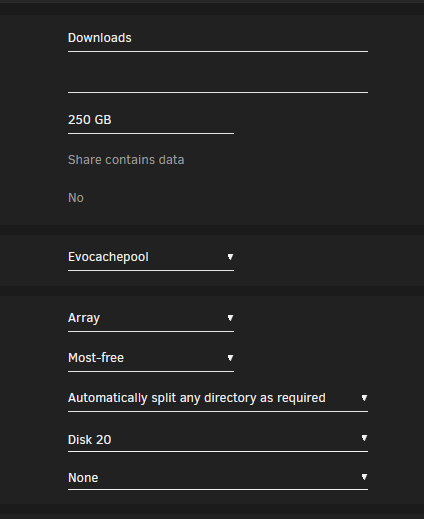
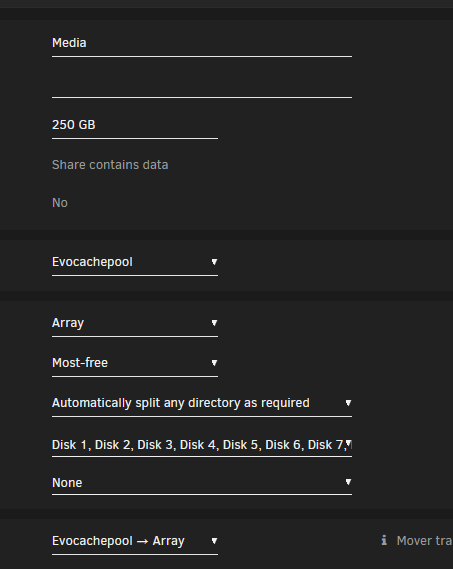
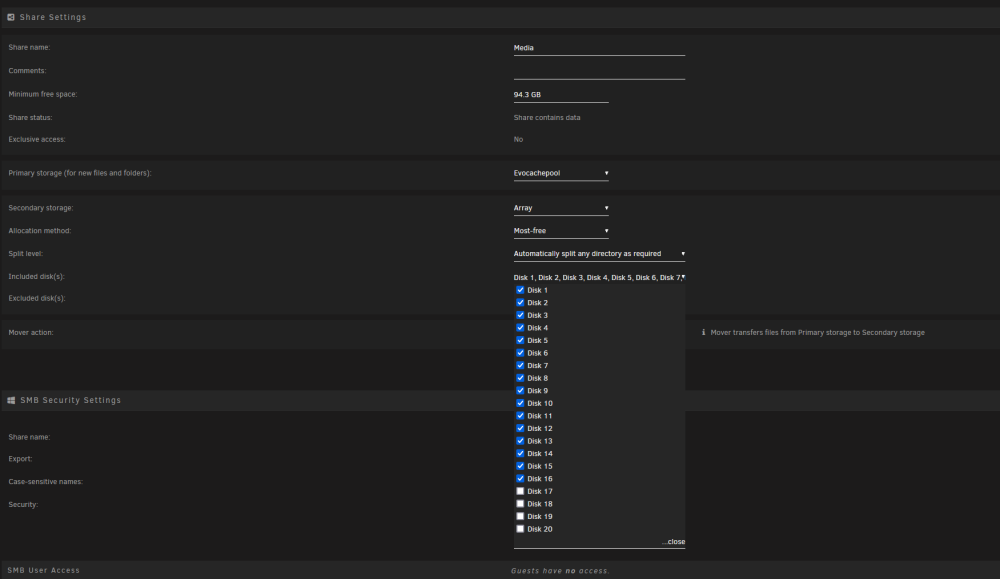
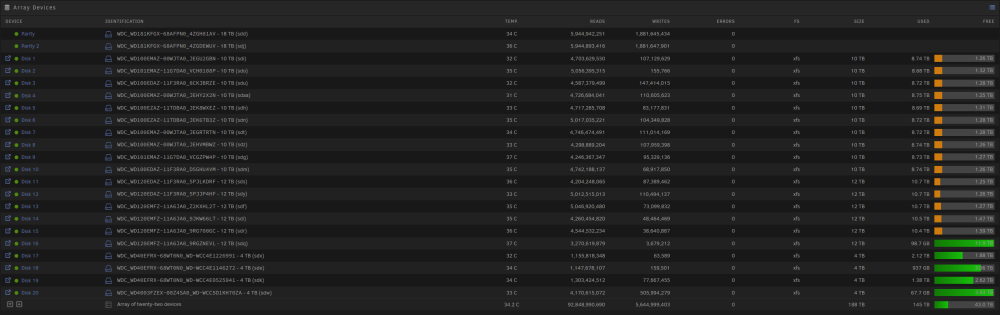
This has never been my past experience. To go further into it, im using syncthing to copy media across to my downloads folder: Files are copied to the Downloads folder which is generally on evocachepool, but when it fills up or gets a mover run it moved these files to disk20. Those files are then imported with sonarr/radarr and are now under the /media folder: where the files are either on the evocachepool or disk 20(downloads) need to be converted to evocachepool or disk1-15 (media). This process should move any files on either the evocachepool/disk20 which were in the DOWNLOADS folder to evocachepool/disk1-15 that are now in the MEDIA folder. This process has been working without any modifications since unraid 6.7 at leasst
-
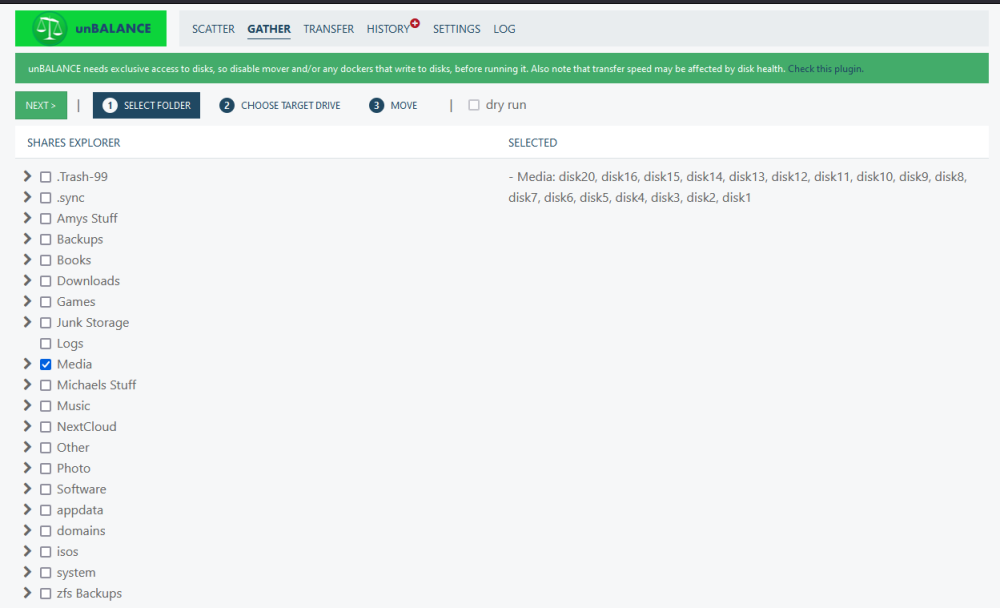
Thats not what i'm saying is the issue. Im saying that the files that should move from disk20 -> disk1-15 are not moving with the mover, but can be manually moved with unbalance as expected. Attached are the logs from running the mover bigrig-diagnostics-20231030-1106.zip
-
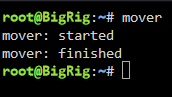
Based on the photos below, i would expect that my Media on disk20 would be moved by the mover to disk 1-16. But when i run mover, it instant start-stops. waiting on logs to finish running with mover logging enabled.
-
I have several sets of files not being moved with mover, but i am having to use the unbalance plugin to move files. When running the mover command from a console window, it starts and immediately stops. How can I get logs or a better determination of why it doesnt think anything needs to move?
-
I have not had an update from this app that i know of in at least a few months. How can i verify that my versions are updating and working as expected:

-
Thanks, currently running with 94GB of ram. First time seeing this, ill keep an eye on it going forward.
-
I received a notification of some Out of Memory Errors on my server overnight. Posting my diagnostics here for review bigrig-diagnostics-20230912-1152.zip
-
Bumping for multiple people with my issue:
-
exactly what i did, and it worked. Just a heads up as i dont think thats something most people would be able/willing to do. but it happening how it did means i dont think its a zfs master plugin issue, and instead a zfs/docker issue as even a reboot didnt resolve
-
just wanted to reply to this. The only way i was able to delete anything was to completely stop the docker daemon. I doubt this is intended functionality.
-
I understand that, i was more asking why the configuration guide shows functionality that isnt in the docker im using, is that a missed config setting or something? I assume without that, when the event name changes it wouldnt change otherwise?
-
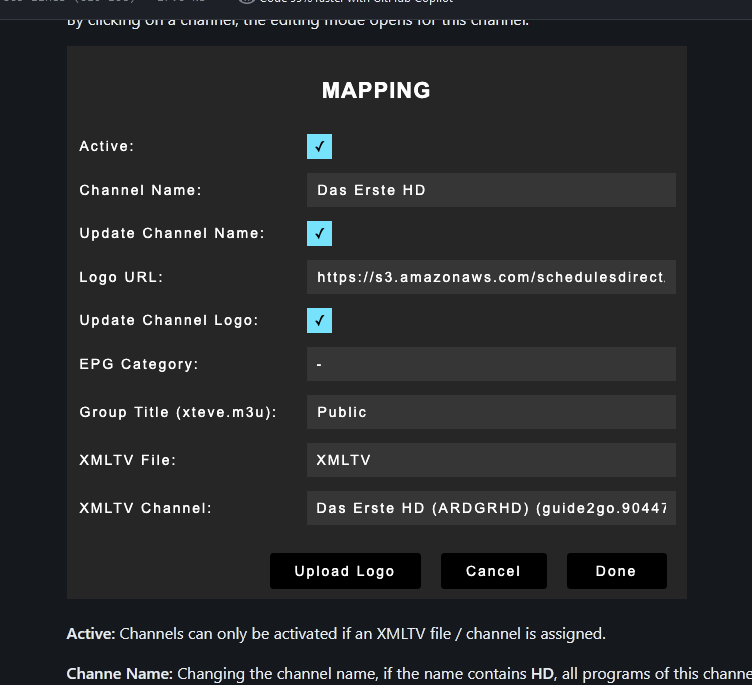
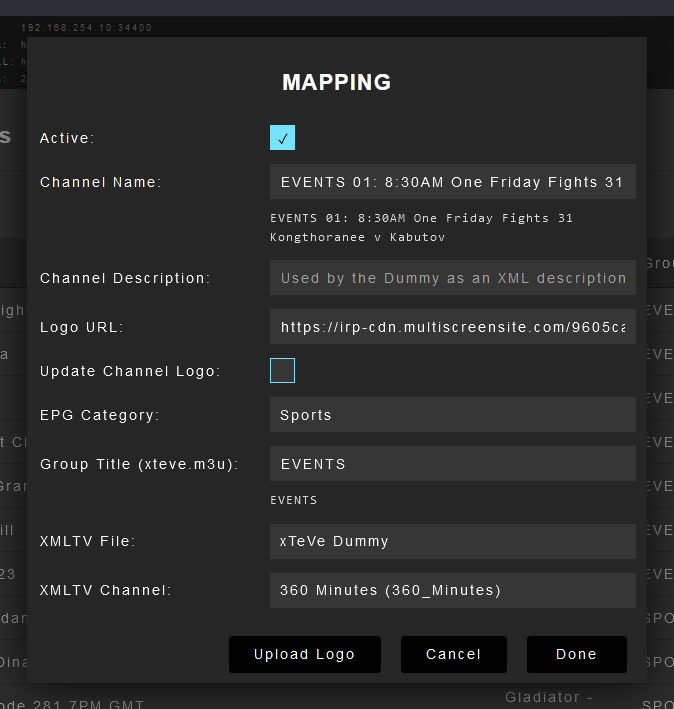
xteve guide here shows the below: https://github.com/xteve-project/xTeVe-Documentation/blob/master/en/configuration.md My version of your docker shows the below: I ask because i am trying to setup a script based on this link: https://forums.plex.tv/t/issues-with-new-live-tv-design/779320/7 where he mentions this functionality
-
Been using the original altruismo docker for xteve for a while now. But my version does not have the "update channel name" option that others have. What is the newest docker reccomended for unraid for xteve, and does it have this functionality?
-
I am trying to remove some existing datasets, that are on cache/appdata and no longer being used by any docker. When running the remove in the gui, i get an error resouce is busy. If the docker app doesnt exist anymore, how could it be busy? CMD output: 'cannot destroy '\''cache/appdata/plextraktsync'\'': dataset is busy destroy cache/appdata/plextraktsync'
-
Trying to run the script on my box results in the below, any suggestions: powertop --quiet --auto-tune powertop: /lib64/libncursesw.so.6: no version information available (required by powertop) powertop: /lib64/libtinfo.so.6: no version information available (required by powertop) Cannot load from file /var/cache/powertop/saved_results.powertop Cannot load from file /var/cache/powertop/saved_parameters.powertop File will be loaded after taking minimum number of measurement(s) with battery only Cannot load from file /var/cache/powertop/saved_parameters.powertop File will be loaded after taking minimum number of measurement(s) with battery only
-
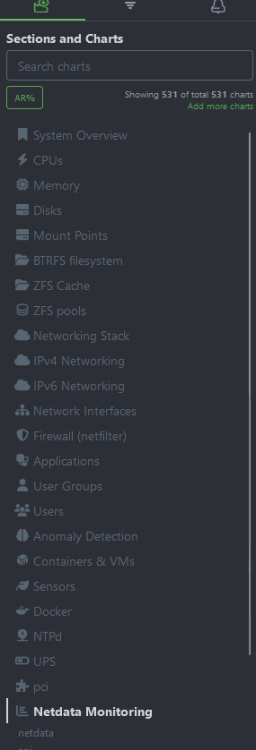
Ran through this without any noticable issue, but still not seeing it in the dashboard after rebooting Netdata. I can run nvidia-smi from inside the container and get results, but nothing on the dashboard. Edit: after waiting about 5 minutes, its now showing in the dashboard!
-
Is there any direct guide on how to convert a docker container on your image on unraid to the new netdata/netdata one while preserving the ability to view my nvidia card?
-
I do notice that it does happen twice, once on initial boot, and a second time during the array start.
-
I only have the following scripts that run during drive start: NVIDIA Power Save Boot rClone Mount Script Script for Mounting rClone Mounts Save syslog to FlashDrive The email is coming from the notifications portion of unraid, and i assume the job number is associated with scripts that run at boot, then again another tailscale script is running on start of the array?
-
after rebooting today, is see the same logs in an email. But its not the first time the job runs, but the second. Diagnostics attached output from job 5: Running pre-startup script Enabling IP Forwarding net.ipv4.ip_forward = 1 net.ipv6.conf.all.forwarding = 1 Stopping tailscaled. Starting tailscaled: /usr/local/sbin/tailscaled tailscale set --accept-routes=false tailscale set --accept-dns=true Running post-startup script second email with the same things: Running pre-startup script Enabling IP Forwarding net.ipv4.ip_forward = 1 net.ipv6.conf.all.forwarding = 1 Stopping tailscaled. Starting tailscaled: /usr/local/sbin/tailscaled tailscale set --accept-routes=false tailscale set --accept-dns=true Running post-startup script ----------------------------------------------------------------------------------------------- email 5 minutes later from job 12: Running pre-startup script Enabling IP Forwarding net.ipv4.ip_forward = 1 net.ipv6.conf.all.forwarding = 1 Stopping tailscaled. Starting tailscaled: /usr/local/sbin/tailscaled logger: send message failed: Bad file descriptor /usr/local/emhttp/plugins/tailscale/update-settings.sh: line 53: tailscale: command not found tailscale set --accept-routes=false /usr/local/emhttp/plugins/tailscale/update-settings.sh: line 70: tailscale: command not found tailscale set --accept-dns=true Running post-startup script bigrig-diagnostics-20230627-1712.zip
-
I have a few questions about the plugin: 1: What is proper setup for the taildrop file location, is something like this acceptable? /mnt/user/Downloads/TailDrop/ 2. should i be concerned about any of these errors: Running pre-startup script Enabling IP Forwarding net.ipv4.ip_forward = 1 net.ipv6.conf.all.forwarding = 1 Stopping tailscaled. Starting tailscaled: /usr/local/sbin/tailscaled logger: send message failed: Bad file descriptor /usr/local/emhttp/plugins/tailscale/update-settings.sh: line 53: tailscale: command not found tailscale set --accept-routes=false /usr/local/emhttp/plugins/tailscale/update-settings.sh: line 70: tailscale: command not found tailscale set --accept-dns=true Running post-startup script
-
Just pinging again on this. Setup like normal, but seeing errors in the logs like above?
-
I have a few questions about the plugin: 1: What is proper setup for the taildrop file location, is something like this acceptable? /mnt/user/Downloads/TailDrop/ 2. should i be concerned about any of these errors: Running pre-startup script Enabling IP Forwarding net.ipv4.ip_forward = 1 net.ipv6.conf.all.forwarding = 1 Stopping tailscaled. Starting tailscaled: /usr/local/sbin/tailscaled logger: send message failed: Bad file descriptor /usr/local/emhttp/plugins/tailscale/update-settings.sh: line 53: tailscale: command not found tailscale set --accept-routes=false /usr/local/emhttp/plugins/tailscale/update-settings.sh: line 70: tailscale: command not found tailscale set --accept-dns=true Running post-startup script
-
I just set a schedule for my drives last night, but I dont understand the error I am seeing. Can someone help me with this? My goal is to only have turbowrite on from 5pm to 2am, and have the drives able to spin down any other time.