





mihcox
Members
-
Joined
-
Last visited
Everything posted by mihcox
-
I have this exact issue. Did you find a solution?
-
I do not see anything in the config fileconfig.php that mentions speed/ or anything like that?
-
Having a problem after install. I can modify the field "default directory for downloads" or the "global max speeds" but after a reboot they are reset. How can i make them persistent?
-
Can anyone make a simple guide/walkthrough for this. I am running the most current version, but would love to downgrade to have drives trimmed!
-
I have configured rclone, but am running into some issues after mounting. My share shows up, /mnt/disks/OneDrive, but is completely empty. Mount script: mkdir -p /mnt/disks/OneDrive #This section mounts the various cloud storage into the folders that were created above. rclone mount --max-read-ahead 1024k --allow-other onedrive: /mnt/disks/OneDrive & rclone lsd output: root@BigRig:~# rclone lsd OneDrive: -1 2020-03-15 20:55:57 3298 Desktop Backgrounds -1 2020-03-14 16:44:55 3 Documents -1 2020-03-14 18:27:32 2 School What do i need to do to resolve this? Also, if i want to move this share so that it is visable on my network machines, do i just need to change the /disks to /user?
-
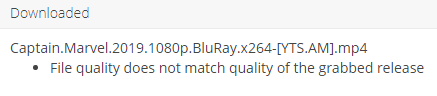
I am using the "Movies" label to filter things torrented through radarr, "Series" through sonarr, etc. Let me know if you notice anything else weird, but now the "completed" is missing from the folder path? -------------------------------------------------------------------------------------------------------------------------------------------------------------------------------------------------------------------------- I manually copied the file to /downloads/Torrents, and this is the error i get then:



-
Bumping this, is there any way to force NGINX to add the /zm to a domain name so that it goes through properly without having to manually add it?
-
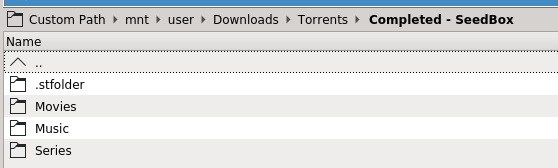
Yeah,really confusing on why it doesnt work. Ill post the link inside/outside my seedbox. But i dont see any errors: WinSCP to seedbox location: rTorrent GUI on seedbox: Local Sonarr/Radarr Install: Local Path: From what i can tell, all of these line up, but i still see the below error:





-
Maybe i dont understand what youre suggesting. This is for "(AKA Linking between containers)". This is not my case, i have one local container, and one external container on a seedbox. I used the following guide for setup from spaceinvaderone: Again, apologies if that applies to me too.
-
Moving to 4 cores, and manually manipulating one at a time worked. Should i assume this will not run on 6 cores, and only stick between 4/8/12 etc?
-
I have a problem with this ive tried to resolve 10+ times now. I can get the catalina image working, and booted up with no problem. Once i go into the XML and modify the number of cores only, from 2 (0/16) to 6 (9/25,10/26,11/27) it will not boot. It loads past the clover boot page, but i get a 1/4 size apple logo in the top left and then i get screen tearing and nothing else happens. I changed the cores by modifying the regular view, then pasting back the missing code as suggested in your video. If i revert back to the default XML it will boot back to the two cores as expected. Any suggestions?
-
I dont see how what you linked explains why the location i set does not match the location it displays back to me. This external location i have confirmed exists,but it does not list this EXACT location as the location it is looking in.


-
That is not my issue. See the screenshots. The location that i set in "Remote Path Mappings does not match the path it is looking for.
-
I have had my server running for a while and noticed a problem using the "Remote Path Mappings". I have the external share set to "/home11/mihcox/files/Completed/", but when i go to the import page i get the following error: I have my "Remote Path Mappings set to a remote path of: /home11/mihcox/files/Completed/ What i see on the Activity page: No files found are eligible for import in /home11/mihcox/files/Doctor.Who.2005.S12E05.HDTV.x264-PHOENiX[eztv].mkv Error Shows: Import failed, path does not exist or is not accessible by Sonarr: /home11/mihcox/files/Doctor.Who.2005.S12E05.1080p.HDTV.H264-MTB[rarbg] Why does the location i have configured not match the location it is looking in, it is missing the “completed” folder
-
I have set this up successfully for a few of my docker containers, but have a question about functionality. Currently i can access my ZoneMinder config by going to ******.*****.com but doing so brings me to the Apache page for ZoneMinder. If i manually add "/zm" to the end of it, such as: *****.*****.com/zm it is able to connect to zoneminder as expected. How can i set this up so that nginx appends this for me?
-
Can anyone explain how the "tag" functionality works. I have setup a few tabs with a separate tag. After doing that, i expected to be able to sort the main menu by tags, is that possible? I would love to group them on the home page so that unraid, and other links can be kept separate
-
I was able to get this up and running for a few specific docker containers (Organizrv2, Shinobi, Ombi). I have 2 questions from here: 1. I am currently accessing them through organizrsubdomain.duckdns.org, ombisubdomain.duckdns.org, and shinobisubdomain.duckdns.org Can i change that to be subdomain.duckdns.org/organizr, etc I did not see a guide on that combing through the forum here 2. Is there a way to allow all my apps to run through Organizr, such that I can access organizr through the reverse proxy, then access all my individual pages through that? That way i only have the organizr page exposed to my firewall, and not other pages like sonarr, radarr, pihole, etc. Looks like was able to fix number 2 on my own, with the settings within organizr. This may be a question for that forum, but i figured someone had already configured it and so i thought i would ask here?
-
AWESOME!!! Thank you
-
Is there a way to do this without F keys. I am trying to do this through remote desktop, and F4 is not an option.
-
Thanks, thats great. Ill run a few tests and then point it over myself. Are there any instructions for implimenting a nvidia GPU in this, or is at as simple as changing the setting in the Docker?
-
Seems to be working, after a force install and reboot a .mp4 file is being filled up. Another question i have, i record most of my tv shows to a different location and was doing this as a test. Does it work recursively, EX. i point the share it "watches" to: /usr/mnt/Media I have .ts files in /usr/mnt/Media/TV/Adult and /usr/mnt/Media/TV/Kids Will it find and replace those files in their same folder structure? ex. /usr/mnt/Media/TV/Adult/Guys Grocery Games/S1E1.TS -> /usr/mnt/Media/TV/Adult/Guys Grocery Games/S1E1.mp4
-
No, i didnt. i have been on software since install this weekend.
-
attached, all look the same postProcess.06-08-2019-1355.log postProcess.07-08-2019-0814.log postProcess.07-08-2019-0821.log postProcess.07-08-2019-0824.log
-
failed_conversions

-
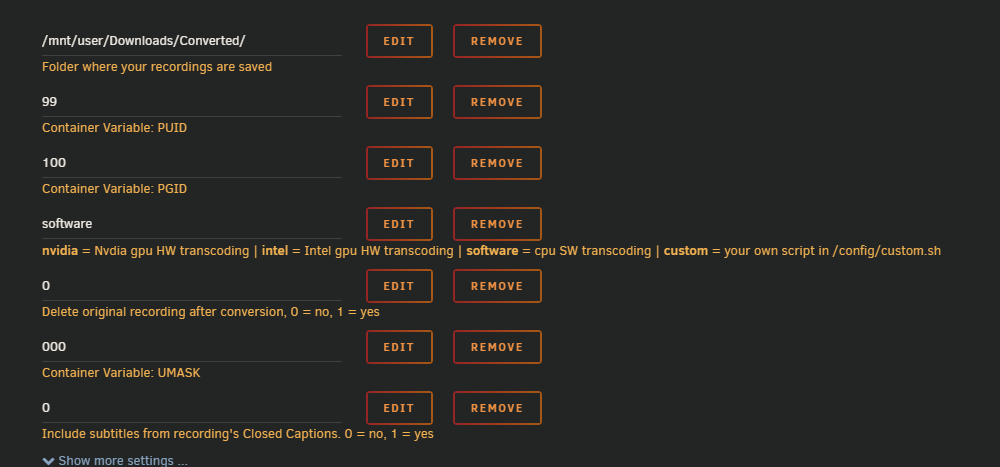
I am trying to use the Recordings-Converter tool. What are the commands to interact with it, since there is no gui?


