





optiman
Members
-
Joined
-
Last visited
Everything posted by optiman
-
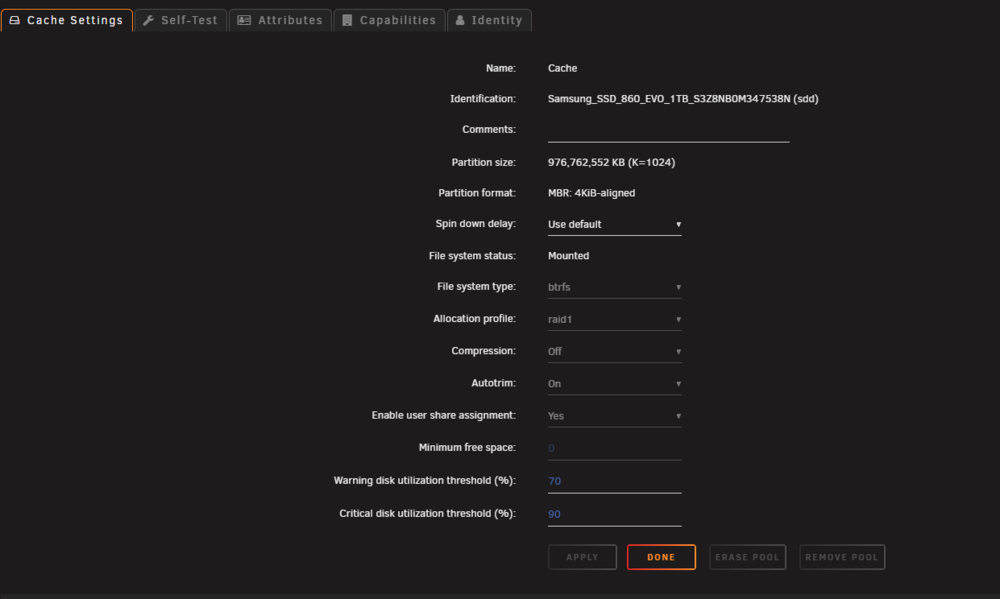
I'm confused because I have never had to do any of this and I have been copying image files that are over 1tb in size with no issues. It used to just go directly to the array, because my pool size is 1tb. I took a look at those directions and I do not see where to change the Floor or min size? Can you tell me exactly where to find this setting? Having to set this temporarily also confused me. That means each time I need to copy a large file, I would manually need to change this value??
-
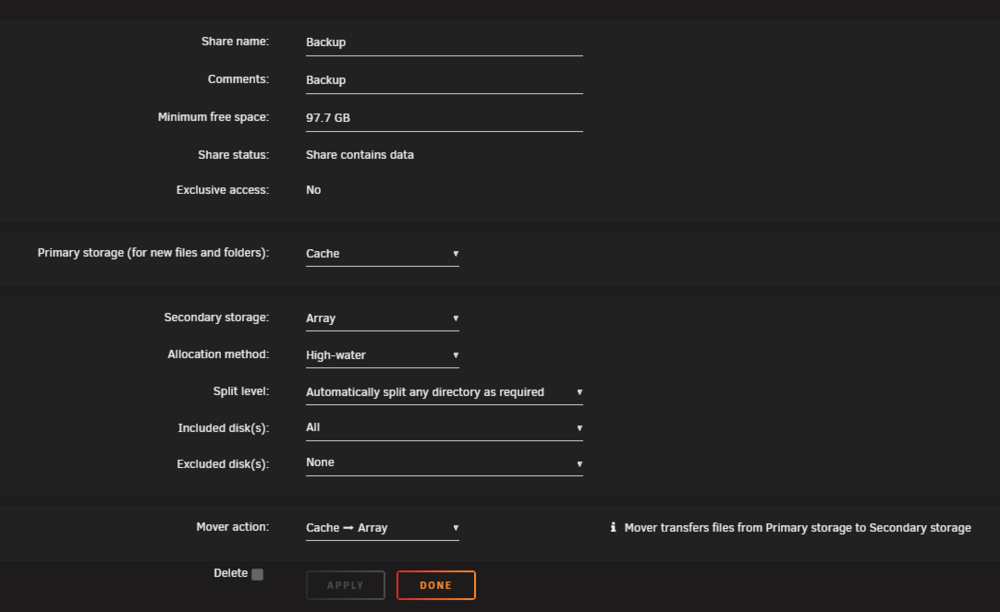
I use Total Commander ver 11.56, current version. I have used TC for years as well. Not likely to be on the pc side here. Nothing has changed on my pc. These copies worked fine until the last unraid update. My Share settings haven't changed since moving from ver 6 to 7. So this points to the last update to 7.1.4. Do my Share settings look correct to you?
-
share name is "Backup"
-
This is a new issue for me after upgrading to 7.1.4 diag file attached. All of my shares are configured to use cache and then array Cache is a pool of two 1tb drives ssd My array has over 30tb free I sometimes copy disk image files which are larger than 1tb, which means they are just copied directly to the array. At least this is how it has worked for many years. Yesterday I tried to copy a 1.4tb image and it keeps failing due to Disk Full error. On the server, I have several warning s about cache drive running out of disk space until it is maxed out, meaning the copy job fails. It looks like it is trying to copy a 1+ tb file to the cache drive when it should not. It did not do this before upgrading to 7.1.4tower-diagnostics-20251013-0822.zip Windows 11 Pro on the pc side, again this has worked for years. For files less than 1tb, they copy to cache drive and then the Mover does it's thing to copy to the array, as it should. Any idea why this is now failing?

-
Awesome reply with tons of great information here, THANK YOU! I will go ahead and try it. Cheers
-
I want to upgrade my server nic to a TrendNet TEG-25GECTX. I'm told that is has the Realtek RTL8125B controller, although I cannot find anything on their website to confirm this. In the past, some nics had lots of issues with Unraid. I'm current with 7.1.4 I searched this forum for the Realtek RTL8125B and was surprised not to find anything. I did find several hits for Realtek 8125 and it looks like I will need a plugin. My current Intel controller does not require any plugin. I'm concerned how stable the plugin is, and what about future unraid updates / upgrades. Why doesn't the base unraid have the Realtek drivers, meaning why should we need a plugin? Anyone use this nic in their unraid server with success? Any driver issues that I need to be aware of?
-
You might want to post your diag file while on 7.0.1 if you are looking for help
-
After the recent SABnzbd docker update, the nzbToMedia script was not renaming the files. I had to update the script again, see above steps.
-
and now the mover ran as it should, so now everything seems to be working. Puzzled as to what happened here.
-
well spoke too soon. The mover ran for a bit, then stopped, leaving a ton of files on the cache drive. It's still not working. I have now manually moved all files to my user shares, cache drive is clean again. Went back to my share settings, and again a couple were changed back to cache only, so changed those again to cache --> arrray sending some new files to my server to see if the mover does it's job.
-
Ok that was it. After upgrading to 7, my some of my shares were set to use cache only and some were set to use array only. I found that changing the primary storage to cache, then the option for secondary shows up, so make that array. Moving is running now. Thanks!
-
I also no longer see the option to use Cache drive on the Shares tab?? Where do I configure a share to use cache initially, and them mover runs to push those files to array?
-
ok, diags attached. I know for sure that this worked prior to upgrading to v7 and I've made no changes to my settings. tower-diagnostics-20250327-1235.zip
-
cache disk full and moving not working. I have no mover plugins installed. When manually try to run, it starts and instantly stops, moving nothing. What is the fix for this bug?
-
I don't know if this is still required, but I always Stop all dockers, go to settings and disable Docker, and then upgrade. Once upgraded, turn Docker back on in settings. Works well for me and I have not had any Docker issues regarding upgrades since. Yes, Dockers must be updated prior as well. I use the Update Assistant checks all of those things. I also check for plugin updates prior and backup flash drive.
-
7.0.0 to 7.0.1 upgraded, no issues to report. Great job team!
-
Upgraded from 6.12.14 to 7.0.0 with no issues.
-
Updated from 6.12.13 to 6.12.14, no issues. After reading the release notes, I was expecting my one Public share to not work with my Windows 11 (fully updated), but I was still able to access the share, so all good.
-
Have you checked to see if a firmware update is available? I had to update the firmware on one of my drives before it would work. Even if there is no update, try flashing the firmware anyway, can't hurt.
-
It's a mystery of how I ended up with those DNS settings, as I did not change them. I didn't even know about Open DNS until I searched for these. Thanks for confirming they are safe and good option.
-
I recently noticed that my Unraid server DNS settings have changed, and I didn't change them. Not sure if this is part of the standard Unraid install or upgrade now, or something else. The new DNS servers are: 208.67.222.222 208.67.220.220 After a search, these are listed as Open DNS and they look to be hosted in San Francisco, Ca. I do have a 3rd DNS server listed, 8.8.4.4, which is Google and I had set that one a long time ago. 1. Are the Open DNS servers part of the default for Unraid now? 2. Are they safe to use? 3. From a performance perspective, are they the best choice? Thanks!
-
Upgraded from 6.12.3 to 6.12.6 without issues. I only had one server crash on 6.12.3, where my server froze and I had to hard reboot.
-
@ConnerVT Thanks for posting that link. I too am looking to add a 2.5 and I was going to try the TRENDnet TEG-25GECTX which has the Realtek 8125 chipset, until I read this thread. Given the IO CREST with intel chip is plug and play with unraid, no brainer. Thanks again!
-
The nzbToMedia script is no longer running and I have already confirmed I still have the latest version. I have not changed anything. @binhex Has something changed with this docker?
-
After updating the script and installing the latest version of your docker, the script is now working again, thank you! For referrence, this is what they had me do: do a git pull from within the Docker terminal. Once you are connected via terminal (as the appropriate user) try the following commands to do a git pull (and clean etc) cd /nzbToMedia git reset --hard git pull git clean -i The last step to clean didn't work. I'm waiting for a reply to find out why



