BoKKeR
Members
-
Joined
-
Last visited
Everything posted by BoKKeR
-
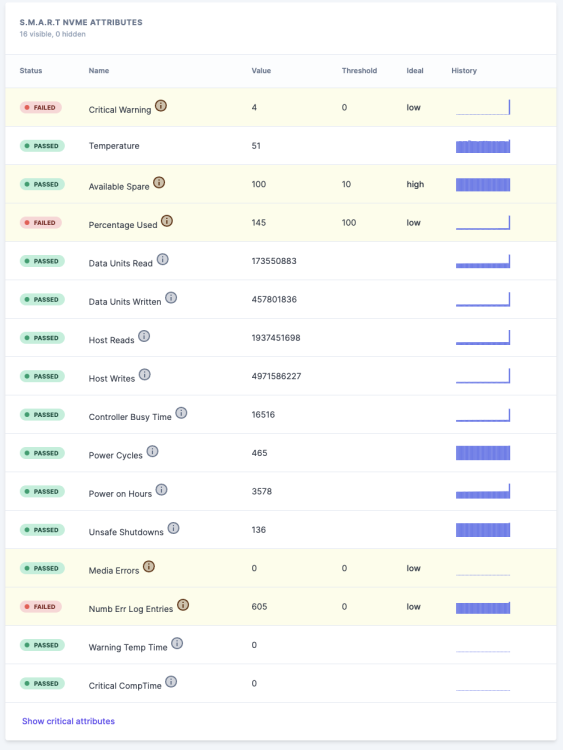
The SMART data is reporting failed on multiple fields, the nvme drive only has 150 power on days. I will be traveling abroad for a few weeks. Wondering if I should replace it ASAP. Or are these only false positives/manufacturer recommendations.
-
Really cool looking project! Hope it gets more traction over time.
-
any idea?
-
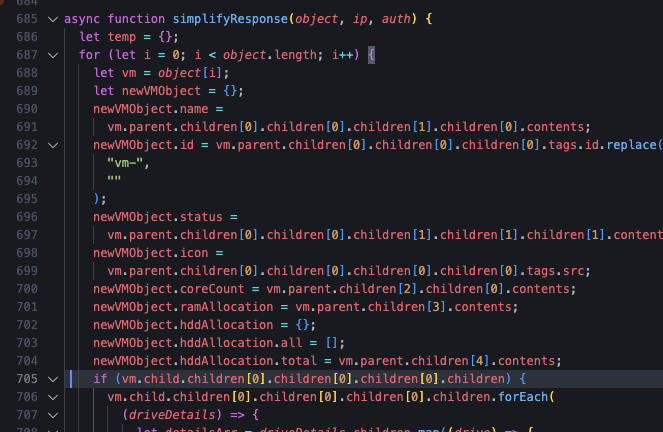
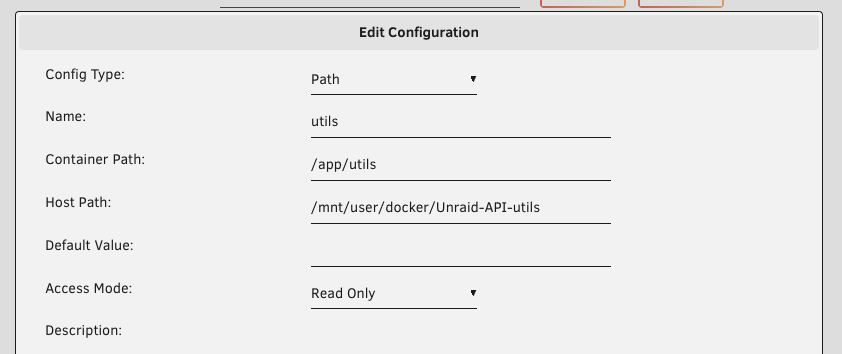
I started rewriting the project from scratch since it wouldnt build anymore ( I am not the author ). The last updates were years ago. Here is a quick fix for those who just want the VMs to work. FOR NOW mount utils: In the file utils/Unraid.js change the children to be [0] [0] [0], instead of [0] [0] [1] on lines 705/706 (might be different line but you see it on the screenshot) Restart the container. There are many extra functionalities I might not support like swap gpu, update xml, I just dont see the point of them? I will try to focus on just start/stop/reset on VM, docker. List pcie devices
-
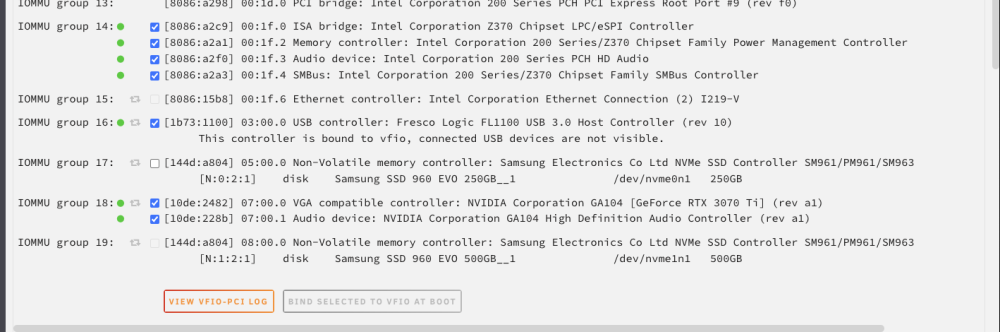
I have to reopen this since it does not seem to fix my problem. I have rebooted many times since. unraid-diagnostics-20230401-2158.zip
-
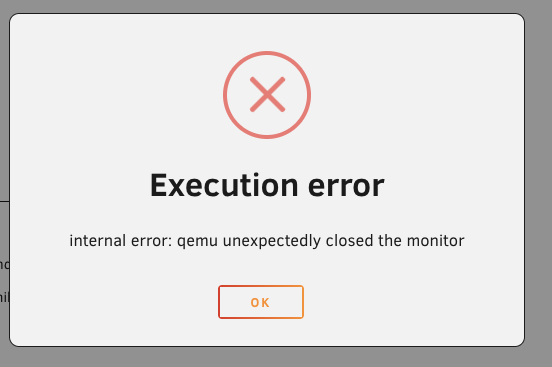
I am facing some issue with my VM, it works the first time I try it. Then if I shut it down it will not start again. The logs end up with status=failed, the gui gets the following error: internal error: qemu unexpectedly closed the monitor but I cant find any other error in the logs that would give me more hints 2023-02-12 08:23:08.472+0000: Starting external device: TPM Emulator /usr/bin/swtpm socket --ctrl 'type=unixio,path=/run/libvirt/qemu/swtpm/6-Windows 11-swtpm.sock,mode=0600' --tpmstate dir=/var/lib/libvirt/swtpm/70ddc61a-5237-096a-813b-799dcda23a66/tpm2,mode=0600 --log 'file=/var/log/swtpm/libvirt/qemu/Windows 11-swtpm.log' --terminate --tpm2 2023-02-12 08:23:08.497+0000: starting up libvirt version: 8.7.0, qemu version: 7.1.0, kernel: 5.19.17-Unraid, hostname: unraid LC_ALL=C \ PATH=/bin:/sbin:/usr/bin:/usr/sbin \ HOME='/var/lib/libvirt/qemu/domain-6-Windows 11' \ XDG_DATA_HOME='/var/lib/libvirt/qemu/domain-6-Windows 11/.local/share' \ XDG_CACHE_HOME='/var/lib/libvirt/qemu/domain-6-Windows 11/.cache' \ XDG_CONFIG_HOME='/var/lib/libvirt/qemu/domain-6-Windows 11/.config' \ /usr/local/sbin/qemu \ -name 'guest=Windows 11,debug-threads=on' \ -S \ -object '{"qom-type":"secret","id":"masterKey0","format":"raw","file":"/var/lib/libvirt/qemu/domain-6-Windows 11/master-key.aes"}' \ -blockdev '{"driver":"file","filename":"/usr/share/qemu/ovmf-x64/OVMF_CODE-pure-efi-tpm.fd","node-name":"libvirt-pflash0-storage","auto-read-only":true,"discard":"unmap"}' \ -blockdev '{"node-name":"libvirt-pflash0-format","read-only":true,"driver":"raw","file":"libvirt-pflash0-storage"}' \ -blockdev '{"driver":"file","filename":"/etc/libvirt/qemu/nvram/70ddc61a-5237-096a-813b-799dcda23a66_VARS-pure-efi-tpm.fd","node-name":"libvirt-pflash1-storage","auto-read-only":true,"discard":"unmap"}' \ -blockdev '{"node-name":"libvirt-pflash1-format","read-only":false,"driver":"raw","file":"libvirt-pflash1-storage"}' \ -machine pc-i440fx-6.2,usb=off,dump-guest-core=off,mem-merge=off,memory-backend=pc.ram,pflash0=libvirt-pflash0-format,pflash1=libvirt-pflash1-format \ -accel kvm \ -cpu host,migratable=on,hypervisor=off,hv-time=on,hv-relaxed=on,hv-vapic=on,hv-spinlocks=0x1fff,hv-vendor-id=none,kvm=off,host-cache-info=on,l3-cache=off \ -m 20480 \ -object '{"qom-type":"memory-backend-ram","id":"pc.ram","size":21474836480}' \ -overcommit mem-lock=off \ -smp 8,sockets=1,dies=1,cores=4,threads=2 \ -uuid 70ddc61a-5237-096a-813b-799dcda23a66 \ -display none \ -no-user-config \ -nodefaults \ -chardev socket,id=charmonitor,fd=36,server=on,wait=off \ -mon chardev=charmonitor,id=monitor,mode=control \ -rtc base=localtime \ -no-hpet \ -no-shutdown \ -boot strict=on \ -device '{"driver":"ich9-usb-ehci1","id":"usb","bus":"pci.0","addr":"0x7.0x7"}' \ -device '{"driver":"ich9-usb-uhci1","masterbus":"usb.0","firstport":0,"bus":"pci.0","multifunction":true,"addr":"0x7"}' \ -device '{"driver":"ich9-usb-uhci2","masterbus":"usb.0","firstport":2,"bus":"pci.0","addr":"0x7.0x1"}' \ -device '{"driver":"ich9-usb-uhci3","masterbus":"usb.0","firstport":4,"bus":"pci.0","addr":"0x7.0x2"}' \ -device '{"driver":"ahci","id":"sata0","bus":"pci.0","addr":"0x3"}' \ -device '{"driver":"virtio-serial-pci","id":"virtio-serial0","bus":"pci.0","addr":"0x4"}' \ -blockdev '{"driver":"file","filename":"/mnt/user/isos/Win11_22H2_EnglishInternational_x64.iso","node-name":"libvirt-4-storage","auto-read-only":true,"discard":"unmap"}' \ -blockdev '{"node-name":"libvirt-4-format","read-only":true,"driver":"raw","file":"libvirt-4-storage"}' \ -device '{"driver":"ide-cd","bus":"sata0.0","drive":"libvirt-4-format","id":"sata0-0-0","bootindex":2}' \ -blockdev '{"driver":"file","filename":"/mnt/disks/Samsung_SSD_960_EVO_250GB_S3ESNX0JB32921B/domains/Windows 11/vdisk1.img","node-name":"libvirt-3-storage","cache":{"direct":false,"no-flush":false},"auto-read-only":true,"discard":"unmap"}' \ -blockdev '{"node-name":"libvirt-3-format","read-only":false,"cache":{"direct":false,"no-flush":false},"driver":"qcow2","file":"libvirt-3-storage","backing":null}' \ -device '{"driver":"ide-hd","bus":"sata0.2","drive":"libvirt-3-format","id":"sata0-0-2","bootindex":1,"write-cache":"on"}' \ -blockdev '{"driver":"host_device","filename":"/dev/disk/by-id/ata-WDC_WD20EZRX-00DC0B0_WD-WCC1T0211008","node-name":"libvirt-2-storage","cache":{"direct":false,"no-flush":false},"auto-read-only":true,"discard":"unmap"}' \ -blockdev '{"node-name":"libvirt-2-format","read-only":false,"cache":{"direct":false,"no-flush":false},"driver":"raw","file":"libvirt-2-storage"}' \ -device '{"driver":"ide-hd","bus":"sata0.3","drive":"libvirt-2-format","id":"sata0-0-3","write-cache":"on"}' \ -blockdev '{"driver":"file","filename":"/mnt/user/isos/virtio-win-0.1.221.iso","node-name":"libvirt-1-storage","auto-read-only":true,"discard":"unmap"}' \ -blockdev '{"node-name":"libvirt-1-format","read-only":true,"driver":"raw","file":"libvirt-1-storage"}' \ -device '{"driver":"ide-cd","bus":"ide.0","unit":1,"drive":"libvirt-1-format","id":"ide0-0-1"}' \ -netdev tap,fd=37,id=hostnet0 \ -device '{"driver":"virtio-net","netdev":"hostnet0","id":"net0","mac":"52:54:00:49:91:5c","bus":"pci.0","addr":"0x2"}' \ -chardev pty,id=charserial0 \ -device '{"driver":"isa-serial","chardev":"charserial0","id":"serial0","index":0}' \ -chardev socket,id=charchannel0,fd=35,server=on,wait=off \ -device '{"driver":"virtserialport","bus":"virtio-serial0.0","nr":1,"chardev":"charchannel0","id":"channel0","name":"org.qemu.guest_agent.0"}' \ -chardev 'socket,id=chrtpm,path=/run/libvirt/qemu/swtpm/6-Windows 11-swtpm.sock' \ -tpmdev emulator,id=tpm-tpm0,chardev=chrtpm \ -device '{"driver":"tpm-tis","tpmdev":"tpm-tpm0","id":"tpm0"}' \ -device '{"driver":"usb-tablet","id":"input0","bus":"usb.0","port":"1"}' \ -audiodev '{"id":"audio1","driver":"none"}' \ -device '{"driver":"vfio-pci","host":"0000:07:00.0","id":"hostdev0","bus":"pci.0","addr":"0x5"}' \ -device '{"driver":"vfio-pci","host":"0000:07:00.1","id":"hostdev1","bus":"pci.0","addr":"0x6"}' \ -device '{"driver":"vfio-pci","host":"0000:03:00.0","id":"hostdev2","bus":"pci.0","addr":"0x8"}' \ -device '{"driver":"usb-host","hostdevice":"/dev/bus/usb/001/004","id":"hostdev3","bus":"usb.0","port":"2"}' \ -sandbox on,obsolete=deny,elevateprivileges=deny,spawn=deny,resourcecontrol=deny \ -msg timestamp=on char device redirected to /dev/pts/15 (label charserial0) 2023-02-12 08:23:34.582+0000: shutting down, reason=failed unraid-diagnostics-20230212-0928.zip <?xml version='1.0' encoding='UTF-8'?> <domain type='kvm'> <name>Windows 11</name> <uuid>70ddc61a-5237-096a-813b-799dcda23a66</uuid> <metadata> <vmtemplate xmlns="unraid" name="Windows 11" icon="windows11.png" os="windowstpm"/> </metadata> <memory unit='KiB'>20971520</memory> <currentMemory unit='KiB'>20971520</currentMemory> <memoryBacking> <nosharepages/> </memoryBacking> <vcpu placement='static'>8</vcpu> <cputune> <vcpupin vcpu='0' cpuset='1'/> <vcpupin vcpu='1' cpuset='7'/> <vcpupin vcpu='2' cpuset='3'/> <vcpupin vcpu='3' cpuset='9'/> <vcpupin vcpu='4' cpuset='4'/> <vcpupin vcpu='5' cpuset='10'/> <vcpupin vcpu='6' cpuset='5'/> <vcpupin vcpu='7' cpuset='11'/> </cputune> <os> <type arch='x86_64' machine='pc-i440fx-6.2'>hvm</type> <loader readonly='yes' type='pflash'>/usr/share/qemu/ovmf-x64/OVMF_CODE-pure-efi-tpm.fd</loader> <nvram>/etc/libvirt/qemu/nvram/70ddc61a-5237-096a-813b-799dcda23a66_VARS-pure-efi-tpm.fd</nvram> </os> <features> <acpi/> <apic/> <hyperv mode='custom'> <relaxed state='on'/> <vapic state='on'/> <spinlocks state='on' retries='8191'/> <vendor_id state='on' value='none'/> </hyperv> <kvm> <hidden state='on'/> </kvm> </features> <cpu mode='host-passthrough' check='none' migratable='on'> <topology sockets='1' dies='1' cores='4' threads='2'/> <cache mode='passthrough'/> <feature policy='disable' name='hypervisor'/> </cpu> <clock offset='localtime'> <timer name='hypervclock' present='yes'/> <timer name='hpet' present='no'/> </clock> <on_poweroff>destroy</on_poweroff> <on_reboot>restart</on_reboot> <on_crash>restart</on_crash> <devices> <emulator>/usr/local/sbin/qemu</emulator> <disk type='file' device='cdrom'> <driver name='qemu' type='raw'/> <source file='/mnt/user/isos/Win11_22H2_EnglishInternational_x64.iso'/> <target dev='hda' bus='sata'/> <readonly/> <boot order='2'/> <address type='drive' controller='0' bus='0' target='0' unit='0'/> </disk> <disk type='file' device='disk'> <driver name='qemu' type='qcow2' cache='writeback'/> <source file='/mnt/disks/Samsung_SSD_960_EVO_250GB_S3ESNX0JB32921B/domains/Windows 11/vdisk1.img'/> <target dev='hdc' bus='sata'/> <boot order='1'/> <address type='drive' controller='0' bus='0' target='0' unit='2'/> </disk> <disk type='block' device='disk'> <driver name='qemu' type='raw' cache='writeback'/> <source dev='/dev/disk/by-id/ata-WDC_WD20EZRX-00DC0B0_WD-WCC1T0211008'/> <target dev='hdd' bus='sata'/> <address type='drive' controller='0' bus='0' target='0' unit='3'/> </disk> <disk type='file' device='cdrom'> <driver name='qemu' type='raw'/> <source file='/mnt/user/isos/virtio-win-0.1.221.iso'/> <target dev='hdb' bus='ide'/> <readonly/> <address type='drive' controller='0' bus='0' target='0' unit='1'/> </disk> <controller type='usb' index='0' model='ich9-ehci1'> <address type='pci' domain='0x0000' bus='0x00' slot='0x07' function='0x7'/> </controller> <controller type='usb' index='0' model='ich9-uhci1'> <master startport='0'/> <address type='pci' domain='0x0000' bus='0x00' slot='0x07' function='0x0' multifunction='on'/> </controller> <controller type='usb' index='0' model='ich9-uhci2'> <master startport='2'/> <address type='pci' domain='0x0000' bus='0x00' slot='0x07' function='0x1'/> </controller> <controller type='usb' index='0' model='ich9-uhci3'> <master startport='4'/> <address type='pci' domain='0x0000' bus='0x00' slot='0x07' function='0x2'/> </controller> <controller type='pci' index='0' model='pci-root'/> <controller type='ide' index='0'> <address type='pci' domain='0x0000' bus='0x00' slot='0x01' function='0x1'/> </controller> <controller type='sata' index='0'> <address type='pci' domain='0x0000' bus='0x00' slot='0x03' function='0x0'/> </controller> <controller type='virtio-serial' index='0'> <address type='pci' domain='0x0000' bus='0x00' slot='0x04' function='0x0'/> </controller> <interface type='bridge'> <mac address='52:54:00:49:91:5c'/> <source bridge='br0'/> <model type='virtio-net'/> <address type='pci' domain='0x0000' bus='0x00' slot='0x02' function='0x0'/> </interface> <serial type='pty'> <target type='isa-serial' port='0'> <model name='isa-serial'/> </target> </serial> <console type='pty'> <target type='serial' port='0'/> </console> <channel type='unix'> <target type='virtio' name='org.qemu.guest_agent.0'/> <address type='virtio-serial' controller='0' bus='0' port='1'/> </channel> <input type='tablet' bus='usb'> <address type='usb' bus='0' port='1'/> </input> <input type='mouse' bus='ps2'/> <input type='keyboard' bus='ps2'/> <tpm model='tpm-tis'> <backend type='emulator' version='2.0' persistent_state='yes'/> </tpm> <audio id='1' type='none'/> <hostdev mode='subsystem' type='pci' managed='yes'> <driver name='vfio'/> <source> <address domain='0x0000' bus='0x07' slot='0x00' function='0x0'/> </source> <address type='pci' domain='0x0000' bus='0x00' slot='0x05' function='0x0'/> </hostdev> <hostdev mode='subsystem' type='pci' managed='yes'> <driver name='vfio'/> <source> <address domain='0x0000' bus='0x07' slot='0x00' function='0x1'/> </source> <address type='pci' domain='0x0000' bus='0x00' slot='0x06' function='0x0'/> </hostdev> <hostdev mode='subsystem' type='pci' managed='yes'> <driver name='vfio'/> <source> <address domain='0x0000' bus='0x03' slot='0x00' function='0x0'/> </source> <address type='pci' domain='0x0000' bus='0x00' slot='0x08' function='0x0'/> </hostdev> <hostdev mode='subsystem' type='usb' managed='no'> <source> <vendor id='0x041e'/> <product id='0x324d'/> </source> <address type='usb' bus='0' port='2'/> </hostdev> <memballoon model='none'/> </devices> </domain>
-
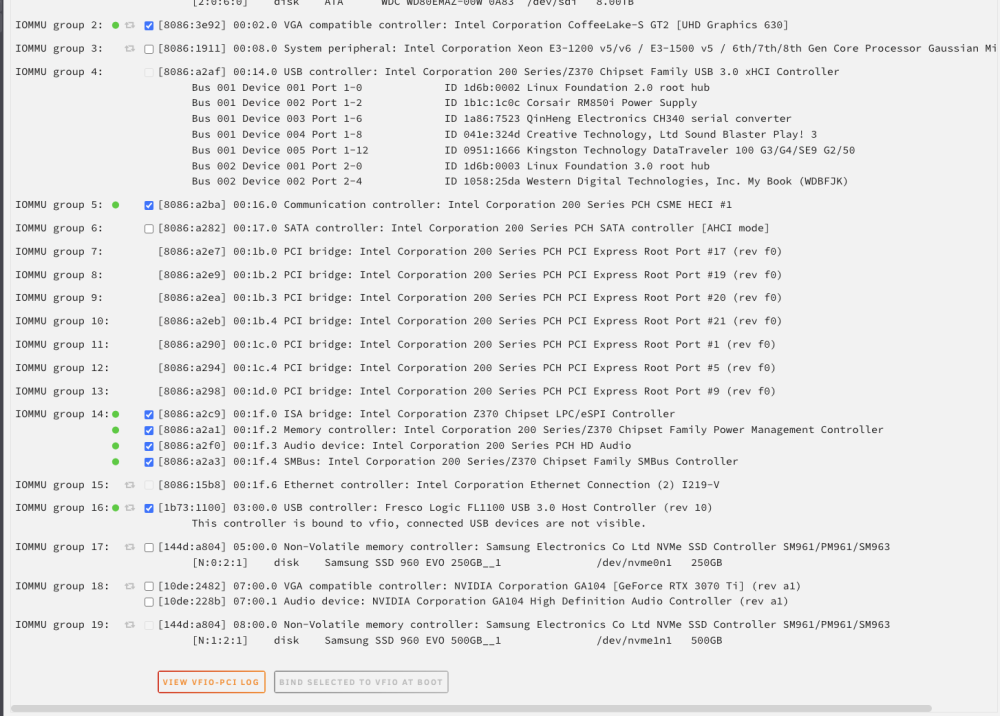
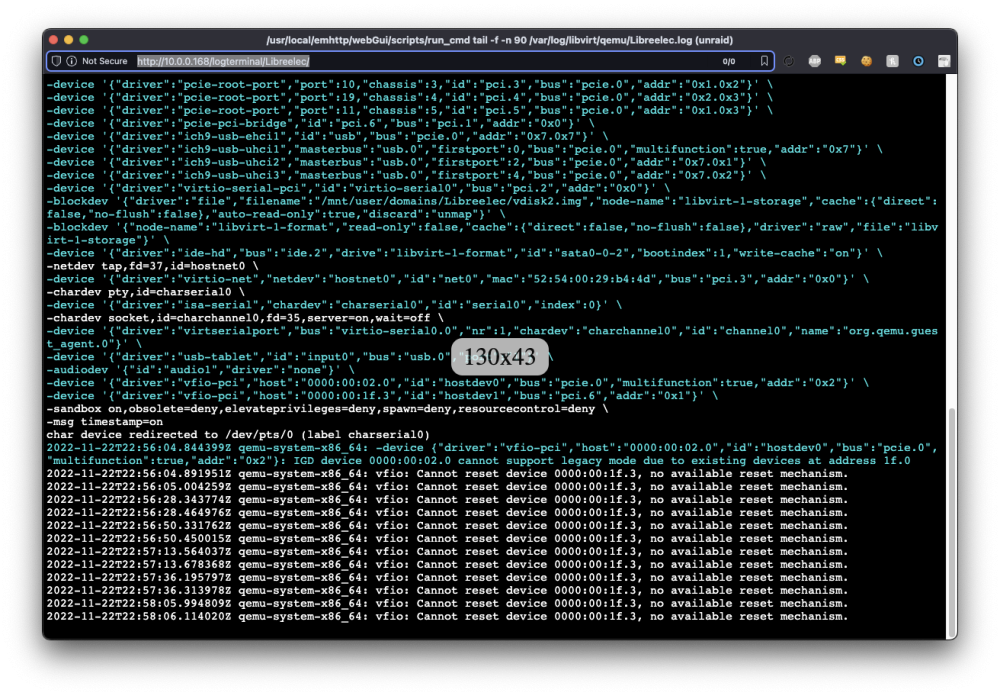
sorry to bypass this, Did linux work out of the box for you? I am trying with bios, video=efifb:off, modprobe.blacklist=i2c_i801,i2c_smbus, set the system devices. Yet no screen and only
-
I have looked at it. The easy way is by getting rid of the plugin thus there would be no integration in unraid, The docker container would work as an API for home assistant only. There might be a way to rewrite the plugin to listen for the port of the docker container, but it all feels like too much work for such a niche feature.
-
The rest api could be deployed as a container so home assistant can access the data. If anyone else is interested I might fix it over the coming weekend.
-
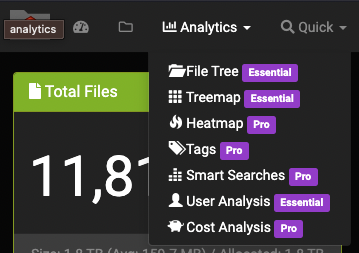
This worked for me, but I had to switch to elasticsearch version 7.17.5, since 2.X edition only supports that one according to their page. https://docs.diskoverdata.com/diskover_installation_guide/ I am not sure if 2.x is worth it, since all features are stripped away. I tried getting an essential license for home use, but I was met with having to schedule a call just to hear the price
-
from the config/diskover-web.conf.d/Constants.php file you can find const USER = 'diskover'; const PASS = 'darkdata';
-
I have been thinking of this also, there are some HA integrations, HA supports zigbee buttons etc. But I think this could be implemented without adding any additional hardware if we figure out how we disable the default action of the RESET button on our PC cases, this is done on the OS level. We could in theory remap the reset button to any command
-
I recreated the VM + image with SATA for drives, and it seems to work properly.
-
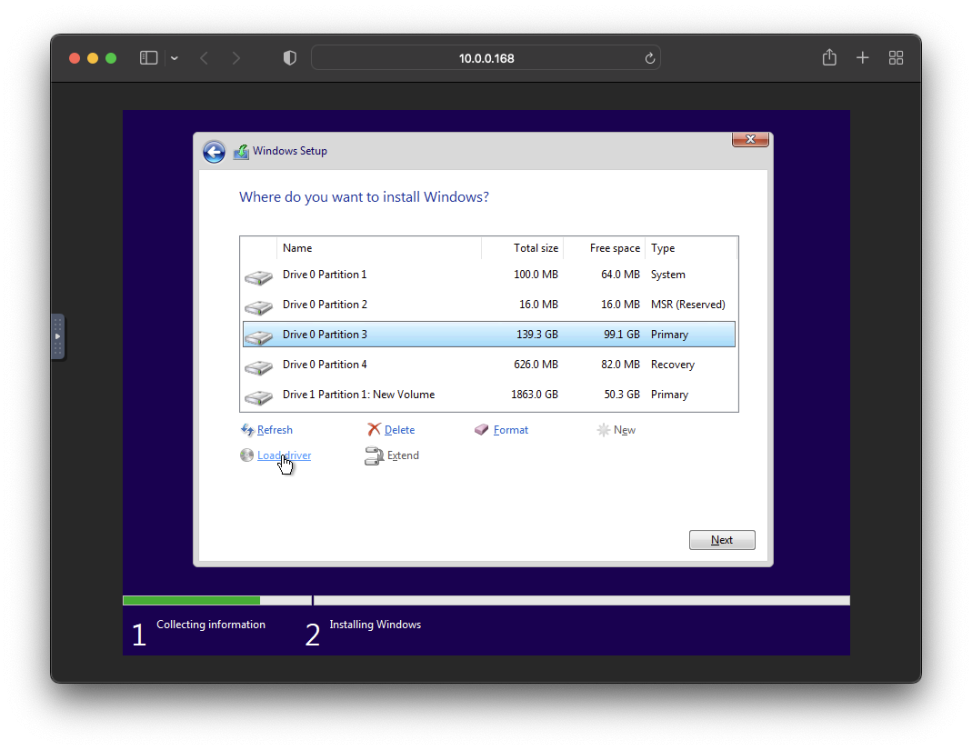
For anyone coming here from google, you are supposed to install the virtio drivers on this screen. You have to start again to get here (you can hit escape on boot to get into bios -> boot manager -> dvd) Then on the next installation NetKVM -> w11 -> amd64 -> pick first
-
does not seem to do anything. Same error next reboot. I can revert thats not a problem, I also have backups so no worries. I am wondering if I should try to downgrade to 6.9.X since that was the last one that worked
-
I am getting a boot into the repair tool saying that the system cant boot. <?xml version='1.0' encoding='UTF-8'?> <domain type='kvm' id='6'> <name>Windows 10</name> <uuid>8f166a58-01dd-c3c1-20cb-bba46457bbd6</uuid> <metadata> <vmtemplate xmlns="unraid" name="Windows 10" icon="windows.png" os="windows10"/> </metadata> <memory unit='KiB'>20971520</memory> <currentMemory unit='KiB'>20971520</currentMemory> <memoryBacking> <nosharepages/> </memoryBacking> <vcpu placement='static'>8</vcpu> <cputune> <vcpupin vcpu='0' cpuset='1'/> <vcpupin vcpu='1' cpuset='7'/> <vcpupin vcpu='2' cpuset='3'/> <vcpupin vcpu='3' cpuset='9'/> <vcpupin vcpu='4' cpuset='4'/> <vcpupin vcpu='5' cpuset='10'/> <vcpupin vcpu='6' cpuset='5'/> <vcpupin vcpu='7' cpuset='11'/> </cputune> <resource> <partition>/machine</partition> </resource> <os> <type arch='x86_64' machine='pc-i440fx-4.2'>hvm</type> <loader readonly='yes' type='pflash'>/usr/share/qemu/ovmf-x64/OVMF_CODE-pure-efi.fd</loader> <nvram>/etc/libvirt/qemu/nvram/8f166a58-01dd-c3c1-20cb-bba46457bbd6_VARS-pure-efi.fd</nvram> </os> <features> <acpi/> <apic/> <hyperv mode='custom'> <relaxed state='on'/> <vapic state='on'/> <spinlocks state='on' retries='8191'/> <vendor_id state='on' value='none'/> </hyperv> </features> <cpu mode='host-passthrough' check='none' migratable='on'> <topology sockets='1' dies='1' cores='4' threads='2'/> <cache mode='passthrough'/> </cpu> <clock offset='localtime'> <timer name='hypervclock' present='yes'/> <timer name='hpet' present='no'/> </clock> <on_poweroff>destroy</on_poweroff> <on_reboot>restart</on_reboot> <on_crash>restart</on_crash> <devices> <emulator>/usr/local/sbin/qemu</emulator> <disk type='file' device='disk'> <driver name='qemu' type='raw' cache='writeback'/> <source file='/mnt/user/vm/win10/vdisk1.img' index='3'/> <backingStore/> <target dev='hdc' bus='sata'/> <boot order='1'/> <alias name='sata0-0-2'/> <address type='drive' controller='0' bus='0' target='0' unit='2'/> </disk> <disk type='block' device='disk'> <driver name='qemu' type='raw' cache='writeback'/> <source dev='/dev/disk/by-id/ata-WDC_WD20EZRX-00DC0B0_WD-WCC1T0211008' index='2'/> <backingStore/> <target dev='hdd' bus='sata'/> <alias name='sata0-0-3'/> <address type='drive' controller='0' bus='0' target='0' unit='3'/> </disk> <disk type='file' device='cdrom'> <driver name='qemu' type='raw'/> <source file='/mnt/user/isos/virtio-win-0.1.221.iso' index='1'/> <backingStore/> <target dev='hdb' bus='ide'/> <readonly/> <alias name='ide0-0-1'/> <address type='drive' controller='0' bus='0' target='0' unit='1'/> </disk> <controller type='usb' index='0' model='qemu-xhci' ports='15'> <alias name='usb'/> <address type='pci' domain='0x0000' bus='0x00' slot='0x07' function='0x0'/> </controller> <controller type='pci' index='0' model='pci-root'> <alias name='pci.0'/> </controller> <controller type='virtio-serial' index='0'> <alias name='virtio-serial0'/> <address type='pci' domain='0x0000' bus='0x00' slot='0x03' function='0x0'/> </controller> <controller type='ide' index='0'> <alias name='ide'/> <address type='pci' domain='0x0000' bus='0x00' slot='0x01' function='0x1'/> </controller> <controller type='sata' index='0'> <alias name='sata0'/> <address type='pci' domain='0x0000' bus='0x00' slot='0x04' function='0x0'/> </controller> <interface type='bridge'> <mac address='52:54:00:50:da:d5'/> <source bridge='br0'/> <target dev='vnet5'/> <model type='virtio'/> <alias name='net0'/> <address type='pci' domain='0x0000' bus='0x00' slot='0x02' function='0x0'/> </interface> <serial type='pty'> <source path='/dev/pts/3'/> <target type='isa-serial' port='0'> <model name='isa-serial'/> </target> <alias name='serial0'/> </serial> <console type='pty' tty='/dev/pts/3'> <source path='/dev/pts/3'/> <target type='serial' port='0'/> <alias name='serial0'/> </console> <channel type='unix'> <source mode='bind' path='/var/lib/libvirt/qemu/channel/target/domain-6-Windows 10/org.qemu.guest_agent.0'/> <target type='virtio' name='org.qemu.guest_agent.0' state='disconnected'/> <alias name='channel0'/> <address type='virtio-serial' controller='0' bus='0' port='1'/> </channel> <input type='tablet' bus='usb'> <alias name='input0'/> <address type='usb' bus='0' port='1'/> </input> <input type='mouse' bus='ps2'> <alias name='input1'/> </input> <input type='keyboard' bus='ps2'> <alias name='input2'/> </input> <audio id='1' type='none'/> <hostdev mode='subsystem' type='pci' managed='yes'> <driver name='vfio'/> <source> <address domain='0x0000' bus='0x07' slot='0x00' function='0x0'/> </source> <alias name='hostdev0'/> <address type='pci' domain='0x0000' bus='0x00' slot='0x06' function='0x0'/> </hostdev> <hostdev mode='subsystem' type='pci' managed='yes'> <driver name='vfio'/> <source> <address domain='0x0000' bus='0x00' slot='0x1f' function='0x3'/> </source> <alias name='hostdev1'/> <address type='pci' domain='0x0000' bus='0x00' slot='0x08' function='0x0'/> </hostdev> <hostdev mode='subsystem' type='pci' managed='yes'> <driver name='vfio'/> <source> <address domain='0x0000' bus='0x07' slot='0x00' function='0x1'/> </source> <alias name='hostdev2'/> <address type='pci' domain='0x0000' bus='0x00' slot='0x09' function='0x0'/> </hostdev> <hostdev mode='subsystem' type='pci' managed='yes'> <driver name='vfio'/> <source> <address domain='0x0000' bus='0x03' slot='0x00' function='0x0'/> </source> <alias name='hostdev3'/> <address type='pci' domain='0x0000' bus='0x00' slot='0x0a' function='0x0'/> </hostdev> <hostdev mode='subsystem' type='usb' managed='no'> <source> <vendor id='0x041e'/> <product id='0x324d'/> <address bus='1' device='4'/> </source> <alias name='hostdev4'/> <address type='usb' bus='0' port='2'/> </hostdev> <memballoon model='none'/> </devices> <seclabel type='dynamic' model='dac' relabel='yes'> <label>+0:+100</label> <imagelabel>+0:+100</imagelabel> </seclabel> </domain>
-
I have reverted to an older backup and changed the XML to i440fx-4.2 as it was before, I also ran msitool but I am not sure what to look for Thanks for you patience 🙏
-
I just upgraded to unraid 6.10.3 from 6.9.2, the vm seems very sluggish in the UI. Here is my setup - main VM disk is on unnasigned NVME ssd - there is a SATA disk attached to it thats not part of the array - updated to i440fx-6.2 - updated virtio with the installer and rebooted - 8 logical cpu-s assigned - 20gb ram assignedunraid-diagnostics-20220910-1432.zip - windows 10 <?xml version='1.0' encoding='UTF-8'?> <domain type='kvm' id='3'> <name>Windows 10</name> <uuid>8f166a58-01dd-c3c1-20cb-bba46457bbd6</uuid> <metadata> <vmtemplate xmlns="unraid" name="Windows 10" icon="windows.png" os="windows10"/> </metadata> <memory unit='KiB'>20971520</memory> <currentMemory unit='KiB'>20971520</currentMemory> <memoryBacking> <nosharepages/> </memoryBacking> <vcpu placement='static'>8</vcpu> <cputune> <vcpupin vcpu='0' cpuset='1'/> <vcpupin vcpu='1' cpuset='7'/> <vcpupin vcpu='2' cpuset='3'/> <vcpupin vcpu='3' cpuset='9'/> <vcpupin vcpu='4' cpuset='4'/> <vcpupin vcpu='5' cpuset='10'/> <vcpupin vcpu='6' cpuset='5'/> <vcpupin vcpu='7' cpuset='11'/> </cputune> <resource> <partition>/machine</partition> </resource> <os> <type arch='x86_64' machine='pc-i440fx-6.2'>hvm</type> <loader readonly='yes' type='pflash'>/usr/share/qemu/ovmf-x64/OVMF_CODE-pure-efi.fd</loader> <nvram>/etc/libvirt/qemu/nvram/8f166a58-01dd-c3c1-20cb-bba46457bbd6_VARS-pure-efi.fd</nvram> </os> <features> <acpi/> <apic/> <hyperv mode='custom'> <relaxed state='on'/> <vapic state='on'/> <spinlocks state='on' retries='8191'/> <vendor_id state='on' value='none'/> </hyperv> </features> <cpu mode='host-passthrough' check='none' migratable='on'> <topology sockets='1' dies='1' cores='4' threads='2'/> <cache mode='passthrough'/> </cpu> <clock offset='localtime'> <timer name='hypervclock' present='yes'/> <timer name='hpet' present='no'/> </clock> <on_poweroff>destroy</on_poweroff> <on_reboot>restart</on_reboot> <on_crash>restart</on_crash> <devices> <emulator>/usr/local/sbin/qemu</emulator> <disk type='file' device='disk'> <driver name='qemu' type='raw' cache='writeback'/> <source file='/mnt/user/vm/win10/vdisk1.img' index='3'/> <backingStore/> <target dev='hdc' bus='virtio'/> <boot order='1'/> <alias name='virtio-disk2'/> <address type='pci' domain='0x0000' bus='0x00' slot='0x04' function='0x0'/> </disk> <disk type='block' device='disk'> <driver name='qemu' type='raw' cache='writeback'/> <source dev='/dev/disk/by-id/ata-WDC_WD20EZRX-00DC0B0_WD-WCC1T0211008' index='2'/> <backingStore/> <target dev='hdd' bus='virtio'/> <alias name='virtio-disk3'/> <address type='pci' domain='0x0000' bus='0x00' slot='0x05' function='0x0'/> </disk> <disk type='file' device='cdrom'> <driver name='qemu' type='raw'/> <source file='/mnt/user/isos/virtio-win-0.1.221.iso' index='1'/> <backingStore/> <target dev='hdb' bus='ide'/> <readonly/> <alias name='ide0-0-1'/> <address type='drive' controller='0' bus='0' target='0' unit='1'/> </disk> <controller type='ide' index='0'> <alias name='ide'/> <address type='pci' domain='0x0000' bus='0x00' slot='0x01' function='0x1'/> </controller> <controller type='pci' index='0' model='pci-root'> <alias name='pci.0'/> </controller> <controller type='virtio-serial' index='0'> <alias name='virtio-serial0'/> <address type='pci' domain='0x0000' bus='0x00' slot='0x03' function='0x0'/> </controller> <controller type='usb' index='0' model='qemu-xhci' ports='15'> <alias name='usb'/> <address type='pci' domain='0x0000' bus='0x00' slot='0x07' function='0x0'/> </controller> <interface type='bridge'> <mac address='52:54:00:50:da:d5'/> <source bridge='br0'/> <target dev='vnet2'/> <model type='virtio'/> <alias name='net0'/> <address type='pci' domain='0x0000' bus='0x00' slot='0x02' function='0x0'/> </interface> <serial type='pty'> <source path='/dev/pts/0'/> <target type='isa-serial' port='0'> <model name='isa-serial'/> </target> <alias name='serial0'/> </serial> <console type='pty' tty='/dev/pts/0'> <source path='/dev/pts/0'/> <target type='serial' port='0'/> <alias name='serial0'/> </console> <channel type='unix'> <source mode='bind' path='/var/lib/libvirt/qemu/channel/target/domain-3-Windows 10/org.qemu.guest_agent.0'/> <target type='virtio' name='org.qemu.guest_agent.0' state='disconnected'/> <alias name='channel0'/> <address type='virtio-serial' controller='0' bus='0' port='1'/> </channel> <input type='tablet' bus='usb'> <alias name='input0'/> <address type='usb' bus='0' port='1'/> </input> <input type='mouse' bus='ps2'> <alias name='input1'/> </input> <input type='keyboard' bus='ps2'> <alias name='input2'/> </input> <audio id='1' type='none'/> <hostdev mode='subsystem' type='pci' managed='yes'> <driver name='vfio'/> <source> <address domain='0x0000' bus='0x07' slot='0x00' function='0x0'/> </source> <alias name='hostdev0'/> <address type='pci' domain='0x0000' bus='0x00' slot='0x06' function='0x0'/> </hostdev> <hostdev mode='subsystem' type='pci' managed='yes'> <driver name='vfio'/> <source> <address domain='0x0000' bus='0x00' slot='0x1f' function='0x3'/> </source> <alias name='hostdev1'/> <address type='pci' domain='0x0000' bus='0x00' slot='0x08' function='0x0'/> </hostdev> <hostdev mode='subsystem' type='pci' managed='yes'> <driver name='vfio'/> <source> <address domain='0x0000' bus='0x07' slot='0x00' function='0x1'/> </source> <alias name='hostdev2'/> <address type='pci' domain='0x0000' bus='0x00' slot='0x09' function='0x0'/> </hostdev> <hostdev mode='subsystem' type='pci' managed='yes'> <driver name='vfio'/> <source> <address domain='0x0000' bus='0x03' slot='0x00' function='0x0'/> </source> <alias name='hostdev3'/> <address type='pci' domain='0x0000' bus='0x00' slot='0x0a' function='0x0'/> </hostdev> <hostdev mode='subsystem' type='usb' managed='no'> <source> <vendor id='0x041e'/> <product id='0x324d'/> <address bus='1' device='4'/> </source> <alias name='hostdev4'/> <address type='usb' bus='0' port='2'/> </hostdev> <memballoon model='none'/> </devices> <seclabel type='dynamic' model='dac' relabel='yes'> <label>+0:+100</label> <imagelabel>+0:+100</imagelabel> </seclabel> </domain> I havent tried downgrading since I am not sure how hard/easy it is.
-
Overview: Support for Docker image thumba in the bokker repo. Application: Thumba - Thumbnail generator using google and thum.io Docker Hub: https://hub.docker.com/repository/docker/bokker/thumba GitHub: https://github.com/BoKKeR/thumba Documentation: https://github.com/BoKKeR/thumba Something that was done in my free time. My main usecase is for Jellyfin, to be able generate thumbnails for courses and other material that does not have IMDB. Thumba A self hosted Thumbnail generator/finder which creates thumbnails based on folder names and google search results. Description This project uses the Google search api to find URL-s based on folder names. From there thum.io is used to generat thumbnails of the url-s. Video thumba_vid.mp4

-
Sorry I forgot to reply, I ended up checking which container has an icon that does not resolve. That helped almost nothing. Then I recreated the docker.raw file and it has been going strong since then. Super fast and reliable. I can recommend doing it @ksarnelli
-
Seconded this is super a super easy fix which would improve the experience for us
-
That must be some unresolved bug that got introduced by a package update. You need to get the chat-id of the chat where you want the bot to post to. Then you set that as an environmental variable in the container @Nicooo76
-
Add the bot to your chat, get the chatID and pass it to the container! @Nicooo76
-
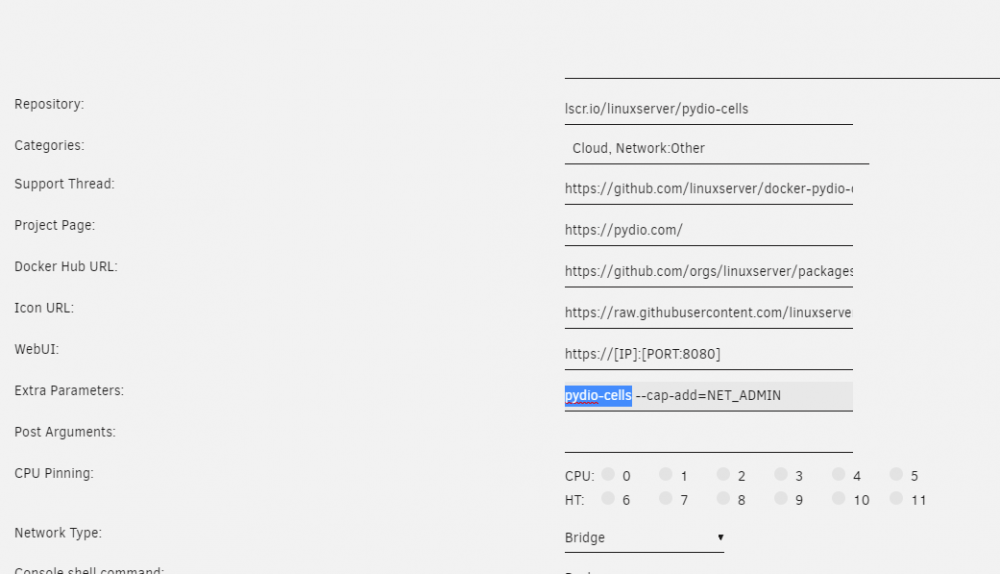
Sure there is! A linuxserver.io mod has said it would be fixed "upstream" but I dont think it happened, remove the blue part . Check if you have advanced view enabled
-
I think this has came up in the last major version. I have 40 containers with about half of them running. The docker tab takes a while to load. If I use the ctrl+f function to search on the page it pretty much locks up the page, and it takes forever to unblock. I tried multiple systems and browsers How would I even debug this? Would be nice to be able to at least hide the containers that are not running.