





BurntOC
Members
-
Joined
-
Last visited
Everything posted by BurntOC
-
So I have 2 Unraid servers, one of which (UnraidA) has containers on custom bridges associated with my management and guest networks. The other has an additional bridge associated with my IOT network, and this one (UnraidB) is my media server. I run about 20 containers on each, but the ones that I'd like to secure a bit more, e.g. unifi-controller, vaultwarden, etc. have been on UnraidA, which has an i7-6700. UnraidB has more of the media-server-related containers as you'd expect, but that server is running on an AMD 5900X with a RTX3070 I have passed through to a VM I use mainly for gaming. At times I need to support transcoding and I don't want to run Plex or Jellyfin in the VM, so I can't support it because the 5900X doesn't have an igpu. I realized I really could just "swap" the servers and then Plex or Jellyfin can use the Intel igpu and I can still use the other box for gaming. I took the step of shutting my containers down and making sure I added or removed shares to keep my sensitive information in a similar posture as to what it is now, and that seemed to go okay. I tried copying appdata for a couple of containers (unifi-controller and swag) from UnraidA to UnraidB and installing them using the same options as I'd used before and firing them up as a test, but I'm failing pretty hard here. Both test containers start just fine, but swag reports it successfully retrieved a certificate then a couple of lines later says ERROR: Cert does not exist. It tells me to check the validation credentials in my cloudflare.ini file but this matches the original, I've confirmed. The unifi-controller won't even accept my username and password. So it seems that due to file locks, permissions, or something else these haven't been transferring properly. Any ideas how to fix this or an easier way to move containers between Unraid servers? They have identical network configurations so at least I don't have to deal with that being different. Thanks for any help from the gurus.
-
Digging up this old post to see if @baccula or somebody else may have an answer to this? I pass through a drive to my VM, but if I've encountered this message before it was so long ago I've forgotten. I added another SSD to my system yesterday - just to use for Windows boot testing and not defined in the array or otherwise used for VM purposes, but now I'm getting messages with the same error: unsupported configuration: source for disk 'hdd' is not a regular file; refusing to generate external snapshot name
-
Hi, did you ever sort this out? I'm facing the same thing at this time. Can no longer make form changes after my update to 6.10.
-
I'm not sure if my issue is exactly the same but I just upgraded one of my two servers to 6.10 just now as well and I'm now getting the certificate is untrusted message, too. Before they both showed secure, and the one on 6.9.2 remains to be fine. Hopefully we can resolve this so I don't have to roll back. EDIT - to be clear, I don't use a custom cert, either. I use Let's Encrypt, mainly wildcard for most everything. My 6.9.2 is still showing LE cert and working as I haven't touched it. EDIT2 - I thought maybe this had to do with not having updated the cert via the MyServers plugin, or whatever it is called. I thought I recalled on one of the early RCs I recalled being told I had to do that at least once. In any case, I tried that and "upgraded my cert" which did appear to generate a new cert, but it didn't fix the issue and I would prefer to use the LE certs anyway.... EDIT3 - Looks like we're getting bitten by the changes noted here https://unraid.net/blog/6-10-stable. I may need to roll back until I understand it better. I know I should read the release notes before upgrading, but this server is my most basic install and I'm not doing anything particularly special. I also ran the Update Assistant and FCP beforehand as well as applied all updates. I think things like this that will affect the vast majority of users probably ought to be copied to an acknowledgement popup in the upgrade workflow.
-
I didn't see this info in the FAQ unless I missed it. Just wondering as 20.10.5 has been out for a long time.
-
Sorry to be dense, Squid - I just want to ensure I'm absolutely clear. The option you're referring to is the bottom one (Restore) or the toggle from Next to Stable? P.S. Love the new avatar. I need to add one later today, too.
-
Will that just restore the OS or will it revert my 2nd cache pool drive back to Unassigned Devices? It also looks like I could toggle Next to Stable, maybe if that would be a problem with the former this other option would work?

-
Not this specific one. I wanted to get the server and VM back running again to make absolutely sure it didn't somehow show up on the VM list before I reported that one. The cert-related ones are in Pre-release bug reports.
-
I have two Unraid servers and both were humming along awesomely on 6.9.2. Normally I wouldn't go to a non-stable release, but the slow release pace of Unraid (still love it!) prompted me to do it based on kernel, security, and other changes. On one server it seemed to go fine. The other, too, until I fired up my gaming VM and bluetooth suddenly no longer worked. I messed with vfio and screwed up my server so I decided to rebuild that one. That's when I started noticing other issues (for which I have 2 bug reports open already for issues affecting both the upgraded and rebuilt servers - both related to certificate handling). When I reinstalled Unraid I took an unassigned devices appdata drive I had and moved it to a 2nd cache pool, then I reinstalled my containers and pointed them to that location. That was the only change, but I'm guessing that array change is what has prompted Unraid to do a parity rebuild - even though my data drives were unchanged and in the same slots. Anyway, now I'm having problems with vfio and passthrough and my gaming VM again, and I no longer see my motherboard's integrated Intel bluetooth even showing up. Now I'm really thinking I jumped the gun here. Since 6.9.2 supports multiple cache pools, could I just reinstall 6.9.2 somehow without having to do another parity rebuild or re-doing the tedious changes I made to my 25 containers to point them to the right place? I can't revert because it was a rebuild and not an upgrade.
-
So there's another bug report on the fact some LE certs are being cut off and not used by NGINX properly. This is related, but different. Due to that bug I've had to pull over an Unraid LE cert from a backup I made last week. Even if I delete all other certs and the LE info appears properly at the bottom of the Management Access screen, it re-generates a self-signed cert (if not already there) and uses that. I've included more info and some pics to clarify the issue here.
-
As discussed in this thread, as of 6.92 and in 6.10 provisioning a cert results in a 12K certificate_bundle.pem that does not have the full cert up through the -----END CERTIFICATE-----or -----END PRIVATE KEY-----. This causes nginx to fail to use in and you cannot access the Unraid gui via ssl.
-
Thanks, @Squid. The way I read it, I'm doing it properly. I think it is associated with this bug that was supposed to be fixed in rc2, but appears to possibly be showing up again.
-
@Squid - thanks for raising the visibility on this. I really do believe it's a bug as it consistently only pulls 12000 bytes of the pem instead of the full thing. While that's being looked at, can you tell me how I can get Unraid to stop creating a self-signed cert and using that instead of the valid one I copied over from a backup from earlier this week? I've attached a pic in case it is hard to understand what I'm saying.
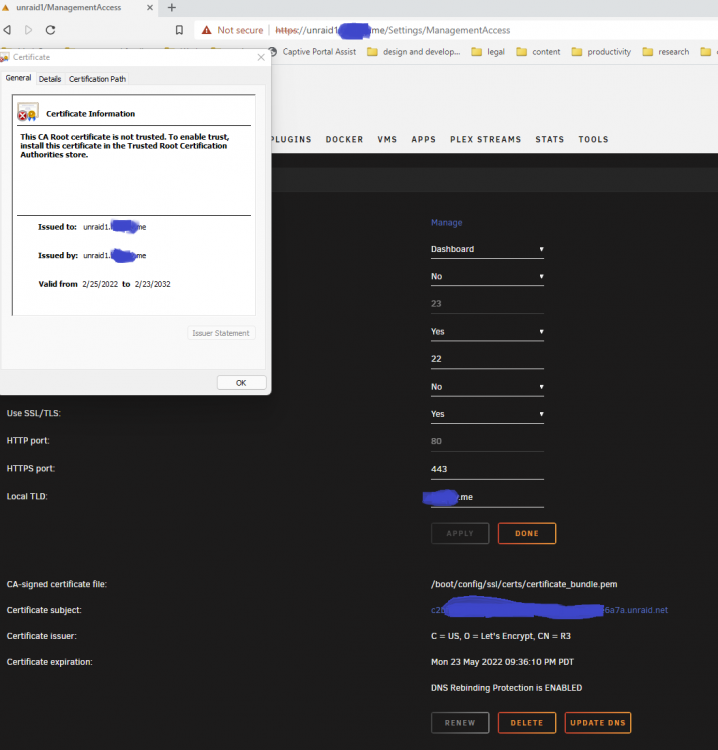
-
Looks like the main issue is that Unraid is not getting a complete PEM bundle as identified in this thread here: I've been able to bring over a certificates_bundle.pem from a recent backup, but it expires in May so I hope that gets fixed. I also can't figure out how to get Unraid to stop using the self-signed cert now and use the proper certificates_bundle.pem I've supplied. It shows the info in the Management Access screen, but it keeps using the other one and if I delete the other cert it just recreates it. Grrr...
-
Yep - I'm seeing the exact same behavior here. HUGELY frustrating as I've been pulling my hair out and spent like 12 hours trying different approaches to get my SSL access back before I figured out it is almost certainly related to this. I believe I have an older cert as well so that will buy me a little time I suppose, but I think this is a defect that needs a ticket opened. NOTE: The length of my older PEM file is 15,844 bytes, and the problematic one here is 12,000 bytes.
-
Adding another update for other souls as I think I'm on track. My flash drive had two certs - the self signed one and certificate_bundle.pem, which I believe is the one Unraid generates from Let's Encrypt. I deleted certifcate_bundle.pem and now I'm back in via SSL, though it is using the self-signed cert so I'm not sure how the heck to go forward from here as I would like the LE cert to work.
-
Looking through the logs myself, though I don't expect I know exactly what to look for, this catches my eye: Feb 25 07:18:25 unraid1 root: nginx: [emerg] cannot load certificate "/boot/config/ssl/certs/certificate_bundle.pem": PEM_read_bio_X509() failed (SSL: error:0908F066:PEM routines:get_header_and_data:bad end line) No idea why this would go from working fine to just not working at all. DNS seems okay, too, unless I'm missing something.
-
So I'll sum up a whole lot of pain by saying I updated both of my servers from 6.9.2 to 6.10rc2, and on one of them bluetooth stopped working in its VM. I messed with vfio devices and screwed up my server, then I decided to start fresh after taking lots of notes. I'm having an absolutely hellish time getting ssl enabled on the new server. I've tried over 20 times, checking DNS settings, editing ident.cfg when access was lost, and in almost all when I enable SSL I lose access to the web gui. This last time I actually got the Unraid self-signed cert and I could still access the gui, but I provisioned a Let's Encrypt cert from Unraid using the button provided and I've lost access again - even though it had succeeded in grabbing the cert. I've done this probably a dozen times in the past and everything was fine. My other server is fine, though it did already have its LE cert when I upgraded it. I don't want to spend hours setting my server back up again to trip up on this, so I'm stuck and this is my primary Unraid server with my gaming VM and about 25 containers when fully configured. I've attached diagnostics and I would really appreciate help understanding what the heck is going on. unraid1-diagnostics-20220225-0725.zip
-
@Josh.5 I just stumbled across this and I'm looking forward to trying it out. I'm running the latest Unraid with an Nvidia RTX. Do I need to use the --runtime=nvidia and GPU UUID or not? Your note under deprecated seems to suggest not, but I see it referenced almost everywhere else so it's been confusing to me. TIA.
-
I searched this thread and generally online for an answer to this, but I don't see it or I missed it. I've been running swag to front end a couple of dozen containers for a year or so and it has worked great. I tried adding another one today and I went to ssh into it to modify the config file and I'm getting an error that the target actively refused it. I've made no changes to my network, and I've restarted the container and even rebooted Unraid but I'm still getting the same error. Any ideas on what I might be missing? NVM - Needed more coffee. I remembered I ssh into Unraid and then go to the appdata from there rather than ssh into the swag container IP.
-
Thank you very much, @IFireflyl. This is exactly what I needed to know.
-
So I read the OP and several pages of this thread, including the latest posts but I don't see any posts speaking to an issue of concern for me. I don't have my server accessible except via VPN tunnel and that's how I like it. As with my Unifi gear, I don't want to enable remote access because I don't trust that a compromise on the vendor side won't facilitate access to my equipment. Am I correct in understanding that you don't have to enable remote access mode? If so, and if online flash backup is stil supported in that scenario, I take it there isn't any major security risk in what's on the flash drive (IIRC it's primarily boot and array config info). Thanks for any insights here. I was using the Appdata backup plugin to handle my flash drive as well, but it looks like that's no longer supported so it's forcing me to look at other options, unfortunately.
-
I tried following the steps posted elsewhere to rename the repository and use the fix plugin to fix the XML file. I can no longer access my container login page via https. If I try via http I get the error page someone posted about it only being accessible via https, even though I have a trusted cert available. It just isn't listening yet. If I go to the /admin URL then I get the same thing you're showing here, and I have no idea where to get that authentication key from. Any help would be appreciated. This was working just fine until I tried to "fix" it to the new repository. EDIT - figured it out. Primarily it was because I needed to update my reverse proxy to account for the new app name. That really fixed it. With respect to the "authentication key", I remembered it was in the container settings and I have it written down in the event I needed it anyway. I think I'm good to go now..
-
I've read through the Video Guide post on this, but I know that the method changed a bit in 6.9 vs S1's video and I'm going to be using the rebuild-dndc container as well (though that's immaterial to my core question here, but it might help someone in the thread piggyback in the future), so I thought I'd create a new post. I've tryinging to route some -arrr and sabnzbd containers through a VPN container and I think I only have one question left. FWIW, while I'm a huge fan of binhex I'm testing with hotio's qbittorrent-vpn container because it doesn't require privileged mode for wireguard and it doesn't reset my wg0.conf permissions from 600 to 755 on every start like the others I've tested. I'm clear on creating the container network, and about identifying the master container in rebuild-dndc. I understand the core part about removing port like 8989 from my Sonarr container and adding that to the VPN container, but here's what I don't understand: What do I do about running multiple containers through if more than one are using 8080, for example, for their web gui access? How will I add them and still access each app's gui? I guess as a note the qbittorrent-vpn itself uses 8080 as well, does the master container using the port complicate things any more? Really excited to try this.
-
Is this not a security concern? Nothing to be concerned about?


