tomwhi
Members
-
Joined
-
Last visited
Everything posted by tomwhi
-
This is a great update - thanks for keeping us up to date and sharing your progress too. I actually sacked off ZTO in favour of Tailscale now. It seemed to integrate a lot easier into the Unraid OS and I've got some really sexy features like using SWAG with Tailscale to provide me an internal reverse proxy. I might look at ZTO again in the future but for now this seems to be working with a lot more stability.
-
Yeah agreed - I think the URL had changed and I kept getting redirected to the same (wrong) page over and over. If I strip back the URL just to http://192.168.32.164/pwa (no login or anything) then it takes me to the right place! 👍
-
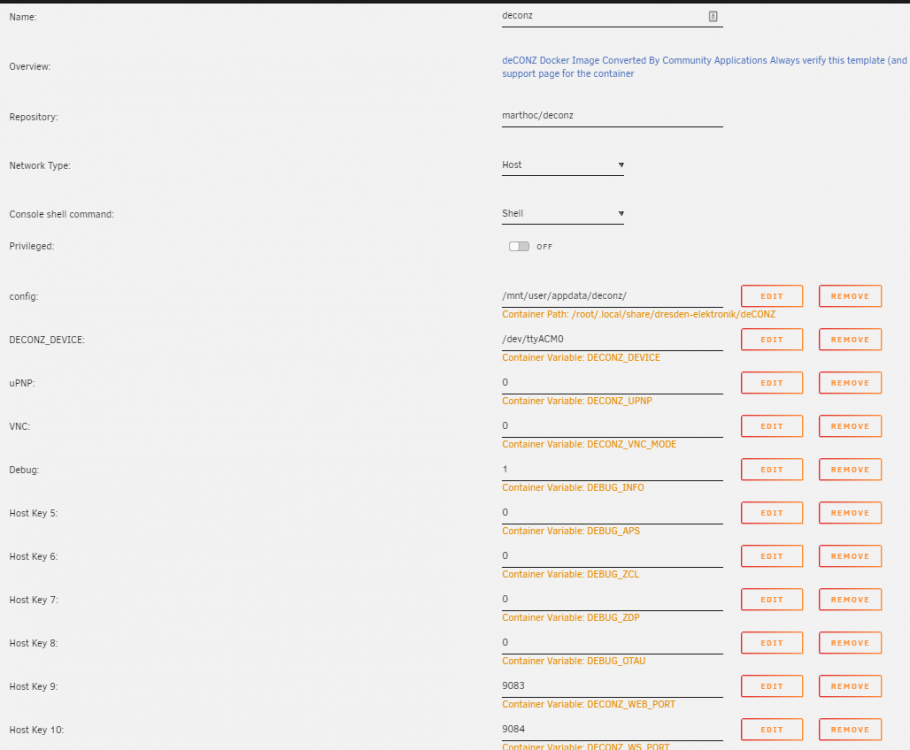
I am having problems after upgrading and wondered if anyone could help. This is the procedure I followed: Shut down the old marthoc/deconz container Started the new deconzcommunity/deconz:stable container I kept the same appdata path as /mnt/user/appdata/deconz which contained my original database and config from the original container The page loads, but doesn't show my stick All the devices react still but I can't see them / add new ones / control the conbee 2 stick. I have pressed F12 and done a hard reset and cleared cache on Chrome (and tried Edge and Firefox). I have restarted the container to see if that cures it. These are the logs from starting the docker tigervncserver: No VNC server running for this user! 17:06:03:301 DEV found DDF for 0x00158D000460A709, path: /usr/share/deCONZ/devices/xiaomi/xiaomi_rtcgqq11lm_presence_sensor.json, result: 1 17:06:03:307 DEV found DDF for 0x84BA20FFFEF89BB6, path: /usr/share/deCONZ/devices/ikea/tradfri_on_off_switch.json, result: 1 17:06:03:312 DEV found DDF for 0x04CF8CDF3C78E030, path: /usr/share/deCONZ/devices/xiaomi/xiaomi_gzcgq01lm_light_sensor.json, result: 1 17:06:03:316 DEV found DDF for 0x00158D0004855AC1, path: /usr/share/deCONZ/devices/xiaomi/xiaomi_mccgq01lm_openclose_sensor.json, result: 1 17:06:03:327 DEV found DDF for 0x00158D0006BFA3A3, path: /usr/share/deCONZ/devices/xiaomi/xiaomi_wsdcgq11lm_temp_hum_sensor.json, result: 1 17:06:03:328 DEV no DDF for 0x00124B001E7317E9, modelId: BASICZBR3 17:06:03:328 DEV create on-the-fly DDF for 0x00124B001E7317E9 17:06:03:334 DEV found DDF for 0x943469FFFE65B5E1, path: /usr/share/deCONZ/devices/ikea/tradfri_motion_sensor.json, result: 1 17:06:03:347 DEV found DDF for 0x00158D0006BFA48E, path: /usr/share/deCONZ/devices/xiaomi/xiaomi_wsdcgq11lm_temp_hum_sensor.json, result: 1 17:06:03:359 DEV found DDF for 0x00158D0006BFA30B, path: /usr/share/deCONZ/devices/xiaomi/xiaomi_wsdcgq11lm_temp_hum_sensor.json, result: 1 17:06:03:367 DEV found DDF for 0x00158D000421491E, path: /usr/share/deCONZ/devices/xiaomi/xiaomi_mfkzq01lm_cube.json, result: 1 17:06:03:378 DEV found DDF for 0x00158D0004186A45, path: /usr/share/deCONZ/devices/xiaomi/xiaomi_wsdcgq11lm_temp_hum_sensor.json, result: 1 17:06:04:181 COM: /dev/ttyACM0 / serialno: , ConBee II 17:06:05:699 Device firmware version 0x264A0700 ConBee II 17:06:05:714 unlocked max nodes: 512 17:06:05:719 Device protocol version: 0x010B 17:06:05:799 Current channel 25 17:06:05:819 CTRL ANT_CTRL 0x03 17:06:05:834 On/Off server cluster not present, append cluster 17:06:05:861 ZCL attribute report 0x00158D00046093B4 for cluster: 0x0400, ep: 0x01, frame control: 0x18, mfcode: 0x0000 17:06:05:882 ZCL attribute report 0x00158D00046093B4 for cluster: 0x0406, ep: 0x01, frame control: 0x18, mfcode: 0x0000 17:06:06:115 Set sensor check interval to 100 milliseconds 17:06:06:753 DB UPDATE device_descriptors SET data = x'01040105000105000006000a0019000105040100200000050205', timestamp = 1722528366 WHERE device_id = (SELECT id FROM devices WHERE mac = '00:21:2e:ff:ff:05:a8:67') AND endpoint = 1 AND type = 4 17:06:08:320 Announced to internet https://phoscon.de/discover 17:06:11:116 DEV Tick.Init: booted after 8000 seconds 17:06:13:958 New websocket 192.168.32.165:33866 (state: 3) 17:06:15:167 ZCL attribute report 0x00158D000460A709 for cluster: 0x0400, ep: 0x01, frame control: 0x18, mfcode: 0x0000 17:06:15:178 ZCL attribute report 0x00158D000460A709 for cluster: 0x0406, ep: 0x01, frame control: 0x18, mfcode: 0x0000 17:06:17:129 saved node state in 0 ms 17:06:17:130 sync() in 0 ms 17:06:25:145 0x00124B001E7317E9 error APSDE-DATA.confirm: 0xD0 on task 17:06:51:583 ZCL attribute report 0x00158D00046093B4 for cluster: 0x0400, ep: 0x01, frame control: 0x18, mfcode: 0x0000 17:06:51:595 ZCL attribute report 0x00158D00046093B4 for cluster: 0x0406, ep: 0x01, frame control: 0x18, mfcode: 0x0000 17:06:54:292 ZCL attribute report 0x00158D00047B79F4 for cluster: 0x0400, ep: 0x01, frame control: 0x18, mfcode: 0x0000 17:06:54:302 ZCL attribute report 0x00158D00047B79F4 for cluster: 0x0406, ep: 0x01, frame control: 0x18, mfcode: 0x0000 17:07:03:268 0x00124B001E7317E9 force poll (2) 17:07:03:287 ZCL attribute report 0x00124B001E7317E9 for cluster: 0x0006, ep: 0x01, frame control: 0x08, mfcode: 0x0000 17:07:07:504 0x00124B001E7317E9 force poll (2) 17:07:07:522 ZCL attribute report 0x00124B001E7317E9 for cluster: 0x0006, ep: 0x01, frame control: 0x08, mfcode: 0x0000 17:07:45:316 sensor 15 (lumi.sensor_motion.aq2): disable presence 17:08:04:661 0x00124B001E7317E9 found group 0xFFF0 17:08:04:661 0x00124B001E7317E9 found group 0x0001 17:08:15:858 ZCL attribute report 0x00158D00047B79F4 for cluster: 0x0400, ep: 0x01, frame control: 0x18, mfcode: 0x0000 17:08:15:869 ZCL attribute report 0x00158D00047B79F4 for cluster: 0x0406, ep: 0x01, frame control: 0x18, mfcode: 0x0000 17:08:21:815 sensor 17 (lumi.sensor_motion.aq2): disable presence 17:08:22:517 ZCL attribute report 0x00124B001E7317E9 for cluster: 0x0006, ep: 0x01, frame control: 0x08, mfcode: 0x0000 17:08:24:012 ZCL attribute report 0x00158D00046093B4 for cluster: 0x0400, ep: 0x01, frame control: 0x18, mfcode: 0x0000 17:08:24:023 ZCL attribute report 0x00158D00046093B4 for cluster: 0x0406, ep: 0x01, frame control: 0x18, mfcode: 0x0000 17:08:39:188 ZCL attribute report 0x04CF8CDF3C78E030 for cluster: 0x0400, ep: 0x01, frame control: 0x18, mfcode: 0x0000 17:09:17:466 ZCL attribute report 0x00158D00047B79F4 for cluster: 0x0400, ep: 0x01, frame control: 0x18, mfcode: 0x0000 17:09:17:475 ZCL attribute report 0x00158D00047B79F4 for cluster: 0x0406, ep: 0x01, frame control: 0x18, mfcode: 0x0000 17:09:24:814 ZCL attribute report 0x00158D00046093B4 for cluster: 0x0400, ep: 0x01, frame control: 0x18, mfcode: 0x0000 17:09:24:824 ZCL attribute report 0x00158D00046093B4 for cluster: 0x0406, ep: 0x01, frame control: 0x18, mfcode: 0x0000 17:10:32:315 ZCL attribute report 0x00158D00047B79F4 for cluster: 0x0400, ep: 0x01, frame control: 0x18, mfcode: 0x0000 17:10:32:325 ZCL attribute report 0x00158D00047B79F4 for cluster: 0x0406, ep: 0x01, frame control: 0x18, mfcode: 0x0000 17:10:55:116 sensor 17 (lumi.sensor_motion.aq2): disable presence 17:10:55:897 DeviceAnnce of SensorNode: 0x943469FFFE65B5E1 [1] 17:11:08:505 ZCL attribute report 0x943469FFFE65B5E1 for cluster: 0x0001, ep: 0x01, frame control: 0x08, mfcode: 0x0000 17:11:12:235 [INFO] - Button 1002 - TRADFRI motion sensor, broadcast to: 0x0003, endpoint: 0x01, cluster: ONOFF (0x0006), action: On with timed off, payload: 0008070000, zclSeq: 20 17:11:51:221 ZCL attribute report 0x00158D00047B79F4 for cluster: 0x0400, ep: 0x01, frame control: 0x18, mfcode: 0x0000 17:11:51:231 ZCL attribute report 0x00158D00047B79F4 for cluster: 0x0406, ep: 0x01, frame control: 0x18, mfcode: 0x0000 17:12:39:276 ZCL attribute report 0x00158D00046093B4 for cluster: 0x0400, ep: 0x01, frame control: 0x18, mfcode: 0x0000 17:12:39:286 ZCL attribute report 0x00158D00046093B4 for cluster: 0x0406, ep: 0x01, frame control: 0x18, mfcode: 0x0000 17:12:51:953 ZCL attribute report 0x00158D00047B79F4 for cluster: 0x0400, ep: 0x01, frame control: 0x18, mfcode: 0x0000 17:12:51:963 ZCL attribute report 0x00158D00047B79F4 for cluster: 0x0406, ep: 0x01, frame control: 0x18, mfcode: 0x0000 17:13:22:521 ZCL attribute report 0x00124B001E7317E9 for cluster: 0x0006, ep: 0x01, frame control: 0x08, mfcode: 0x0000 17:13:37:592 ZCL attribute report 0x04CF8CDF3C78E030 for cluster: 0x0400, ep: 0x01, frame control: 0x18, mfcode: 0x0000 17:13:45:146 [INFO] - Button 1002 - TRADFRI motion sensor, broadcast to: 0x0003, endpoint: 0x01, cluster: ONOFF (0x0006), action: On with timed off, payload: 0008070000, zclSeq: 21 17:14:09:515 sensor 17 (lumi.sensor_motion.aq2): disable presence [deconzcommunity/deconz] Starting deCONZ... [deconzcommunity/deconz] Current deCONZ version: 2.27.6 [deconzcommunity/deconz] Web UI port: 80 [deconzcommunity/deconz] Websockets port: 443 [deconzcommunity/deconz] Using options --auto-connect=1 --appdata=/opt/deCONZ --dbg-info=1 --dbg-aps=0 --dbg-zcl=0 --dbg-ddf=0 --dbg-dev=0 --dbg-zdp=0 --dbg-ota=0 --dbg-error=0 --dbg-http=0 --dev-test-managed=0 --http-port=80 --ws-port=443 [deconzcommunity/deconz] Modifying user and group ID [deconzcommunity/deconz] Checking device group ID [deconzcommunity/deconz] VNC port: 5900 [deconzcommunity/deconz] VNC DISABLE PASSWORD: 0 Cleaning stale pidfile '/home/deconz/.vnc/7fbd4b87d416:0.pid'! Cleaning stale X11 lock '/tmp/.X0-lock'! Cleaning stale X11 lock '/tmp/.X11-unix/X0'! TigerVNC server sessions: X DISPLAY # RFB PORT # RFB UNIX PATH PROCESS ID # SERVER New Xtigervnc server '7fbd4b87d416:0 (deconz)' on port 5900 for display :0. Use xtigervncviewer -SecurityTypes VncAuth,TLSVnc -passwd /tmp/tigervnc.4hb9qN/passwd 7fbd4b87d416:0 to connect to the VNC server. WebSocket server settings: - Listen on :6080 - Web server. Web root: /usr/share/novnc - SSL/TLS support - Backgrounding (daemon) [deconzcommunity/deconz] NOVNC port: 6080 QStandardPaths: XDG_RUNTIME_DIR not set, defaulting to '/tmp/runtime-deconz' libpng warning: iCCP: known incorrect sRGB profile libpng warning: iCCP: known incorrect sRGB profile 17:14:17:579 /opt/deCONZ/config.ini exists and is writeable 17:14:17:579 /opt/deCONZ/zll.db exists and is writeable 17:14:17:635 COM: /dev/ttyACM0 / serialno: , ConBee II 17:14:17:635 ZCLDB init file /opt/deCONZ/zcldb.txt 17:14:17:671 DDF enabled for Gold status 17:14:17:677 gw run mode: normal 17:14:17:677 GW sd-card image version file does not exist: /opt/deCONZ/gw-version 17:14:17:679 DB sqlite version 3.42.0 17:14:17:680 DB PRAGMA page_count: 66 17:14:17:680 DB PRAGMA page_size: 4096 17:14:17:680 DB PRAGMA freelist_count: 1 17:14:17:680 DB file size 270336 bytes, free pages 1 17:14:17:680 DB PRAGMA user_version: 10 17:14:17:680 DB cleanup 17:14:17:683 DB create temporary views 17:14:17:816 DB legacy loading sensor Garage Door Sensor 8, later handled by DDF Mijia open/close sensor MCCGQ01LM 17:14:17:817 DB skip loading sensor Front Door Sensor 6, handled by DDF Aqara open/close sensor MCCGQ11LM 17:14:17:818 DB skip loading sensor Back Door Sensor 7, handled by DDF Mijia open/close sensor MCCGQ01LM 17:14:17:818 DB skip loading sensor Hall Motion Sensor 16, handled by DDF Aqara motion sensor RTCGQ11LM 17:14:17:818 DB skip loading sensor XX Bedroom Temperature 30, handled by DDF Aqara Temperature and Humidity Sensor WSDCGQ11LM 17:14:17:818 DB skip loading sensor XX Bedroom Temperature 31, handled by DDF Aqara Temperature and Humidity Sensor WSDCGQ11LM 17:14:17:818 DB skip loading sensor XX Bedroom Temperature 32, handled by DDF Aqara Temperature and Humidity Sensor WSDCGQ11LM 17:14:17:819 DB skip loading sensor Kitchen Motion Sensor 9, handled by DDF Aqara motion sensor RTCGQ11LM 17:14:17:819 DB skip loading sensor Landing Motion Sensor 14, handled by DDF Aqara motion sensor RTCGQ11LM 17:14:17:819 DB skip loading sensor Lamps Switch 37, handled by DDF TRADFRI on/off switch - E1743 17:14:17:819 DB skip loading sensor Light Sensor 5, handled by DDF Mijia Light Sensor GZCGQ01LM 17:14:17:820 DB skip loading sensor Garage Temperature 27, handled by DDF Aqara Temperature and Humidity Sensor WSDCGQ11LM 17:14:17:820 DB skip loading sensor Garage Temperature 28, handled by DDF Aqara Temperature and Humidity Sensor WSDCGQ11LM 17:14:17:820 DB skip loading sensor Garage Temperature 29, handled by DDF Aqara Temperature and Humidity Sensor WSDCGQ11LM 17:14:17:820 DB skip loading sensor Living Room Temperature 24, handled by DDF Aqara Temperature and Humidity Sensor WSDCGQ11LM 17:14:17:820 DB skip loading sensor Living Room Temperature 25, handled by DDF Aqara Temperature and Humidity Sensor WSDCGQ11LM 17:14:17:821 DB skip loading sensor Living Room Temperature 26, handled by DDF Aqara Temperature and Humidity Sensor WSDCGQ11LM 17:14:17:821 DB skip loading sensor Office Temperature 18, handled by DDF Aqara Temperature and Humidity Sensor WSDCGQ11LM 17:14:17:821 DB skip loading sensor Office Temperature 19, handled by DDF Aqara Temperature and Humidity Sensor WSDCGQ11LM 17:14:17:821 DB skip loading sensor Office Temperature 20, handled by DDF Aqara Temperature and Humidity Sensor WSDCGQ11LM 17:14:17:821 DB skip loading sensor Bedroom Temperature 2, handled by DDF Aqara Temperature and Humidity Sensor WSDCGQ11LM 17:14:17:821 DB skip loading sensor Bedroom Temperature 3, handled by DDF Aqara Temperature and Humidity Sensor WSDCGQ11LM 17:14:17:821 DB skip loading sensor Bedroom Temperature 4, handled by DDF Aqara Temperature and Humidity Sensor WSDCGQ11LM 17:14:17:822 DB skip loading sensor Magic Cube 12, handled by DDF Aqara Cube MFKZQ01LM 17:14:17:822 DB skip loading sensor Magic Cube 11, handled by DDF Aqara Cube MFKZQ01LM 17:14:17:822 DB skip loading sensor Landing Motion Sensor 15, handled by DDF Aqara motion sensor RTCGQ11LM 17:14:17:822 DB skip loading sensor Kitchen Motion Sensor 10, handled by DDF Aqara motion sensor RTCGQ11LM 17:14:17:822 DB skip loading sensor Hall Motion Sensor 17, handled by DDF Aqara motion sensor RTCGQ11LM 17:14:17:822 DB skip loading sensor Garage Motion Sensor 36, handled by DDF TRADFRI motion sensor - E1525, E1745 17:14:17:826 Started websocket server on 0.0.0.0, port: 443 17:14:17:827 [INFO] - Found file containing button maps. Parsing data... 17:14:17:836 [INFO] - Button maps loaded. 17:14:17:837 found node plugin: /usr/share/deCONZ/plugins/libde_rest_plugin.so - REST API Plugin 17:14:17:839 found node plugin: /usr/share/deCONZ/plugins/libstd_otau_plugin.so - STD OTAU Plugin 17:14:17:868 LightNode 1: Configuration tool 1 added 17:14:17:900 DB SELECT manufacturername FROM nodes WHERE mac LIKE '00:12:4b:00:1e:73:17:e9%' COLLATE NOCASE: SONOFF 17:14:17:901 LightNode 3: Steampunk Lamp added 17:14:18:008 DEV found DDF for 0x00158D00046093B4, path: /usr/share/deCONZ/devices/xiaomi/xiaomi_rtcgqq11lm_presence_sensor.json, result: 1 17:14:18:022 DEV found DDF for 0x00158D0006B89088, path: /usr/share/deCONZ/devices/xiaomi/xiaomi_wsdcgq11lm_temp_hum_sensor.json, result: 1 17:14:18:029 dlg action: Read binding table 17:14:18:058 DEV found DDF for 0x00158D00047B79F4, path: /usr/share/deCONZ/devices/xiaomi/xiaomi_rtcgqq11lm_presence_sensor.json, result: 1 17:14:18:062 DEV found DDF for 0x00158D0004798742, path: /usr/share/deCONZ/devices/xiaomi/xiaomi_mccgq11lm_openclose_sensor.json, result: 1 17:14:18:071 DEV found DDF for 0x00158D000460A709, path: /usr/share/deCONZ/devices/xiaomi/xiaomi_rtcgqq11lm_presence_sensor.json, result: 1 17:14:18:080 DEV found DDF for 0x84BA20FFFEF89BB6, path: /usr/share/deCONZ/devices/ikea/tradfri_on_off_switch.json, result: 1 17:14:18:085 DEV found DDF for 0x04CF8CDF3C78E030, path: /usr/share/deCONZ/devices/xiaomi/xiaomi_gzcgq01lm_light_sensor.json, result: 1 17:14:18:088 DEV found DDF for 0x00158D0004855AC1, path: /usr/share/deCONZ/devices/xiaomi/xiaomi_mccgq01lm_openclose_sensor.json, result: 1 17:14:18:100 DEV found DDF for 0x00158D0006BFA3A3, path: /usr/share/deCONZ/devices/xiaomi/xiaomi_wsdcgq11lm_temp_hum_sensor.json, result: 1 17:14:18:101 DEV no DDF for 0x00124B001E7317E9, modelId: BASICZBR3 17:14:18:101 DEV create on-the-fly DDF for 0x00124B001E7317E9 17:14:18:107 DEV found DDF for 0x943469FFFE65B5E1, path: /usr/share/deCONZ/devices/ikea/tradfri_motion_sensor.json, result: 1 17:14:18:119 DEV found DDF for 0x00158D0006BFA48E, path: /usr/share/deCONZ/devices/xiaomi/xiaomi_wsdcgq11lm_temp_hum_sensor.json, result: 1 17:14:18:131 DEV found DDF for 0x00158D0006BFA30B, path: /usr/share/deCONZ/devices/xiaomi/xiaomi_wsdcgq11lm_temp_hum_sensor.json, result: 1 17:14:18:138 DEV found DDF for 0x00158D000421491E, path: /usr/share/deCONZ/devices/xiaomi/xiaomi_mfkzq01lm_cube.json, result: 1 17:14:18:150 DEV found DDF for 0x00158D0004186A45, path: /usr/share/deCONZ/devices/xiaomi/xiaomi_wsdcgq11lm_temp_hum_sensor.json, result: 1 17:14:18:946 COM: /dev/ttyACM0 / serialno: , ConBee II 17:14:20:591 Device firmware version 0x264A0700 ConBee II 17:14:20:598 unlocked max nodes: 512 17:14:20:603 Device protocol version: 0x010B 17:14:20:683 Current channel 25 17:14:20:703 CTRL ANT_CTRL 0x03 17:14:23:301 Announced to internet https://phoscon.de/discover 17:14:26:115 DEV Tick.Init: booted after 8000 seconds 17:14:27:359 New websocket 192.168.32.165:34138 (state: 3) 17:14:42:275 ZCL attribute report 0x00158D00047B79F4 for cluster: 0x0400, ep: 0x01, frame control: 0x18, mfcode: 0x0000 17:14:42:285 ZCL attribute report 0x00158D00047B79F4 for cluster: 0x0406, ep: 0x01, frame control: 0x18, mfcode: 0x0000 17:14:42:615 Set sensor check interval to 100 milliseconds 17:14:45:888 ZCL attribute report 0x00158D00046093B4 for cluster: 0x0400, ep: 0x01, frame control: 0x18, mfcode: 0x0000 17:14:45:897 ZCL attribute report 0x00158D00046093B4 for cluster: 0x0406, ep: 0x01, frame control: 0x18, mfcode: 0x0000 17:14:49:686 ZCL attribute report 0x00158D000460A709 for cluster: 0x0400, ep: 0x01, frame control: 0x18, mfcode: 0x0000 17:14:49:696 ZCL attribute report 0x00158D000460A709 for cluster: 0x0406, ep: 0x01, frame control: 0x18, mfcode: 0x0000
-
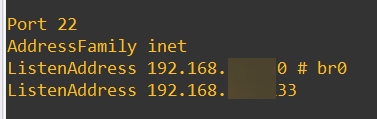
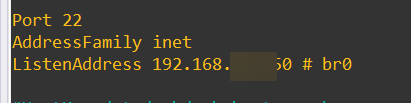
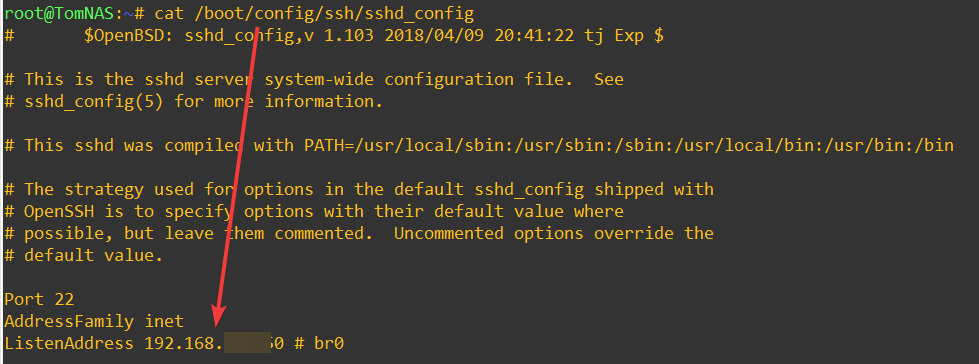
Every time I reboot my unraid server, or even restart the service now - the ListenAddress in ssd_config goes back to the BR0 address / LAN address but I want it to be a custom address or 0.0.0.0. nano /etc/ssh/sshd_config ---> Add the new network nano /boot/config/ssh/sshd_config ---> Add the new network /etc/rc.d/rc.sshd restart ---> Restart the SSHD service (reload has the same effect) nano /etc/ssh/sshd_config ---> Open the config file again to see that my config has been erased. I have inspected the /etc/rc.d/rc.sshd script which contains this comment (no date/timestamp) Looking at line 18 and 21 the ListenAddress is removed and re-added using the "bind" array however I cannot tell where that bind array is being populated from. I have previously been able to have a custom SSH ListenAddress but I don't know if updating from 6.12.8 to 6.12.10 has changed this behaviour, or if I'm missing something else. If I manually runthe following command in the script to restart the service then I can get both listen addresses on both interfaces.
-
Thank you @bmartino1 however I have already tried this as I mentioned in the original post and when I restart the service the settings are reset back to br0. This is the proccess I'm following: nano /etc/ssh/sshd_config ---> Add the new network /etc/rc.d/rc.sshd restart ---> Restart the SSHD service nano /etc/ssh/sshd_config ---> Open the config file again to see that my config has been erased. I don't think adding this as a user script will help the problem I'm encountering where my config alterations are being wiped out. I can also confirm that after a reboot the /boot/config/ssh/sshd_config is overwritten and reset back to just my default bridge, even though I added the extra IP address of my ZTO interface in here as another line. Any ideas for why when I restart the service the default br0 network is being added back into the config?

-
I have ZeroTierOne running which I would like to SSH to, however every time I reboot my unraid server, or even restart the service now - the ListenAddress in ssd_config goes back to the BR0 address / LAN address but I want it to be a custom address or 0.0.0.0. I have tried editing /boot/config/ssh/sshd_config and /etc/ssh/sshd_config locations but after a reboot both are reset back to the br0 address. I have the SSH plugin installed which I am not sure if it's doing something. There doesn't look to be any way of setting the listen address in here, so my next option would be to remove it, but I wanted to get some opinions in first before I sarted doing that. Does anyone have any ideas why this keeps resetting back to the default LAN and not what I've set it to?
-
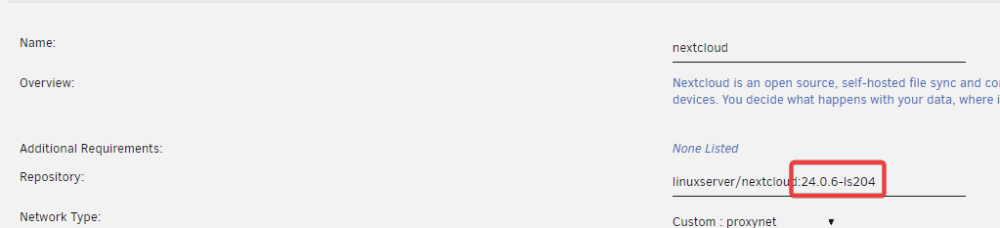
Hi gang. I had this same problem with NextCloud and the PHP error (This version of Nextcloud is not compatible with PHP>=8.2. You are currently running 8.2.6.) and I've managed to fix it. My write up is over on this thread if it's any help. I've tried to make it as step-by-step as possible as it was the first time I had to do this myself.I found a way to progress past this error. I added a tag onto my repo referenced in my container. In my case I'm on V24 so I used this tag however all the tags can be found can be found here: https://hub.docker.com/r/linuxserver/nextcloud/tags (This is assuming you're using the LinuxServer container, adjust for your own image creator of choice). I then started my container up and ran the following command in the Console for Nexcloud container (I'm assuming the user is abc but I've seen it called other things in different OS'): sudo -u abc php /config/www/nextcloud/updater/updater.phar I kept doing this until my application was up to date (I tried running this command without changing the tag first, and I found it wouldn't progress past the error). During the process I couldn't update any more... I tried reverting back to the "latest" tag (by not imputting a tag), but i still got the error. I changed to tag on the repo to a v25 tag (25.0.4) and was able to get back into the GUI and was able to keep updating. I was then presented with an update to v26.0.2 inside the GUI and the CLI updater. Once I completed that I removed the tag off my application and restarted the docker again. This is probably a good time to think about the way we look after our NextCloud instances. It's an amazing app but it's not "set and forget"... I think what I'll start doing it setting the tag to the version I'm on so that it can update the container within the major version (i.e. now I'm on v26) which will not allow it to go to v27 when that comes out - and i'll do the in-app updates first before I do the container updates.... Ref: https://github.com/linuxserver/docker-nextcloud/issues/288 Ref: https://www.reddit.com/r/unRAID/comments/13xlxyz/nextlcoud_stuck_in_step_3/
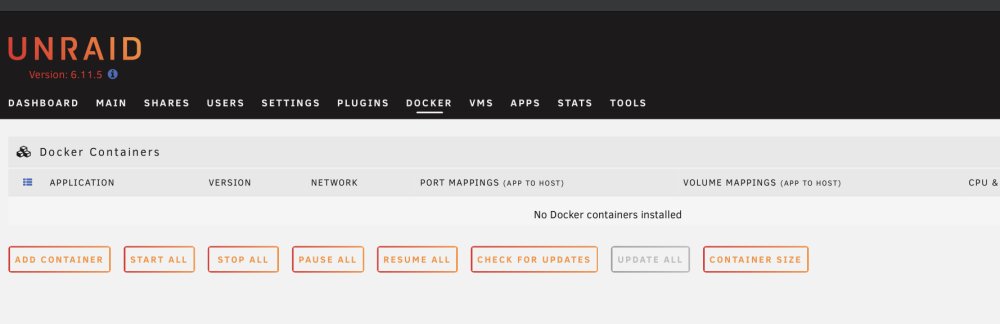
 Oh gang, this is perfect. Thank you so much for supporting me during this mega stressful time. I'll try and work out what's happened another day. But for now i'm mostly back up and running. Thank you again...!!Thank you so much! They array is back online and all my shares are there! However the dockers aren’t, maybe the docker.img was corrupted? Is there any advice about where to start with that? I’ve uploaded a fresh drag but I can’t see anything obvious in the logs to why the dockers aren’t defined any more… tomnas-diagnostics-20230214-1730.zip
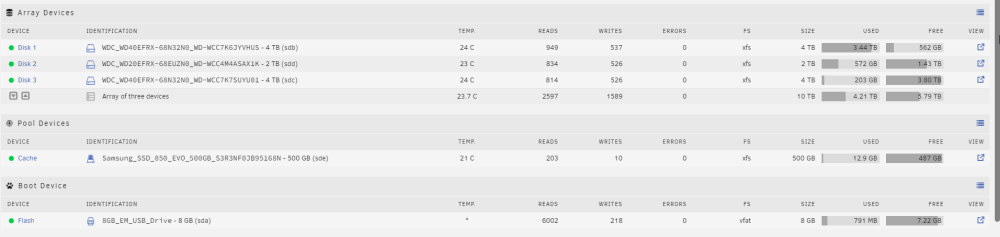
 Thank you! I am normally way better at this but my brain is all foggy. Am I at any risk that the -L removes any data off the disk or wipes it other than stuff that's corrupted?Thank you - Attached is the output of check disk against Disk1. It looks like there might be something that didn't finish with a success message, so I've tried to run the same option wihtout the "n" flag. However when I come to run the following command (while the array is still up in maint-mode) I get this error. root@TomNAS:/dev# xfs_repair -v /dev/sdb1 Phase 1 - find and verify superblock... - block cache size set to 709656 entries Phase 2 - using internal log - zero log... zero_log: head block 859423 tail block 859419 ERROR: The filesystem has valuable metadata changes in a log which needs to be replayed. Mount the filesystem to replay the log, and unmount it before re-running xfs_repair. If you are unable to mount the filesystem, then use the -L option to destroy the log and attempt a repair. Note that destroying the log may cause corruption -- please attempt a mount of the filesystem before doing this. Do I need to stop the array to carry out the option to fix the problem do you think? checkdisk.txtHi guys I'm really struggling - I lost my dad yesterday so my brain is a little foggy but I've woken up to my Unraid server broken and lost all its shares and what seems to be an array disk missing data / showing the wrong data. Also my shares aren't showing on the SHARES tab, and none of my dockers are starting, I assume because something is with Disk1 is messed up. My setup is : HP Microserver Gen10 3x Array disks (not in parity) (sdb, sdc, sdd) Cache drive on 50GB SSD (sde) Flash on 8GB USB stick (sda) When I click on SDB, Disk 1 in the array, I only see system files and none of my data. I would expect to see a list of "share folders" in here and not a linux root folder layout. When I click on Disk2 and Disk3 I see all the data I expect to see. When I click on "Fix common problems" it seems that Disk 1 is read-only or full But it's full not - and it's showing the amout of "Used" space to be what I expect this disk to be at - as disk 3 is now where all my new data is being written to. And I can't see it being read only anywhere, only that the data looks weird on the disk when I click "View". I've attached a diagnostics to see if that helps anyone. And I appoligise for not giving much more information but I wasn't execpting this fault to happen so soon after a family tragidy. I do have backups of the data so all is not lost, it just means I'd need to rebuild all my apps again if Unraid is really that broken and the restore process would take ages and I'd like to avoid it, please try to avoid judging my setup too harshly, it works for me and we can circle back around to what I could have done better later. Thank you so much for understanding, and any help you're able to offer me! Tom tomnas-diagnostics-20230214-0843.zip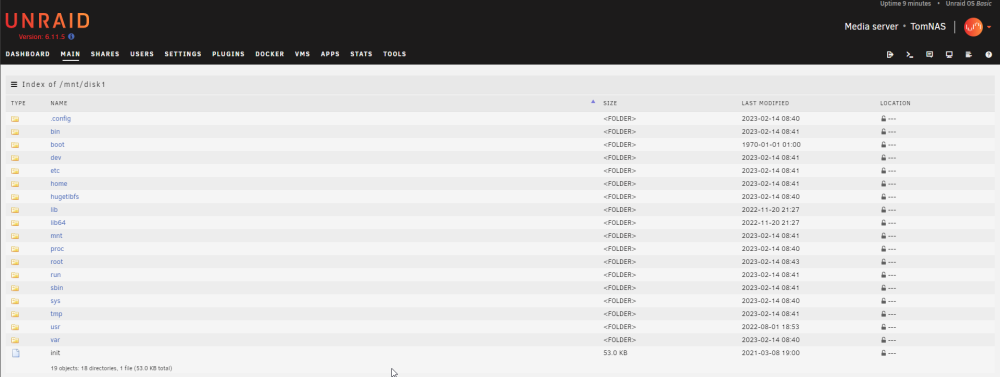

 This is a nice idea! I'm going to try to pad it out a little more to answer the questions about what's backed up, and setting up cron jobs to do it on a scheduled but it's deffo I great starting point for anyone who wants an application aware backup of their bitwarden / vaultwarden vault!OH MY GOSH - I've just worked out why my Home Assistant couldn't talk to my Phoscon/Deconz app.... They weren't on the same docker network... DOH!! My HA was on "host" because there was too many ports to map across, and my Phoscon was on br0 (also as shown in SIO's instructions but made the most sense because it needs it's own IP for things to find it on tcp/80 and tcp/443. I found out by going into the console of the HA container and trying to ping my Phoscon IP - it failed! So the "Api key couldn't not be whatever" is utter bullsh!t from an error message. I also realised it couldn't talk to Pi-hole (which I was less worried about, but equally as annoyed with not working) - and for anyone else who lives and breaths the SIO videos - it's also on br0!! So once my HA was moved onto the br0 network everything worked - well - not everything, now it can't talk to the host, so I can't get Sonnar or Raddar data into my HA setup but that really is the lowest of the low priorities and now I've worked this out I'll try and work out how to get it talking to both br0 and host networks.I am pretty desperate for this video SIO! :-) Please can you let us know when you think it will be due out?I've just had the same thing. I've been ripping my hair out all day. I was in the same situation as you, couldn't get the SIO one working so used marthoc/deconz, then on Saturday when my docker updated automatically I was getting a USB error. I've been able to get the docker up and running again by using SIO's and my original appdata, but I am still getting the API error that we've both had with Home Assistant. I've read the API issue is normal in HA, and I've tried updating the configuration.yml for HA with my host IP and port (various attempts) with nothing working. I'd be interested to know if anyone gets this working in any way, shape or form.I had exactly the same issue too, my post is in this thread so you might have tried this already. I ended up using a different container off the Docker Hub. I can't see which container you're using (I'd need to see the edit page & Repo or send another screenshot with advanced options enabled). I used this guide and it sorted me out:Well - my entire Unraid journey thus far has been to wait for a SpaceInvaderOne video, copy what he did, be happy with the results because it always worked first time. I wish I knew this video series was on the way otherwise I wouldn't have spent 3 hours last night trying to get deconz working!! I'm so excited to see this series! During the lockdown home automation has been my number 1 thing to keep me sane, I've tried a CC2531 Zigbee stick, bought loads of Xiaomi sensors and just put a new Sonoff BasicR3 one in to the network. @SpaceInvaderOne, I saw your docker and tried it - it worked well until I tried to get it linked with HA, but then it wasn't able to get an API key. I ended up using the one out of the docker hub with this post to fix my integration issues with the home assistant core docker. I needed to set loads of environment variables and also the "dialout" usermod setting to get it working properly. I don't know if it's worth you adding those into your docker image too? I used the command ls -l /dev/serial/by-id to find out what my conbee2 was using. lrwxrwxrwx 1 root root 13 May 30 02:40 usb-dresden_elektronik_ingenieurtechnik_GmbH_ConBee_II_DE2195326-if00 -> ../../ttyACM0 This is what I ended up with in my docker settings (obviously I had to remap the port from the usual port 80 to some other random port).