





almulder
Members
-
Joined
-
Last visited
Everything posted by almulder
-
So I have setup another unraid machine and setup 2 vms with windows 11 pro installed on each. Both units have dedicated video cards/sound, NVME, & USBs passed through to each. Randomly one CPU on a vm will get stuck at 100% These are the cores assigned to one vm and as you can see one is now stuck at 100% when looking at task manager in the VM, no proccesses are really hitting CPU, and looking at performance / CPU / Logical Processors, they are not being used much, and the core in question does not show 100% usage. Is this just an issue with UNRAID GUI? It has happened on my other vm also but on a different core. Things I should look at?

-
Thanks for that link. I think I have tracked down my issue to my 980 Pro NVME. Its the only one throwing the error. All my other NVMEs in my cards are 990 Pros 2TB (Except for a 980 pro 1TB) IOMMU group 13: [144d:a80a] 62:00.0 Non-Volatile memory controller: Samsung Electronics Co Ltd NVMe SSD Controller PM9A1/PM9A3/980PRO [N:0:6:1] disk Samsung SSD 980 PRO 2TB__1 /dev/nvme0n1 2.00TB Seems other have the same issue if they are not the 990 Pros. I have ordered a replacement 990 (I can use the 980 elsewhere) And I believe this will solve my issue. (Hopefully). Thanks again so much for helping. (Google was not my friend this time, did not think to search for my motherboard as the issue / card)
-
ya I did notice I missed the e, so I guess I deleted my post as you repiled, but I did fix that and issue still there. Guess I will leave as is until I notice an issue. (did notice a bit of a speed increase when booting when i updated it) For reference to others this is what my line looks like now. label Unraid OS GUI Mode menu default kernel /bzimage append pci=realloc=off pcie_aspm=off isolcpus=18-31,50-63 initrd=/bzroot,/bzroot-gui
-
I have made the change and will reboot later once mover finishes. (in a few hours). Thanks for the help.
-
Is it something I need to worry about? I have 2 installed and using the NVMEs in them. (is there a fix)
-
So I figured out my issue. My New setup is zfs and datasets not folders, renamed the dataset appdata to appdata1 and then ran the restore and it work great. So incase people run into the issue, you cant restore the folders if they were converted to datasets. (and I am sure vs versa)
-
I am seeing the following error. What could be causing it? Sep 23 14:18:28 HuskyServer kernel: {9}[Hardware Error]: Hardware error from APEI Generic Hardware Error Source: 514 Sep 23 14:18:28 HuskyServer kernel: {9}[Hardware Error]: It has been corrected by h/w and requires no further action Sep 23 14:18:28 HuskyServer kernel: {9}[Hardware Error]: event severity: corrected Sep 23 14:18:28 HuskyServer kernel: {9}[Hardware Error]: Error 0, type: corrected Sep 23 14:18:28 HuskyServer kernel: {9}[Hardware Error]: section_type: PCIe error Sep 23 14:18:28 HuskyServer kernel: {9}[Hardware Error]: port_type: 0, PCIe end point Sep 23 14:18:28 HuskyServer kernel: {9}[Hardware Error]: version: 0.2 Sep 23 14:18:28 HuskyServer kernel: {9}[Hardware Error]: command: 0x0406, status: 0x0010 Sep 23 14:18:28 HuskyServer kernel: {9}[Hardware Error]: device_id: 0000:62:00.0 Sep 23 14:18:28 HuskyServer kernel: {9}[Hardware Error]: slot: 0 Sep 23 14:18:28 HuskyServer kernel: {9}[Hardware Error]: secondary_bus: 0x00 Sep 23 14:18:28 HuskyServer kernel: {9}[Hardware Error]: vendor_id: 0x144d, device_id: 0xa80a Sep 23 14:18:28 HuskyServer kernel: {9}[Hardware Error]: class_code: 010802 Sep 23 14:18:28 HuskyServer kernel: {9}[Hardware Error]: bridge: secondary_status: 0x0000, control: 0x0000 Sep 23 14:18:28 HuskyServer kernel: nvme 0000:62:00.0: AER: aer_status: 0x00000001, aer_mask: 0x00000000 Sep 23 14:18:28 HuskyServer kernel: nvme 0000:62:00.0: [ 0] RxErr (First) Sep 23 14:18:28 HuskyServer kernel: nvme 0000:62:00.0: AER: aer_layer=Physical Layer, aer_agent=Receiver ID
-
So I have moved to a new unraid system and needed to restore my appdata (fresh install of everything) I have my backupd from just before I decommissioned my old server, restore sees them and tried to restore them, but I get an error when I do. I have tried one at a time also and get the same errors. Here is the log from when I tried to restore swag. (it just repeats the same message for all the files. Debug log ID: d4fa841f-c17f-4dd1-b7bc-d435c0372cb4

-
Ok I got help from the discord and the issue was I had things in my que before I enabled the "allow GPU workers to do CPU tasks" Restarted from scratch and made sure it was checked before adding libraries and started a fresh scan, now issue is gone. Hope this helps others in the future. Note: It was in the staging area that said CPU required and only CPU option then was working, now GPU does it all.
-
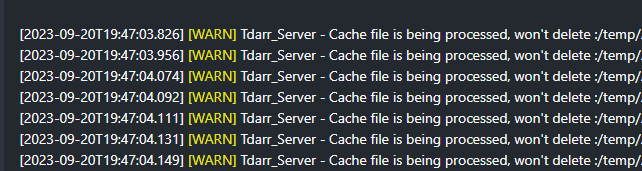
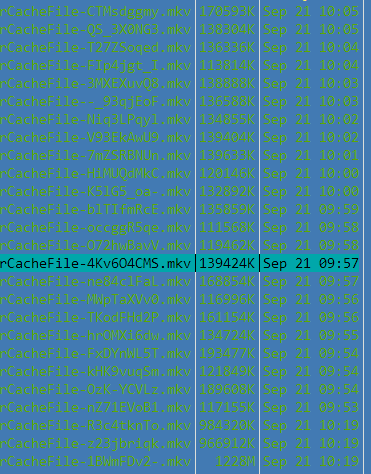
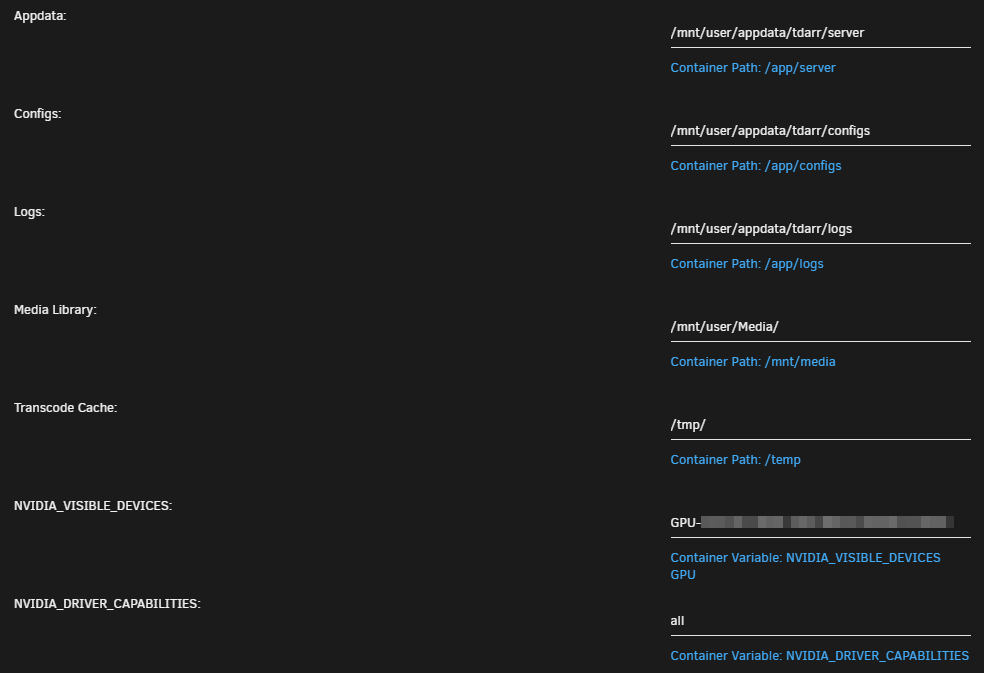
Anyone else using the /tmp ram folder for transcoding temp location? I am but it just fills up the tmp folder (ram) and eventually locks me out of unraid gui as there is no ram left. I keep getting these errors: anyone know how to fix? (After the / is the file name) its not removing the cachefiles: (From MC) Note: Both Tdarr and Tadarr-Node have the same paths setup
-
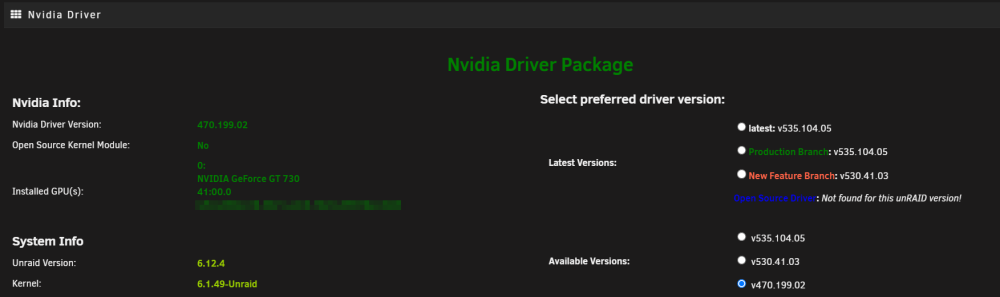
yes uefi mode, and i did get it to work, I had the most current firmware installed for nvidia, but that kept giving me issues, so I seen that ver 470.199.02 was listed and thought to give that a try. I installed that and the GT 730 booted into GUI mode without issue. Took me forever to figure out the issue but its resolved now.
-
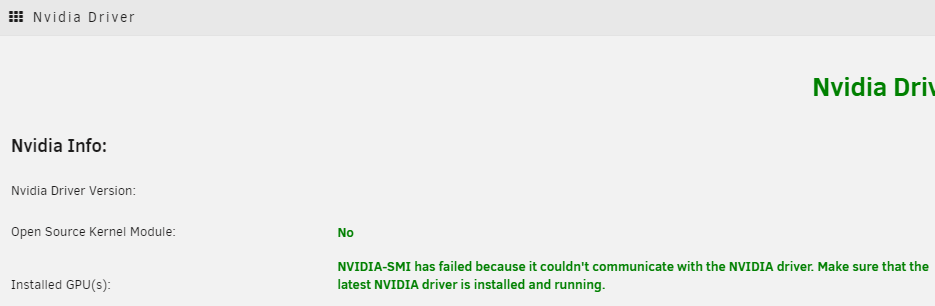
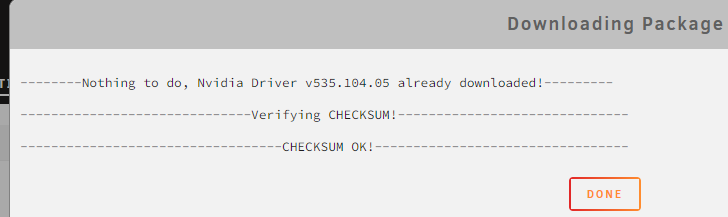
So I have a new server that I am working on getting ready, Fresh new Thumb Drive with 6.12.4 installed. I try and boot to GUI and non GUI mode, the screen stops responding at a line "ACPI: BUS TYPE DRM_CONNECTOR REGISTERED" Read up its because I have and Nvidia card installed without the drivers installed. So i put in an Radeon card and that works fine, so I installed the nvidia driver, rebooted once back to GUI i shut down, swapped cards and its again stuck. I can access the GUI via IP address, but still locks up at "ACPI: BUS TYPE DRM_CONNECTOR REGISTERED" regardless if I select GUI boot or not. Plus the nvidia driver page it shows this: Yet I have the latest driver installed. How can I get an nvidia card to work. Note: Motherboard = ASUS Pro WS WRX80E-SAGE SE WIFI Video Card: Nvidia GT 730
-
Yes, new docker setup no apps installed, starts docker and it locks up.
-
So I am posting this for a friend because they are busy at work. He has unraid 6.12.3 and has been running for several weeks with the upgrade without issue. The he had a drive fail and while rebuilding another drive failed in the array, but that is due to age of drives and not the reason for the post. He has removed the bad drives and started a new config, and now when he starts docker it locks up and nothing will respond. everything worked fine prior to the drive crash, Docker image was on cache so not affected by drives that crashed. he even went as far as removing docker.img and started fresh, same issue. He has been pulling his hair out over the weekend trying to get it back up and running but a every turn it keeps locking up. Can you take a look at the 2 different diagnostics he was able to pull and see if you see anything that would cause issues other than the drives failing. And he has to force shutdown his system each time. Thanks tower-diagnostics-20230828-1954.zip tower-diagnostics-20230828-2013.zip
-
Trying to install from community apps, but it errors out. Saying the package does not exist, same with developer version. plugin: installing: disklocation-master.plg Executing hook script: pre_plugin_checks plugin: downloading: disklocation-master.plg ... done Executing hook script: pre_plugin_checks Removing old plugin data before installing, if they exists... Installing plugin... Plugin folder /boot/config/plugins/disklocation already exists Checking existing package /boot/config/plugins/disklocation/disklocation.2023.08.21.zip... Latest package does not exist /boot/config/plugins/disklocation/disklocation.2023.08.21.zip Saving any previous packages from /boot/config/plugins/disklocation Attempting to download plugin package https://github.com/olehj/disklocation/archive/master.zip... Package server down https://github.com/olehj/disklocation/archive/master.zip - Plugin cannot install Reverting back to previously saved packages... No previous packages to restored Plugin install failed plugin: run failed: '/bin/bash' returned 1 Executing hook script: post_plugin_checks I manually downloaded the "master.zip" and renamed to "disklocation.2023.08.21.zip" and copied it to the "/boot/config/plugins/disklocation/" and then ran community apps and it installed since I manually put it there. Else it would not download for some reason. Just wanted to make you aware
-
So I have new hardware that I wanted to test and switch over to. Only thing installed since initial boot is community apps. Nothing else has changed. Wake up today and log files are full. Looking at the log they are full of "Tower kernel: {2}[Hardware Error]" I have posted my diagnostic if someone can look at it and let me know what is up. tower-diagnostics-20230824-0914.zip
-
@linuxserver.io Found something interesting and wondering if you can you look into creating a docker with this: https://github.com/ChuckPa/PlexDBRepair DBRepair provides database repair and maintenance for the most common Plex Media Server database problems. It is a simple menu-driven utility with a command line backend. Needs to be installed within the plex container, so a new plex container would be needed with this added so that when you release an updated for plex it does not overwrite the program
-
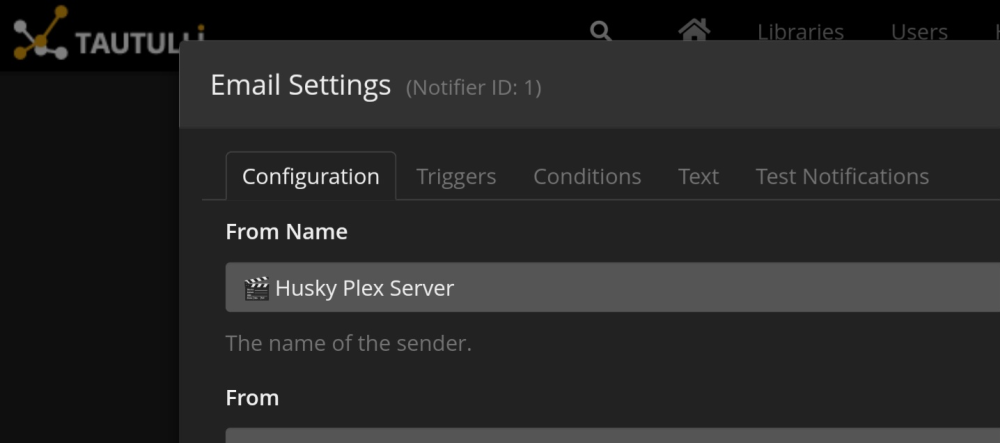
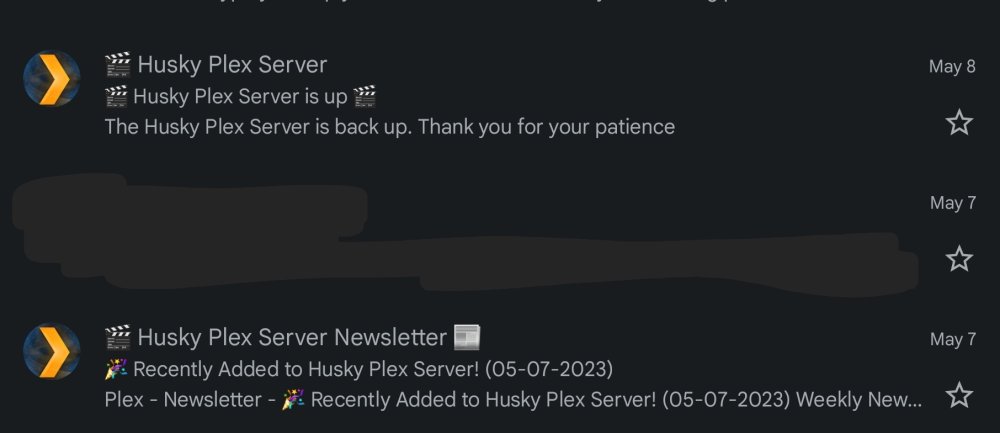
So this has bugged me for some time and keep forgeting to request it. When we use SMTP to send messages and we receive them. I don't want the email to show my email address as the name (minus the @gmail) Example: If I use my email address to send myself an email from unraid notifications, my email shows "Me" as the sender which does not help me quickly identify the emails. If I use a different sending email address such as [email protected] the the email come through it shows sender as abc123 Now in other grograms there is another field that is populated "Sender Name" and if that is populated it make it so what ever the sender name is that is what appears in the email as the sender. Example if i use my email address to send but put the sender name as "Unraid Server" then that is what appears as the Sender name in Gmail. Same if I use a different email and make the sender name "Unraid Server" that is what appears in the email as the sender name. Tautulli supports this and love it So I am able to do this.
-
Just did a manual backup and all seem to go good, except it did not exclude the folders I specified. Example: (All on one line separated by a comma with no space) /mnt/user/appdata/Music-Lidarr/MediaCover/Albums/, /mnt/user/appdata/Movies-Radarr/MediaCover/, /mnt/user/appdata/TV-Sonarr/MediaCover/, /mnt/user/appdata/Movies_4K-Radarr/MediaCover/, /mnt/user/appdata/Standup-Radarr/MediaCover/
-
Where / How do you edit the excludes, I have been running a script for plex for about a year now so it would not grab all the metadata and such and would love to go back to using this and also being able to exclude it for the arr's as its a lot of space.
-
Also as Hawkins is doing, is there an easy way to exclude subfolders from the interface? This would be a nice touch, maybe something along the lines of an edit button where it shows the full list of what is going to be excluded and can be edited right there in the interface? (Also all these improvement asked for and done so far, I wanted years ago, and recommended several times, so glad someone was able to have the time and update and continue this project. Also one more suggestion for backing up, would be nice if there was a way to say backup these folders daily, backup these folders weekly, and these backup monthly, and then keep x copies of each backup by frequency, with more options. So I have apps I would like a daily backup, but also want a few weekly and monthly, Example: Daily Backups keep for 7 day (One rolling week worth), Weekly 4 rolling weeks worth backups , and monthly 3 months, so I would have apps listed in all 3 backup types, this way I would have a nice history of backups should they ever be needed. (AKA 3 different tabs maybe for backups with each getting a subfolder in the destination folder: /$destination_folder/Daily/ /$destination_folder/Weekly/ /$destination_folder/Monthly/ Also I have 2 different appdata drives, but I can only select one in Source, would be great if we could select multiple ones and the restore process would remember where each backup came from, or allow us to restore to any of the appdata locations should it be needed, Select the restore location upon restoring. Thanks a million!
-
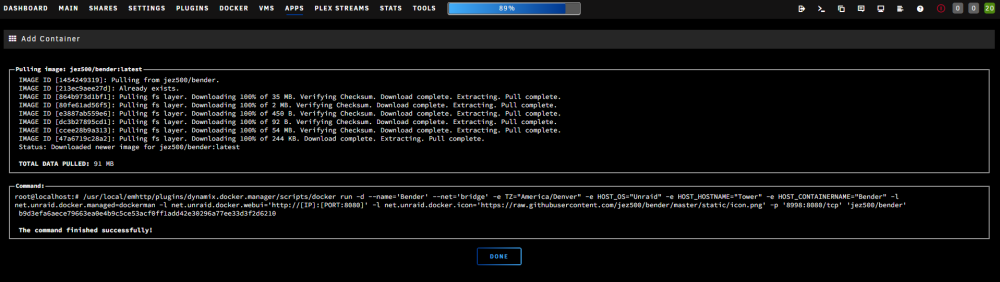
So I just installed the same app and no issues. Are you using v7? And what theme are you using? (What version of unraid?)
-
I will look into it.
-
Version 7 Posted
-
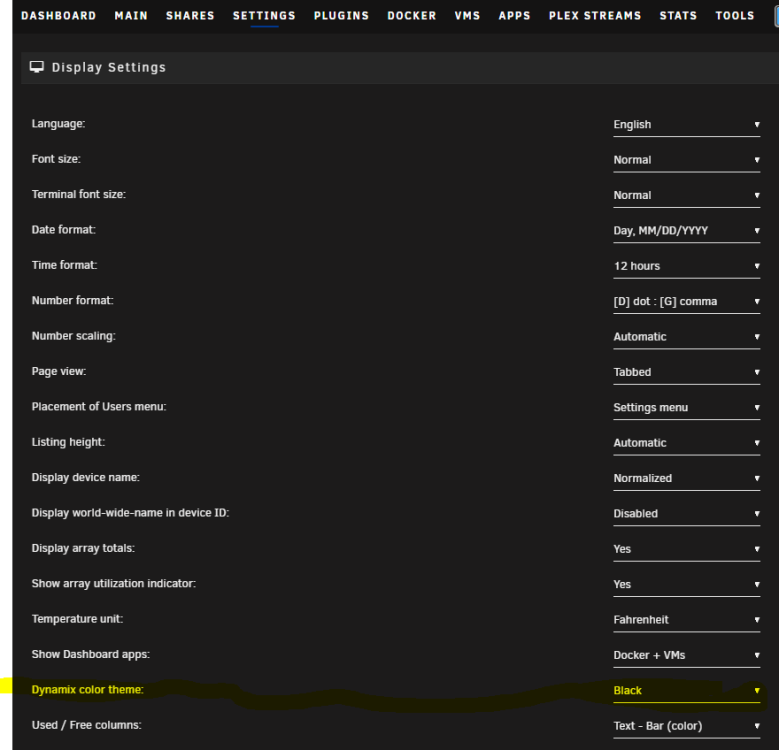
So sorry, I just see your post. Whenever I check my logs the background is black with white text. Mind showing me where your having the issue, and what theme do you have set in Settings/Display Settings/Dynamix color theme Should be set to black






