





garethsnaim
Members
-
Joined
-
Last visited
Everything posted by garethsnaim
-
Hello there. I have instaled clam and it runs for a while but next time I come to look at unraid its stopped. I have this, is there somethign I need to do? ClamAV update process started at Sat Feb 29 18:25:58 2020 WARNING: Your ClamAV installation is OUTDATED! WARNING: Local version: 0.102.1 Recommended version: 0.102.2 DON'T PANIC! Read https://www.clamav.net/documents/upgrading-clamav daily database available for update (local version: 25727, remote version: 25737) Testing database: '/var/lib/clamav/tmp/clamav-ed47729b10ad292e79249938d2b367bd.tmp-daily.cld' ... Database test passed. daily.cld updated (version: 25737, sigs: 2201376, f-level: 63, builder: raynman) main.cvd database is up to date (version: 59, sigs: 4564902, f-level: 60, builder: sigmgr) bytecode.cvd database is up to date (version: 331, sigs: 94, f-level: 63, builder: anvilleg) WARNING: Clamd was NOT notified: Can't connect to clamd through /run/clamav/clamd.sock: No such file or directory Freshclam updated the DB ClamAV 0.102.1/25737/Sat Feb 29 12:12:46 2020 I am not an expert, there does not appear to be anything in the logs. Does clam shut down if nothing is happening in the folder perhaps?
-
Well all I know is FreeNas and OpenMediaVault simply do not exhibit the same SMB issues that unraid does, it would be super cool if the developers spent some time actually fixing this issue, rather than constantly blaming windows. It might be windows for all I know, but other solutions work flawlessly, but I paid for unraid, so am somewhat stuck with none of my windows machines reliably and consistently connecting to my unraid server. The back slash thing works but it does not stick for me for such things as mapping network drives or for other apps to access unraid, that should be able to do so as guest. I'll give this solution a shot, but I honestly don't think I should have to be tinkering like this.
-
Hi there. Thats where I am going and it does not work. Says connection refused. I have tried different ports in the advanced bit of the docker set up as well. I have had this issue on numerous dockers. However this one has been updated in the last few days so I was hoping it would work. Other dockers work find but so far as I can tell its all very similar in the templates. I just find it bizarre there are no instructions for these various dockers, I guess because they should 'just work' and the user follow the instructions for the actual software, but I cannot get past first base.
-
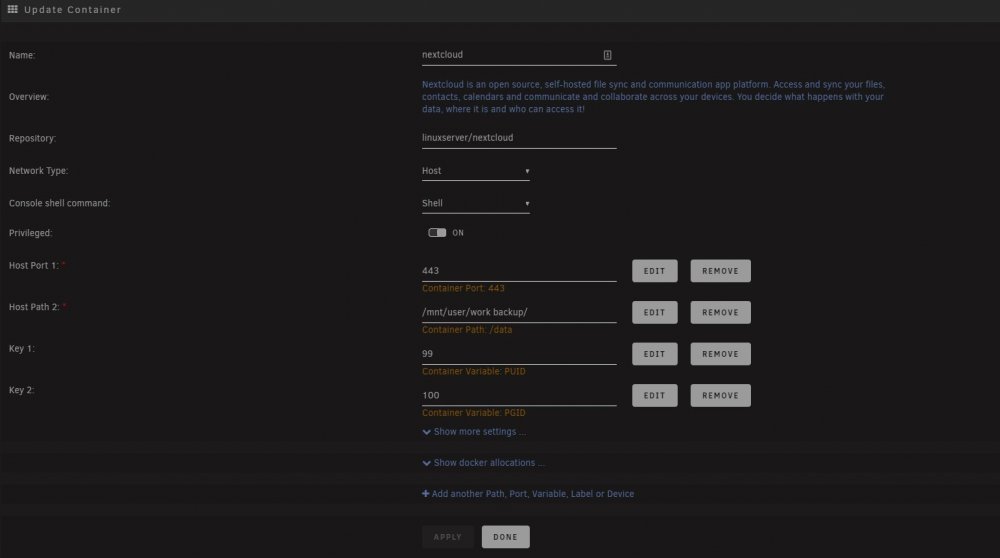
Hi there. I have successfully got a number of dockers going, transmission, plex and roon all run fine. But lots of dockers I simply cannot get past the first hurdle, because the webgui says either server is not respond or err_connection_refused. For the most part I am using host, but have also tried various options int he networking bit. For instance I have tried installing nextcloud, apparently its running, the log shows nothing unusual, so far as I am aware the thing is working perfectly. In the above my assumption is I goto myip:443? Well that just results in connection refused, I tried with http and https just in case. Many other dockers in that host port actually show port 80, which when I select webgui just goes straight back to the unraid main page. Could someone give me an idea of what I am doing wrong and why I cannot access the webgui of a lot of dockers. I have also tried various Photo hosting apps, and other things always the same issue, it appears to be running but I cannot access the webgui. Many thanks
-
Hi can someone point to a resource that will help with this and indeed other dockers? I feel thick but why is so little information given. I have loaded this docker and when I hit the webgui it just returns to the unraid page? Perhaps because its gui is set to port 80, why is that? Is there any resources on how to use these dockers because so many of them exhibit the same behavior, apparently they are running but I cannot access them, its extremely frustrating.
-
Hi thanks unPaid. I had tried that before but like a moron left the <> in!
-
I wonder it TVDB does not want plex pulling on it, it does seem to break very often and its hard to know whos fault it is. Mine did eventually scrape last night. This particular docker though, well plex is not great through it. You cannot scrub for instance, trying to fast forward simply does not work once you have fast forwarded you then have to stop the playing movie and restart it for it to pick up where you scrubbed to and play No such issues in the VM version. Its a shame, I'll stick with it for now. I am trying to get my head around dockers, they are super super unfriendly for average joes, very geeky stuff. I also notice there are like a million available for unraid and 90% of them seem to be redundant or dumb stuff like the webgui is on port 80 etc. Hey ho.
-
Hi where exactly do I put this, it would be super if a little detail was given for those of us that are not linux programmers!
-
Hum, having finally coxed this docker to work, I have to agree very hit and miss on the tv scraping. Think I will stick with a VM.
-
I am reluctant to blame unraid for that there has been scraping issues with TVDB for ages. I just flipped all the options over to Movie Database which does ok
-
Cannot get this going, it says its going, in the logs, and web gui will load but there are no servers found
-
Hey brill it worked and I finally get it, I am essentially creating a link between the container and the unraid? Well anyway its important lets see how we get on! Thanks for your help
-
can someone tell me what explicitly I have to put into the template and how to do it? I have roon running and tried to add a path to my music share but for the life of me I cannot find that path in the roon interface. Any help would be appriciated


