





Ver7o
Members
-
Joined
Everything posted by Ver7o
-
Hey, thanks for pitching in. Yes, I have file activity plugin running and with the exception of MODIFY => /mnt/cache/domains/Mint/vdisk1.img there is no activity logged on the array.
-
Hello, I have a linux VM set up which I run for basic daily lightweight stuff. The "problem" I cannot seem to figure out is why my array disks are both (I have 2 disks, excl. parity) always spun up if the VM is online. Both disks get reads every 5-15 min in the range of 348 B/s to a MB or two. - The VMs if running off of my cache drive, without the install ISO file attached (which is on the array) - Spin ups/downs work fine if the VM is not running - I don't have a share passthrough to VM - I do not have any shares open in file browser inside VM = nothing (that I know of) is accesing the shares from inside VM. Here is the VMs XML, which as far as I can tell does not give any clues to the problem. I also attached my diagnostics just in case. <?xml version='1.0' encoding='UTF-8'?> <domain type='kvm' id='1'> <name>Mint</name> <uuid>27312160-1413-2ae6-1f6b-839b2ac13944</uuid> <metadata> <vmtemplate xmlns="unraid" name="Ubuntu" icon="linux.png" os="ubuntu"/> </metadata> <memory unit='KiB'>3670016</memory> <currentMemory unit='KiB'>3670016</currentMemory> <memoryBacking> <nosharepages/> </memoryBacking> <vcpu placement='static'>4</vcpu> <cputune> <vcpupin vcpu='0' cpuset='0'/> <vcpupin vcpu='1' cpuset='2'/> <vcpupin vcpu='2' cpuset='1'/> <vcpupin vcpu='3' cpuset='3'/> </cputune> <resource> <partition>/machine</partition> </resource> <os> <type arch='x86_64' machine='pc-q35-5.1'>hvm</type> </os> <features> <acpi/> <apic/> </features> <cpu mode='host-passthrough' check='none' migratable='on'> <topology sockets='1' dies='1' cores='2' threads='2'/> <cache mode='passthrough'/> </cpu> <clock offset='utc'> <timer name='rtc' tickpolicy='catchup'/> <timer name='pit' tickpolicy='delay'/> <timer name='hpet' present='no'/> </clock> <on_poweroff>destroy</on_poweroff> <on_reboot>restart</on_reboot> <on_crash>restart</on_crash> <devices> <emulator>/usr/local/sbin/qemu</emulator> <disk type='file' device='disk'> <driver name='qemu' type='raw' cache='writeback'/> <source file='/mnt/user/domains/Mint/vdisk1.img' index='1'/> <backingStore/> <target dev='hdc' bus='virtio'/> <boot order='1'/> <alias name='virtio-disk2'/> <address type='pci' domain='0x0000' bus='0x02' slot='0x00' function='0x0'/> </disk> <controller type='usb' index='0' model='ich9-ehci1'> <alias name='usb'/> <address type='pci' domain='0x0000' bus='0x00' slot='0x07' function='0x7'/> </controller> <controller type='usb' index='0' model='ich9-uhci1'> <alias name='usb'/> <master startport='0'/> <address type='pci' domain='0x0000' bus='0x00' slot='0x07' function='0x0' multifunction='on'/> </controller> <controller type='usb' index='0' model='ich9-uhci2'> <alias name='usb'/> <master startport='2'/> <address type='pci' domain='0x0000' bus='0x00' slot='0x07' function='0x1'/> </controller> <controller type='usb' index='0' model='ich9-uhci3'> <alias name='usb'/> <master startport='4'/> <address type='pci' domain='0x0000' bus='0x00' slot='0x07' function='0x2'/> </controller> <controller type='pci' index='0' model='pcie-root'> <alias name='pcie.0'/> </controller> <controller type='pci' index='1' model='pcie-root-port'> <model name='pcie-root-port'/> <target chassis='1' port='0x8'/> <alias name='pci.1'/> <address type='pci' domain='0x0000' bus='0x00' slot='0x01' function='0x0' multifunction='on'/> </controller> <controller type='pci' index='2' model='pcie-root-port'> <model name='pcie-root-port'/> <target chassis='2' port='0x9'/> <alias name='pci.2'/> <address type='pci' domain='0x0000' bus='0x00' slot='0x01' function='0x1'/> </controller> <controller type='pci' index='3' model='pcie-root-port'> <model name='pcie-root-port'/> <target chassis='3' port='0xa'/> <alias name='pci.3'/> <address type='pci' domain='0x0000' bus='0x00' slot='0x01' function='0x2'/> </controller> <controller type='pci' index='4' model='pcie-root-port'> <model name='pcie-root-port'/> <target chassis='4' port='0xb'/> <alias name='pci.4'/> <address type='pci' domain='0x0000' bus='0x00' slot='0x01' function='0x3'/> </controller> <controller type='pci' index='5' model='pcie-root-port'> <model name='pcie-root-port'/> <target chassis='5' port='0xc'/> <alias name='pci.5'/> <address type='pci' domain='0x0000' bus='0x00' slot='0x01' function='0x4'/> </controller> <controller type='pci' index='6' model='pcie-root-port'> <model name='pcie-root-port'/> <target chassis='6' port='0xd'/> <alias name='pci.6'/> <address type='pci' domain='0x0000' bus='0x00' slot='0x01' function='0x5'/> </controller> <controller type='pci' index='7' model='pcie-root-port'> <model name='pcie-root-port'/> <target chassis='7' port='0xe'/> <alias name='pci.7'/> <address type='pci' domain='0x0000' bus='0x00' slot='0x01' function='0x6'/> </controller> <controller type='virtio-serial' index='0'> <alias name='virtio-serial0'/> <address type='pci' domain='0x0000' bus='0x03' slot='0x00' function='0x0'/> </controller> <controller type='sata' index='0'> <alias name='ide'/> <address type='pci' domain='0x0000' bus='0x00' slot='0x1f' function='0x2'/> </controller> <interface type='bridge'> <mac address='52:54:00:99:fc:fd'/> <source bridge='br0'/> <target dev='vnet0'/> <model type='virtio-net'/> <alias name='net0'/> <address type='pci' domain='0x0000' bus='0x01' slot='0x00' function='0x0'/> </interface> <serial type='pty'> <source path='/dev/pts/0'/> <target type='isa-serial' port='0'> <model name='isa-serial'/> </target> <alias name='serial0'/> </serial> <console type='pty' tty='/dev/pts/0'> <source path='/dev/pts/0'/> <target type='serial' port='0'/> <alias name='serial0'/> </console> <channel type='unix'> <source mode='bind' path='/var/lib/libvirt/qemu/channel/target/domain-1-Mint/org.qemu.guest_agent.0'/> <target type='virtio' name='org.qemu.guest_agent.0' state='disconnected'/> <alias name='channel0'/> <address type='virtio-serial' controller='0' bus='0' port='1'/> </channel> <input type='mouse' bus='ps2'> <alias name='input0'/> </input> <input type='keyboard' bus='ps2'> <alias name='input1'/> </input> <hostdev mode='subsystem' type='pci' managed='yes' xvga='yes'> <driver name='vfio'/> <source> <address domain='0x0000' bus='0x01' slot='0x00' function='0x0'/> </source> <alias name='hostdev0'/> <address type='pci' domain='0x0000' bus='0x04' slot='0x00' function='0x0'/> </hostdev> <hostdev mode='subsystem' type='pci' managed='yes'> <driver name='vfio'/> <source> <address domain='0x0000' bus='0x01' slot='0x00' function='0x1'/> </source> <alias name='hostdev1'/> <address type='pci' domain='0x0000' bus='0x05' slot='0x00' function='0x0'/> </hostdev> <hostdev mode='subsystem' type='usb' managed='no'> <source> <vendor id='0x046d'/> <product id='0xc52b'/> <address bus='1' device='3'/> </source> <alias name='hostdev2'/> <address type='usb' bus='0' port='1'/> </hostdev> <hostdev mode='subsystem' type='usb' managed='no'> <source> <vendor id='0x046d'/> <product id='0xc534'/> <address bus='1' device='2'/> </source> <alias name='hostdev3'/> <address type='usb' bus='0' port='2'/> </hostdev> <memballoon model='none'/> </devices> <seclabel type='dynamic' model='dac' relabel='yes'> <label>+0:+100</label> <imagelabel>+0:+100</imagelabel> </seclabel> </domain> As far as I remember, when I ran Windows/Linux VM on my old system, the disks were not spun up for no apparent reason, which is why I find this curious (and a lot noisier with disks spun up and the vent goin because of it ) tower-diagnostics-20210707-0754.zip
-
Does using this plugin to backup the flash somehow help with not needing to wait for LT to manually reactivate the key if the flash drive dies before 1 year has elapsed? This is extremely frustrating, as I seem to be extremely unlucky with my flash drives with none of them lasting even a year.
-
Hey, thanks for that. I set this up and it seemed to work until today. Today inform IP got overwritten with dockers internal IP again, so this doesn't help.
-
Jesus christ, I'm regretting going the ubiquiti route. Half page adverts, high power consumption of the switch, electronics in my AP whining when there is traffic on a device connected to wifi... Anyway, has anyone found the cause of devices forgetting the correct inform IP (which causes then to be reported as disconnected or in endless adoption loop)? For me, it happens every few days for no apparent reason. Nothing on the network or docker changes, but somehow inform IP gets overwritten with the dockers internal IP every few days. Having to SSH or switching host/bridge gets annoying over time.
-
Hey guys, I'm getting this error in my syslog daily. I have an external HDD mounted as unassigned device for some backups. fstrim: /mnt/disks/My_Passport: FITRIM ioctl failed: Device or resource busy as far as I understand this, its trying to trim it, but since its a HDD it can't? How do I tell it to stop?
-
I use Mullvad. Haven't had a single problem yet. As far as I can tell, then support port forwarding on all of their servers.
-
I'm gonna ask my question here as it's somewhat related to this topic. I had 2 events with the thumb drive running unraid so far. Both times I copied the config folder over to the new thumb drive, and both times I was greeted by a rather old config (6 months ish), as the dockers listed were long gone and not installed anymore. The reason this baffles me is that both times I copied the config folder from a less then a week old thumb drive backup (I have weekly backups of my thumb drive using the excellent CA plugin). I was able to one click reinstall everything using the "past apps" tab in CA, but still... What is happening here and how to fix it?
-
Hello guys, I recently changed my off the shelf router for a pfSense box, and since then when I try to connect to the nextcloud web UI, I get a 504 Gateway Time-out. I only ever use Nextcloud on the local network, I don't have any reverse proxies and other then changing the router, everything else remains the same. How should I go about troubleshooting it? EDIT: Fixed it. The issue was in www/nextcloud/config/config.php, pointing to an old address.
-
This is an issue described here in this topic. I decided to post it under here becase @jonp showed interest in debugging it. Basically, the reason the VM template hangs at updating is because, the template itself has a wrong path to the vdisk (always uses its VM namesake folder), and no matter how many times you correct it manually, upon next edit it will not remember the correct location.
-
Just throwing this here; I had to make a new Unraid boot drive which used UEFI boot mode (the old one did not). That however resulted in all my linux VMs not booting up and Windows VM throwing the error code 43 error. Going back to legacy boot mode, fixed it all again. Hope this helps someone.
-
TL;DR: Check vdisk path upon editing the template. I have a VM named Spynet, which has a correct vdisk path by /mnt/user/domains/Skynet/vdisk1.iso Whenever I edit the template, the template thinks the vdisk location is /mnt/user/domains/Spynet/vdisk1.iso which doesnt actually exist and results in the that dreaded Updating... The bug here would be, that the template does not remember the manual location and always reverts to auto which always looks from the vdisk inside the VMs namesake folder. Hope this helps someone.
-
@trurl I mounted a "master" share like that to avoid slow moves between different shares on the array. I haven't even considered that would bypass the security which is completely logical as thats how that was written. After disconnecting the share and browsing \\localIP eveything works as intended. @Frank1940 I was careful to not fall into that windows trap, following spaceinvaders videos. Thank you guys!
-
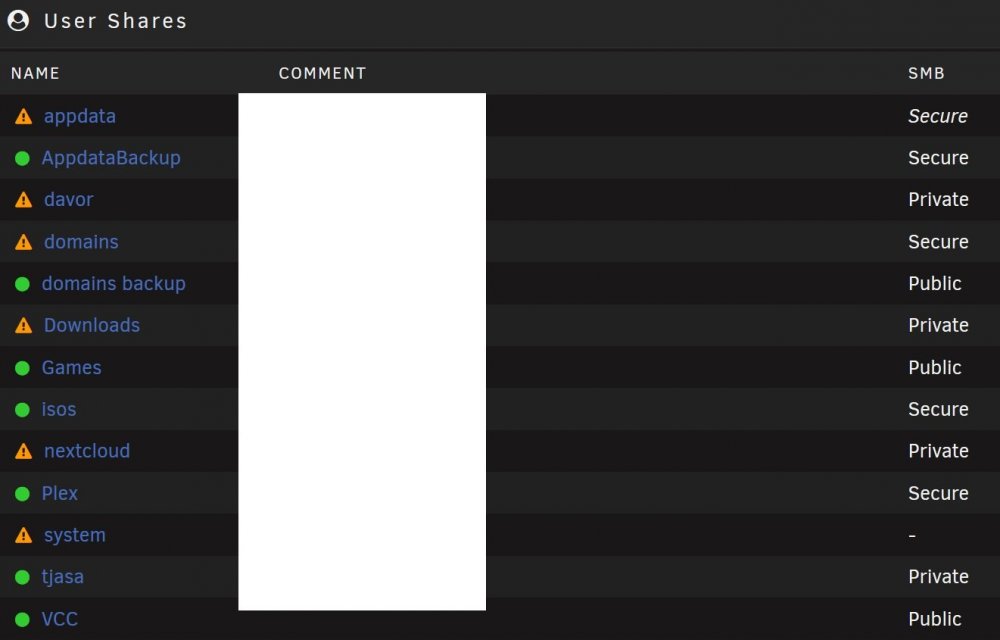
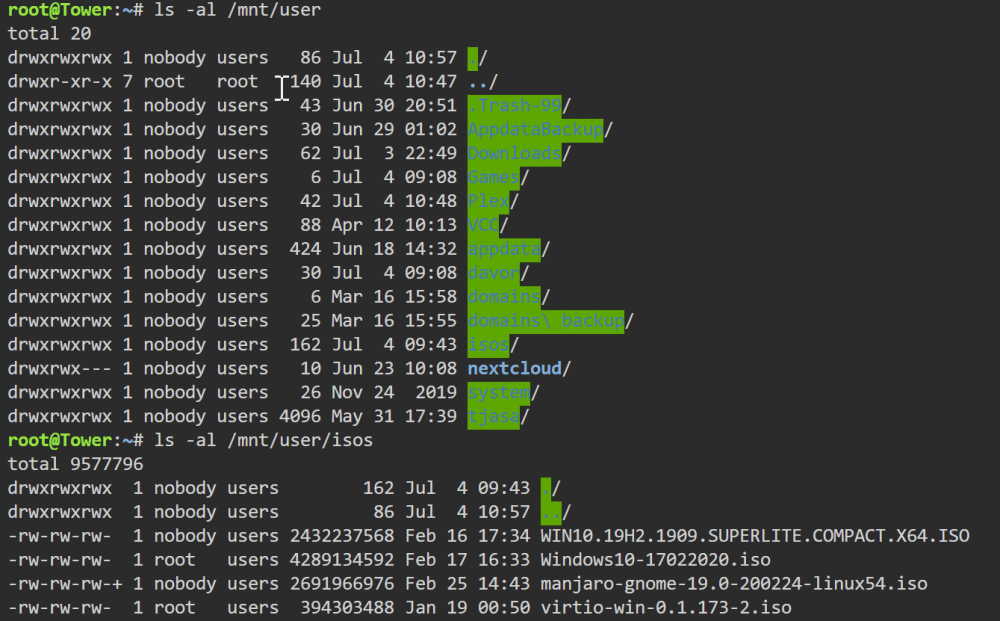
Hello there, Upon looking over this topic I don't think I've seen anything resembling my issue. My issue is that the permissions I set for shares in Unraid are being ignored on my mapped drives in windows (and linux) which means I have r/w permission for all shares, no matter the security set for each and additionally the export setting is being ignored and even the shares which have export set to no are visible. For example I can r/w on a private share which should only be accessible by a different user and I can r/w on a secure share even tho it's set as r/o for my username. I'm trying to avoid public shares (was reading that ransomware topic :D) and I am logged in on windows via credential manager which is set to correct user and password as set in Unraid. This is my setting for mapping the share in windows: [Tower] path = /mnt/user comment = browseable = yes valid users = davor write list = davor vfs objects =
-
How can I get custom columns for "Added" and "Completed" to stay there after reboot? Thanks!
-
I had similar issue once, when trying to use 2 graphic cards. I do not remember exactly what I did to make it work, but I ditched the idea because the gaming performance running off a second pcie slot was horrible. Try only using the 1080ti in the first slot. Run unraid in faceless mode, make a user script to stub the card after boot and then try passing it to a vm.

