





Ver7o
Members
-
Joined
Everything posted by Ver7o
-
Q35, cachy linux, arc pro b50. I never had black screen issues, only audio passthrough not working. And with these edits I'm sad to report, the audio still doesnt initialize correctly (dummy output only). I'm really happy for people who got it working with this. Kudos @dnaKID .
-
Sparkle A310 Omni view Intel B50 both cases Q35 and OVMF. both times dGPU is not set as primary. both times the audio is passed through, lspci detects it withing vm, but driver only lists analogue capabilites hence the no HDMI sound.
-
7.3.2 with A310 and CachyOS. Video works, audio does not. 7.3.2 with B50 and CachyOS. Video works, audio does not.
-
Downgrade was done from within GUI. Tools - Downgrade OS - redirect to unraid account and from there you confirm the downgrade. No manual changes were made to the flash drive. The trial account is now complaining that the GUID belongs to a different account. The issue seems that nothing is stopping you or alerting you that current licence is not matched to the current account before performing a downgrade. I'm speculating here, ofcourse, but this seems like the most likely failure mode that got me locked out. I do not remember relogging from my main account, which I keep logged in, to the trial account or any alert that there is a potential mismatch before downgrading. I opened a ticket with LT because this is just silly.
-
I think the issue is that when I downgraded Unraid from that shiny, unneccessary, 1000 redirects unraid account page I have not noticed that I was logged in with my main account, not the trial account. Upon booting back up the licence was then invalid because it somehow got reassigned to a different email then initially used. Hence the complaining that the GUID is registered to another user. Could this have happened?
-
I have used a quality drive. Its a Kingston DT SE9 2.0 which were recommended on these forums years ago, AFAIR. GUID format is 09XX-XXXX-XXXX-C391B939D633. Surely its flash based. I would like the trial that should still be active back. Buying a licence doesn't seem like a fix when something went very wrong. No matter what I do, I cannot get past it complaining about invalid installation.
-
it cannot be TPM. everything is contained within the flashdrive. And I cannot start a new trial because its throwing "GUID '<snip>-C391B939D633' is already registered to another user"
-
Hi, I activated a trial licence with 7.3.1 and it has about a week left. To test if I'd had more luck with what I'm trying to do I downgraded to 7.2.7 and now the system is complaining of GUID mismatch, even tho the flash drive is the same. What is the correct way to go about this so I can get back to testing?
-
I cannot for the life on me get sound over HDMI on 11th gen HD750. I tried windows and linux, i440fx and q35 as well as seabios. It makes no difference no matter the permutation of with or w/o sound card, combined bios, different igpu bios. In linux sound card shows up, uses correct snd_hda_intel drivers but aplay -l shows it is only detecting analog audio and does not have any knowledge of HDMI. I am out of idea of what else I could try.
-
I could swear I did it the same before but some reason it didn't take. Now it did. 😒 Thanks a bunch!
-
has anyone managed to succesfully remap port 8080 to something else and have webui come up?
-
I will add to this with my experiences. I have A310 and Pro B50. Case 1: 7.2.7 with A310 in VM works flawlessly, winblows and linux. Case 2: 7.2.7 with Pro B50 VM has no sound, correct resolution and scaling do not load + another usb device for some reason isn't properly passed through as its not shown in lspci inside VM. Case 3: 7.3.1 with A310 VM has no sound, correct resolution and scaling do not load + another usb device isn't properly passed through as its not shown in lspci inside VM. Case 4 7.3.1 with Pro B50 VM boots to black screen.
-
went from 7.2.5 to 7.3.1. this update makes my linux VM /w intel arc not work. no errors, no clues in the logs just blank "no input" screen. downgraded as im not in the mood to troubleshoot.
-
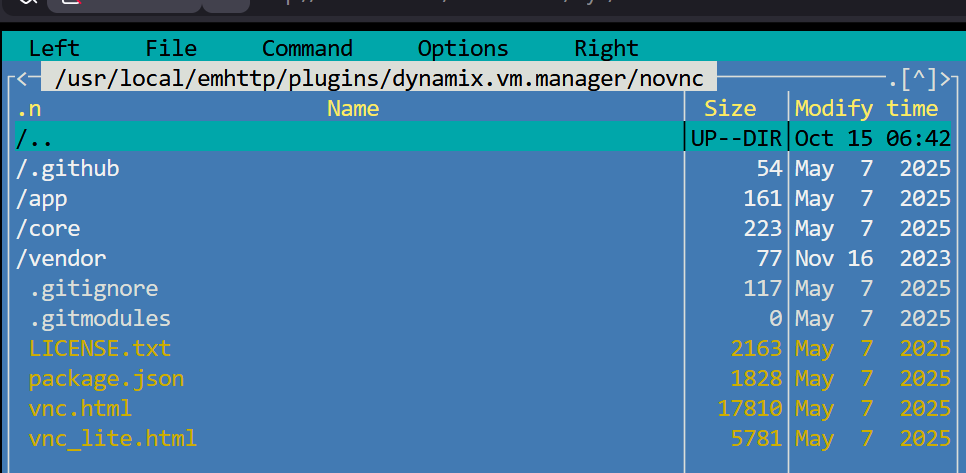
Fixed it. Per https://github.com/novnc/noVNC/blob/master/defaults.json these files are empty so I just used: cd /usr/local/emhttp/plugins/dynamix.vm.manager/novnc/ touch defaults.json touch mandatory.json and it works.
-
I have been trying to create a Linux VM but immediately ran into problems with dynamix.vm.manager trying to remote into the VM using VNC. It seems some files are missing vm manager: /usr/local/emhttp/plugins/dynamix.vm.manager/novnc/defaults.json /usr/local/emhttp/plugins/dynamix.vm.manager/novnc/mandatory.jso Log output: Feb 2 08:38:55 Tower nginx: 2026/02/02 08:38:55 [error] 18625#18625: *4094 open() "/usr/local/emhttp/plugins/dynamix.vm.manager/novnc/defaults.json" failed (2: No such file or directory) while sending to client, client: 192.168.1.102, server: , request: "GET /plugins/dynamix.vm.manager/novnc/defaults.json HTTP/1.1", host: "192.168.1.100", referrer: "http://192.168.1.100/plugins/dynamix.vm.manager/vnc.html?v=1746576860&resize=scale&autoconnect=true&host=192.168.1.100&port=&path=/wsproxy/5700/" Feb 2 08:38:55 Tower nginx: 2026/02/02 08:38:55 [error] 18625#18625: *4094 open() "/usr/local/emhttp/plugins/dynamix.vm.manager/novnc/mandatory.json" failed (2: No such file or directory) while sending to client, client: 192.168.1.102, server: , request: "GET /plugins/dynamix.vm.manager/novnc/mandatory.json HTTP/1.1", host: "192.168.1.100", referrer: "http://192.168.1.100/plugins/dynamix.vm.manager/vnc.html?v=1746576860&resize=scale&autoconnect=true&host=192.168.1.100&port=&path=/wsproxy/5700/" Feb 2 08:38:55 Tower nginx: 2026/02/02 08:38:55 [error] 18625#18625: *4233 recv() failed (104: Connection reset by peer) while reading upstream, client: 192.168.1.102, server: , request: "GET //wsproxy/5700/ HTTP/1.1", upstream: "http://127.0.0.1:5700/", host: "192.168.1.100" How should I go about fixing? tower-diagnostics-20260202-0843.zip
-
Hey people. I've been having some hardware issues for a while now. It finally got to a point where I just went with new hardware, because sanity. So I bought Gigabyte Z590i Aorus Ultra, along with some new ram. Jury is still out about the CPU. My current mobo is Asrock H410M-ITX with a G6400. In the past when I tried to make iGPU passthough to a VM on H410 chipset, I just gave up because I could not get it to work. Not really interested in going the discrete GPU route. My question is, is the situation with iGPU passthough to VM any better on Z590? Is it CPU dependent?
-
When I experimented with power saving, ASPM was generally not a problem as long as I left 'DMI ASPM', 'PCH DMI ASPM' and CPU C states disabled. If any of these were enabled, I would get all sorts of errors before crash... call traces, CPU stalls... and sometimes within 5 minutes of boot, or sometimes even after 2 weeks. It drove me crazy for about half a year before I figured these 3 things out and has been rock solid since. Just my 2 cents in case you feel like experimenting.
-
Hopefully this isn't somehow connected to this topic. I came from RC2 where I had no issues. Before I went to RC4, I manually updated all the plugins and after update my apps tab does not load.
-
The thing I found out is that it makes a big difference which mobo vendor you choose. I have a Ryzen MSI (B450 Tomahawk) board with almost ZERO power tuning options in BIOS. Meanwhile, my server runs on a H410 Asrock ITX board with LOADS of BIOS power optimizations. The difference is such that I can get from like a default ~24, 25W to 16, 17W idle power draw. My point is, before buying anything, I would look at some youtube vids of the chosen mobo's BIOS options.
-
Sorry for the late reply. I forgot to add my array I see. I use 3x 4TB WD Reds. The mentioned power consumption is with disks spun down.
-
I thought I'd toss this here, as it was driving me batty for a while. Going wild with ASPM was the reason my Unraid was crashing (webgui crash, ssh crash, samba crash, console crash...) without any syslog entries. Drove me crazy for a while, not knowing if I indeed have bad hardware. I'm on H410 chipset. Current BIOS settings: - PCI Express Native Control: Enabled - PCIE ASPM Support: Enabled - PCH PCIE ASPM: Enabled - DMI ASPM: Enabled - PCH DMI ASPM: Disabled PCH DMI ASPM set to disabled, as this looked to be the reason for Unraid silently crashing. root@Tower:~# dmesg | grep -i aspm [ 0.226470] acpi PNP0A08:00: _OSC: OS supports [ExtendedConfig ASPM ClockPM Segments MSI HPX-Type3] root@Tower:~# lspci -vv | grep 'ASPM.*abled' LnkCtl: ASPM L1 Enabled; RCB 64 bytes, Disabled- CommClk+ LnkCtl: ASPM L1 Enabled; RCB 64 bytes, Disabled- CommClk+ root@Tower:~# lspci -vvvnnPPDq | grep -B 30 ':[[:space:]]ASPM' Address: fee00258 Data: 0000 Capabilities: [70] Power Management version 3 Flags: PMEClk- DSI- D1- D2- AuxCurrent=0mA PME(D0-,D1-,D2-,D3hot+,D3cold-) Status: D0 NoSoftRst+ PME-Enable- DSel=0 DScale=0 PME- Capabilities: [a8] SATA HBA v1.0 BAR4 Offset=00000004 Kernel driver in use: ahci Kernel modules: ahci 0000:00:1c.0 PCI bridge [0604]: Intel Corporation Device [8086:a394] (rev f0) (prog-if 00 [Normal decode]) Control: I/O+ Mem+ BusMaster+ SpecCycle- MemWINV- VGASnoop- ParErr- Stepping- SERR- FastB2B- DisINTx+ Status: Cap+ 66MHz- UDF- FastB2B- ParErr- DEVSEL=fast >TAbort- <TAbort- <MAbort- >SERR- <PERR- INTx- Latency: 0, Cache Line Size: 64 bytes Interrupt: pin A routed to IRQ 122 IOMMU group: 5 Bus: primary=00, secondary=01, subordinate=01, sec-latency=0 I/O behind bridge: 0000f000-00000fff [disabled] Memory behind bridge: b1000000-b10fffff [size=1M] Prefetchable memory behind bridge: 00000000fff00000-00000000000fffff [disabled] Secondary status: 66MHz- FastB2B- ParErr- DEVSEL=fast >TAbort- <TAbort- <MAbort+ <SERR- <PERR- BridgeCtl: Parity- SERR+ NoISA- VGA- VGA16+ MAbort- >Reset- FastB2B- PriDiscTmr- SecDiscTmr- DiscTmrStat- DiscTmrSERREn- Capabilities: [40] Express (v2) Root Port (Slot+), MSI 00 DevCap: MaxPayload 256 bytes, PhantFunc 0 ExtTag- RBE+ DevCtl: CorrErr- NonFatalErr- FatalErr- UnsupReq- RlxdOrd- ExtTag- PhantFunc- AuxPwr- NoSnoop- MaxPayload 256 bytes, MaxReadReq 128 bytes DevSta: CorrErr- NonFatalErr- FatalErr- UnsupReq- AuxPwr+ TransPend- LnkCap: Port #5, Speed 8GT/s, Width x4, ASPM L1, Exit Latency L1 <16us ClockPM- Surprise- LLActRep+ BwNot+ ASPMOptComp+ LnkCtl: ASPM L1 Enabled; RCB 64 bytes, Disabled- CommClk+ -- Kernel driver in use: e1000e Kernel modules: e1000e 0000:00:1c.0/01:00.0 Non-Volatile memory controller [0108]: Sandisk Corp WD Blue SN550 NVMe SSD [15b7:5009] (rev 01) (prog-if 02 [NVM Express]) Subsystem: Sandisk Corp WD Blue SN550 NVMe SSD [15b7:5009] Control: I/O+ Mem+ BusMaster+ SpecCycle- MemWINV- VGASnoop- ParErr- Stepping- SERR- FastB2B- DisINTx+ Status: Cap+ 66MHz- UDF- FastB2B- ParErr- DEVSEL=fast >TAbort- <TAbort- <MAbort- >SERR- <PERR- INTx- Latency: 0, Cache Line Size: 64 bytes Interrupt: pin A routed to IRQ 16 NUMA node: 0 IOMMU group: 5 Region 0: Memory at b1000000 (64-bit, non-prefetchable) [size=16K] Region 4: Memory at b1004000 (64-bit, non-prefetchable) [size=256] Capabilities: [80] Power Management version 3 Flags: PMEClk- DSI- D1- D2- AuxCurrent=0mA PME(D0-,D1-,D2-,D3hot-,D3cold-) Status: D0 NoSoftRst+ PME-Enable- DSel=0 DScale=0 PME- Capabilities: [90] MSI: Enable- Count=1/32 Maskable- 64bit+ Address: 0000000000000000 Data: 0000 Capabilities: [b0] MSI-X: Enable+ Count=17 Masked- Vector table: BAR=0 offset=00002000 PBA: BAR=4 offset=00000000 Capabilities: [c0] Express (v2) Endpoint, MSI 00 DevCap: MaxPayload 512 bytes, PhantFunc 0, Latency L0s <1us, L1 unlimited ExtTag- AttnBtn- AttnInd- PwrInd- RBE+ FLReset+ SlotPowerLimit 0.000W DevCtl: CorrErr+ NonFatalErr+ FatalErr+ UnsupReq+ RlxdOrd+ ExtTag- PhantFunc- AuxPwr- NoSnoop+ FLReset- MaxPayload 256 bytes, MaxReadReq 512 bytes DevSta: CorrErr- NonFatalErr- FatalErr- UnsupReq- AuxPwr- TransPend- LnkCap: Port #0, Speed 8GT/s, Width x4, ASPM L1, Exit Latency L1 <8us ClockPM+ Surprise- LLActRep- BwNot- ASPMOptComp+ LnkCtl: ASPM L1 Enabled; RCB 64 bytes, Disabled- CommClk+ root@Tower:~#
-
While I myself would also love the option to have logging to an unassigned thumb drive or something similar to add more flexibility, I make due with my pfSense box accepting Unraids syslog. Just throwing it out here, because I used to run a laptop 24/7 to accept the logs before the eureka moment of doing it on the router. Anything moderately advanced should probably have a syslog option. And a router is also a device that runs 24/7.
-
Interesting. When I was running the setup listed below, my power consumption was as low as 60W idle, with disks spun down. No particular bios tuning for power savings tho. 3700X B450 ATX 16GB 2x 2TB SATA cache 3x 4TB WD Red 550W Gold RTX 2070 2x 140mm fans 2x 120mm fans Hopefully someone else with a similar setup pitches in because I don't want to be the party pooper saying the consumption u are seeing does, to me at least, not seem out of the ordinary.
-
- G6400 - H410 itx - 2x4GB - nvme cache - 3x 4TB WD Red - R7 240 GPU - 1x120mm case fan which is always running My idle consumption (disks spun down) is about 20-21W. Without the GPU its about 15-16W. Thats with everything unused turned off and bios tuned for power savings (eg. turned off wifi antennas, bluetooth, onboard sound, turned on pcie aspm...). I'm running the conservative cpu governor as it makes zero difference in power draw but a giant difference in overall speed. I do not use Plex with transcoding, but if thats your objective even something like G5400/G6400 is plenty powerful for such task and might be closer to your power target then an i3. Cheers
-
Hello, I run a modest R7 240 4G in my server for a VM that gets used rarely for big screen web browsing, youtube and the like. The thing that bugs me about the GPU is that it seems to consume quite a bit of power, relatively speaking. My whole home setup (pfsense box, unraid, switch, AP) consumes about 27-28W during idle. However ever since adding a GPU that went up to 32-34W during idle, which is quite a lot to me for something that is needed rarely. Now, the TDP for the card I'm using is specified as 30W and it seems to idle at about 5-6W (which seems a lot for something that is doing nothing? or am I exaggerating?). Nvidia cards like GT 710 have a specified TDP of 19W, but since I don't have one to test, I'm asking the community to pitch in as these cards seem to be a popular bunch for Unraid users. What's the idle power consumption of those? Do you guys have any other suggestions for new hardware / software tips and trick? I'd be willing to make a change for a less power hungry GPU on merit, but I just cannot justify doing it blindly, hence the awesome community. In case it matters, I run H410 motherboard with Pentinum G6400 for which I am unable to isolate the sound device in its own IOMMU group, which renders the whole iGPU useless for VM passthrough.

